
Function Calling and Tool Use Explained: The Loop, Provider Differences and MCP
The most common misunderstanding about function calling is in the name. The model doesn't call anything. It can't reach your database, your API or your filesystem. What it does is write a small, structured request ("call get_order_status with order_id: ORD-10293") and stop. Your code reads that request, decides whether to honour it, runs the function, and sends the result back as another message. Then the model carries on.
Once that clicks, the rest of the topic is detail: how each provider spells the request and the response, how to run several calls at once, how to force or forbid a call, what it costs in tokens, and where the Model Context Protocol fits. Those details differ enough between Anthropic, OpenAI and Google that code written for one won't run on another, so this post lines them up as of November 2026.
The loop
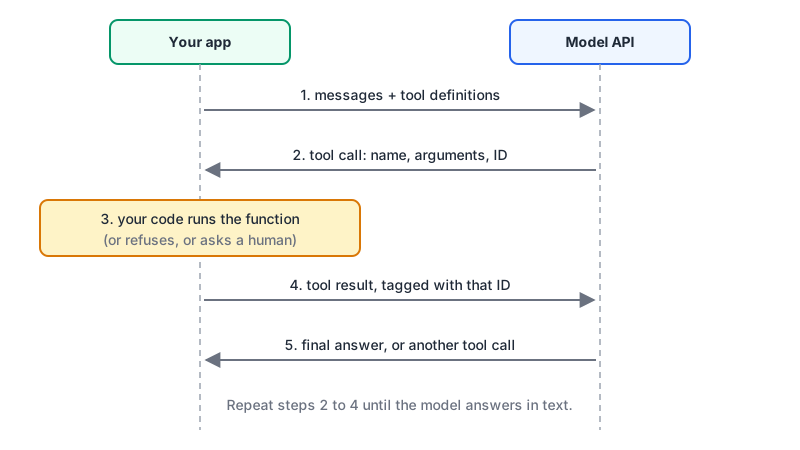
Every provider follows the same four steps:
- You send the conversation plus a list of tool definitions: a name, a description and a JSON Schema for the arguments.
- The model either answers in text or returns one or more tool calls, each with an ID and arguments.
- Your code runs each call and sends back the results, each tagged with the ID it answers.
- Repeat until the model answers in text.
That loop is what agent frameworks wrap. If you've used Claude Code or Codex, you've watched it run hundreds of times in one session.
Same idea, three spellings
| Anthropic Messages API | OpenAI Responses API | Gemini Interactions API | |
|---|---|---|---|
| Tool definition | name, description, input_schema | type: "function", name, description, parameters, strict | type: "function", name, description, parameters |
| Model asks for a call | tool_use block, stop_reason: "tool_use" | function_call item in output | function_call step |
| Arguments arrive as | Parsed object in input | JSON string in arguments | arguments |
| Call ID field | id | call_id | id |
| You send back | tool_result block in a user message, with tool_use_id | function_call_output item with call_id and output | function_result with call_id and result |
Sources: Anthropic's tool use overview, OpenAI's function calling guide and Google's function calling docs.
Two differences catch people. OpenAI returns arguments as a JSON string you must parse, while Anthropic hands you a parsed object. And Google's current docs are built around the newer Interactions API (client.interactions.create, with results passed by previous_interaction_id), so older generateContent tutorials won't match what you see there.
A complete loop in code
Here's a working loop against Claude that handles several calls per turn and reports errors back to the model instead of crashing:
import json
import anthropic

client = anthropic.Anthropic()

TOOLS = [{
    "name": "get_order_status",
    "description": (
        "Look up the shipping status of a single order by its ID. Use it when the user "
        "asks where an order is or when it will arrive. Returns status, carrier and "
        "estimated delivery date. It does not return payment or refund details."
    ),
    "input_schema": {
        "type": "object",
        "properties": {
            "order_id": {"type": "string", "description": "Order ID, e.g. ORD-10293"}
        },
        "required": ["order_id"],
    },
}]

def run_tool(name: str, args: dict) -> dict:
    if name == "get_order_status":
        return lookup_order(args["order_id"])      # your code
    raise ValueError(f"Unknown tool: {name}")

def ask(question: str, max_turns: int = 8) -> str:
    messages = [{"role": "user", "content": question}]
    for _ in range(max_turns):
        resp = client.messages.create(
            model="claude-sonnet-5-5",
            max_tokens=1024,
            tools=TOOLS,
            messages=messages,
        )
        if resp.stop_reason != "tool_use":
            return "".join(b.text for b in resp.content if b.type == "text")

        messages.append({"role": "assistant", "content": resp.content})
        results = []
        for block in resp.content:
            if block.type != "tool_use":
                continue
            try:
                out = json.dumps(run_tool(block.name, block.input))
                results.append({"type": "tool_result", "tool_use_id": block.id, "content": out})
            except Exception as exc:
                results.append({"type": "tool_result", "tool_use_id": block.id,
                                "content": f"Error: {exc}", "is_error": True})
        # every result goes back in ONE user message
        messages.append({"role": "user", "content": results})
    raise RuntimeError("Too many tool turns")
The OpenAI version has the same shape. You append the response's output items to your input list, then add one function_call_output per call:
from openai import OpenAI
import json

client = OpenAI()
items = [{"role": "user", "content": "Where is order ORD-10293?"}]
resp = client.responses.create(model="gpt-6.1-sol", tools=OPENAI_TOOLS, input=items)
items += resp.output

for item in resp.output:
    if item.type == "function_call":
        args = json.loads(item.arguments)              # a string, so parse it
        items.append({
            "type": "function_call_output",
            "call_id": item.call_id,
            "output": json.dumps(run_tool(item.name, args)),
        })

final = client.responses.create(model="gpt-6.1-sol", tools=OPENAI_TOOLS, input=items)
print(final.output_text)
With reasoning models, OpenAI's guide says to pass the reasoning items back along with the tool outputs. Appending all of resp.output, as above, does that for you.
Parallel calls
All three providers can return several independent calls in one turn: "check the status of these three orders" can come back as three calls at once. Anthropic's parallel tool use docs say the API doesn't prescribe an order, so running them with asyncio.gather is fine for read-only lookups. For anything with side effects (refunds, writes, deploys), run them one at a time in the order given.
The formatting rule matters more than it looks. Anthropic wants one tool_result per tool_use, all in the next user message, placed before any text in that message. The docs list a separate user message per result as the most common mistake: it "teaches" Claude to avoid parallel calls.
To turn parallel calls off:
- Anthropic:
tool_choice: {"type": "auto", "disable_parallel_tool_use": true}. It's insidetool_choice, not a top-level parameter. - OpenAI:
parallel_tool_calls: false. - Gemini: Google's page shows parallel calls (pairing them with
tool_choice: "any") but I didn't find a switch to turn them off, so handle multiplefunction_callsteps either way.
Forcing, restricting and forbidding calls
| Intent | Anthropic | OpenAI | Gemini |
|---|---|---|---|
| Model decides | auto (default) | auto (default) | auto (default) |
| Must call some tool | any | required | any |
| Must call this tool | {"type": "tool", "name": ...} | {"type": "function", "name": ...} | allowed_tools (a mode plus a tool list) |
| No tool calls | none | none | none |
OpenAI also has {"type": "allowed_tools", ...} to limit calls to a subset of the tools you passed. Gemini puts tool_choice inside generation_config and adds a validated mode that the docs describe only as ensuring schema adherence.
Now the gotcha. Anthropic's define tools page says Claude Opus 5.5, Sonnet 5.5, Fable 5.1 and Mythos 5.1 return a 400 error for any and tool. Forced tool use also fails with manual extended thinking on any model. The documented workaround is auto plus strict tool use, or structured outputs if what you really wanted was a fixed JSON shape. If you used forced tool calls as a structured-output hack on older Claude models, that code breaks when you upgrade. The structured outputs post covers the proper replacement.
Strict schemas
Without strict mode, the arguments are the model's best attempt at your schema. Usually right, occasionally not: a missing field, a number sent as a string.
- OpenAI
strict: truerequiresadditionalProperties: falseon every object and every property listed inrequired. Optional fields become nullable:"type": ["string", "null"]. A non-conforming schema is rejected. - Anthropic takes
strict: trueon the tool definition to guarantee calls match the schema.
Validate anyway on your side. Strict mode guarantees shape, not sense, and order_id: "ORD-00000" is perfectly valid JSON. A JSON Schema validator is handy while you write the schemas.
Tools cost tokens
Tool definitions are input tokens on every request. On top of your definitions, Anthropic adds a tool-use system prompt: 286 tokens on Opus 5.5, Sonnet 5.5 and Haiku 5.5 with auto, and more on some older models (675 on Opus 4.7). OpenAI's guide suggests keeping fewer than 20 functions available at the start of a turn and calls it a soft suggestion.
With a large tool catalogue, Anthropic and OpenAI both offer tool search with defer_loading, so definitions load only when needed. And keep the list stable between requests: tool definitions sit at the very start of the prompt, so changing them invalidates the prompt cache (the LLM API pricing comparison shows what that costs).
Where MCP fits
Function calling is the contract between your app and the model. The Model Context Protocol is a contract between your app and the services that provide tools. They stack:
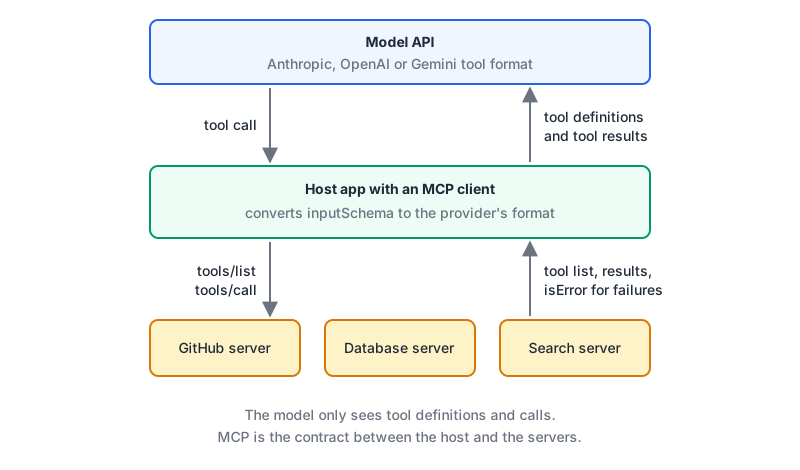
The host calls tools/list on each MCP server, gets definitions with a name, description and inputSchema, and converts them into Anthropic, OpenAI or Gemini format. When the model asks for a call, the host sends tools/call to the right server and passes the result back as a tool_result or function_call_output. The model never knows MCP was involved. Anthropic also offers an MCP connector that does this from the Messages API without your own client.
The MCP tools spec adds a few useful ideas:
- Two kinds of error. Protocol errors (unknown tool, malformed request) are JSON-RPC errors. Tool execution errors (bad date, API failure) come back as a result with
isError: true, so the model can read them and retry. That's the same pattern asis_errorin the loop above. - Name collisions. Two servers can both expose
search. The spec says aggregating clients should disambiguate, for example by prefixing with a server identifier. - A human in the loop. It says there should always be a person able to deny a tool call, and that tool annotations from untrusted servers must be treated as untrusted.
That last point is where tool calling stops being a formatting problem. A tool description is text the model reads and trusts, which makes it an injection route. The MCP tool poisoning post covers documented attacks, and the configuration guide shows how to set permissions in the common clients.
Checklist for every tool you write
- Write the description for a reader who has never seen your codebase: what it does, when to use it, what it doesn't return. Anthropic suggests at least three or four sentences.
- Prefix names by service (
github_list_prs) once you have more than a handful. - Return compact results with stable IDs, not raw API dumps.
- Return errors as tool results the model can act on, not exceptions that kill the loop.
- Use strict schemas, and validate arguments anyway.
- Run side-effecting calls sequentially and put a human confirmation in front of anything destructive.
- Cap the loop. A model that keeps calling tools forever is a bill, not an agent.
Written by AIDToolStack Editorial
Researched from official documentation, specifications and vendor pages, listed under Sources below. Last checked November 2026.
Sources
- platform.claude.com/docs/en/agents-and-tools/tool-use/overview
- developers.openai.com/api/docs/guides/function-calling
- aistudio.google.com/docs/function-calling
- platform.claude.com/docs/en/agents-and-tools/tool-use/parallel-tool-use
- platform.claude.com/docs/en/agents-and-tools/tool-use/define-tools
- modelcontextprotocol.io/specification/latest/server/tools
Related Posts
Explore on AIDToolStack
Discover tools and servers featured in our directory.
AI Tools
MCP Servers
Sponsor Our Newsletter
Reach thousands of developers who are actively evaluating AI tools, MCP servers, and dev infrastructure. Our weekly newsletter goes to engaged technical decision-makers.
All sponsored content is clearly labeled per our editorial policy.