
AGENTS.md, CLAUDE.md, Copilot Instructions and Cursor Rules: What Each Agent Actually Reads
A repository that three people work on with three different agents tends to grow three different instruction files. Someone runs /init in Claude Code and commits a CLAUDE.md. Someone else adds .github/copilot-instructions.md. A Cursor user drops rules into .cursor/rules/. Six months later the test command differs in two of them and nobody knows which file each agent actually reads.
The good news is that this has mostly converged. As of November 2026, AGENTS.md is read by every major coding agent, either natively or with one line of config, with a few chat surfaces as exceptions. The details still differ in ways that bite: which file wins when two exist, whether nested files load, and how much text gets read before the rest is silently dropped. This post is the map, built from each vendor's current docs.
What AGENTS.md actually is
AGENTS.md is plain Markdown in your repository that tells coding agents how to work on the project: build steps, test commands, conventions. The site calls it a README for agents, kept separate so your human README stays readable. There's no schema and no required sections. It's now stewarded by the Agentic AI Foundation under the Linux Foundation, and the site lists support from Codex, Jules, Gemini CLI, Cursor, Aider, goose, opencode, Zed, Warp, VS Code, Devin, Windsurf, Junie, Amp, Kilo Code, Augment Code and GitHub Copilot's coding agent, among others.
Its one real rule is about precedence in monorepos: put an AGENTS.md in each package, and "the closest AGENTS.md to the edited file wins; explicit user chat prompts override everything." That's the spec's intent. How each tool implements "closest wins" is where it gets interesting.
Tool by tool
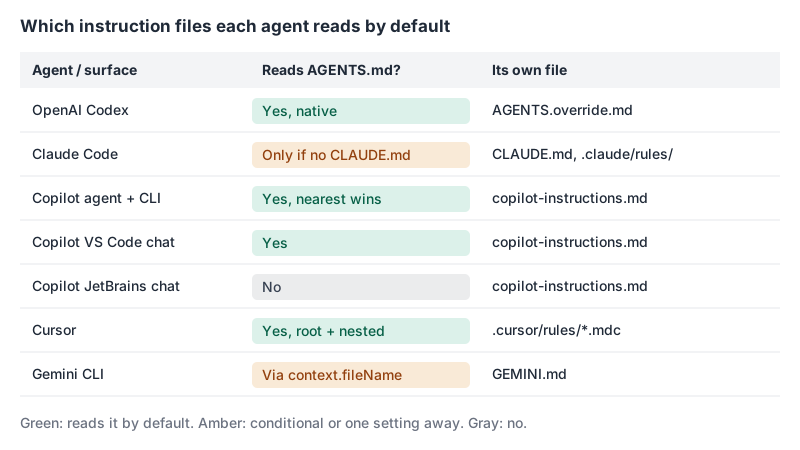
OpenAI Codex
Codex has the most precise rules. Its AGENTS.md docs are precise:
- Global: it reads
~/.codex/AGENTS.override.mdif it exists and isn't empty, otherwise~/.codex/AGENTS.md(or the same underCODEX_HOME). - Project: it walks from the project root (usually the Git root) down to your current directory. In each directory it takes at most one file, checking
AGENTS.override.md, thenAGENTS.md, then any names inproject_doc_fallback_filenames. - It concatenates them root first, so the file nearest your working directory comes last and overrides broader guidance.
Two gotchas. The combined size is capped by project_doc_max_bytes, which is 32 KiB by default; once it's hit, Codex stops adding files. And the chain is built once per run (once per session in the TUI), so edits mid-session need a restart. If your team already has a TEAM_GUIDE.md, you can teach Codex to read it:
# ~/.codex/config.toml
project_doc_fallback_filenames = ["TEAM_GUIDE.md", ".agents.md"]
project_doc_max_bytes = 65536
Claude Code
Claude Code has its own file, CLAUDE.md, at several levels: an organisation-managed one (for example /etc/claude-code/CLAUDE.md on Linux), your personal ~/.claude/CLAUDE.md, the project's ./CLAUDE.md or ./.claude/CLAUDE.md, and a gitignored ./CLAUDE.local.md for personal notes. Per the memory docs, files from the working directory and every directory above it load at launch and are concatenated root first; CLAUDE.md files in subdirectories load on demand when Claude reads or edits something there.
The big change this year: since v2.1.277 Claude Code reads AGENTS.md itself. The default rule is "either/or", not "both":
| What's in your repo | What Claude reads by default |
|---|---|
AGENTS.md, no CLAUDE.md or CLAUDE.local.md in cwd or above | AGENTS.md |
AGENTS.md plus a CLAUDE.md or CLAUDE.local.md | Only the CLAUDE.md files |
A CLAUDE.md containing @AGENTS.md | CLAUDE.md with AGENTS.md imported |
The trap is in the second row. CLAUDE.local.md counts, so creating one for your own scratch notes in an AGENTS.md repo quietly stops Claude from reading AGENTS.md. You can change the behaviour with the Project instructions setting in /config (claude-md-and-agents-md reads both). Claude Code also ignores AGENTS.override.md, AGENTS.local.md and anything under .agents/, so Codex's override trick doesn't carry over.
The docs suggest keeping each CLAUDE.md under 200 lines and moving path-specific guidance into .claude/rules/*.md files with a paths: frontmatter field, which only load when Claude touches matching files. Imports via @path help organisation but don't save context, because imported files load with their parent. I covered the rest of the Claude Code setup in Claude Code tips: CLAUDE.md, skills, permissions and hooks.
GitHub Copilot
Copilot has the most file types and the most surface-dependent behaviour. Per GitHub's repository instructions docs:
.github/copilot-instructions.mdapplies repository-wide..github/instructions/NAME.instructions.mdfiles apply to paths matched by anapplyToglob in frontmatter; anexcludeAgentkey can hide a file from"code-review"or"cloud-agent".AGENTS.mdfiles can live anywhere in the repo, and "the nearest AGENTS.md file in the directory tree will take precedence." Alternatively, a singleCLAUDE.mdorGEMINI.mdat the root works.
Which surface reads what is the part people miss. GitHub's support matrix says the cloud agent, Copilot CLI and code review on GitHub.com read AGENTS.md, CLAUDE.md and GEMINI.md (code review also reads REVIEW.md). VS Code chat reads AGENTS.md only. JetBrains and Visual Studio chat don't read agent files at all, and Copilot Chat on GitHub.com only reads the repository-wide file. So if your JetBrains users rely on chat, the shared conventions still need to be in copilot-instructions.md. My Copilot post goes further into prompt files and custom agents.
Cursor
Cursor's rules live in .cursor/rules/ and must use the .mdc extension; plain .md files in that folder are ignored. Frontmatter decides when a rule loads:
---
description: Conventions for the payments API handlers
globs: src/payments/**/*.ts
alwaysApply: false
---
Use the Money type for all amounts. Never use floats for currency.
alwaysApply: true loads it in every chat; a description alone lets the agent decide; globs attaches it when matching files are in context; neither means you @-mention it manually. Cursor also reads AGENTS.md in the root and in subdirectories, combining nested files with their parents, more specific ones taking precedence. Team rules beat project rules, which beat user rules. Cursor's guidance is to keep rules under 500 lines.
Gemini CLI
Gemini CLI reads GEMINI.md from ~/.gemini/, from your workspace directories and their ancestors, and just-in-time from subdirectories when a tool touches files there. It concatenates everything; /memory show prints exactly what the model gets. Per its GEMINI.md docs, you switch it to AGENTS.md in .gemini/settings.json:
{ "context": { "fileName": ["AGENTS.md", "GEMINI.md"] } }One caveat that will date: Google announced in May 2026 that Gemini CLI stopped serving individual Google AI Pro/Ultra and free Code Assist users on 18 June 2026, in favour of the new Antigravity CLI. Organisations on Code Assist Standard/Enterprise and paid API keys keep access. I couldn't find Antigravity CLI documentation on instruction files, so I'm not making claims about it.
How "nearest wins" really plays out
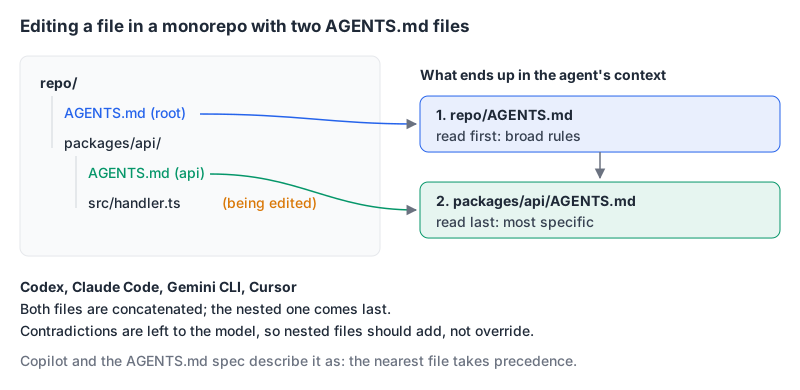
Most tools don't pick one file. Codex, Claude Code, Gemini CLI and Cursor all concatenate ancestor files, ordering them so the most specific comes last. That means a root file saying "use npm" and a package file saying "use pnpm" are both in context, and you're relying on the model to prefer the later one. Claude's docs say it plainly: if two instructions contradict each other, Claude may pick one arbitrarily. Don't write nested files that override; write nested files that add.
A setup that works across all of them
Here's what I'd do in a repo where people use different agents:
- Make
AGENTS.mdthe source of truth. Put the commands, test and lint steps, directory map and hard rules there. - If you need Claude-specific content, create
CLAUDE.mdwith@AGENTS.mdas the first line, then your extras. That keeps working in sessions where Claude can't readAGENTS.mddirectly (older versions, or the plugin disabled), and the docs say the import never causes a double read. - Add one line of Gemini config (above) and, for Aider,
read: AGENTS.mdin.aider.conf.yml, as the AGENTS.md site suggests. - Keep
.github/copilot-instructions.mdshort and only for surfaces that don't read agent files, or skip it if nobody uses Copilot chat in JetBrains or Visual Studio. - Use path-scoped rules (
.claude/rules/,.cursor/rules/,.instructions.md) for the long tail instead of one giant file. Codex has no path-scoped equivalent beyond nestedAGENTS.md, so mind the 32 KiB cap.
What goes in the file matters more than which file it is. The things that pay off are the things an agent can't infer: the exact test command for one package, the generated directories it must not edit, the migration step that has to run after schema changes. "Write clean code" is wasted tokens.
Instruction files are not a security control
Two warnings worth taking seriously.
First, these files are context, not enforcement. Claude's docs say so directly and point you to a PreToolUse hook or permissions.deny if something must never happen. The same is true for every tool here. If "never run terraform apply" matters, block it in the agent's permission config, not in prose.
Second, an instruction file is something the agent obeys, which makes it an injection target. A pull request that edits AGENTS.md is effectively editing the agent's instructions for anyone who runs an agent on that branch. Anthropic's GitHub Action handles this by restoring CLAUDE.md, .claude/ and .mcp.json from the base branch before running on a PR. Review changes to these files as carefully as changes to CI config; the same reasoning is behind the attacks in our post on MCP tool poisoning and prompt injection.
Quick checklist
- One
AGENTS.mdat the root, nested ones that add rather than contradict. CLAUDE.md=@AGENTS.mdplus Claude-only extras, and be careful withCLAUDE.local.md.- Gemini
context.fileNameset; Cursor rules in.mdc, not.md. - Under 200 lines per file is a sane target; Codex stops reading files past 32 KiB by default.
- Anything that must never happen goes in permissions or hooks, not instructions.
- Treat diffs to instruction files like diffs to
.github/workflows/.
If you're still choosing between agents, Claude Code vs OpenAI Codex compares the two that take these files most seriously.
Written by AIDToolStack Editorial
Researched from official documentation, specifications and vendor pages, listed under Sources below. Last checked November 2026.
Sources
- agents.md/
- learn.chatgpt.com/docs/agent-configuration/agents-md
- code.claude.com/docs/en/memory
- docs.github.com/en/copilot/how-tos/configure-custom-instructions/add-repository-instructions
- docs.github.com/en/copilot/reference/custom-instructions-support
- cursor.com/docs/context/rules
- geminicli.com/docs/cli/gemini-md/
- developers.googleblog.com/an-important-update-transitioning-gemini-cli-to-antigravity-cli/
- github.com/anthropics/claude-code-action/blob/main/docs/security.md
Related Posts
Explore on AIDToolStack
Discover tools and servers featured in our directory.
AI Tools
MCP Servers
Sponsor Our Newsletter
Reach thousands of developers who are actively evaluating AI tools, MCP servers, and dev infrastructure. Our weekly newsletter goes to engaged technical decision-makers.
All sponsored content is clearly labeled per our editorial policy.