
AI Code Editors Beyond Cursor: Zed, Devin Desktop, Kiro, TRAE and JetBrains AI
Cursor became the default answer to "which AI editor?" so quickly that a lot of developers never looked at the alternatives. That's a shame, because the other editors aren't Cursor clones with a different logo. Each one bets on a different idea: speed and openness, an agent command centre, written specs before code, the cheapest path to a frontier model, or the IDE you already pay for.
This is a tour of five of them as of November 2026: Zed, Devin Desktop (the editor you knew as Windsurf), Kiro, TRAE and JetBrains AI with Junie. Prices and plan details come from each vendor's own pricing page, linked inline, and they change often. If you want the head-to-head with Cursor itself, we have Zed vs Cursor, Cursor vs Windsurf, Kiro vs Cursor, TRAE vs Cursor and Cursor vs JetBrains AI.
The short version
| Editor | Who makes it | The bet | Entry paid plan (Nov 2026) |
|---|---|---|---|
| Zed | Zed Industries | Fast, open-source editor; bring any model or agent | Pro, $10/month |
| Devin Desktop (ex-Windsurf) | Cognition | Editor as a control panel for local and cloud agents | Pro, $20/month |
| Kiro | AWS | Specs first: requirements, design, tasks | Pro, $20/user/month |
| TRAE | ByteDance (see below) | Low entry price, cloud tasks | Pro, $20/month |
| JetBrains AI + Junie | JetBrains | AI inside the IDE you already use | AI Pro, $10/month (individual) |
Sources for each row are in the sections below.
Zed: the editor first, the AI second
Zed is the odd one out because it's a real editor written from scratch rather than a fork of VS Code. The AI features sit on top of that. According to Zed's AI page, the agent panel takes a task, finds context and edits files, and you review the changes as an editable unified diff before anything gets committed. Edit prediction is handled by Zeta, which Zed describes as open-weight and open-data.
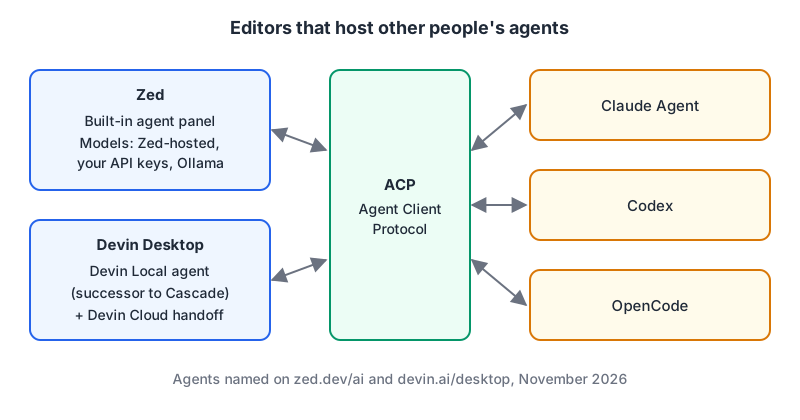
What makes Zed interesting in 2026 is how little it locks you in. The same page lists three ways to get a model: models hosted by Zed, local models through Ollama, or your own API keys from any provider. It also runs third-party agents through the Agent Client Protocol (ACP), naming Claude Agent, Codex and OpenCode. Zed, Zeta and ACP are all described as open source.
The pricing page as of November 2026:
- Personal, $0: no bundled AI, but "unlimited use" with your own keys or external agents.
- Pro, $10/month: $5 of tokens included, then usage at API list price plus 10%, and unlimited edit predictions.
- Business, $30/seat/month: no included credit; you pay usage rates or bring your own keys, plus org-wide model policies. The page says SSO, SAML and SCIM are planned but not available yet, which matters if your company requires them.
If you already pay for a Claude or OpenAI plan and just want a fast editor that can drive that agent, Zed's free tier is hard to argue with.
Devin Desktop: Windsurf under a new name
If you go to windsurf.com today, you land on devin.ai. Cognition announced on June 2, 2026 that Windsurf is now Devin Desktop. The product page FAQ says only the name and branding are changing, and that existing plans, pricing, extensions and settings carry over. Our Windsurf page covers the history.
The rename hides a bigger change. The announcement introduces Devin Local, a Rust rewrite of the local agent, as "the successor to Cascade." Cascade was the agent most people chose Windsurf for, and the post said it would stay available only through July 1. So if a colleague recommends Windsurf because of Cascade, that advice is out of date.
The pitch now is an "agent command center": a Kanban view of local and cloud agent sessions, Spaces for sharing context between agents, and handoff between your machine and Devin Cloud. Like Zed, it speaks ACP, so third-party agents such as Codex, Claude Agent and OpenCode can run inside it. Tab completion is still there.
Pricing as of November 2026: Free ($0, a light agent quota with unlimited Tab and inline edits), Pro ($20/month, up to 10 concurrent sessions), Max ($200/month) and Teams ($80 team fee plus $40 per developer seat). The page doesn't publish numeric quotas; paid allowances reset daily and weekly, and extra usage is billed at API prices.
Kiro: write the spec before the code
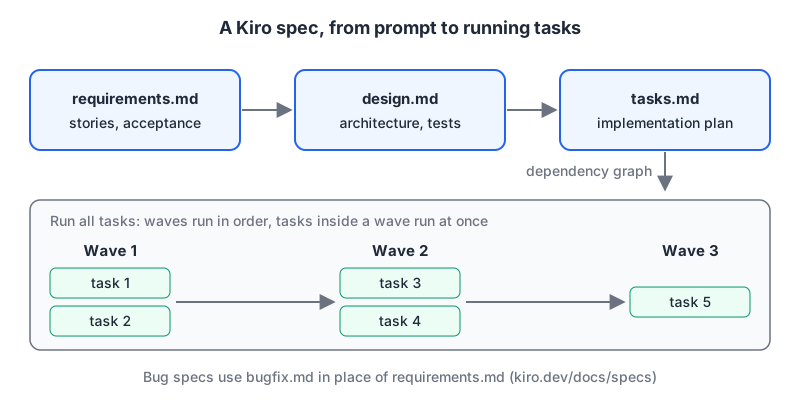
Kiro is built by AWS (its pricing page bills Enterprise through AWS and supports AWS Builder ID and IAM Identity Center). Its distinctive feature is specs. Per the Kiro specs docs, every spec produces three files:
requirements.md(orbugfix.mdfor a bug): user stories and acceptance criteria.design.md: architecture, sequence diagrams, error handling and testing strategy.tasks.md: a discrete implementation plan whose tasks Kiro marks in progress or done.
When you run all the tasks, Kiro builds a dependency graph and groups independent tasks into waves; tasks in a wave run concurrently, and waves run in order. There's also a Quick Spec that writes all three files in one pass without approval gates.
This is the right tool when the thing that goes wrong on your team isn't typing speed but agreeing on what to build. The markdown files live in the repo, so a reviewer can argue with design.md before any code exists. For a one-line fix it's overhead, which is presumably why Quick Spec exists.
Kiro is also more than an IDE now. The home page lists an IDE, a CLI (with headless use in CI/CD), a web app, a mobile app in early access, and Kiro Crew.
Pricing is credit-based as of November 2026: Free gives 50 credits a month, Pro is $20/user for 1,000 credits, Pro+ $40 for 2,000, Pro Max $100 for 5,000 and Power $200 for 10,000, with extra credits at $0.04 each. Spec mode, spec refinement, task execution and agent hooks all consume credits, so a spec-heavy workflow spends faster than chat alone.
TRAE: cheap to start, harder to evaluate
TRAE is the editor I found hardest to research, which is itself useful information. Its site is a thin landing page, and its terms and privacy pages didn't render any text when I fetched them. Our TRAE page cites press coverage identifying ByteDance as the maker; the closest official link I found is that ByteDance's GitHub organisation hosts Trae Agent, an MIT-licensed coding agent whose repo links to trae.ai.
The pricing page is clear enough as of November 2026: Free ($0, limited usage, 5,000 autocompletes a month, Auto model mode only), Pro ($20/month with $20 of usage and access to all models), Pro+ ($60) and Ultra ($200). Paid plans run more concurrent cloud tasks (10, 15 and 20).
My advice: TRAE is fine for side projects, but before pointing it at company code, read its privacy policy in a browser and get your security team's sign-off. I couldn't verify its data handling, so I won't describe it.
JetBrains AI and Junie: stay in the IDE you have
If you live in IntelliJ, PyCharm or Rider, JetBrains AI is the low-friction option. It has two parts: AI Assistant in the editor and Junie, JetBrains' coding agent. According to Junie's site, Junie now runs in the terminal as Junie CLI, in IDEs, as a GitHub Action from issues and pull requests, and in GitLab CI/CD. It supports bring-your-own-key for "10+ models" at provider rates with zero markup.
The licensing docs explain the credit model: one AI credit equals $1. AI Free gives 3 credits per 30 days. AI Pro is listed at $10 with 10 credits and AI Ultimate at $30 with 35 credits; the same table shows a higher pair ($20/20 and $60/70), which reads as organisation pricing. Junie's own page quotes AI Pro at $8.33 and AI Ultimate at $25 per user per month ($100 and $300 a year), and labels Ultimate "Recommended for Junie." The useful detail: AI Pro is included free with the All Products Pack and dotUltimate.
So if your company already pays for the All Products Pack, you already have AI Pro, used or not. Try it before buying another editor.
Picking one
- You want a fast editor and already pay for a model or agent: Zed. Free tier, your keys, ACP for Claude Agent or Codex.
- You run several agents at once and want them on one screen: Devin Desktop, especially if you also use Devin in the cloud.
- Your problems are unclear requirements and review churn: Kiro's specs, accepting the credit cost.
- You live in a JetBrains IDE: JetBrains AI first, Junie for agent work. Check if your licence already includes AI Pro.
- You want the cheapest way to try an agentic editor on a hobby project: TRAE's free tier, after reading the privacy terms yourself.
Whichever you pick, the agent is only as safe as the commands you let it run. Our guides to Claude Code and configuring MCP servers in each editor cover the permission side.
Written by AIDToolStack Editorial
Researched from official documentation, specifications and vendor pages, listed under Sources below. Last checked November 2026.
Sources
Related Posts
Explore on AIDToolStack
Discover tools and servers featured in our directory.
AI Tools
MCP Servers
Sponsor Our Newsletter
Reach thousands of developers who are actively evaluating AI tools, MCP servers, and dev infrastructure. Our weekly newsletter goes to engaged technical decision-makers.
All sponsored content is clearly labeled per our editorial policy.