
v0, Bolt, Lovable and Replit Agent: Code Export, Ownership and Pricing
The demo always goes well. You type "a booking app for my partner's yoga studio", and a few minutes later there's a working page with a calendar, a sign-in button and a database. The questions that matter come a month later: can I get this code into my own repo, who owns it, what happens when I edit it outside the tool, and why did my credits run out on day nine?
This post compares four prompt-to-app builders on exactly those questions: Vercel's v0, StackBlitz's Bolt, Lovable and Replit Agent. Everything comes from each vendor's own docs, pricing pages and terms as of November 2026. For narrower head-to-heads, see v0 vs Bolt, v0 vs Lovable and Replit Agent vs Bolt.
What each one actually builds
v0 leans toward the front end. Its docs say it works with "Next.js, Tailwind, shadcn/ui, and more", builds backend logic too, and connects to your APIs and databases. Deployment is one click to Vercel. If your team already ships Next.js on Vercel, v0's output will look like code you'd write.
Bolt builds websites and apps in the browser and hosts them. Its pricing page bundles hosting, databases (unlimited on the free plan, with a choice of database provider on Pro) and custom domains on paid plans. Bolt is operated by StackBlitz: the StackBlitz terms cover StackBlitz and Bolt alike.
Lovable generates full-stack web apps and runs the backend on Lovable Cloud, which has its own monthly credit grant on every plan according to Lovable's plans page.
Replit Agent lives inside Replit's browser workspace. Per Replit's Agent docs, it sets up the project, configures databases, checks its own work and creates checkpoints you can roll back to. It now produces web apps, mobile apps, slides, designs and data visualisations.
Getting your code out
This is where the four differ most, and where people get surprised.
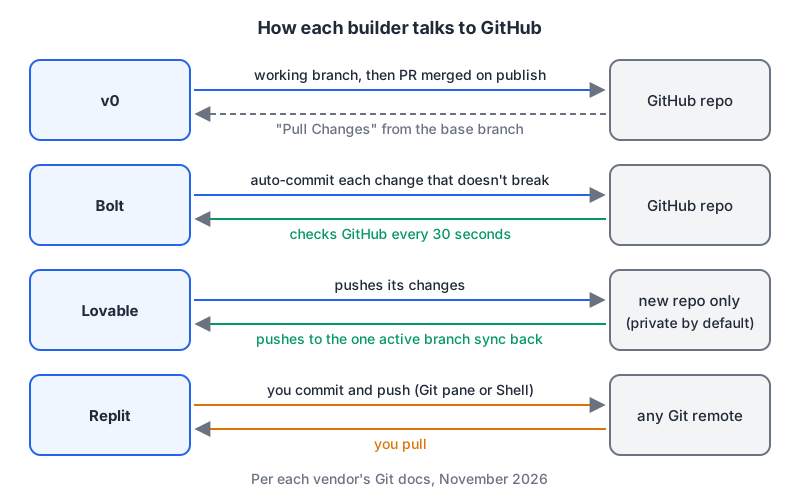
v0: branches and pull requests. Once you connect a repo, v0's GitHub docs say the repository "becomes the source of truth." The first change in a chat creates a working branch with its own Vercel preview; publishing opens (or reuses) a pull request and merges it into the base branch. Branch protection is respected: if a required review or check blocks the merge, v0 leaves the PR open and links to it. Commits on the base branch come back into a chat through Pull Changes. This is the most "normal" Git workflow of the four, and the one your team lead will like best.
Bolt: two-way sync every 30 seconds. Bolt's Git docs say it commits every change that doesn't break the project and "checks GitHub every 30 seconds" for outside changes. Bolt doesn't merge branches itself; you do that on GitHub. Two gotchas: only the project owner can manage the integration, and disconnecting is permanent: the app won't reconnect a disconnected project, so you'd have to contact support. On the plus side, you can import an existing repository as long as you have push permission and it has a default branch. You can also download a project as a zip from the desktop app.
Lovable: two-way sync on one branch. Lovable's GitHub docs describe sync in both directions, but "Lovable only edits and syncs one branch at a time," usually main. Git sync always creates a new repository; it can't attach to an existing one, and reconnecting after a disconnect creates another new repo. If you disconnect, the repo and its history stay on GitHub. A separate Download codebase button exists, but the subscription plans page lists code download as a paid-plan feature.
Replit: a normal Git pane. Replit's Git docs describe initialising a repo, adding a remote, staging, committing, pushing and pulling, either in the pane or with git in the Shell. It's the least magical and the most familiar to anyone who uses Git daily:
git remote add origin https://github.com/you/studio-booking.git
git push origin main
Who owns the output
All four say the code is yours, with the same caveat: the AI output may not be unique, and third-party rights in the models still apply.
| Builder | What the terms say (Nov 2026) | Training on your content |
|---|---|---|
| v0 | You own Customer Content, and Vercel assigns its rights, if any, in Output (AI Product Terms §6.2) | Business plan has training opt-out on by default (pricing) |
| Bolt | You retain rights in User Content, which includes AI Output; StackBlitz assigns its rights, if any (terms §3.2–3.3) | §3.5 allows training on eligible Bolt content unless you opt out |
| Lovable | You own your projects and the AI Output generated for you (terms) | Lovable gets a licence that includes training; you can opt out for future use |
| Replit | You retain rights to content you submit (terms §3a) | The terms don't explicitly address ownership of AI output |
The StackBlitz terms state it most bluntly: AI output "may not be protectable by copyright," and you're "solely responsible for reviewing, testing, and validating" it before you deploy. That applies in spirit to all four.
What it costs as of November 2026
The units differ, so read this as a rough guide rather than a price comparison.
| Builder | Free | Entry paid plan | What you're buying |
|---|---|---|---|
| v0 (pricing) | $0, 7 messages a day | Plus, $30/user/month | $30 of monthly credits plus $2 of daily login credits per user |
| Bolt (pricing) | 1M tokens/month, 300K daily cap | Pro, $25/month | From 10M tokens a month; unused paid tokens roll over for up to two months |
| Lovable (plans) | 5 build credits a day, up to 30 a month | Pro, from $25/month | From 100 credits a month, scaling up to 10,000 |
| Replit (pricing) | Not listed on the page | Core, $20/month ($18 billed annually) | $20 toward more powerful models plus Free Mode allowance |
A few things that bite: Lovable's monthly credits expire two months after issue and daily build grants expire at the end of the day (pricing). Replit's Free Mode allowance resets every five hours with weekly limits, while Power and Max modes are paid per action and ask for confirmation first (Agent docs). Bolt's free tokens don't roll over at all.
Which one I'd use
- You ship Next.js on Vercel and want reviewable PRs: v0. The branch-and-PR model fits a team that already reviews code.
- You want an app hosted with a database and custom domain from one bill: Bolt or Lovable. Bolt's 30-second two-way sync is friendlier if you also edit locally; Lovable is fine if you're happy working mostly in Lovable.
- You want an agent that can also run arbitrary code, scripts and background tasks: Replit, which is a full workspace rather than just a builder.
- You need the code in an existing repo: avoid Lovable's Git sync for that, since it can only create new repos. Bolt can import an existing repo you can push to, and Replit is plain Git.
Whatever you choose, connect GitHub on day one, not when you're about to leave. And before the app touches real users, read the auth code it generated. If it issues JWTs, paste one into our JWT decoder and check what's actually in the payload.
Written by AIDToolStack Editorial
Researched from official documentation, specifications and vendor pages, listed under Sources below. Last checked November 2026.
Sources
- v0.app/docs
- bolt.new/pricing
- stackblitz.com/terms-of-service
- docs.lovable.dev/introduction/plans-and-credits
- docs.replit.com/replitai/agent
- v0.app/docs/github
- support.bolt.new/integrations/git
- support.bolt.new/building/using-bolt/projects-files
- docs.lovable.dev/integrations/github
- docs.lovable.dev/introduction/subscription-plans
- docs.replit.com/features/workspace-tools/git-interface
- vercel.com/legal/ai-product-terms
- v0.app/pricing
- lovable.dev/terms
- replit.com/terms-of-service
- replit.com/pricing
- lovable.dev/pricing
Related Posts
Explore on AIDToolStack
Discover tools and servers featured in our directory.
AI Tools
MCP Servers
Sponsor Our Newsletter
Reach thousands of developers who are actively evaluating AI tools, MCP servers, and dev infrastructure. Our weekly newsletter goes to engaged technical decision-makers.
All sponsored content is clearly labeled per our editorial policy.