
Terminal AI Coding Agents Compared: Claude Code, Codex CLI, Gemini CLI, Aider and OpenHands
A year ago, picking a terminal coding agent mostly meant picking a model. In November 2026 the more useful questions are duller: how do you pay, what does it do before asking, what stops a bad shell command, and which instruction file does it read. Those differ more between tools than the demos suggest, and two of the five tools people usually list are no longer what older tutorials describe.
This is a side-by-side of Claude Code, OpenAI's Codex CLI, Gemini CLI, Aider and OpenHands, built only from each project's own docs, repos and release pages. I'm not ranking them on output quality. The public benchmarks change monthly, and none of these vendors' docs give a like-for-like comparison worth repeating.
Status check first
Before comparing features, make sure the tool is the one you think it is.
- Claude Code ships constantly. The GitHub releases page shows v2.1.319 on November 6, 2026, two days after v2.1.318.
- Codex CLI is on 0.167.0 (stable, November 6, 2026) per its releases. Its docs moved:
developers.openai.com/codexnow redirects tolearn.chatgpt.com. - Gemini CLI is on v0.67.0 stable (November 4, 2026), but its audience shrank. The README says free individual access and Google AI Pro/Ultra "moved to Antigravity CLI on June 18, 2026." It's now aimed at Gemini Code Assist Standard and Enterprise customers, plus paid API and Vertex keys.
- Aider is still installable and Apache-2.0, but quiet. The newest release on PyPI is 0.86.2 from February 12, 2026.
- OpenHands CLI is effectively retired. The installation docs say "The OpenHands CLI is no longer actively maintained" and point to Agent Canvas instead.
That last one changes the comparison. OpenHands as a project is alive; its terminal client isn't the recommended way in anymore.
Install, billing and default model
| Install | How you pay | Default model | |
|---|---|---|---|
| Claude Code | curl -fsSL https://claude.ai/install.sh | bash, Homebrew, WinGet, apt/dnf/apk, npm | Pro, Max, Ultra, Team, Enterprise or Console API; also Bedrock, Google Cloud, Foundry | Opus 5.5 on Anthropic plans |
| Codex CLI | curl -fsSL https://chatgpt.com/codex/install.sh | sh, npm, Homebrew | ChatGPT plan (Plus and up for the CLI) or API key at API rates | Not named; config examples use gpt-6.1-sol |
| Gemini CLI | npm install -g @google/gemini-cli, Homebrew, MacPorts | Code Assist licence, paid Gemini API key or Vertex AI | auto |
| Aider | curl -LsSf https://aider.chat/install.sh | sh, pipx, uv | Your own provider key | Whatever you pass to --model |
| OpenHands | Agent Canvas: npm install -g @openhands/agent-canvas | Your own LLM key | Configured on first run |
A few details behind that table. Claude Code's setup page says the free claude.ai plan doesn't include it; Anthropic's pricing page lists Pro at $20 billed monthly ($17 a month annually), Max at $100 and Ultra at $200. The model config page puts the default at Opus 5.5 for Pro through Enterprise and the API, Sonnet 4.5 on Microsoft Foundry.
For Codex, the pricing page lists Plus at $20 a month with the CLI, IDE extension and web included, Pro from $100, and Business at $20 per user per month billed annually. Free and Go get GPT-6 Luna in the desktop app "subject to rollout", which is not the CLI. With an API key you pay API rates and lose cloud features such as GitHub code review. The models page says Codex picks "a recommended model" if you don't set one and lists gpt-6-astra, gpt-6.1-sol, gpt-6.1-terra and gpt-6-luna.
Gemini CLI's CLI reference gives -m a default of auto with aliases pro, flash and flash-lite. Its docs also warn that it "has not been optimized for Gemini 4 Argon" and send you to Antigravity CLI for that model.
Aider and OpenHands don't sell you anything: you bring a provider key and pay that provider. Aider's install page shows the pattern, for example aider --model sonnet --api-key anthropic=<key>.
What runs before it asks
This is where the tools really differ, and it's the row I'd read first.
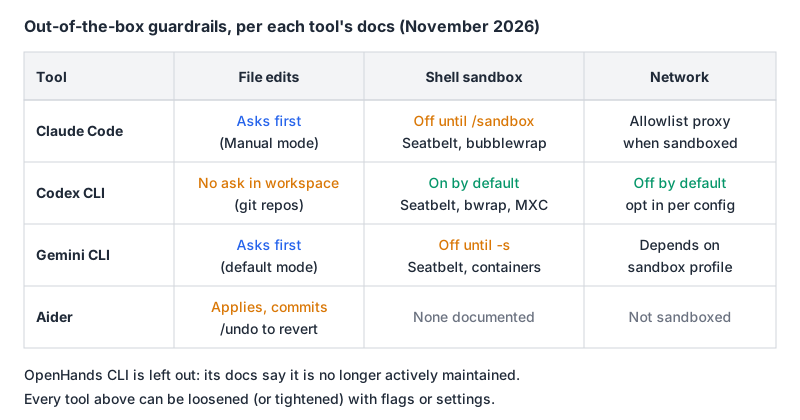
Claude Code starts in default mode, shown as Manual, where only reads run without asking. Shift+Tab cycles through acceptEdits and plan, and there's an auto mode where a classifier reviews actions. Per the permission modes page, bypassPermissions is meant for isolated containers or VMs only. The OS-level Bash sandbox is off until you run /sandbox; the sandboxing docs say it uses Seatbelt on macOS and bubblewrap on Linux and WSL2, routes network through a proxy whose allowedDomains "start empty," and doesn't exist on native Windows. One honest caveat from those docs: reads still cover most of the machine, including ~/.ssh.
Codex CLI flips the defaults. Its approvals and security page says version-controlled folders get the Auto preset, --sandbox workspace-write --ask-for-approval on-request: Codex edits and runs commands inside the workspace without asking, and the OS sandbox is on from the start (Seatbelt, bwrap plus seccomp, or MXC on Windows). Network is off by default. Folders without version control start read-only.
Gemini CLI has --approval-mode values default, auto_edit, yolo and plan; the old --yolo flag is deprecated. Sandboxing is opt-in with -s, GEMINI_SANDBOX or tools.sandbox, and the sandbox docs list Seatbelt profiles, Docker or Podman, gVisor, LXC and a native Windows mode.
Aider works differently. Its git docs say "Whenever aider edits a file, it commits those changes," after first committing any dirty files separately. Your guardrail is git: /undo discards the last change. Its docs don't describe an OS sandbox, so run it in a container if that matters.
Instruction files and MCP
| Project instructions | MCP client | |
|---|---|---|
| Claude Code | CLAUDE.md; reads AGENTS.md when no CLAUDE.md exists (v2.1.277+) | claude mcp add, .mcp.json |
| Codex CLI | AGENTS.md, AGENTS.override.md, 32 KiB cap | codex mcp add, ~/.codex/config.toml |
| Gemini CLI | GEMINI.md; context.fileName can add AGENTS.md | gemini mcp add, settings.json |
| Aider | Any file loaded read-only with --read CONVENTIONS.md | Not in its docs |
Claude Code's memory docs spell out the AGENTS.md rule precisely: if there's a CLAUDE.md, .claude/CLAUDE.md or CLAUDE.local.md in your working directory or above it, Claude reads those and skips AGENTS.md. If you share a repo between tools, the clean setup is one AGENTS.md and a CLAUDE.md that imports it. Codex's AGENTS.md page concatenates files from the repo root down to your current directory, at most one per directory.
MCP support is similar across the three vendor tools: local stdio servers by command, remote servers by URL, and OAuth for remote servers. Codex shares its MCP config between the CLI, IDE extension and ChatGPT desktop app. Our MCP configuration guide covers the Claude Code side in more depth.
Headless and CI
All three vendor CLIs have a scriptable mode. Claude Code has claude -p. Codex has codex exec, and its auth docs recommend API keys for CI while warning against running Codex in untrusted or public environments. Gemini CLI has -p with --output-format json or stream-json. For CI, Codex's documented read-only preset is --sandbox read-only --ask-for-approval never, which is a sensible shape for review-only jobs in any of them.
How I'd choose
- You already pay for ChatGPT Plus or Pro: try Codex CLI first. The sandbox is on out of the box, and the subscription covers it. Our Codex tool page and Claude Code vs Codex comparison go deeper.
- You're on a Claude plan or want the deepest configuration (hooks, skills, permission rules): Claude Code. Turn on
/sandboxon day one if you're on macOS, Linux or WSL2. - Your company has Gemini Code Assist Standard or Enterprise: Gemini CLI is still the supported terminal tool for you. As an individual on a free or Google AI plan, it isn't; see Gemini CLI vs Claude Code for how the two compare.
- You want to bring any model, including local ones, and like small git commits: Aider, accepting that releases have slowed. Aider vs Claude Code covers the trade-off.
- You want an open-source agent with a browser UI: OpenHands via Agent Canvas, not the old CLI. Its README warns that the npm install runs the agent directly on your machine with full filesystem access, so prefer the Docker route.
Whichever you pick, spend the first ten minutes on the boring part: read its permission modes, decide on the sandbox, and write the instruction file. That's where the real differences live.
Written by AIDToolStack Editorial
Researched from official documentation, specifications and vendor pages, listed under Sources below. Last checked November 2026.
Sources
- github.com/anthropics/claude-code/releases
- code.claude.com/docs/en/setup
- code.claude.com/docs/en/model-config
- code.claude.com/docs/en/permission-modes
- code.claude.com/docs/en/sandboxing
- code.claude.com/docs/en/memory
- claude.com/pricing
- github.com/openai/codex
- github.com/openai/codex/releases
- learn.chatgpt.com/docs/pricing.md
- learn.chatgpt.com/docs/models.md
- learn.chatgpt.com/docs/auth.md
- learn.chatgpt.com/docs/agent-approvals-security.md
- learn.chatgpt.com/docs/agent-configuration/agents-md.md
- learn.chatgpt.com/docs/extend/mcp.md
- github.com/google-gemini/gemini-cli
- github.com/google-gemini/gemini-cli/releases
- geminicli.com/docs/cli/cli-reference/
- www.geminicli.com/docs/cli/sandbox
- aider.chat/docs/install.html
- aider.chat/docs/git.html
- aider.chat/docs/usage/conventions.html
- pypi.org/project/aider-chat/
- docs.openhands.dev/openhands/usage/cli/installation
- github.com/OpenHands/OpenHands
Related Posts
Explore on AIDToolStack
Discover tools and servers featured in our directory.
AI Tools
MCP Servers
Sponsor Our Newsletter
Reach thousands of developers who are actively evaluating AI tools, MCP servers, and dev infrastructure. Our weekly newsletter goes to engaged technical decision-makers.
All sponsored content is clearly labeled per our editorial policy.