
Structured Outputs from LLMs: JSON Schema Support in OpenAI, Claude and Gemini
If you've ever parsed LLM output with JSON.parse and a prayer, you know the failure modes: a Markdown fence around the JSON, a trailing comment, "amount": "12.50 USD" where you wanted a number, a field renamed because the model thought it read better. Prompting harder reduces these. It doesn't eliminate them.
All three major APIs now offer constrained decoding against a JSON Schema, which removes the syntax problems entirely. What it doesn't remove is the subtler stuff: each provider supports a different subset of JSON Schema, some silently drop constraints you wrote, and a schema-valid answer can still be wrong. This post covers what each one enforces as of November 2026, how to write the schema once in Zod or Pydantic, and what to do when the output fails anyway.
JSON mode is not structured outputs
OpenAI's structured outputs guide draws the line clearly: JSON mode and Structured Outputs both produce valid JSON, but only Structured Outputs guarantees adherence to your schema, and the guide recommends it whenever possible. JSON mode gives you something that parses. Structured outputs give you something that parses into your shape.
The mechanism is the same everywhere. The provider compiles your schema into a grammar and only lets the model sample tokens that keep the output valid. That's also why each one supports a subset of JSON Schema: some keywords are hard or impossible to express as a grammar.
What each provider enforces
From each provider's docs, fetched on 7 November 2026:
| OpenAI | Anthropic | Gemini | |
|---|---|---|---|
| Request field | text.format, type: "json_schema", strict: true | output_config.format, type: "json_schema" | response_json_schema with response_mime_type: "application/json" |
| Optional fields | Not allowed: every field in required; use a null union | Allowed (limit 24 optional params per request) | Allowed |
additionalProperties | Must be false on every object | Must be false | Supported |
minimum / maximum | Enforced | 400 error (SDK moves it to the description) | Enforced |
minLength / maxLength | Not in the supported list | 400 error | Accepted but ignored |
pattern | Supported | Supported, no backreferences or lookaround | Not listed |
| Array length | minItems, maxItems | minItems of 0 or 1 only | minItems, maxItems |
allOf | Not supported | Supported, not combined with $ref | Not listed |
| Recursive schemas | Supported via $ref | Not supported | Supported; keep recursive refs optional |
| Published size limits | 5,000 properties, 10 nesting levels, 1,000 enum values | 20 strict tools, 16 union-typed params, 180 s compile timeout | Unspecified state-machine limits, 400 INVALID_ARGUMENT |
Sources: OpenAI's supported schemas section, Anthropic's structured outputs page, Google's structured output docs.
A few details worth pulling out:
- Anthropic's parameter moved. Structured outputs are now stable, under
output_config.formatwith no beta header. The olderoutput_formatparameter is deprecated and returns a 400 unless you send thestructured-outputs-2025-11-13beta header. If you have code from the beta, update it. - Gemini drops constraints quietly. Its docs say
minLength,maxLength,uniqueItemsand a few others are "not enforced during constrained decoding and are ignored by the server," and that PydanticField(min_length=...)and Zod.min()are silently stripped. Your schema looks enforced and isn't. - Anthropic doesn't guarantee enum casing. The docs warn that values differing only by case may come back in the other case, so compare case-insensitively.
- Key order. OpenAI produces keys in schema order. Anthropic puts required properties first, then optional ones.
The portable subset is smaller than any single provider's: objects with additionalProperties: false, every field required, nullable unions instead of optional fields, string enums, and arrays without length rules. Anything beyond that, validate yourself.
Define the schema once
Don't hand-write JSON Schema. Write a Pydantic model or a Zod schema, let the SDK convert it, and validate the response with the same object. That way the type your code uses and the schema the model sees can't drift.
from typing import Literal
from pydantic import BaseModel, Field

class LineItem(BaseModel):
    description: str
    quantity: int = Field(ge=1)
    unit_price_cents: int = Field(ge=0)

class Invoice(BaseModel):
    vendor: str
    invoice_number: str
    currency: Literal["USD", "EUR", "GBP"]
    due_date: str | None = Field(description="ISO 8601 date, or null if not stated")
    items: list[LineItem]
due_date has no default, so Pydantic lists it in required (per its JSON Schema docs, fields with defaults are left out of required), and it's nullable. That's the shape OpenAI insists on, and the others accept it. Prices in integer cents avoid floats.
Now the same model against each API:
# OpenAI: Responses API
from openai import OpenAI
resp = OpenAI().responses.parse(
    model="gpt-6.1-terra",
    input=[{"role": "user", "content": f"Extract the invoice:\n\n{text}"}],
    text_format=Invoice,
)
invoice = resp.output_parsed

# Anthropic: Messages API
from anthropic import Anthropic
resp = Anthropic().messages.parse(
    model="claude-haiku-5-5",
    max_tokens=2048,
    messages=[{"role": "user", "content": f"Extract the invoice:\n\n{text}"}],
    output_format=Invoice,
)
invoice = resp.parsed_output

# Gemini: google-genai
from google import genai
from google.genai import types
resp = genai.Client().models.generate_content(
    model="gemini-3.8-flash",
    contents=f"Extract the invoice:\n\n{text}",
    config=types.GenerateContentConfig(
        response_mime_type="application/json",
        response_json_schema=Invoice.model_json_schema(),
    ),
)
invoice = Invoice.model_validate_json(resp.text)
Anthropic's Python helper takes output_format=Invoice as an SDK argument and sends it as output_config.format; per its docs the SDK also moves unsupported constraints like ge=1 into the description and validates them client-side. Gemini's newer Interactions API takes a response_format object instead; the python-genai README documents both.
In TypeScript, Zod plays the same role. OpenAI's Node SDK docs show zodTextFormat from openai/helpers/zod, and Anthropic's equivalent is zodOutputFormat from @anthropic-ai/sdk/helpers/zod:
import OpenAI from "openai";
import { zodTextFormat } from "openai/helpers/zod";
import { z } from "zod/v4";

const Invoice = z.object({
  vendor: z.string(),
  currency: z.enum(["USD", "EUR", "GBP"]),
  due_date: z.string().nullable(),
  total_cents: z.number().int(),
});

const response = await new OpenAI().responses.parse({
  model: "gpt-6.1-terra",
  input: `Extract the invoice:\n\n${text}`,
  text: { format: zodTextFormat(Invoice, "invoice") },
});
const invoice = response.output_parsed; // null if incomplete
For a provider without a Zod helper, z.toJSONSchema() converts the schema. Per the Zod docs, it targets draft 2020-12 by default, z.string().nullable() becomes { type: ["string", "null"] }, and types JSON can't express (date, bigint, transforms) throw unless you set unrepresentable: "any". Our Zod validation patterns post covers the parsing side, and if you're starting from a sample payload, the JSON to Zod and JSON to Pydantic converters give you a first draft.
When it still goes wrong
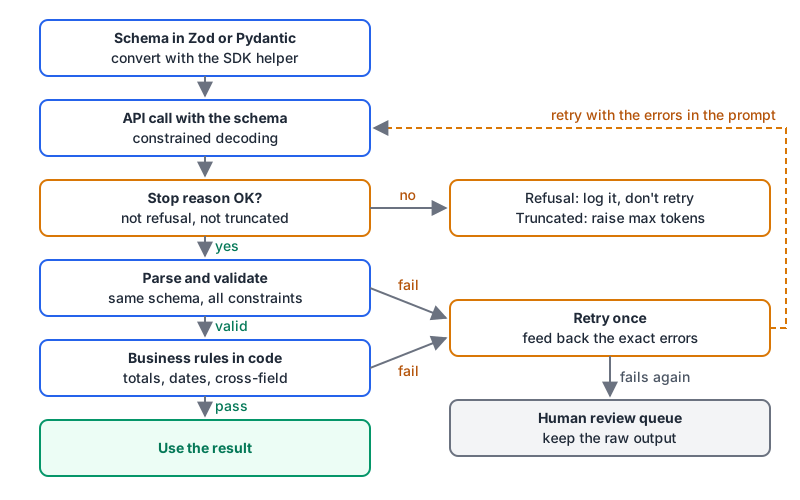
Constrained decoding guarantees shape, under conditions. The conditions are where production bugs live.
Refusals. Anthropic returns stop_reason: "refusal" with a 200, bills you, and the output "might not match your schema." Its docs add a specific trap: asking for the model's reasoning inside a schema property can trigger a reasoning_extraction refusal; ask for a short explanation instead. OpenAI puts a refusal item in the output, which also won't follow your schema.
Truncation. If the output hits the token limit, it's cut off mid-JSON. Anthropic signals stop_reason: "max_tokens"; OpenAI marks the response incomplete with reason max_output_tokens, and the Node SDK leaves output_parsed null. Check the stop reason before you read the parsed value, and set the limit with room for your largest realistic output.
Valid but wrong. Google's docs say it bluntly: handle "schema-compliant but semantically incorrect outputs." A schema can't check that line items add up to the total or that the due date is after the invoice date. That's ordinary code:
def problems(inv: Invoice, stated_total_cents: int | None) -> list[str]:
    errs = []
    if not inv.items:
        errs.append("items is empty")
    if stated_total_cents is not None:
        computed = sum(i.quantity * i.unit_price_cents for i in inv.items)
        if computed != stated_total_cents:
            errs.append(f"line items sum to {computed}, document says {stated_total_cents}")
    return errs
Retries. My rule is one retry with the specific errors fed back, because each attempt costs a full call, and if one targeted correction doesn't fix it I'd rather a person looked than pay for a third guess. If you'd rather not write the loop, Instructor does validation retries with max_retries and raises InstructorRetryException when they run out.
Costs and compatibility you'll hit
- First-call latency. Both OpenAI and Anthropic note extra latency the first time a schema is used, while it's compiled. Anthropic caches compiled grammars for 24 hours from last use, and changing only
nameordescriptiondoesn't invalidate that cache. Keep schemas stable rather than generating them per request. - Prompt caching. Anthropic's docs say changing
output_config.formatinvalidates the prompt cache for that conversation thread. - Incompatible features. On Anthropic, citations with
output_config.formatreturn a 400, and message prefilling doesn't work with JSON outputs. Strict tool use (strict: true) can be combined with JSON outputs. - Data handling. Anthropic caches the schema separately from prompts and says not to put PHI in property names, enums or patterns.
- Streaming. Gemini streams partial JSON strings you concatenate; don't parse until the stream ends.
For broader API hygiene (timeouts, retries, logging), our LLM API best practices guide has the rest, and OpenAI API vs Anthropic API compares the platforms more broadly.
A checklist for each extraction endpoint
- Write the schema in Pydantic or Zod; never hand-maintain a second JSON Schema copy.
- Stay inside the portable subset: required fields, nullable unions,
additionalProperties: false, string enums. - Re-validate the response with the same schema, because some providers drop constraints.
- Check stop reasons for refusal and truncation before reading parsed output.
- Run business-rule checks in code.
- Retry once with the errors, then route to a human.
- Log the raw output for every failure so you can tell a schema problem from a prompt problem.
Written by AIDToolStack Editorial
Researched from official documentation, specifications and vendor pages, listed under Sources below. Last checked November 2026.
Sources
- developers.openai.com/api/docs/models
- platform.claude.com/docs/en/about-claude/models/overview
- github.com/openai/openai-node/blob/main/examples/responses/structured-outputs.ts
- developers.openai.com/api/docs/guides/structured-outputs
- platform.claude.com/docs/en/build-with-claude/structured-outputs
- aistudio.google.com/docs/structured-output
- pydantic.dev/docs/validation/latest/concepts/json_schema/
- github.com/googleapis/python-genai
- github.com/openai/openai-node/blob/main/docs/structured-outputs.md
- zod.dev/json-schema
- python.useinstructor.com/concepts/retrying/
Related Posts
Explore on AIDToolStack
Discover tools and servers featured in our directory.
AI Tools
MCP Servers
Sponsor Our Newsletter
Reach thousands of developers who are actively evaluating AI tools, MCP servers, and dev infrastructure. Our weekly newsletter goes to engaged technical decision-makers.
All sponsored content is clearly labeled per our editorial policy.