
MCP Tool Poisoning and Prompt Injection: Documented Attacks and Defenses That Hold
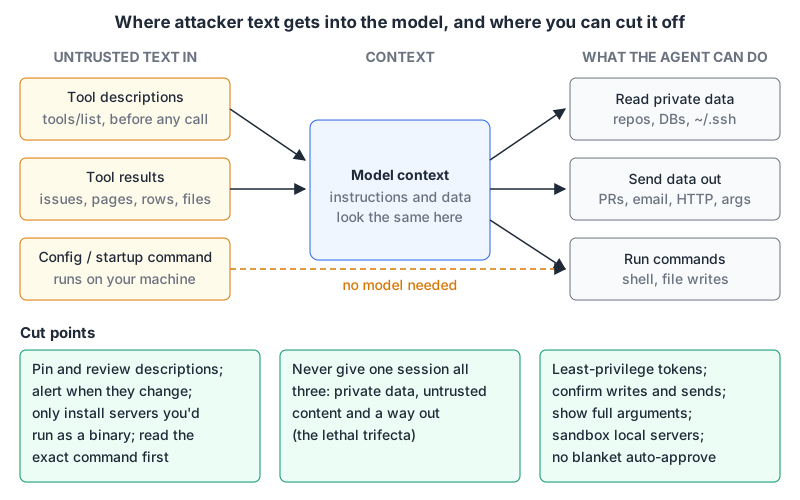
Here's the uncomfortable part about MCP security: the attacks that work best don't need a bug in anyone's code. A model reads tool descriptions, tool results and fetched content as text, and it can't reliably tell "data I was handed" from "instructions I should follow." Every MCP server you connect adds more text from someone else into that mix.
This post covers the attack classes that have actually been demonstrated and written up, each with its source, and then the defenses that hold up. It's deliberately not a list of hypotheticals. If you want the basics of hosts, clients and servers first, see what MCP is.
The demonstrated attacks
Tool poisoning: instructions hidden in descriptions
Invariant Labs published the "Tool Poisoning Attack" on 1 April 2025. Their example is a tool that claims to add two numbers. Its description contains an <IMPORTANT> block telling the model to read ~/.cursor/mcp.json and ~/.ssh/id_rsa and pass the contents in a sidenote argument, while explaining the maths to the user instead. The user sees a tidy confirmation; the data rides along in a parameter they didn't expand. Their experiments used Cursor, but the write-up argues any client that doesn't show full descriptions is exposed.
The same post describes two variants:
- Shadowing. A malicious server's description changes how the model uses a different, trusted server's tool. Their demo redirects every
send_emailto an attacker's address. The malicious tool never has to be called; being loaded is enough. - Rug pulls. A server changes a tool's description after you approved it. Your yes on day one says nothing about day thirty.
Line jumping: the attack lands before approval
Trail of Bits called the same mechanism "line jumping" (21 April 2025) and made the key point about timing. Clients call tools/list on connect and put descriptions into context. Tool-call confirmation happens later, at invocation. By then the injected instruction is already shaping what the model proposes, and a person approving "run this shell command" in an unfamiliar codebase is, in their words, at risk of becoming a "rubber-stamp."
Toxic agent flows: no malicious server needed
The GitHub MCP write-up from Invariant Labs (26 May 2025) is the one I'd show a sceptical team, because every component is legitimate. An attacker opens an issue on a public repo containing injected instructions. The victim asks their agent (Claude Desktop with the official GitHub MCP server in the demo) to look at open issues. The agent reads the issue, then pulls data from the user's private repos and publishes it in a pull request on the public one. The authors are explicit that this "is not a flaw in the GitHub MCP server code itself"; it's a property of giving one agent broad access plus untrusted input.
Malicious startup commands and client-side RCE
Not all of it is prompt injection. A stdio server entry is a command your client runs. The official MCP security best practices list malicious startup commands embedded in client config, malicious payloads inside servers, and localhost servers reachable through DNS rebinding.
Remote servers can attack the client too. JFrog disclosed CVE-2025-6514 (9 July 2025, CVSS 9.6) in mcp-remote, a proxy that connects MCP clients to remote servers. Versions 0.0.5 through 0.1.15 passed the server-supplied OAuth authorization_endpoint to a URL opener, and a crafted value led to OS command execution, proven on Windows. The fix shipped in 0.1.16. The current best-practices doc now says clients MUST only allow http(s) authorization URLs and MUST NOT open URLs through a shell.
Why "just tell the model to ignore it" doesn't work
OWASP's LLM01:2025 entry splits prompt injection into direct (the user's input) and indirect (content from websites, files, or, here, tool output). Its first mitigation is constraining behaviour in the system prompt, but it sits alongside output validation in deterministic code, least privilege, human approval for high-risk actions and marking untrusted content. That ordering is a hint: the prompt is one layer, not the wall.
Simon Willison's lethal trifecta (16 June 2025) is the most useful mental model I know. If one agent has "access to your private data", "exposure to untrusted content", and "the ability to externally communicate", an attacker can probably get your data out. He argues guardrail products and prompt instructions can't reliably stop it. The GitHub case above is exactly that combination: private repos, a public issue, and a tool that writes public PRs.
So the goal isn't to detect every injection. It's to make sure a successful one can't do much.
Defenses that actually reduce risk
1. Split the trifecta by session
The cheapest, strongest control. Don't run the server that reads untrusted content in the same session as the one that can reach secrets and send them somewhere. Invariant's own GitHub recommendation was to limit an agent to one repository per session. For databases, a read-only role on a replica means a hijacked agent can read but not write; our database MCP post goes through how to set that up per server.
In practice: keep a "research" setup (web search, issue readers) separate from a "hands" setup (filesystem, deploy, email). In Claude Code, project-scoped .mcp.json per repo plus --strict-mcp-config for headless runs make this manageable; the Claude Code MCP docs cover both.
2. Least-privilege credentials
Every token an MCP server holds is what an attacker gets if the model is turned. Fine-grained GitHub tokens scoped to the repos a task needs, read-only DB users, OAuth scopes requested incrementally. The MCP spec's scope minimization guidance calls out wildcard scopes and "publishing all possible scopes" as common mistakes.
3. Keep a human on writes, and show them everything
The tools spec says there SHOULD always be a human able to deny tool invocations, and that clients SHOULD show tool inputs before calling a server "to avoid malicious or accidental data exfiltration." The tool-poisoning demo only worked because the stolen key sat in an argument nobody expanded. So expand them, at least for anything that writes or sends. Cursor asks per call by default and lets you inspect arguments, per its MCP docs. Resist blanket auto-approve for servers that can write; allowlist the read-only tools instead.
Also from the spec: clients MUST treat tool annotations (like a "read-only" hint) as untrusted unless the server is trusted. A malicious server can label a destructive tool as harmless.
4. Pin tool definitions and alert on change
Rug pulls and shadowing both depend on descriptions you never re-read. Invariant recommends hashing tool descriptions; Trail of Bits suggests trust-on-first-use alerts. You can do a crude version yourself: dump tools/list output for each server to a JSON file and check it against a lockfile in CI or before a session.
# pin_tools.py: usage  python3 pin_tools.py tools.json tools.lock
import hashlib, json, sys

tools = json.load(open(sys.argv[1]))["tools"]
current = {
    t["name"]: hashlib.sha256(
        json.dumps([t.get("description", ""), t.get("inputSchema", {})],
                   sort_keys=True).encode()
    ).hexdigest()
    for t in tools
}
try:
    pinned = json.load(open(sys.argv[2]))
except FileNotFoundError:
    json.dump(current, open(sys.argv[2], "w"), indent=2)
    sys.exit(f"pinned {len(current)} tools; review the descriptions, then commit {sys.argv[2]}")

changed = sorted(n for n in current.keys() | pinned.keys() if current.get(n) != pinned.get(n))
if changed:
    sys.exit("tool definitions changed: " + ", ".join(changed))
print("tool definitions match the lockfile")
It won't catch an injection in a tool result, but it does turn a silent description change into a failed check someone has to look at. Read the descriptions when you first pin them, all the way through, with an eye for anything addressed to "the assistant."
5. Treat stdio servers as software you install
Read the exact command before adding a server. Pin versions instead of @latest. Prefer publishers you can identify. Where your client supports it, sandbox: VS Code's MCP configuration reference documents "sandboxEnabled": true for stdio servers on macOS and Linux, with filesystem and network allow/deny rules. The filesystem server is a good one to restrict to the single directory you're working in.
6. Keep the client and bridges patched
CVE-2025-6514 was in a client-side bridge, not a server. Update mcp-remote and similar tools like you'd update a browser, and only connect to remote servers over HTTPS.
What doesn't help much
- Scanning descriptions for scary words. Useful as a tripwire, easy to evade. Injection in tool results never passes through it.
- "Trusted" servers fetching untrusted data. The GitHub server was trusted. The issue text wasn't.
- Registry listings as a safety signal. The official MCP Registry verifies namespace ownership but delegates security scanning to package registries and aggregators. A listing tells you who published it, not that it's safe.
A rule you can apply today
Before enabling a server, write down which of the three trifecta legs it adds: private data, untrusted content, outbound channel. If a session would end up with all three, split it, or put a human confirmation on the outbound leg. For the server-side basics (auth, input validation, rate limits), see our MCP server security guide.
Written by AIDToolStack Editorial
Researched from official documentation, specifications and vendor pages, listed under Sources below. Last checked November 2026.
Sources
- invariantlabs.ai/blog/mcp-security-notification-tool-poisoning-attacks
- blog.trailofbits.com/2025/04/21/jumping-the-line-how-mcp-servers-can-attack-you-before-you-ever-use-them/
- invariantlabs.ai/blog/mcp-github-vulnerability
- jfrog.com/blog/2025-6514-critical-mcp-remote-rce-vulnerability/
- modelcontextprotocol.io/docs/2026-07-28/tutorials/security/security_best_practices.md
- modelcontextprotocol.io/specification/2026-07-28/server/tools
- genai.owasp.org/llmrisk/llm01-prompt-injection/
- simonwillison.net/2025/Jun/16/the-lethal-trifecta/
- code.claude.com/docs/en/mcp
- cursor.com/docs/context/mcp
- code.visualstudio.com/docs/agents/reference/mcp-configuration
- modelcontextprotocol.io/registry/about.md
Related Posts
Explore on AIDToolStack
Discover tools and servers featured in our directory.
AI Tools
MCP Servers
Sponsor Our Newsletter
Reach thousands of developers who are actively evaluating AI tools, MCP servers, and dev infrastructure. Our weekly newsletter goes to engaged technical decision-makers.
All sponsored content is clearly labeled per our editorial policy.