
MCP Servers for Payments and Commerce: Stripe and Shopify's Official Servers
Giving an AI agent access to your payments account is different from giving it a database or a ticket tracker. A bad SQL query wastes an afternoon. A bad refund, a cancelled subscription or a price change on a live product reaches real customers before anyone notices. So the questions for a payments MCP server are mostly about money paths: which account it can touch, what proves it's allowed to, and what it can do without a human saying yes.
This post covers the servers Stripe and Shopify run themselves, as their docs describe them in November 2026. Both have changed a lot this year, and a fair amount of what you'll find in older tutorials no longer works.
Stripe: one hosted server, and a deadline at the end of November
Stripe runs a remote MCP server at https://mcp.stripe.com. The local packages are finished: the README of Stripe's stripe/ai repository (renamed from agent-toolkit) says @stripe/mcp and @stripe/agent-toolkit are deprecated and "will receive no further updates, including security fixes." If a guide tells you to run npx @stripe/mcp --api-key=..., it's out of date. Our Stripe MCP server page tracks the hosted version.
Setup is short. Stripe's MCP docs give one command per client:
# Claude Code: add the server, then run /mcp inside a session to sign in
claude mcp add --transport http stripe https://mcp.stripe.com/

# Codex CLI, IDE extension and the ChatGPT desktop app share this config
codex mcp add stripe --url https://mcp.stripe.com
Cursor and VS Code take a JSON entry with just the URL. Stripe also offers stripe agent setup from the Stripe CLI, which detects your agents and configures the server plus Stripe's skills for you. If you've never wired up a remote server before, our guide to configuring MCP servers in Claude Code, Cursor and VS Code covers where each client keeps its config.
OAuth for people, agent keys for automation
There are exactly two ways to authenticate, and the choice decides how much damage a confused agent can do.
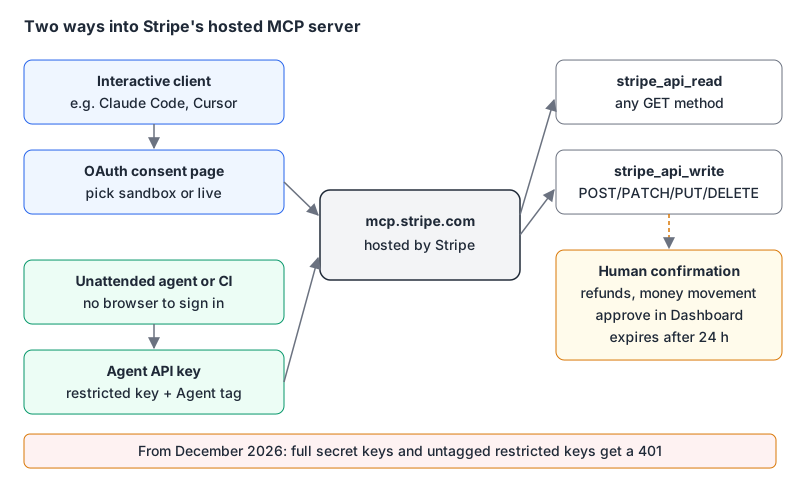
OAuth is for interactive clients acting as you. During consent you choose which live accounts or sandboxes the client can reach, and you can set different permissions per environment. Sessions show up under OAuth sessions in your Dashboard user settings, where you can revoke them, and admins can see and revoke other people's. If you want the background on how remote servers do this, see our post on OAuth for remote MCP servers.
Agent API keys are for autonomous agents that can't open a browser. They're restricted keys (rk_...) tagged as belonging to an agent when you create them. According to Stripe's API keys page, agent-tagged keys authenticate like any other restricted key, but they're automatically subject to approval rules, and Stripe adds default rules covering payouts, refunds and account configuration changes when you create your first one.
Here's the part with a date on it. The MCP docs say: migrate by November 30, 2026. "Starting in December, Stripe MCP will stop accepting full-access secret keys and restricted API keys without the Agent tag." Requests with those keys get a 401 with an OAuth discovery challenge. If you have an agent running on an sk_live_ key today, it breaks next month.
In Codex, the key goes in by environment variable name rather than value:
[mcp_servers.stripe]
url = "https://mcp.stripe.com"
bearer_token_env_var = "STRIPE_AGENT_KEY"
Claude Code's .mcp.json does the same with "Authorization": "Bearer ${STRIPE_AGENT_KEY}" in headers. Either way the key stays out of the file you commit, which matters because Stripe's docs are blunt that only publishable keys are safe to expose. Our secrets management guide has the longer version of why.
Test in a sandbox, not "test mode"
Stripe's docs now talk about sandboxes: isolated environments with their own keys (sk_test_, rk_test_, pk_test_) where card networks don't process anything. Objects don't cross between a sandbox and live mode. For MCP that means two easy wins: connect OAuth to a sandbox first, and when you create an agent key, create it in the sandbox and test there before making the live one. Stripe's own advice for replacing a key is the same: test the new configuration in a sandbox, then expire the old key.
What the Stripe server lets an agent call
Instead of one tool per endpoint, the hosted server exposes a few general tools. stripe_api_search finds a method, stripe_api_details returns its parameters, stripe_api_read calls any supported GET, and stripe_api_write handles POST, PATCH, PUT and DELETE. Around them sit search_stripe_documentation, stripe_implementation_planner, get_stripe_account_info, a preview stripe_analytics tool and Treasury tools in public preview. The supported-methods list on the docs page runs from customers and invoices to subscriptions, coupons, disputes, webhook endpoints and tax.
The safety feature I like most is human confirmation. Some actions, including creating a refund, send_money, transfer_money and convert_currency, make the agent hand you a link instead of doing the thing. You approve in the Dashboard, the agent gets an approval token, and you tell it to retry. Unapproved requests expire after 24 hours. Note what Stripe stresses here: confirmation depends on the action, not the tool name. stripe_api_write creates refunds (confirmed) and also updates customers (not confirmed), so allow-listing the tool in your client is not the same as allow-listing refunds.
Two smaller points from the docs. Turn on your client's tool-approval setting anyway, since Stripe's confirmation is separate from it. And Connect platforms can act on a connected account by adding a Stripe-Account header, but only with an agent key: OAuth doesn't cover connected accounts.
Shopify: four different servers for four different jobs
"The Shopify MCP server" is ambiguous, because Shopify now runs several, and they don't overlap much.
| Server | Who it's for | Endpoint | Auth |
|---|---|---|---|
| Dev MCP | You, building an app or theme | local, npx -y @shopify/dev-mcp@latest | none |
| Storefront Catalog, Cart, Checkout, Order | A shopping agent | https://{shop}/api/ucp/mcp | anonymous, signed or token tiers |
| Customer Accounts MCP | A buyer who signed in | https://{shop}/customer/api/mcp | OAuth 2.0 + PKCE |
| Global Catalog | Cross-merchant discovery | https://catalog.shopify.com/api/ucp/mcp | API client, 5 req/s default |
Dev MCP is the one most developers want. Per Shopify's Dev MCP page it "runs locally and doesn't require authentication" and connects your assistant to Shopify's developer resources, docs and API schemas. It doesn't hold store credentials. Install it in Claude Code with:
claude mcp add --transport stdio shopify-dev-mcp -- npx -y @shopify/dev-mcp@latestShopify also ships an AI Toolkit as plugins for Claude Code, Codex, Cursor and others. Unlike Dev MCP, it can prepare store-management tasks that run through Shopify CLI's authenticated store context, with you choosing when to execute them. Treat that one like any other tool with write access to a real shop.
Shopify storefront servers moved to UCP
If you built a shopping agent on https://{shop}/api/mcp with search_catalog, get_cart and update_cart, read the migration notice: those catalog and cart tools were removed in favour of the Universal Commerce Protocol endpoint at /api/ucp/mcp. Every request there must carry meta["ucp-agent"].profile, a URL to your agent's UCP profile, and the tools you get depend on the capabilities that profile declares. The Storefront Catalog docs list search_catalog, lookup_catalog and get_product, plus location tools for stores with physical shops.
Cart semantics changed too. The migration page warns that "each update_cart request replaces the full cart," and the Checkout MCP docs say update_checkout works the same way: omit a field and it's removed. That's the bug I'd expect in every first draft of an agent.
Trust tiers decide who can complete a purchase
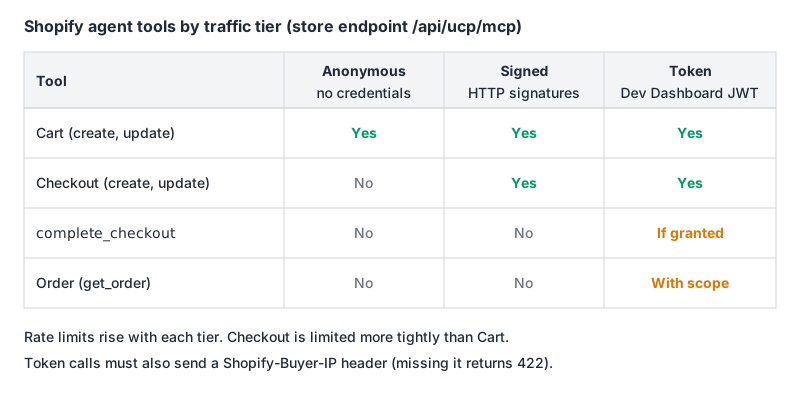
Shopify's auth and rate-limiting page defines three tiers. Anonymous agents get catalog and cart tools at the lowest limits. Signed agents implement HTTP Message Signatures (RFC 9421, ECDSA P-256) against the public key in their UCP profile and add checkout tools, though not complete_checkout or order tools. Token agents use a Dev Dashboard credential: a client-credentials exchange at https://api.shopify.com/auth/access_token returns a JWT with a 60-minute lifetime. complete_checkout needs the token to be granted permission to complete purchases, and get_order needs the read_global_api_orders scope and only returns orders your agent placed.
Checkout is built around handing off to the buyer. For most partners the docs say it finishes by sending the buyer to continue_url, which you should validate (https: scheme), treat as sensitive and keep out of logs, and complete_checkout expects a payment credential from a trusted UI rather than card numbers pasted into a chat. complete_checkout and cancel_checkout require an idempotency key, which is the right call for anything that moves money.
Customer Accounts MCP is separate again: order status and account details for a signed-in buyer, behind OAuth 2.0 with PKCE and the scope customer-account-mcp-api:full. Its docs require a custom domain on the store and approved access to protected customer data.
One note about our own directory: the Shopify MCP server page covers shopify-mcp, a community server for the Admin GraphQL API, not any of Shopify's official servers above. It's useful for store admin work, but it's a different trust decision.
A checklist before an agent touches money
- Start in a sandbox or dev store. Stripe lets you grant OAuth per environment; use that.
- Replace secret keys now. Untagged keys stop working on Stripe MCP in December 2026. Create an agent key with only the permissions the job needs.
- Keep confirmation on for anything irreversible. Stripe's human confirmation covers refunds and money movement; your client's tool approval should cover the rest.
- Don't mix a payments server with untrusted input servers in one session without thinking about prompt injection. Stripe's docs warn about this directly, and our post on tool poisoning explains how it happens.
- For Shopify, pick the server by job: Dev MCP to build, UCP endpoints for shopping agents, Customer Accounts MCP for signed-in buyers.
- Keep fulfilment on webhooks, not on what an agent says happened. Our Stripe integration patterns post covers why.
Written by AIDToolStack Editorial
Researched from official documentation, specifications and vendor pages, listed under Sources below. Last checked November 2026.
Sources
- docs.stripe.com/mcp
- github.com/stripe/ai
- docs.stripe.com/keys
- shopify.dev/docs/apps/build/devmcp
- shopify.dev/docs/apps/build/ai-toolkit
- shopify.dev/docs/apps/build/storefront-mcp
- shopify.dev/docs/agents
- shopify.dev/docs/agents/catalog/storefront-mcp
- shopify.dev/docs/agents/profiles/auth-and-rate-limiting
- shopify.dev/docs/agents/carts-and-checkout/checkout-mcp
- shopify.dev/docs/apps/build/customer-accounts-mcp
Related Posts
Explore on AIDToolStack
Discover tools and servers featured in our directory.
AI Tools
MCP Servers
Sponsor Our Newsletter
Reach thousands of developers who are actively evaluating AI tools, MCP servers, and dev infrastructure. Our weekly newsletter goes to engaged technical decision-makers.
All sponsored content is clearly labeled per our editorial policy.