
Authorization for Remote MCP Servers: OAuth 2.1, Resource Metadata and CIMD
A local stdio MCP server is easy to secure in one sense: it runs as you, and you hand it an API key through an environment variable. The moment you move that server to a URL so a whole team (or the public) can use it, you need a real answer to "who is calling, and what are they allowed to do?" MCP's answer is OAuth, profiled tightly enough that any compliant client can sign in to any compliant server with no prior setup.
This post walks through that flow as defined in the current spec revision, 2026-07-28, from both sides: what your server must publish and check, and what a client does. If you haven't built a server yet, start with the SDK walkthrough first.
What changed in 2026-07-28
If you implemented auth against an earlier revision, three things in the 2026-07-28 changelog are worth knowing:
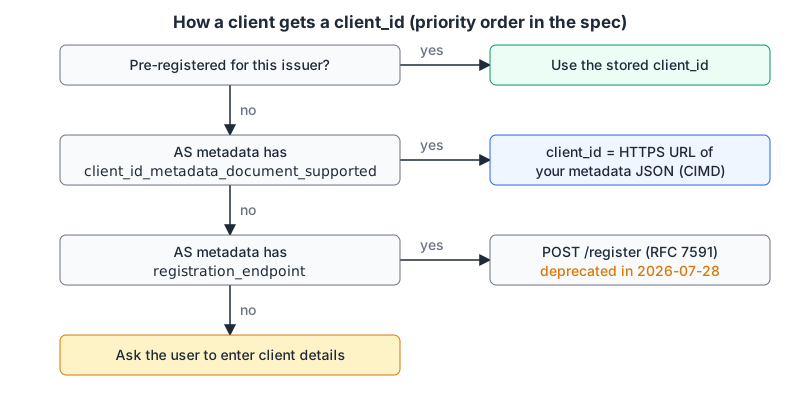
- Dynamic Client Registration (RFC 7591) is deprecated as a registration mechanism, in favour of Client ID Metadata Documents. It stays available for authorization servers that don't support CIMD yet.
- Issuer validation (RFC 9207). Authorization servers SHOULD return an
issparameter in the authorization response, and clients MUST compare a presentissagainst the issuer they recorded before redeeming the code. This defends against mix-up attacks. - Credentials are bound to an issuer. Clients must key stored client credentials by the authorization server's
issuerand re-register if the protected resource metadata starts pointing somewhere else.
The same revision made the protocol stateless (no initialize handshake, no Mcp-Session-Id), which matters for auth in one way: there's no session to hang identity on, so the bearer token on each request is the identity. The authorization spec says authorization "MUST be included in every HTTP request from client to server."
The roles
- Your MCP server is an OAuth 2.1 resource server. It accepts and validates access tokens.
- The MCP client (Claude Code, Cursor, VS Code, your own agent) is the OAuth client.
- The authorization server (your identity provider or your own service) signs users in and issues tokens. It can be the same deployment as your MCP server or a separate one.
The spec builds on OAuth 2.1 (draft 13), RFC 8414 server metadata, RFC 9728 protected resource metadata, RFC 8707 resource indicators, RFC 9207 issuer identification and the CIMD draft. You don't need to read all of them, but you do need to know which piece each step comes from when something breaks.
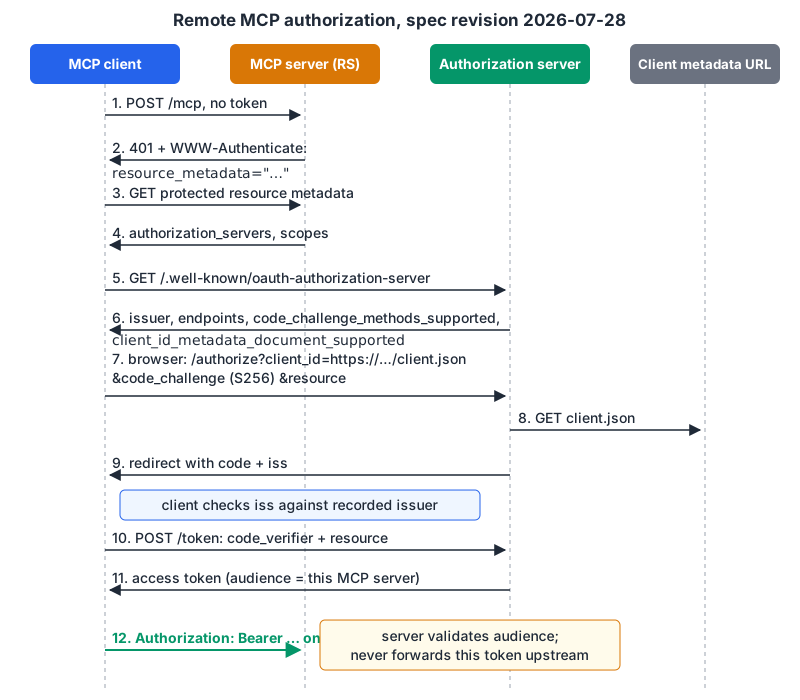
Server side: three things you must get right
1. Return a useful 401
When a request arrives with no token or a bad one, answer 401 with a WWW-Authenticate header pointing at your protected resource metadata, and ideally the scopes this call needs. This example is straight from the spec:
HTTP/1.1 401 Unauthorized
WWW-Authenticate: Bearer resource_metadata="https://mcp.example.com/.well-known/oauth-protected-resource",
                         scope="files:read"
If you skip the header, clients fall back to probing well-known URIs: first the path-specific form (/.well-known/oauth-protected-resource/public/mcp for an endpoint at /public/mcp), then the root /.well-known/oauth-protected-resource, per the discovery rules. Send the header anyway; it's one line and removes the guessing.
2. Publish protected resource metadata
This JSON document (RFC 9728) tells clients which authorization server to use. The spec requires authorization_servers with at least one entry. A minimal version:
{
  "resource": "https://mcp.example.com/mcp",
  "authorization_servers": ["https://auth.example.com"],
  "scopes_supported": ["files:read"]
}
Keep scopes_supported small. The spec describes it as "the minimal set of scopes necessary for basic functionality", with more requested later through step-up. If a client gets a 401 with no scope, it requests everything in scopes_supported, so a bloated list means bloated tokens. The security best practices list "publishing all possible scopes in scopes_supported" as a common mistake, and the spec says servers shouldn't put offline_access there, since refresh tokens aren't a resource requirement.
3. Validate every token, and never pass it on
The spec is blunt: servers "MUST validate that access tokens were issued specifically for them as the intended audience" and "MUST NOT accept or transit any other tokens." In practice, for a JWT access token with jose:
import { createRemoteJWKSet, jwtVerify } from "jose";

const JWKS = createRemoteJWKSet(new URL("https://auth.example.com/.well-known/jwks.json"));

export async function verify(authHeader: string | undefined) {
  const token = authHeader?.match(/^Bearer (.+)$/)?.[1];
  if (!token) throw new Error("missing token");      // -> 401
  const { payload } = await jwtVerify(token, JWKS, {
    issuer: "https://auth.example.com",
    audience: "https://mcp.example.com/mcp",          // your canonical URI
  });
  return payload;                                      // check scopes next
}
The JWKS path and claim layout depend on your authorization server; check its docs. Use our JWT decoder to look at a real token's aud and scope while you debug. For the classic validation mistakes, see JWT security mistakes.
If your server calls an upstream API (GitHub, Google), it gets its own token for that API as an OAuth client. Forwarding the user's MCP token upstream is the "token passthrough" anti-pattern, and the best-practices doc explains why: it bypasses controls tied to audience, wrecks your audit trail, and turns your server into a proxy for anyone holding a stolen token.
When a valid token lacks a scope, return 403 with error="insufficient_scope", the scopes needed, and the resource_metadata URL again. Include every scope the operation needs in one challenge; drip-feeding them one per retry forces repeated sign-ins.
Client side: discovery, registration, PKCE
A client that gets your 401 does this, in order:
- Fetch the protected resource metadata and pick an authorization server.
- Fetch the authorization server's metadata. For an issuer with no path, try
/.well-known/oauth-authorization-server, then/.well-known/openid-configuration. Reject the document if itsissuerdoesn't exactly match the issuer used to build the URL. - Check PKCE support. If
code_challenge_methods_supportedis absent, the security considerations say the client MUST refuse to proceed. UseS256. - Get a client ID (next section).
- Send the user to
/authorizewith the PKCE challenge and aresourceparameter set to the MCP server's canonical URI, such ashttps://mcp.example.com/mcp. Clients sendresourceeven if the authorization server ignores it. - On the redirect back, validate
issagainst the recorded issuer, then exchange the code with thecode_verifierand the sameresource.
That resource parameter is what lets the authorization server mint a token whose audience is your MCP server and nothing else.
Client ID Metadata Documents, the new default
The awkward part of open-ended OAuth has always been registration: a client has never met this authorization server, so what's its client_id? DCR answered with "POST to /register and get one," which meant every authorization server accumulated a pile of throwaway clients. CIMD flips it: the client_id is an HTTPS URL, and that URL serves a JSON document describing the client. From the client registration page:
{
  "client_id": "https://app.example.com/oauth/client-metadata.json",
  "client_name": "Example MCP Client",
  "client_uri": "https://app.example.com",
  "logo_uri": "https://app.example.com/logo.png",
  "redirect_uris": [
    "http://127.0.0.1:3000/callback",
    "http://localhost:3000/callback"
  ],
  "grant_types": ["authorization_code"],
  "response_types": ["code"],
  "token_endpoint_auth_method": "none"
}
The rules: the URL must be https with a path, the document must include at least client_id, client_name and redirect_uris, and the client_id inside must match the URL exactly. Authorization servers advertise support with "client_id_metadata_document_supported": true, fetch the document when they see a URL-shaped client ID, cache it per HTTP cache headers, and validate the redirect URI against it. A bonus: CIMD client IDs are portable across authorization servers, so there's nothing to re-register when a server switches identity providers.
Two caveats the spec is honest about. An authorization server fetching arbitrary URLs is an SSRF risk, so block private ranges and consider an egress proxy. And a metadata document proves who controls a domain, not which process is listening on localhost: an attacker can reuse a real client's metadata URL with their own localhost port. Authorization servers are told to show the redirect hostname clearly and warn on localhost-only redirect URIs.
Where clients are today
Client docs lag the spec a little. As of November 2026, Cursor's MCP docs describe PKCE with dynamic client registration as a public client, with an auth object for static client IDs; they don't mention CIMD. Claude Code's MCP docs offer --client-id, --client-secret and --callback-port for servers without dynamic registration, and /mcp or claude mcp login to sign in. So if you run the authorization server, I'd turn on CIMD and keep DCR enabled for now, because deprecated features normally stay in the spec for at least twelve months under the feature lifecycle policy and real clients still use it.
Server checklist
401responses carryWWW-Authenticatewithresource_metadata(andscopewhere you can)./.well-known/oauth-protected-resourcelistsauthorization_serversand a minimalscopes_supported.- Tokens are checked for issuer, signature, expiry and audience = your canonical URI, on every request.
- Upstream calls use the server's own upstream tokens. No passthrough.
- Insufficient scope returns
403witherror="insufficient_scope"and the full set of needed scopes. - Authorization server metadata includes
code_challenge_methods_supported,client_id_metadata_document_supportedif you support CIMD, and emitsisson redirects. - stdio servers skip all of this: the spec says they "SHOULD NOT follow this specification, and instead retrieve credentials from the environment."
For general OAuth pitfalls that aren't MCP-specific (state handling, redirect URI matching), our OAuth implementation mistakes post is the companion read.
Written by AIDToolStack Editorial
Researched from official documentation, specifications and vendor pages, listed under Sources below. Last checked November 2026.
Sources
- modelcontextprotocol.io/specification/versioning
- modelcontextprotocol.io/specification/2026-07-28/changelog
- modelcontextprotocol.io/specification/latest/basic/authorization
- modelcontextprotocol.io/specification/2026-07-28/basic/authorization/client-registration.md
- modelcontextprotocol.io/specification/2026-07-28/basic/authorization/authorization-server-discovery.md
- modelcontextprotocol.io/specification/2026-07-28/basic/authorization/security-considerations.md
- modelcontextprotocol.io/docs/2026-07-28/tutorials/security/security_best_practices.md
- github.com/panva/jose/blob/main/docs/jwt/verify/functions/jwtVerify.md
- cursor.com/docs/context/mcp
- code.claude.com/docs/en/mcp
Related Posts
Explore on AIDToolStack
Discover tools and servers featured in our directory.
AI Tools
MCP Servers
Sponsor Our Newsletter
Reach thousands of developers who are actively evaluating AI tools, MCP servers, and dev infrastructure. Our weekly newsletter goes to engaged technical decision-makers.
All sponsored content is clearly labeled per our editorial policy.