
Web Workers for Heavy JavaScript: Transfers, Comlink and OffscreenCanvas
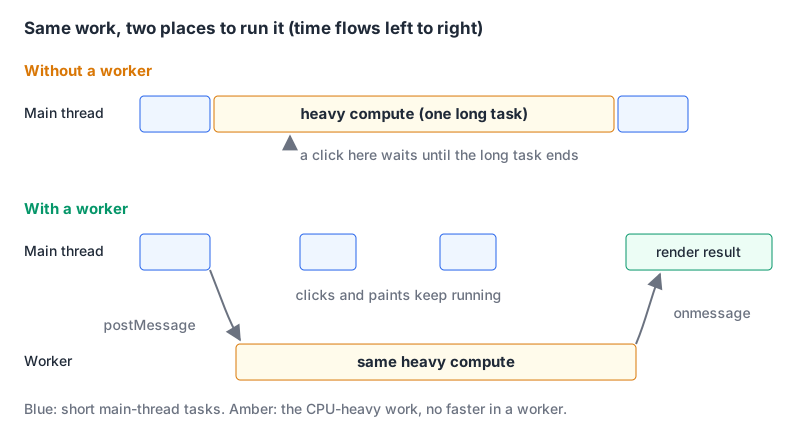
The user drops a large CSV onto your page, you parse and aggregate it in a click handler, and for the next few seconds nothing on the page responds. No hover states, no scroll, the spinner you added doesn't even spin, because the thread that would draw it is busy. That's the case a Web Worker exists for: CPU-heavy JavaScript that can run without touching the DOM.
Workers don't make code faster. They move it off the thread that handles input and paint. This post covers when that's worth doing, how data gets across (the part that decides whether a worker helps or hurts), and the small library that makes the API bearable. Every example here ran in Chrome 152 (the Comlink ones with Comlink 4.4.2 loaded from unpkg), and the output shown is what came back.
When a worker helps, and when it doesn't
web.dev's guide to long tasks defines the threshold: "Any task that takes longer than 50 milliseconds is a long task." Long tasks are what make Interaction to Next Paint bad, which our Core Web Vitals explainer covers in detail. The same article notes that JavaScript runs on the main thread "with the exception of web workers and similar APIs."
| Situation | Worker? | Why |
|---|---|---|
| Parsing or transforming big files, image processing, search indexing, compression | Yes | Pure CPU work with a clear input and output |
Slow fetch or database calls | No | Already asynchronous; the main thread isn't blocked while waiting |
| Slow rendering, layout, huge DOM | No | Workers can't touch the DOM |
| Lots of tiny calculations per frame | Usually no | Message round-trips cost more than the work |
| A long loop you can split | Maybe | Yielding with scheduler.yield() or setTimeout may be enough |
If your slow path is React re-rendering, start with our React performance guide instead; a worker can't help with rendering.
A minimal module worker
// sum.worker.js
self.onmessage = (event) => {
  const values = new Float64Array(event.data.buffer);
  let sum = 0;
  for (let i = 0; i < values.length; i++) sum += values[i];
  self.postMessage({ sum, length: values.length });
};
// main.js
const worker = new Worker(new URL("./sum.worker.js", import.meta.url), { type: "module" });
worker.onmessage = (event) => console.log(event.data);
worker.onerror = (event) => console.error("worker failed:", event.message);The new URL(..., import.meta.url) form is what bundlers detect. Vite's docs call it "the recommended way to create workers" and warn that detection "will only work if the new URL() constructor is used directly inside the new Worker() declaration", with static option values. Our bundlers overview has the wider picture. Module workers (type: "module", so you can use import) arrived in Chrome 80, Safari 15 and Firefox 114, per MDN's compat data.
Not to be confused with service workers, which sit between your page and the network; our Manifest V3 extensions post deals with those.
What crosses the boundary: copies, by default
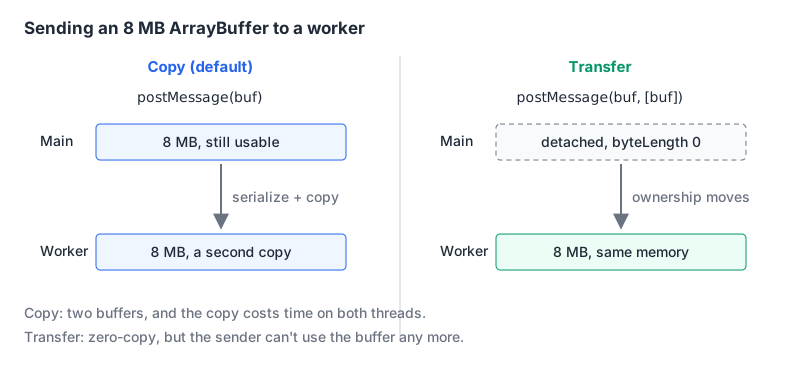
MDN is blunt: "Data passed between the main page and workers is copied, not shared." The copy uses the structured clone algorithm, which handles Map, Set, Date, typed arrays, Blob and friends, and refuses a few things. What I got back from Chrome 152:
worker.postMessage({ fn: () => 1 });
// DataCloneError: Failed to execute 'postMessage' on 'Worker': () => 1 could not be cloned.

structuredClone({ el: document.body });
// DataCloneError: ... HTMLBodyElement object could not be cloned.

class Point { constructor(x) { this.x = x; } get double() { return this.x * 2; } }
const p = structuredClone(new Point(2));
p instanceof Point; // false
p.double;           // undefined, it's a plain { x: 2 } now
The class one causes the quiet bugs. MDN: "The prototype chain is not walked or duplicated", and getters aren't copied either. Send plain data and rebuild objects on the other side.
Transfer big buffers instead of copying them
For large binary data, copying is the expensive part. Transferable objects move ownership instead: a "zero-copy operation" after which the sender can't use the object. You list what to transfer in the second argument:
const data = new Float64Array(1_000_000).map((_, i) => i);
console.log(data.byteLength);              // 8000000

worker.postMessage({ buffer: data.buffer }, [data.buffer]);
console.log(data.byteLength);              // 0

new Float64Array(data.buffer);
// TypeError: Cannot perform Construct on a detached ArrayBuffer
The worker summed it and replied { sum: 499999500000, length: 1000000 }.
Three details the short examples skip:
- Typed arrays aren't transferable; their buffers are. Pass
[view.buffer], not[view]. - A detached view doesn't always throw. MDN says any read or write of the original "will throw". In Chrome 152, writing
data[0] = 1on the detached array did nothing and reading it gaveundefined; only creating a new view threw. Either way, the data is gone from the sender. Don't keep references around. structuredClonetakes the same option:structuredClone(obj, { transfer: [obj.buffer] })moves rather than copies. It's in Chrome 98, Firefox 94, Safari 15.4 and Node 17 according to the compat data.
If you need two threads reading the same memory at once, that's SharedArrayBuffer, and it comes with a hosting requirement: MDN says your document must be in a secure context and cross-origin isolated (the COOP and COEP headers), otherwise postMessage throws for it. Check crossOriginIsolated before relying on it.
Comlink: call the worker like an object
Raw postMessage turns into a hand-rolled RPC protocol fast: request IDs, a switch on message type, error forwarding. Comlink from Google Chrome Labs does that with ES Proxies. Its README lists the size as about 1.2 kB gzipped. The latest release is v4.4.2 from November 2024, and the last commit on the main branch is from June 2025. The repo isn't archived. For a library this small, slow maintenance doesn't worry me much.
// worker.js
import * as Comlink from "comlink";
const api = {
  sum(buffer) {
    let s = 0;
    for (const x of new Float64Array(buffer)) s += x;
    return s;
  },
  fib(n) { return n < 2 ? n : api.fib(n - 1) + api.fib(n - 2); },
};
Comlink.expose(api);
// main.js
import * as Comlink from "comlink";
const worker = new Worker(new URL("./worker.js", import.meta.url), { type: "module" });
const api = Comlink.wrap(worker);
await api.fib(30); // 832040
const data = new Float64Array(1000).map((_, i) => i);
await api.sum(Comlink.transfer(data.buffer, [data.buffer])); // 499500
data.byteLength; // 0
api[Comlink.releaseProxy]();
worker.terminate();Every call returns a promise, even for synchronous functions, because it's a message round-trip underneath. Comlink.transfer marks values to move instead of copy; Comlink.proxy passes callbacks by reference, which is handy for progress reporting. releaseProxy detaches the proxy from the message channel when you're done.
OffscreenCanvas: draw from the worker
Canvas-heavy work (charts with many points, image filters, games) can move entirely into a worker. You hand over control of a <canvas> once:
const canvas = document.querySelector("canvas");
const offscreen = canvas.transferControlToOffscreen();
worker.postMessage({ canvas: offscreen }, [offscreen]);
// in the worker
self.onmessage = ({ data }) => {
const ctx = data.canvas.getContext("2d");
ctx.fillStyle = "#2563eb";
ctx.fillRect(0, 0, data.canvas.width, data.canvas.height);
};After the transfer, the main thread can't draw on it: getContext("2d") threw InvalidStateError: ... Cannot get context from a canvas that has transferred its control to offscreen. Compat data lists transferControlToOffscreen in Chrome 69, Firefox 105 and Safari 16.4, with WebGL contexts on OffscreenCanvas in Safari 17. Running models in the browser is a related case; our WebGPU LLM post covers libraries that already do their heavy lifting off the main thread.
Errors, cleanup and pool size
- An uncaught exception in the worker fires
erroron theWorkerobject. In my test,null.xinside the worker arrived asevent.message="Uncaught TypeError: Cannot read properties of null (reading 'x')". Callevent.preventDefault()once you've handled it. worker.terminate()kills the thread; MDN's wording is that it "is killed immediately". Whatever the worker was halfway through is abandoned, so save anything you need before calling it.- Spinning up a worker isn't free. Create it once and reuse it, or keep a small pool sized from
navigator.hardwareConcurrency(8 on the machine I tested; yours will differ), minus one for the main thread. - Sub-workers must be same-origin with the parent page.
A decision checklist
- Profile first. Is there a long task over 50 ms, and is it your JavaScript rather than layout or rendering?
- Can the work run with only data in and data out, no DOM?
- Is the input big? Transfer
ArrayBuffers instead of copying, and send plain objects, not class instances. - More than two or three message types? Use Comlink rather than inventing a protocol.
- Drawing a lot? Move the canvas with
transferControlToOffscreen. - Create workers once, handle
error, andterminate()them when the feature unmounts.
Written by AIDToolStack Editorial
Researched from official documentation, specifications and vendor pages, listed under Sources below. Last checked November 2026.
Sources
- web.dev/articles/optimize-long-tasks
- developer.mozilla.org/en-US/docs/Web/API/Web_Workers_API/Using_web_workers
- developer.mozilla.org/en-US/docs/Web/API/Web_Workers_API/Structured_clone_algorithm
- developer.mozilla.org/en-US/docs/Web/API/Web_Workers_API/Transferable_objects
- developer.mozilla.org/en-US/docs/Web/JavaScript/Reference/Global_Objects/SharedArrayBuffer
- vite.dev/guide/features#web-workers
- github.com/mdn/browser-compat-data/blob/main/api/Worker.json
- github.com/mdn/browser-compat-data/blob/main/api/_globals/structuredClone.json
- github.com/mdn/browser-compat-data/blob/main/api/OffscreenCanvas.json
- github.com/mdn/browser-compat-data/blob/main/api/HTMLCanvasElement.json
- github.com/GoogleChromeLabs/comlink
- github.com/GoogleChromeLabs/comlink/releases
Related Posts
Explore on AIDToolStack
Discover tools and servers featured in our directory.
AI Tools
MCP Servers
Sponsor Our Newsletter
Reach thousands of developers who are actively evaluating AI tools, MCP servers, and dev infrastructure. Our weekly newsletter goes to engaged technical decision-makers.
All sponsored content is clearly labeled per our editorial policy.