
Running LLMs in the Browser with WebGPU: Support, WebLLM, Transformers.js and Model Sizes
Say you want a "summarise this note" button in an app where the notes are private enough that you'd rather not ship them to an API. Running a small model on the user's own GPU, inside the browser tab, is a real option now. It's also an option with sharp edges: not every browser has WebGPU, the first visit downloads the whole model before it can answer anything, and the models that fit are small. This post covers what's supported as of November 2026, the two libraries most people use (WebLLM and transformers.js), and what the model sizes actually look like.
If the model can run on a developer machine instead of the user's, our post on running local LLMs with Ollama, LM Studio and llama.cpp is the simpler path.
Who can actually run it
MDN marks the WebGPU API as "Limited availability": it isn't Baseline because it "does not work in some of the most widely-used browsers." It is also secure-context only, so pages must be served over HTTPS. The details come from MDN's browser-compat-data for GPU, and they're more fragmented than "supported in Chrome":
| Browser | Since | Caveats in MDN's data |
|---|---|---|
| Chrome desktop | 113 | ChromeOS, macOS and Windows; Linux added in 144, Intel Gen12+ GPUs only |
| Edge | mirrors Chrome | |
| Chrome for Android | 121 | |
| Firefox desktop | 141 | partial: Windows from 141, macOS Tahoe on Apple silicon from 145, older macOS on Apple silicon from 147; no Intel Macs, no Linux, not in service workers |
| Firefox for Android | not supported | |
| Safari (macOS and iOS) | 26 |
So Firefox on Linux and Firefox for Android get no WebGPU at all, and Chrome on Linux only covers Intel Gen12+ GPUs. The transformers.js docs quote caniuse at "around 85%" global support as of March 2026, which is a fair ballpark but hides exactly the platform gaps above. Plan a fallback from day one: a server endpoint, a smaller WASM model, or simply hiding the feature.
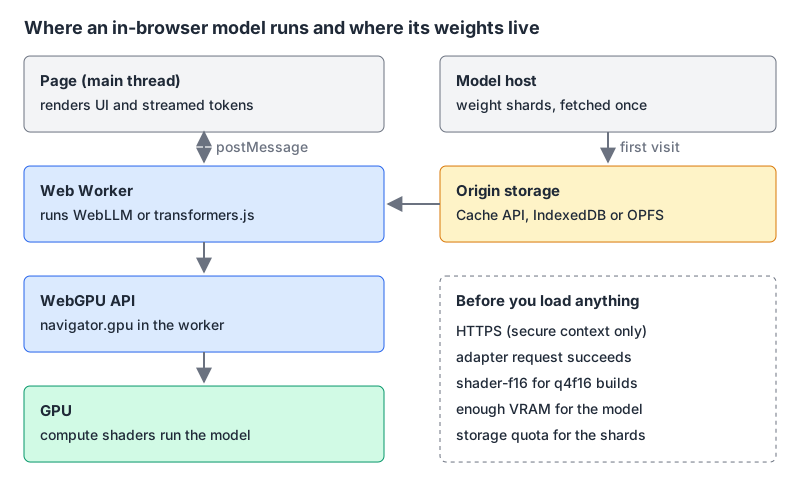
Detection is cheap, so do it before you download anything:
async function getGpu() {
  if (!("gpu" in navigator)) return null;          // no WebGPU at all
  const adapter = await navigator.gpu.requestAdapter();
  if (!adapter) return null;                         // API exists, no usable GPU
  return {
    adapter,
    f16: adapter.features.has("shader-f16"),         // needed for q4f16 builds
  };
}
requestAdapter() can return null even when navigator.gpu exists, so check both, as MDN's own example does. MDN also documents a compatibility mode (requestAdapter({ featureLevel: "compatibility" })) that targets older graphics APIs such as OpenGL ES 3.1 and Direct3D 11 with a restricted subset of WebGPU. Whether a given ML library runs under it is a separate question; test before relying on it.
Two libraries, two different jobs
| WebLLM | transformers.js | |
|---|---|---|
| Package | @mlc-ai/web-llm | @huggingface/transformers |
| Latest on npm | 0.2.87, 30 Oct 2026 | 4.3.2, 27 Oct 2026 |
| Licence | Apache 2.0 | Apache 2.0 |
| What it's for | chat-style LLMs with an OpenAI-shaped API | many tasks: embeddings, speech, vision, text generation |
| Model format | MLC-compiled weights plus a WebGPU .wasm library | ONNX models from the Hugging Face Hub |
| Precision choice | baked into the model ID (q4f16_1, q4f32_1) | dtype option: fp32, fp16, q8, q4, q4f16 and others |
WebLLM gives you engine.chat.completions.create() with streaming, so code written against OpenAI's client mostly ports over. It supports JSON mode (our structured outputs post covers how hosted APIs handle the same job); function calling is marked work-in-progress with "preliminary support" for tools and tool_choice. It can run the engine in a Web Worker or a Service Worker, which matters because inference on the main thread will freeze your UI.
Transformers.js v4 shipped on 30 March 2026 with a new WebGPU runtime rewritten in C++, built with the ONNX Runtime team. On WebGPU it defaults to fp32, and on WASM to q8, per its README. It pulls ONNX models from the Hugging Face Hub, and it's the better pick when you need embeddings for client-side search, Whisper for transcription, or an image classifier, and a chat model is only part of the picture.
Licences for the libraries are permissive. The models are not all the same; check each model card before shipping its weights to users.
How big are the models, really
WebLLM publishes the VRAM it expects for every prebuilt model in its config.ts, along with a low_resource_required flag meaning the model "can run on limited devices (e.g. Android phone)." Here are the q4f16 builds of some common models:
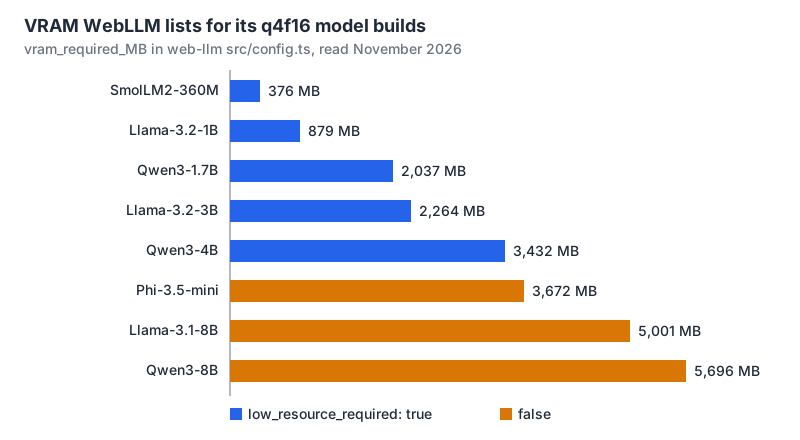
What the chart tells you:
- Sub-1 GB is possible but tiny. SmolLM2-360M at 376 MB and Llama-3.2-1B at 879 MB are both flagged as suitable for limited devices. I would use them for short rewriting and classification, not open-ended reasoning.
- f16 saves real memory. Llama-3.2-1B needs 1,129 MB as
q4f32_1versus 879 MB asq4f16_1. The catch: 30 entries in the config listshader-f16as a required feature, so checkadapter.features.has("shader-f16")and fall back to theq4f32build when it's missing. - Context length costs memory too. Most builds set
context_window_sizeto 4096. The-1kvariants cut it to 1024: Llama-3.1-8B q4f16 drops from 5,001 MB to 4,598 MB. - 8B is a desktop-GPU feature. The full-context 8B builds, around 5 to 5.7 GB, are flagged
low_resource_required: false. Offer it as an opt-in "large model" for people who know their hardware.
VRAM isn't the only cost. The weights also land in browser storage. WebLLM uses the Cache API by default and can also use IndexedDB, OPFS or a Chrome cross-origin storage extension (the config notes the Cache API is "the most well-tested"). MDN's storage quota page says Chromium allows up to 60% of total disk per origin and Firefox's best-effort limit is the smaller of 10% of disk or 10 GiB. Best-effort data can be evicted under storage pressure, and Safari may delete script-created data for a site after seven days of browser use without interaction when tracking prevention is on. Call navigator.storage.persist() if you want the download to stick, and use navigator.storage.estimate() to check room before you start.
A minimal WebLLM setup that doesn't freeze the page
Put the engine in a worker. This is straight from the WebLLM README, trimmed:
// worker.ts
import { WebWorkerMLCEngineHandler } from "@mlc-ai/web-llm";

const handler = new WebWorkerMLCEngineHandler();
self.onmessage = (msg: MessageEvent) => {
  handler.onmessage(msg);
};
// main.ts
import { CreateWebWorkerMLCEngine } from "@mlc-ai/web-llm";
const engine = await CreateWebWorkerMLCEngine(
new Worker(new URL("./worker.ts", import.meta.url), { type: "module" }),
"Llama-3.2-1B-Instruct-q4f16_1-MLC",
{ initProgressCallback: (p) => console.log(p) },
);
const chunks = await engine.chat.completions.create({
messages: [
{ role: "system", content: "Summarise the user's note in two sentences." },
{ role: "user", content: noteText },
],
stream: true,
});
let reply = "";
for await (const chunk of chunks) {
reply += chunk.choices[0]?.delta.content || "";
render(reply);
}Wire initProgressCallback to a real progress bar. On a first visit the user is downloading the whole model, and a spinner with no number reads as "broken."
For embeddings, transformers.js is a few lines. This example is from its WebGPU guide:
import { pipeline } from "@huggingface/transformers";

const extractor = await pipeline(
  "feature-extraction",
  "mixedbread-ai/mxbai-embed-xsmall-v1",
  { device: "webgpu" },
);
const embeddings = await extractor(["Hello world!"], { pooling: "mean", normalize: true });
For text generation, its dtype guide shows onnx-community/Qwen2.5-0.5B-Instruct with { dtype: "q4", device: "webgpu" }, and ModelRegistry.get_available_dtypes() tells you which quantisations a repo actually has before you pick one.
Gotchas worth checking before launch
- WebGPU errors are asynchronous. MDN notes calls are "validated asynchronously in the GPU process," so a failure may show up later than the call that caused it. Wrap model loading in try/catch and listen for device loss.
- Firefox flags in old docs. The transformers.js guide still tells Firefox users to flip
dom.webgpu.enabled. MDN's data says Firefox 141 ships it on Windows. Trust the compat data and test the platforms you care about. - Service workers can be killed. WebLLM's README warns the browser can terminate a service worker at any time; the dedicated-worker setup above is the safer default.
- Token counts still matter. A 4096-token window fills fast with a long note plus a system prompt. Our token counter helps you size prompts before you test on a phone.
- Compare against the API bill. If the only reason for in-browser inference is cost, run your volume through the LLM pricing calculator first; a cheap hosted model can beat a 2 GB download on user experience.
When to reach for it
Use in-browser inference when the data shouldn't leave the device, when the task is small (summaries, classification, embeddings, transcription), and when you can tell users up front that the first run downloads a model. Use transformers.js if the job is anything other than chat; use WebLLM if you want an OpenAI-style chat API with streaming. Keep a server fallback for Firefox on Linux and Android, and keep the default model under about 1 GB unless the user opts in to something larger.
Written by AIDToolStack Editorial
Researched from official documentation, specifications and vendor pages, listed under Sources below. Last checked November 2026.
Sources
- developer.mozilla.org/en-US/docs/Web/API/WebGPU_API
- github.com/mdn/browser-compat-data/blob/main/api/GPU.json
- caniuse.com/webgpu
- www.npmjs.com/package/@mlc-ai/web-llm
- www.npmjs.com/package/@huggingface/transformers
- github.com/mlc-ai/web-llm
- github.com/huggingface/transformers.js
- github.com/huggingface/transformers.js/releases/tag/4.0.0
- github.com/mlc-ai/web-llm/blob/main/src/config.ts
- developer.mozilla.org/en-US/docs/Web/API/Storage_API/Storage_quotas_and_eviction_criteria
- huggingface.co/docs/transformers.js/guides/webgpu
- huggingface.co/docs/transformers.js/guides/dtypes
- raw.githubusercontent.com/mdn/browser-compat-data/main/api/GPU.json
Related Posts
Explore on AIDToolStack
Discover tools and servers featured in our directory.
AI Tools
MCP Servers
Sponsor Our Newsletter
Reach thousands of developers who are actively evaluating AI tools, MCP servers, and dev infrastructure. Our weekly newsletter goes to engaged technical decision-makers.
All sponsored content is clearly labeled per our editorial policy.