
Apache .htaccess Redirects: Redirect, RedirectMatch or mod_rewrite
The site lives on shared hosting, you can't touch httpd.conf, and the only lever you have is a .htaccess file in the document root. Someone needs /services moved to /what-we-do, the old product.php?id=42 links pointed at new pretty URLs, and everything forced to https://www.. The internet's answer to all three is usually a pile of RewriteRule lines copied from a forum.
Apache's own documentation disagrees. Its page on when not to use mod_rewrite opens by saying it "should be considered a last resort, when other alternatives are found wanting." Most redirects are a one-line Redirect. This post covers when that's enough, when you really need mod_rewrite, and the per-directory quirks that make .htaccess rules behave differently from the same rules in server config. All of it is Apache httpd 2.4; the project site announced 2.4.70 on 6 November 2026.
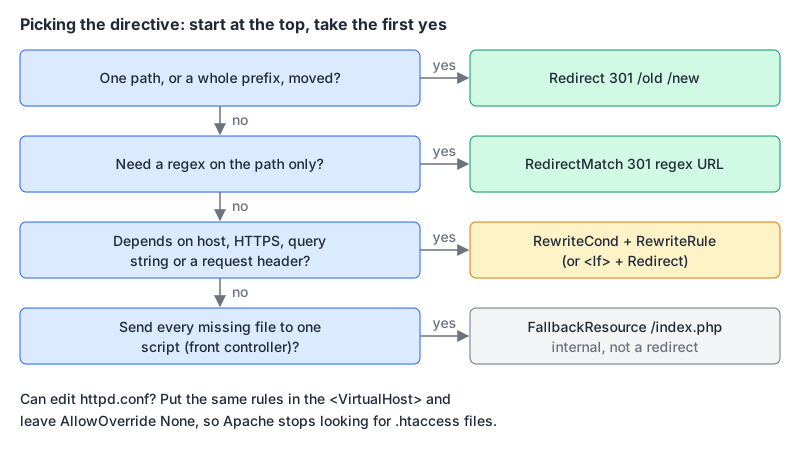
Redirect: the one-liner that covers most moves
Redirect comes from mod_alias. Its syntax is Redirect [status] [URL-path] URL:
Redirect 301 "/services" "/what-we-do"
Redirect permanent "/old-blog" "https://blog.example.com"
Redirect gone "/summer-sale-2019"
What it does is more than the syntax suggests:
- It matches a prefix and carries the rest of the path along. The docs' example: with
Redirect "/service" "http://foo2.example.com/service", a request for/service/foo.txtgoes tohttp://foo2.example.com/service/foo.txt. - It only matches whole path segments.
/servicefoo.txtdoesn't match/service. - Query strings come along too.
?q=23&a=42is preserved. The docs also say "POSTs will be discarded", so don't redirect form endpoints this way. - The default status is 302. Leave out the status and you get a temporary redirect. Write
301orpermanentevery time you mean permanent. - The old path is case-sensitive and %-decoded, and must start with a slash.
- A target starting with
/gets your scheme and hostname added. Since 2.4.58,RedirectRelative Onsends the relative URL as-is.
The status can also be seeother (303), gone (410, with no URL), or any numeric code; 3xx codes need a URL and others must not have one.
RedirectMatch: a regex, still without mod_rewrite
When a prefix isn't enough, RedirectMatch takes a regular expression against the URL path and lets you reuse the captures:
RedirectMatch 301 "^/blog/\d{4}/\d{2}/(.+)$" "/articles/$1"
RedirectMatch 301 "(.*)\.gif$" "https://img.example.com$1.jpg"
Unlike Redirect, nothing gets appended for you; the target is whatever you build from the captures. Anchor your patterns with ^ and $, because an unanchored regex matches anywhere in the path. If you want to try a pattern against sample URLs first, a regex tester helps, but it runs JavaScript's regex engine, and Apache uses PCRE, so check anything unusual (lookbehinds, possessive quantifiers) on the server too.
When you actually need mod_rewrite
mod_rewrite is the right tool when the decision depends on something other than the path: the hostname, whether the connection is HTTPS, the query string, or a request header. Here's the canonical HTTPS-plus-www redirect as a single hop:
RewriteEngine On
RewriteCond %{HTTPS} off [OR]
RewriteCond %{HTTP_HOST} !^www\.example\.com$ [NC]
RewriteRule ^ https://www.example.com%{REQUEST_URI} [R=301,L]
Line by line, using the mod_rewrite reference:
RewriteCondlines are conditions for theRewriteRulethat follows them. They're ANDed by default;[OR]combines a condition with the next one instead.%{HTTPS}is "on" for TLS connections and "off" otherwise.[NC]makes the host comparison case-insensitive.%{REQUEST_URI}is the path, already %-decoded, and it "notably excludes the query string". You don't lose the query string, though: the substitution has no?, so mod_rewrite passes the original one through unchanged.[R=301,L]: the flags page saysRalone means 302, and that you'll "almost always want to use [R] in conjunction with [L]".
One trap with that first condition: if a CDN or load balancer terminates TLS and talks plain HTTP to Apache, %{HTTPS} is "off" for every request, and the rule redirects forever. In that setup, test the header your proxy sets instead, for example RewriteCond %{HTTP:X-Forwarded-Proto} !=https, and only if the proxy always sets it.
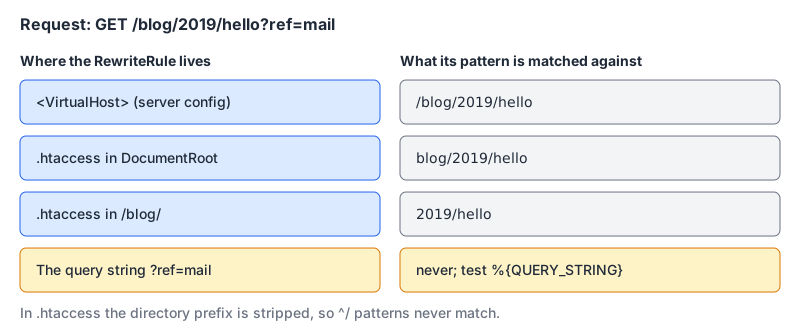
Query-string redirects are the other classic case. The pattern in a RewriteRule never sees the query string, so match it with a condition and use %1 for the condition's capture:
RewriteCond %{QUERY_STRING} (?:^|&)id=(\d+)(?:&|$)
RewriteRule ^product\.php$ /products/%1? [R=301,L]
The trailing ? in the target erases the old query string; without it, id=42 would ride along to the new URL. The [QSD] flag (2.4.0 and later) does the same thing more readably. The query strings guide has more on how parameters are parsed.
How .htaccess changes the rules
The same rule behaves differently in .htaccess than in a <VirtualHost>, and most copy-paste failures come from that.
The directory prefix is stripped. The reference says the match happens "against a string which never has a leading slash", so "a Pattern with ^/ never matches" in per-directory context. A rule written for httpd.conf as ^/old$ must be ^old$ in the root .htaccess, and in /blog/.htaccess the blog/ part is gone too.
[L] doesn't always mean last. In per-directory context, L "stops the current pass through the ruleset, but the rewritten request may be re-processed from the top", which can loop. The [END] flag stops further rewrite processing in per-directory context, and the flags page calls it "the preferred flag for most per-directory rules". In server context, L and END behave the same.
mod_alias runs first. If you mix Redirect and RewriteRule in one .htaccess, the avoid page says that "in per-directory context (.htaccess), mod_alias runs first", while in server context mod_rewrite does. So a Redirect 301 /old /new fires before your HTTPS rule, and http://example.com/old takes two hops. Pick one module per file, or accept the extra hop.
Front controllers don't need rewrites. The familiar three-line RewriteCond !-f / !-d / RewriteRule ^(.*)$ /index.php block has a one-line replacement:
FallbackResource /index.phpExisting files and directories are served normally and everything else goes to index.php, "without the overhead and complexity of the rewrite engine", and it works in .htaccess as well as server config.
Some flags you'll see in the wild, from the flags page:
| Flag | Meaning |
|---|---|
R=301 | External redirect with that status (default 302) |
L / END | Stop this pass / stop all further rewriting in per-directory context |
NC | Case-insensitive match |
NE | Don't percent-encode the target, so # and ? pass through |
QSA | Combine a new query string with the original |
QSD | Drop the original query string |
PT | Pass the result back through URL mapping; implied in .htaccess |
If you can edit the server config, use it
The .htaccess howto is direct: with access to the main config, put everything there, mod_rewrite rules included. When AllowOverride permits .htaccess files, httpd looks for one in every directory on the path for every request, "whether or not you actually even use them", and regexes in .htaccess are recompiled on every request instead of once at startup.
The cleanest canonical-host setup, from Apache's remapping guide, uses no rewrite at all:
<VirtualHost *:80>
    ServerName example.com
    ServerAlias www.example.com
    Redirect permanent "/" "https://www.example.com/"
</VirtualHost>
Because Redirect carries the path and query string, that one line handles every URL. Give example.com the same treatment in its :443 vhost so the bare domain over HTTPS lands on www too. For a single vhost that must check the host itself, 2.4 also supports <If "%{HTTP_HOST} != 'www.example.com'"> around a Redirect.
If you do allow .htaccess, keep it narrow. AllowOverride defaults to None; Redirect and the rewrite directives need the FileInfo category, and AllowOverrideList can name individual directives instead:
AllowOverride None
AllowOverrideList Redirect RedirectMatch RewriteEngine RewriteRule RewriteCond
Testing and debugging
curl -sI http://example.com/services
curl -sIL "http://example.com/product.php?id=42"
Check the status, the Location header and the number of hops. Use 302 while testing: RFC 9110 says a 301 "is heuristically cacheable", so a browser may keep a wrong permanent redirect after you fix it. For POST endpoints, prefer 308 or 307; the status codes post explains why.
When a rule doesn't do what you expect and you have server config access, turn on rewrite tracing:
LogLevel alert rewrite:trace3The reference warns that levels above trace2 slow the server "dramatically", so switch it off afterwards.
Our .htaccess generator produces the standard versions of these rules (%{HTTPS} off for HTTPS, a host check for www) plus Redirect lines for single pages. It writes the HTTPS and www rules as separate blocks, so http://example.com goes through two redirects; merge them as shown above if a single hop matters.
Checklist
- Start with
RedirectorRedirectMatch; reach formod_rewriteonly for host, HTTPS, query string or header conditions. - Always write the status:
301,permanentorR=301. The default is 302. - In
.htaccess, drop the leading slash from patterns and prefer[END]over[L]. - Don't mix
RedirectandRewriteRulefor the same URLs in one file. - Use
FallbackResourcefor front controllers. - Move rules into the
<VirtualHost>and setAllowOverride Nonewhen you can. - Test with 302 and
curl -sIL, then switch to permanent.
Written by AIDToolStack Editorial
Researched from official documentation, specifications and vendor pages, listed under Sources below. Last checked November 2026.
Sources
- httpd.apache.org/
- httpd.apache.org/docs/2.4/rewrite/avoid.html
- httpd.apache.org/docs/2.4/mod/mod_alias.html
- httpd.apache.org/docs/2.4/mod/mod_rewrite.html
- httpd.apache.org/docs/2.4/rewrite/flags.html
- httpd.apache.org/docs/2.4/rewrite/remapping.html
- httpd.apache.org/docs/2.4/howto/htaccess.html
- www.rfc-editor.org/rfc/rfc9110.html
Related Posts
Explore on AIDToolStack
Discover tools and servers featured in our directory.
AI Tools
MCP Servers
Sponsor Our Newsletter
Reach thousands of developers who are actively evaluating AI tools, MCP servers, and dev infrastructure. Our weekly newsletter goes to engaged technical decision-makers.
All sponsored content is clearly labeled per our editorial policy.