
Writing Bash Scripts Safely: What set -euo pipefail Misses, Quoting and ShellCheck
Most Bash scripts that cause outages aren't complicated. They're twenty lines long, they ran fine for a year, and then one day a cd failed, the next line was rm -rf *, and it ran in the wrong directory. Or a variable came back empty and rsync --delete synced nothing onto a full backup.
The usual advice is "put set -euo pipefail at the top." That's a good start, and it belongs in almost every script. But it doesn't do what most people think it does, and the gaps are exactly where the damage happens. This post goes through what each flag actually guarantees according to the Bash manual, where it quietly stops working, and the habits that cover the rest.
Every example below was run with the Bash that ships with macOS (3.2.57). The behaviour shown matches what the current Bash 5.3 manual documents; where a feature needs a newer Bash, I say so.
What set -euo pipefail actually promises
Three options, three different jobs:
-e(errexit). The manual says Bash will "Exit immediately if a pipeline (which may consist of a single simple command), a list, or a compound command ... exits with a non-zero status." Then it lists exceptions, which is where the trouble starts.-u(nounset). Treat unset variables "as an error when performing parameter expansion." A non-interactive shell prints an error and exits.-o pipefail. Normally a pipeline's status is the status of its last command. With pipefail, it's "the value of the last (rightmost) command to exit with a non-zero status, or zero if all commands in the pipeline exit successfully." It's off by default.
Here's -u catching a typo'd variable, run for real:
#!/usr/bin/env bash
set -u
echo "env: ${DEPLOY_ENV:-staging}"
echo "target: $TARGET_DIR"
echo "not reached"
env: staging
nounset.sh: line 4: TARGET_DIR: unbound variable${DEPLOY_ENV:-staging} is how you say "this one is optional." Everything else must be set, which is the behaviour you want before an rm or rsync.
Where set -e stops protecting you
The manual's exception list is long. The shell does not exit when the failing command is in the test of an if, elif, while or until; part of an && or || list "except the command following the final && or ||"; any command in a pipeline but the last (unless pipefail changes the outcome); or inverted with !.
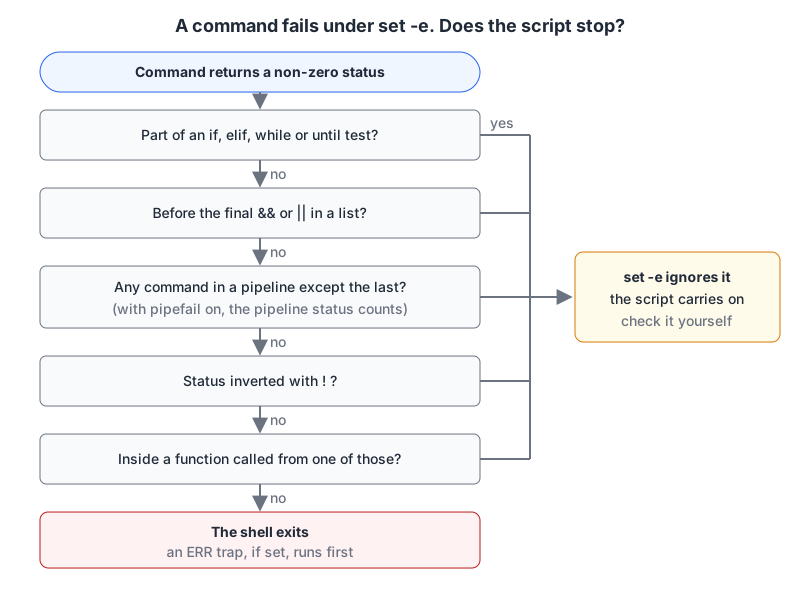
The last question in that chart is the one that bites. The manual says: "If a compound command or shell function executes in a context where -e is being ignored, none of the commands executed within the compound command or function body will be affected by the -e setting." So a function that's safe on its own becomes unsafe the moment you call it from an if:
#!/usr/bin/env bash
set -e
deploy() {
  false
  echo "still running after false"
}
if deploy; then
  echo "deploy reported success"
fi
deploy
echo "never printed"
still running after false
deploy reported successCalled from the if, false is ignored, the echo runs and returns 0, and the function reports success. Called on its own line, the same function stops the script (exit status 1). Same code, opposite behaviour. BashFAQ/105 on Greg's wiki has a whole gallery of these, and the verdict signed by GreyCat is "don't use set -e. Add your own error checking instead." I don't go that far. I keep set -e as a net and write explicit checks for anything that matters, because the net has holes.
local and export swallow the exit status
This one is easy to miss in review:
set -eu
f() {
  local out=$(false)
  echo "local hid the failure"
}
f
local hid the failurelocal is a command, it succeeded, and its status replaces the status of $(false). ShellCheck flags it as SC2155, "Declare and assign separately to avoid masking return values," and the same applies to export and readonly. Split the line and set -e works again:
g() {
  local out
  out=$(false)    # the script exits here
  echo "not reached"
}
Running that version printed nothing from g and the script exited with status 1.
Command substitution doesn't inherit -e
Inside $( ... ), Bash turns errexit off unless you enable shopt -s inherit_errexit, which the manual describes as making command substitution inherit "the value of the errexit option, instead of unsetting it in the subshell environment." It needs Bash 4.4 or later, per BashFAQ/105, so it won't work on macOS's stock Bash. On Linux servers, add it next to your set line:
set -euo pipefail
shopt -s inherit_errexit
Arithmetic that evaluates to zero
(( expr )) returns 1 when the expression is zero. Incrementing a counter that starts at 0 therefore "fails":
$ count=0; (( count++ )) || echo "(( count++ )) returned $?"; echo "count=$count"
(( count++ )) returned 1
count=1
Under set -e, a bare (( count++ )) on the first iteration kills the script. BashFAQ/105 opens with the let i++ version of the same trap. Write count=$((count + 1)) instead; an assignment returns 0.
pipefail and its one surprise
Without pipefail, curl ... | jq ... reports only jq's status, so a failed download can look like success. Run for real:
$ set -e; false | true; echo "status ignored"
status ignored
$ set -o pipefail; if ! false | true; then echo "pipeline fails"; fi
pipeline fails
The surprise is in the other direction. When the reader stops early (grep -q, head -1), the writer can be killed by SIGPIPE and exit non-zero, and pipefail turns that into a failure of the whole pipeline. BashFAQ/105 notes this can fail intermittently depending on pipe buffer size, which is the worst kind of bug. If a pipeline ends in something that deliberately reads only part of its input, capture the output first or check the status you care about with PIPESTATUS.
Quote everything, and use arrays for argument lists
-u catches missing variables. It doesn't catch present ones with spaces in them:
$ file="my report.txt"
$ printf '<%s>\n' $file
<my>
<report.txt>
$ printf '<%s>\n' "$file"
<my report.txt>
That's SC2086, "Double quote to prevent globbing and word splitting." The fix is mechanical: quote every expansion, and use "$@" to pass arguments through.
The harder case is building a list of options. Putting them in a string doesn't work, because the quotes inside the string are just characters:
show() { printf '[%s] ' "$@"; echo; }
opts="--exclude '*.log' --delete"
show rsync $opts src/ dest/
opts_arr=(--exclude '*.log' --delete)
show rsync "${opts_arr[@]}" src/ dest/
[rsync] [--exclude] ['*.log'] [--delete] [src/] [dest/]
[rsync] [--exclude] [*.log] [--delete] [src/] [dest/]The string version passes '*.log' with literal quote marks, so rsync would only exclude names that start and end with a quote character. An array keeps each argument intact. When you need to paste a path or a user-supplied string into a command line by hand, our shell escape tool quotes it for Bash using the '\'' trick, line by line.
Fail loudly and clean up
Two traps make failures readable and leave no mess:
#!/usr/bin/env bash
set -euo pipefail
trap 'echo "failed at line $LINENO: $BASH_COMMAND (exit $?)" >&2' ERR

workdir=$(mktemp -d)
trap 'rm -rf -- "$workdir"' EXIT

echo "working in a temp dir"
grep -q "needle" /dev/null
echo "not reached"
working in a temp dir
failed at line 9: grep -q "needle" /dev/null (exit 1)The manual says a trap on ERR "is executed before the shell exits," so you get the line and command that killed the script. The EXIT trap removes the temp directory whichever way the script ends. Note the -- before the path in rm: it ends option parsing, so a path that starts with a dash can't be read as a flag.
And the cd from the opening paragraph: always cd /some/dir || exit. ShellCheck's SC2164 suggests exactly that (or || return inside functions).
Let ShellCheck read it first
ShellCheck catches most of the above before you run anything. The current release is v0.11.0, from August 2025 (releases), which added new checks and updates for Bash 5.3. Install it with sudo apt install shellcheck or brew install shellcheck and run shellcheck yourscript.sh. It isn't installed where I wrote this post, so the SC codes above come from the ShellCheck wiki rather than from a local run.
Because it "makes canonical use of exit codes," it can fail a CI job directly. The README gives a pre-commit hook:
repos:
  - repo: https://github.com/koalaman/shellcheck-precommit
    rev: v0.11.0
    hooks:
      - id: shellcheck
When a warning is wrong for your case, silence that one line with a directive above it, per the ignore docs:
# shellcheck disable=SC2086Leave a comment saying why. Future you won't remember.
A header to start from
#!/usr/bin/env bash
set -euo pipefail
shopt -s inherit_errexit 2>/dev/null || true   # Bash 4.4+
trap 'echo "error at line $LINENO: $BASH_COMMAND" >&2' ERR
Then, before the script goes into a crontab or a deploy pipeline:
- Run ShellCheck and fix or justify every warning.
- Quote every expansion; build option lists as arrays.
- Declare
localvariables on their own line before assigning from$(...). - Never call a function whose failures matter from
if,&&or||without checking inside it. - Guard every
cdwith|| exit, and put--before paths inrm,mvandcp. - Make it executable (
chmod 755, or work out the bits with our chmod calculator) and give it a full shebang.
Cron runs scripts with a minimal environment and no terminal, so failures that would be obvious at your prompt go unnoticed. Our cron jobs post covers locking with flock and heartbeat monitoring, which pairs well with a script that fails loudly. If you'd rather run it as a systemd timer, so the ERR trap's message lands in the journal, our systemd unit generator writes a matching .service and .timer pair, and the crontab generator builds the schedule line if you stay with cron.
Written by AIDToolStack Editorial
Researched from official documentation, specifications and vendor pages, listed under Sources below. Last checked November 2026.
Sources
Related Posts
Explore on AIDToolStack
Discover tools and servers featured in our directory.
AI Tools
MCP Servers
Sponsor Our Newsletter
Reach thousands of developers who are actively evaluating AI tools, MCP servers, and dev infrastructure. Our weekly newsletter goes to engaged technical decision-makers.
All sponsored content is clearly labeled per our editorial policy.