
S3 Presigned URLs for File Uploads: Expiry, Checksums, Size Limits and CORS
Sooner or later someone uploads a 2 GB screen recording through your API, and your Node process spends a minute holding the request open, buffering bytes it's only going to forward to S3 anyway. A presigned URL fixes that. Your server signs a short-lived URL for one object, hands it to the browser, and the browser sends the file straight to the bucket.
The idea is simple. The details are where uploads quietly break: expiry that ends early, a checksum the SDK adds without asking, a Content-Type nobody enforces, and CORS on the bucket. This post walks through all of them with output from the current AWS SDK for JavaScript.
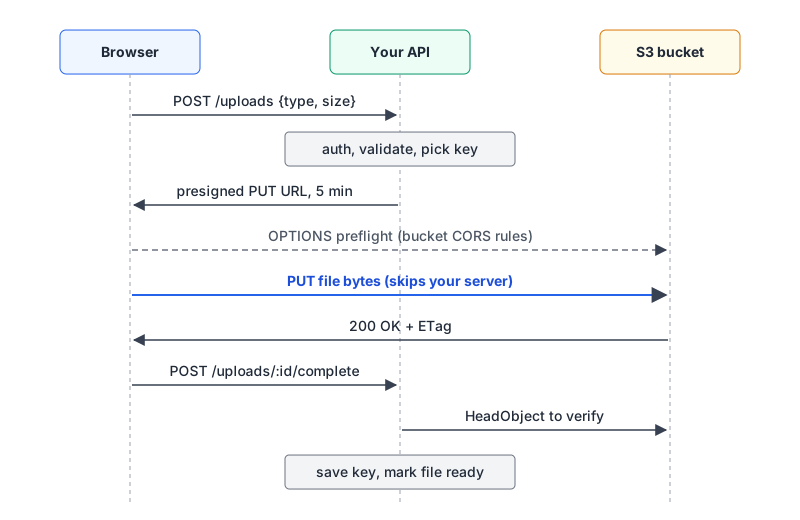
What a presigned URL actually grants
AWS describes presigned URLs as bearer tokens: whoever holds one can use it, and it carries the permissions of the IAM principal that signed it, no more. Three details from that page shape the design:
- The URL can be used multiple times until it expires, not just once.
- If an object with the same key already exists, the upload replaces it.
- If the signer lacks
s3:PutObjecton that key, the URL is signed fine and then fails with 403 when used.
So the server, not the client, should choose the key. A random suffix per upload means a leaked URL can only overwrite its own object. Something like avatars/<userId>/<uuid> works; our post on UUID versions covers whether v4 or v7 suits you.
Signing one with the AWS SDK v3
Here's the server side with @aws-sdk/client-s3 and @aws-sdk/s3-request-presigner (I ran version 3.1164.0 locally with AWS's documented example keys; signing happens offline, so no bucket is needed to see the URL):
import { S3Client, PutObjectCommand } from "@aws-sdk/client-s3";
import { getSignedUrl } from "@aws-sdk/s3-request-presigner";
import { randomUUID } from "node:crypto";

const s3 = new S3Client({
  region: "us-east-1",
  requestChecksumCalculation: "WHEN_REQUIRED", // see below
});
const ALLOWED = new Set(["image/png", "image/jpeg", "image/webp"]);

export async function createUpload(userId, { type, size }) {
  if (!ALLOWED.has(type)) throw new Error("unsupported type");
  if (size > 5 * 1024 * 1024) throw new Error("too large"); // a hint, not enforcement
  const key = `avatars/${userId}/${randomUUID()}`;
  const url = await getSignedUrl(
    s3,
    new PutObjectCommand({ Bucket: "uploads-demo", Key: key, ContentType: type }),
    { expiresIn: 300, signableHeaders: new Set(["content-type"]) },
  );
  return { key, url };
}
The browser then does a plain fetch(url, { method: "PUT", body: file, headers: { "Content-Type": file.type } }). If you want to poke at a URL from the terminal, curl -X PUT -T file.png -H "Content-Type: image/png" "<url>" is the same call AWS shows; quote the URL or your shell will eat the &s (more in our curl guide).
Two options in that code exist because of what the defaults produced.
The checksum you didn't ask for
With a default client, the signed URL came out like this (signature shortened):
https://uploads-demo.s3.us-east-1.amazonaws.com/avatars/u_123/7f3c.png
  X-Amz-Algorithm = AWS4-HMAC-SHA256
  X-Amz-Content-Sha256 = UNSIGNED-PAYLOAD
  X-Amz-Credential = AKIAIOSFODNN7EXAMPLE/20261107/us-east-1/s3/aws4_request
  X-Amz-Date = 20261107T201726Z
  X-Amz-Expires = 300
  X-Amz-Signature = 97e75f7a4041...
  X-Amz-SignedHeaders = host
  x-amz-checksum-crc32 = AAAAAA==
  x-amz-sdk-checksum-algorithm = CRC32
  x-id = PutObject
AAAAAA== is the CRC32 of an empty body, because at signing time there's no body yet. AWS SDKs now calculate a CRC checksum for uploads by default (request_checksum_calculation defaults to WHEN_SUPPORTED, and CRC32 is the JavaScript SDK's default algorithm), and S3 validates a provided checksum against the bytes it receives. I didn't send this URL to a real bucket, but a non-empty file can't have that CRC32. Setting requestChecksumCalculation: "WHEN_REQUIRED" (or AWS_REQUEST_CHECKSUM_CALCULATION=WHEN_REQUIRED) and re-signing removed both checksum parameters. If you want integrity checking, compute the real checksum first and sign it as a header, which the presigner README shows with unhoistableHeaders.
Content-Type isn't enforced by default
Notice X-Amz-SignedHeaders = host above, even though the command set ContentType: "image/png". The presigner adds content-type to its unsignable headers, so the client can send any type it likes. Passing signableHeaders: new Set(["content-type"]) changed it to content-type;host, and a mismatched header then fails the signature check. Cloudflare's R2 docs describe the SDK signing ContentType automatically; in the version I ran it didn't, so set it explicitly and check the URL.
How long a URL really lasts
The limits from AWS's expiry docs:
| Signed with | Maximum validity |
|---|---|
| S3 console | 1 minute to 12 hours |
| CLI or SDK, IAM user keys (SigV4) | 7 days |
| IAM role or STS credentials | until the session ends, whatever you asked for |
| EC2 instance profile | duration of the role credentials, typically 6 hours |
The SDK enforces the 7-day ceiling locally. Asking for expiresIn: 604801 threw Signature version 4 presigned URLs must have an expiration date less than one week in the future.
The role case catches people. Your API on Lambda or ECS signs with temporary credentials, so a URL "valid for 24 hours" dies when that session does. AWS's FAQ says AssumeRole sessions default to 1 hour and ECS task credentials typically rotate every 1 to 6 hours.
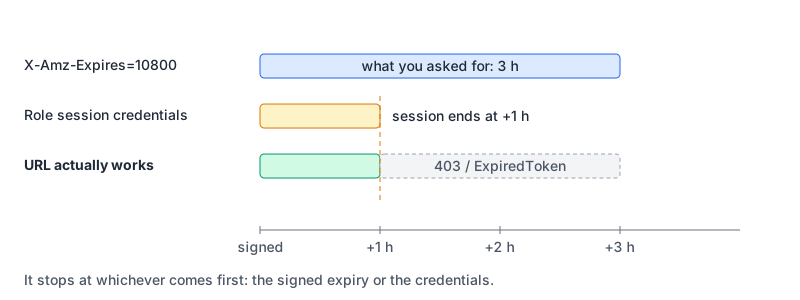
For uploads this rarely matters, since five minutes is plenty. S3 checks expiry when the request starts, so a slow upload that began in time finishes. If you want a hard cap regardless of what a developer passes, a bucket policy can deny requests whose s3:signatureAge exceeds a limit; AWS's example uses 600000 ms.
Limiting size: PUT can't, POST can
A presigned PUT has nothing like a size range. The size check in createUpload only trusts what the client claims. For a real limit, use a presigned POST, whose policy document supports ["content-length-range", min, max] in bytes, plus starts-with conditions:
import { createPresignedPost } from "@aws-sdk/s3-presigned-post";

const { url, fields } = await createPresignedPost(s3, {
  Bucket: "uploads-demo",
  Key: `avatars/u_123/${randomUUID()}`,
  Conditions: [
    ["content-length-range", 1, 5 * 1024 * 1024],
    ["starts-with", "$Content-Type", "image/"],
  ],
  Expires: 300,
});
Decoding the Policy field it returned shows what S3 will check:
{
  "expiration": "2026-11-07T20:37:10Z",
  "conditions": [
    ["content-length-range", 1, 5242880],
    ["starts-with", "$Content-Type", "image/"],
    { "bucket": "uploads-demo" },
    { "X-Amz-Algorithm": "AWS4-HMAC-SHA256" },
    { "X-Amz-Credential": "AKIAIOSFODNN7EXAMPLE/20261107/us-east-1/s3/aws4_request" },
    { "X-Amz-Date": "20261107T203210Z" },
    { "key": "avatars/u_123/0b9e6c1e-5d2a-4f0e-9a51-3c1f2b7d8e40" }
  ]
}
The browser sends the returned fields, a Content-Type field and the file as multipart/form-data. Every form field you send must be covered by a condition, which is why Content-Type has a starts-with rule. The SDK's README also shows keys ending in ${filename}. When I tried that, the library turned the key into ["starts-with", "$key", "avatars/u_123/"], which lets the client pick any name under that prefix, including one that already exists. A fixed random key is safer.
Whichever you use, verify after the fact. When the client reports completion, call HeadObject, check the size and type, and only then mark the record as ready.
Big files: multipart
A single PUT tops out at 5 GB. Beyond that, and AWS suggests from about 100 MB, use multipart upload: up to 10,000 parts of 5 MiB to 5 GiB (the last part can be smaller), for objects up to 48.8 TiB. Your server calls CreateMultipartUpload, presigns an UploadPart URL per part, and calls CompleteMultipartUpload with each part's number and ETag at the end.
That ETag requirement matters for browsers, which leads to CORS. And abandoned multipart uploads keep their parts stored, so add an AbortIncompleteMultipartUpload lifecycle rule, say 7 days after initiation.
CORS on the bucket
The browser's PUT goes to a different origin, so the bucket needs a CORS configuration or the preflight fails. A tight one for a single app:
[
  {
    "AllowedOrigins": ["https://app.example.com"],
    "AllowedMethods": ["PUT", "POST"],
    "AllowedHeaders": ["content-type"],
    "ExposeHeaders": ["ETag"],
    "MaxAgeSeconds": 3000
  }
]
S3 uses the first rule that matches the origin, method and requested headers, and allows up to 100 rules. If you sign checksum or other x-amz-* headers, list them in AllowedHeaders too. ExposeHeaders: ["ETag"] is there because JavaScript can only read response headers the server exposes, and multipart completion needs each part's ETag. If preflights confuse you, our CORS explainer covers what the browser checks, and the CORS tester lets you simulate a preflight for your origin and settings before you touch the bucket (it simulates; it doesn't send a request to S3).
If you're on Cloudflare R2
R2 speaks the S3 API, and the same SDK code works with region: "auto" and your account's R2 endpoint. Per Cloudflare's docs, presigned URLs support GET, HEAD, PUT and DELETE for 1 second to 7 days, but not POST, so no content-length-range. They also only work on the <ACCOUNT_ID>.r2.cloudflarestorage.com endpoint, not custom domains. Verify uploads server-side there too.
Checklist before you ship
- The server picks the key, with a random component per upload.
requestChecksumCalculation: "WHEN_REQUIRED", or a real checksum signed as a header.signableHeadersincludescontent-type, and the client sends the same value.- Expiry in minutes, and you know what credentials sign it.
- Presigned POST with
content-length-rangeif size matters, andHeadObjectverification either way. - Bucket CORS limited to your origins, exposing
ETagif you do multipart. - A lifecycle rule for incomplete multipart uploads.
- The bucket stays private. The signature carries the access, so nothing in the bucket policy needs opening up.
If you also want an AI assistant to read files from S3, our page on the S3 MCP server covers AWS's sample server, which is read-only and has no upload tools; the cloud infrastructure MCP roundup covers the broader AWS servers.
Written by AIDToolStack Editorial
Researched from official documentation, specifications and vendor pages, listed under Sources below. Last checked November 2026.
Sources
- docs.aws.amazon.com/AmazonS3/latest/userguide/using-presigned-url.html
- docs.aws.amazon.com/AmazonS3/latest/userguide/PresignedUrlUploadObject.html
- docs.aws.amazon.com/AmazonS3/latest/developerguide/sigv4-HTTPPOSTConstructPolicy.md
- docs.aws.amazon.com/sdkref/latest/guide/feature-dataintegrity.html
- github.com/aws/aws-sdk-js-v3/tree/main/packages/s3-request-presigner
- github.com/aws/aws-sdk-js-v3/tree/main/packages/s3-presigned-post
- docs.aws.amazon.com/AmazonS3/latest/userguide/upload-objects.html
- docs.aws.amazon.com/AmazonS3/latest/userguide/qfacts.html
- docs.aws.amazon.com/AmazonS3/latest/API/API_CompleteMultipartUpload.html
- docs.aws.amazon.com/AmazonS3/latest/userguide/mpu-abort-incomplete-mpu-lifecycle-config.html
- docs.aws.amazon.com/AmazonS3/latest/userguide/cors.html
- docs.aws.amazon.com/AmazonS3/latest/userguide/ManageCorsUsing.html
- developers.cloudflare.com/r2/api/s3/presigned-urls/
Related Posts
Explore on AIDToolStack
Discover tools and servers featured in our directory.
AI Tools
MCP Servers
Sponsor Our Newsletter
Reach thousands of developers who are actively evaluating AI tools, MCP servers, and dev infrastructure. Our weekly newsletter goes to engaged technical decision-makers.
All sponsored content is clearly labeled per our editorial policy.