
MCP Servers for Cloud Infrastructure: AWS, Azure, Google Cloud, Cloudflare and Least-Privilege Credentials
A cloud MCP server is the most powerful thing you can hand an agent and the easiest to get wrong. The same connection that answers "which of my Lambda functions still run Node 18?" can, with the wrong credentials, delete a security group. There's no clever server flag that fixes that. The fix is boring: the identity the server uses should only be allowed to do what you'd let a new hire do unsupervised.
This post goes through the servers I could verify for AWS, Azure, Google Cloud, Cloudflare, DigitalOcean, Render, Netlify, Fly.io and Hetzner, how each one authenticates, and what least privilege looks like for each. Facts are from vendor docs and repositories as of November 2026. Several of these products are labelled preview or experimental, so check before you depend on one.
Three shapes of cloud MCP server
They fall into three patterns, and the pattern tells you where the permission check happens.
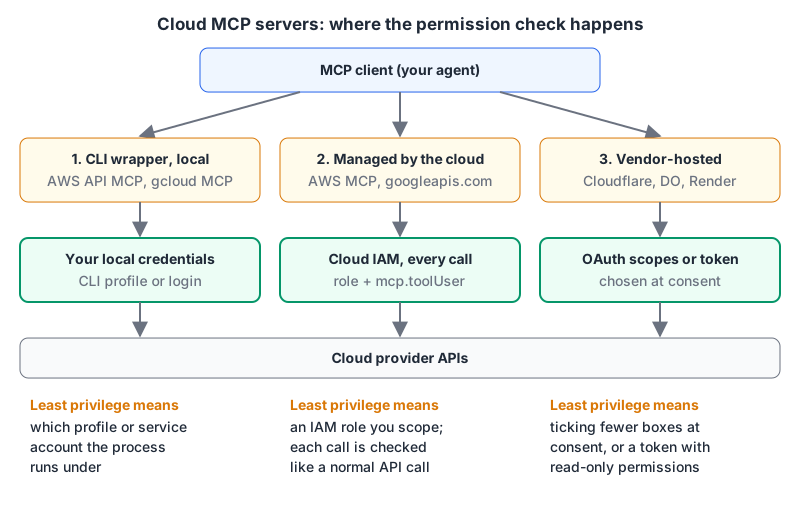
- CLI wrappers run locally and execute cloud CLI commands with whatever credentials your shell already has. AWS API MCP Server, Google's gcloud MCP and
fly mcp serverwork this way. - Managed servers checked by cloud IAM are hosted by the cloud provider, and every tool call is authorized against IAM like any other API call. The AWS MCP Server and Google Cloud's per-product remote servers are here.
- Vendor-hosted OAuth servers are remote endpoints where you sign in and grant permissions on a consent screen. Cloudflare, DigitalOcean, Render and Netlify.
AWS
AWS now steers people to the AWS MCP Server, a managed remote server (labelled preview in the awslabs/mcp README). The setup guide lists regional endpoints such as https://aws-mcp.us-east-1.api.aws/mcp and https://aws-mcp.eu-west-1.api.aws/mcp, and two ways in:
- OAuth: your IAM principal needs the
AWSMCPSignInOAuthAccessPolicymanaged policy, then you sign in through the browser. Tokens last an hour and refresh for up to 12. - SigV4 through the MCP Proxy for AWS, using your normal CLI credentials. The guide says this is the option to pick if you need read-only mode, multiple accounts in one session, or a default region.
claude mcp add-json aws-mcp '{"type":"stdio","command":"uvx","args":["mcp-proxy-for-aws-cli@latest","https://aws-mcp.us-east-1.api.aws/mcp","--read-only","--profile","prod-readonly","--metadata","AWS_REGION=eu-west-1"]}'The proxy's --read-only flag hides tools that aren't annotated readOnlyHint=true, and --profile picks the credentials. The guide recommends removing the older aws-api-mcp-server and aws-knowledge-mcp-server entries if you switch, to avoid duplicate tools.
The older AWS API MCP Server is still in awslabs/mcp and runs locally (uvx awslabs.aws-api-mcp-server@latest). It exposes call_aws, which runs AWS CLI commands, and suggest_aws_commands. Its safety settings are worth copying even if you use something else: READ_OPERATIONS_ONLY=true only allows operations AWS classifies as non-Write, and REQUIRE_MUTATION_CONSENT=true asks for confirmation through MCP elicitation before anything else. The README is candid that IAM remains the primary control, and adds a warning I'd underline: even with a ReadOnlyAccess role, "some AWS read only operations can still return AWS credentials or sensitive information."
The service-specific servers in the same repo (ECS, Lambda, EKS and dozens more) are stdio only. The Cloud Control API server is marked deprecated in favour of the IaC server.
Azure
The Azure MCP Server moved from the now-archived Azure/azure-mcp repository into microsoft/mcp. The latest stable release is 3.0.0 (12 October 2026), with 4.0.0 betas shipping since. It runs locally from npm, NuGet or PyPI:
{
  "mcpServers": {
    "azure": {
      "command": "npx",
      "args": ["-y", "@azure/mcp@latest", "server", "start",
               "--namespace", "storage", "--namespace", "monitor", "--read-only"]
    }
  }
}
--read-only blocks write operations and --namespace limits which service groups load. Authentication goes through a credential chain (Azure CLI, VS Code, Azure PowerShell and so on), per the authentication guide; AZURE_TOKEN_CREDENTIALS=AzureCliCredential pins one. The README's own advice: MCP clients act with the user's Azure RBAC permissions, so apply least-privilege roles because "autonomous or misconfigured clients may perform destructive actions." For a read-only agent, the built-in Reader role can view resources but not change them; assign it on one resource group rather than the subscription.
Google Cloud
Google has two offerings. The first is remote MCP servers per product, listed on the supported products page with endpoints like https://compute.googleapis.com/mcp, https://run.googleapis.com/mcp, https://logging.googleapis.com/mcp and https://container.googleapis.com/mcp. According to Manage MCP servers, calling them needs the MCP Tool User role on the project, on top of the service's own IAM roles:
gcloud projects add-iam-policy-binding my-project \
  --member="serviceAccount:[email protected]" \
  --role="roles/mcp.toolUser"
That two-part check is nice: an identity with roles/mcp.toolUser and only viewer roles on Compute can't change anything through MCP.
The second is the local gcloud MCP (npx -y @google-cloud/gcloud-mcp), which exposes run_gcloud_command and blocks some commands that don't make sense for an agent. Its README says it's in preview and not an officially supported Google product. For least privilege it recommends running as a service account through impersonation with a limited role.
Cloudflare
Cloudflare's recommended server is now https://mcp.cloudflare.com/mcp from cloudflare/mcp. Instead of thousands of tools it exposes search and execute: the agent writes JavaScript to find endpoints in the OpenAPI spec and call them. The README puts that at about 1,100 tokens of tool definitions versus roughly 244,000 for one tool per endpoint.
You sign in with OAuth and select permissions, or use an API token for automation (account tokens need Account Resources: Read). Because execute can call any endpoint the token allows, the token's permission list is your whole safety story. Product-specific servers such as docs, containers and Browser Run still live in mcp-server-cloudflare, and the old /sse URLs now return 410 Gone. Our Cloudflare MCP page has more.
DigitalOcean, Render and Netlify
DigitalOcean splits its hosted server by service, so least privilege starts with only adding the ones you need: https://droplets.mcp.digitalocean.com/mcp, https://apps.mcp.digitalocean.com/mcp, https://databases.mcp.digitalocean.com/mcp and about twenty more. Each takes OAuth or a personal access token as a bearer header. Locally, npx @digitalocean/mcp --services apps,databases does the same.
Render runs https://mcp.render.com/mcp, with OAuth through its plugins or an API key as a bearer token. Its docs say it won't delete anything and can only run read-only SQL against Render Postgres, but it can update environment variables and trigger deploys, which is plenty of rope.
Netlify's remote server is https://mcp.netlify.com/mcp, with npx -y @netlify/mcp as the local option. The repo lists creating and deploying projects and managing environment variables and secrets among its capabilities. Neither Render nor Netlify documents a read-only mode. If you're picking between hosts, see Vercel vs Netlify.
Fly.io and Hetzner
Fly.io's old flymcp repo hasn't changed since April 2025. The current route is flyctl itself: fly mcp server, which Fly's docs mark experimental. It can add itself to Claude, Cursor, VS Code and others with flags like --claude, and takes --access-token to use a specific token. No read-only option is documented, so scope the token.
Hetzner doesn't publish an official MCP server; nothing in the hetznercloud GitHub organization is one. The community dkruyt/mcp-hetzner was last updated in April 2025, and we removed it from our directory in November 2026. I'd hesitate to give an unmaintained third-party project a token that can delete servers. For Hetzner, plain hcloud in a script you've read, or the setup in our Hetzner deployment guide, is a safer default.
Least-privilege setup, per cloud
| Cloud | Identity to create | What to grant | Server-side extra |
|---|---|---|---|
| AWS | Dedicated role or profile | ReadOnlyAccess, or narrower | Proxy --read-only; READ_OPERATIONS_ONLY on the API server |
| Azure | Separate identity | Reader on one resource group | --read-only, --namespace |
| Google Cloud | Service account via impersonation | roles/mcp.toolUser plus viewer roles | Only enable the product servers you need |
| Cloudflare | API token | Read permissions on chosen zones or accounts | None; the token is the boundary |
| DigitalOcean | Personal access token | Only the scopes you need | Add only the services you need |
A few things that apply everywhere:
- Separate the read identity from the write identity, and name the MCP entries differently (
aws-readonly,aws-deploy) so it's obvious which one an agent used. - Reads can leak secrets. The AWS warning above applies broadly: describing a function or an app can return environment variables. Our guide to secrets management is relevant here.
- Keep approval on for every mutating call. Turn off auto-approve for cloud servers, even when it's tempting.
- Prefer short-lived credentials. AWS's guide recommends
aws login, which rotates credentials every 15 minutes for sessions up to 12 hours.
The MCP server security guide covers the general version of these rules. For cloud, the short form is: never connect an agent with credentials you'd be uncomfortable leaving in a shared terminal.
Written by AIDToolStack Editorial
Researched from official documentation, specifications and vendor pages, listed under Sources below. Last checked November 2026.
Sources
- github.com/awslabs/mcp
- docs.aws.amazon.com/agent-toolkit/latest/userguide/getting-started-aws-mcp-server.md
- github.com/aws/mcp-proxy-for-aws
- github.com/awslabs/mcp/tree/main/src/aws-api-mcp-server
- github.com/microsoft/mcp/tree/main/servers/Azure.Mcp.Server
- github.com/microsoft/mcp/blob/main/docs/Authentication.md
- learn.microsoft.com/en-us/azure/role-based-access-control/built-in-roles
- docs.cloud.google.com/mcp/supported-products
- docs.cloud.google.com/mcp/manage-mcp-servers
- github.com/googleapis/gcloud-mcp
- github.com/cloudflare/mcp
- github.com/cloudflare/mcp-server-cloudflare
- github.com/digitalocean-labs/mcp-digitalocean
- render.com/docs/mcp-server
- docs.netlify.com/welcome/build-with-ai/netlify-mcp-server/
- github.com/netlify/netlify-mcp
- github.com/superfly/flymcp
- docs.fly.io/flyctl/mcp-server
- github.com/hetznercloud
- github.com/awslabs/mcp/blob/main/src/aws-api-mcp-server/README.md
- github.com/Azure/azure-mcp
- github.com/microsoft/mcp/releases
- github.com/dkruyt/mcp-hetzner
Related Posts
Explore on AIDToolStack
Discover tools and servers featured in our directory.
AI Tools
MCP Servers
Sponsor Our Newsletter
Reach thousands of developers who are actively evaluating AI tools, MCP servers, and dev infrastructure. Our weekly newsletter goes to engaged technical decision-makers.
All sponsored content is clearly labeled per our editorial policy.