
Choosing a Backend-as-a-Service: Supabase, Firebase, Appwrite, Convex or PocketBase
The app needs sign-in, a database, somewhere to put uploaded files and maybe a live-updating list. You could stand up Postgres, an auth service, an S3 bucket and a WebSocket server, or you could pick one product that does all four. That's the backend-as-a-service pitch, and in November 2026 the five names that keep coming up are Supabase, Firebase, Appwrite, PocketBase and Convex.
They look similar on a features page. They're not similar underneath, and what's underneath decides how hard it is to leave.
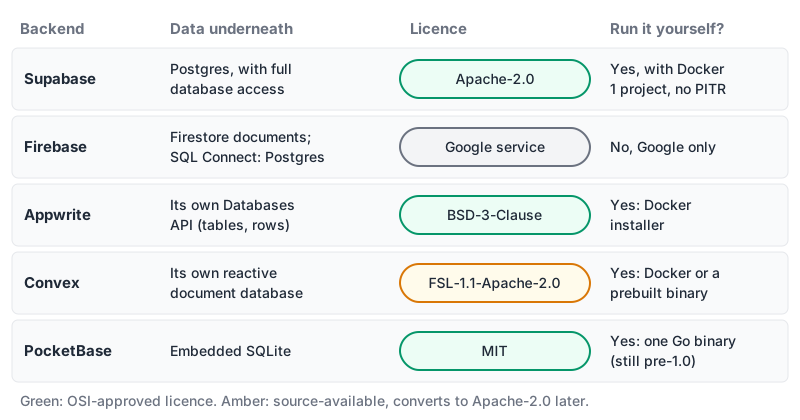
The question that matters most: what's the data model?
Pick the database first and the rest follows.
- Supabase is Postgres. Its architecture page says it doesn't abstract the database and you get "full privileges". Your tables, indexes and SQL are ordinary Postgres, which means
pg_dumpis your exit plan. - Firebase is mainly Firestore, a document database. It also has SQL Connect, described as "Firebase's first relational database solution" and "Backed by Cloud SQL for PostgreSQL", with a GraphQL schema and generated SDKs for Android, iOS, Flutter and web. The URL still says
data-connect, which suggests the product was renamed from Data Connect. - Appwrite has its own Databases API with tables and rows, and you go through Appwrite's SDKs rather than a SQL connection.
- Convex is its own thing: the docs call it "the open source, reactive database where queries are TypeScript code running right in the database". There's no SQL and no ORM.
- PocketBase embeds SQLite. Its README lists an "embedded database (_SQLite_) with realtime subscriptions" plus users, files and an admin dashboard, all in one Go binary.
If your data is relational and you expect to write reports, joins and migrations, Supabase's Postgres is the least surprising choice. If it's naturally document-shaped and read by mobile clients, Firestore fits. If you want the database to push updates to the UI without you thinking about subscriptions, Convex was designed around that.
Supabase
Beyond Postgres you get PostgREST for an auto-generated REST API, GoTrue for auth, Realtime over WebSockets, an S3-compatible Storage API, Deno Edge Functions and the Supavisor pooler, all per the architecture page.
Pricing as of November 2026, from supabase.com/pricing: the Free plan gives two active projects, a 500 MB database, 50,000 monthly active users, and pauses projects after a week of inactivity. Pro starts at $25 a month with 8 GB of disk and 100,000 MAU per project, plus $10 of compute credit. Team starts at $599.
The repository is Apache-2.0, and you can self-host with Docker Compose. Read the self-hosting page before you plan on that, though. Self-hosted Supabase runs a single project, and it doesn't include branching, managed backups and PITR, or the Management API. It's also community-supported. Self-hosting is a real exit, just not the same product.
There's a Supabase MCP server if you want an agent to inspect the schema, and our Supabase vs Firebase comparison goes feature by feature.
Firebase
Firebase's free tier is generous on reads and strict on everything else. From the pricing page, as of November 2026, the Spark plan gives Firestore 1 GiB stored, 50,000 document reads, 20,000 writes and 20,000 deletes per day, and 10 GiB of egress a month. Auth allows 50,000 MAU on Spark, and phone auth isn't available there.
The table also shows what Spark doesn't include. Every Cloud Functions row and every Cloud Storage row says "Not applicable" in the Spark column. In practice, server-side code and file uploads mean moving to the pay-as-you-go Blaze plan. Blaze includes 2 million function invocations a month before charging $0.40 per million.
SQL Connect on Spark is a three-month trial of Cloud SQL for PostgreSQL. If you don't upgrade, the pricing page says "your instance will be archived" and then deleted after another 90 days. On Blaze, Cloud SQL starts at $9.37 a month. That's a reasonable way to try relational data inside Firebase, but don't let a prototype's only database sit on a trial clock.
Firebase is Google-run only; there's no self-hosted version. If that's fine, it's the most mature option for mobile apps here. The Firebase MCP server page covers agent access.
Appwrite
Appwrite's README lists Auth, Databases, Storage, Functions, Sites, Messaging, Realtime and more, under a BSD-3-Clause licence. Self-hosting is a docker run installer, currently using the appwrite/appwrite:2.7.1 image, and the README says it "was designed from the ground up with self-hosting in mind".
On Appwrite Cloud, the Free plan docs allow one organisation and two projects. When a Free project hits a limit it's frozen: uploads stop, function executions stop, and new sign-ups are blocked until the next billing period or an upgrade. You can't buy extra resources on Free. Pro buys overage automatically up to a budget cap you set. The pricing page also lists dedicated database tiers starting at $10 a month for 1 core and 1 GB, with point-in-time recovery at +20% of the tier price. I couldn't get the per-plan limits table to load, so check that page for current bandwidth and MAU numbers.
Appwrite suits teams who want Firebase-style products but need the option to run the whole thing on their own servers. There's an Appwrite MCP server too.
Convex
Convex's model is functions. Queries are read-only, mutations are transactions, and actions can call the network. The docs say "The entire Convex mutation function is a transaction" and that Convex "automatically retries the function on conflicts". Clients subscribe with hooks like useQuery, and when any data a query depends on changes, the query reruns and subscribers update.
// convex/messages.ts
import { query } from "./_generated/server";
import { v } from "convex/values";

export const byChannel = query({
  args: { channel: v.string() },
  handler: async (ctx, { channel }) =>
    ctx.db
      .query("messages")
      .filter((q) => q.eq(q.field("channel"), channel))
      .collect(),
});
From the pricing page, as of November 2026: the Free & Starter plan includes 1 million function calls, 0.5 GB of database storage and 1 GB of egress, then pay-as-you-go at $2.20 per extra million calls. Professional is $25 per developer per month with 25 million calls and 50 GB of storage.
The licence needs a careful read. The convex-backend repo is under FSL-1.1-Apache-2.0. The licence text forbids "Competing Use", meaning offering it commercially as a competing service, and grants an Apache 2.0 licence "effective on the second anniversary" of each release. For running your own app, self-hosting works: the README says the self-hosted build "includes most features of the cloud product", with Docker or a prebuilt binary. Offering it to others as a competing commercial service is the case the licence excludes. See the Convex MCP server page for agent tooling.
PocketBase
PocketBase is the smallest option: one Go binary, SQLite inside, an admin UI, auth, files and realtime. It's MIT-licensed. The docs setup is: download, extract, run ./pocketbase serve.
Two things to know as of November 2026. First, it's still 0.x: the homepage shows v0.41.1, and the README warns that "full backward compatibility is not guaranteed before reaching v1.0.0". Pin the version and read the changelog before every upgrade. Second, the GitHub repository is now archived, and its README says the repo "has moved to" a self-hosted Git server at ganigeorgiev.com. If your tooling watches GitHub releases for updates, point it at the new location.
SQLite's write model is the real constraint. Our SQLite in production post covers WAL mode, write concurrency and Litestream backups, and all of it applies here. For an internal tool, a side project or a single-region app with modest writes, PocketBase is hard to beat on simplicity. The PocketBase MCP server page is there if you want an agent on it.
Questions to ask before you sign up
- Can I get my data out in a standard format? Postgres and SQLite: yes, trivially. Firestore, Appwrite and Convex: possible, but the data comes out in their model and you'll remap it.
- What happens at the free-tier limit? Supabase pauses idle projects, Appwrite freezes the project, Firebase SQL Connect's trial ends with archival.
- Where does server code run? Firebase needs Blaze for Functions; Supabase uses Deno Edge Functions; Convex runs your TypeScript next to the data.
- Is self-hosting the same product? For Supabase, no branching or PITR; for Convex, most features; for PocketBase, it's the only way it runs.
- Who restores the backup? If you self-host, you do. Our database backup strategies post has the checklist.
The decision rule
Start from the data, then the exit:
- Relational data and SQL you want to keep: Supabase.
- A mobile-first app with document-shaped data, happy on Google's cloud: Firebase, budgeting for Blaze as soon as you need Functions or Storage.
- Firebase-like products you must be able to self-host under a permissive licence: Appwrite.
- A UI that should update live from the database, written in TypeScript end to end: Convex, after reading the FSL terms.
- One small app, one server, and you'd rather not run anything else: PocketBase, version pinned.
If two of these still fit, build the sign-in flow and one live list in each. That's an evening's work and it'll tell you more about the SDKs than any docs page.
Written by AIDToolStack Editorial
Researched from official documentation, specifications and vendor pages, listed under Sources below. Last checked November 2026.
Sources
- supabase.com/docs/guides/getting-started/architecture
- supabase.com/pricing
- supabase.com/docs/guides/self-hosting
- github.com/supabase/supabase
- firebase.google.com/pricing
- firebase.google.com/docs/data-connect
- github.com/appwrite/appwrite
- appwrite.io/docs/advanced/platform/free
- appwrite.io/docs/advanced/platform/pro
- appwrite.io/pricing
- docs.convex.dev/understanding/
- www.convex.dev/pricing
- github.com/get-convex/convex-backend
- github.com/get-convex/convex-backend/blob/main/LICENSE.md
- github.com/pocketbase/pocketbase
- pocketbase.io/
- pocketbase.io/docs/
Related Posts
Explore on AIDToolStack
Discover tools and servers featured in our directory.
AI Tools
MCP Servers
Sponsor Our Newsletter
Reach thousands of developers who are actively evaluating AI tools, MCP servers, and dev infrastructure. Our weekly newsletter goes to engaged technical decision-makers.
All sponsored content is clearly labeled per our editorial policy.