
curl for API Testing: The Flags You Actually Use, Auth, JSON and Timing
Somebody files a bug: "the endpoint returns garbage". The fastest way to find out whether that's true is a curl command you can paste into the ticket, because everyone can run it, nobody has to install a GUI, and it shows exactly what went over the wire. Most API docs print their examples as curl for the same reason.
The trouble is that curl has hundreds of options and most people use the same five, a couple of them wrongly. This is the short list I'd actually keep in muscle memory for API work, checked against the curl man page and Everything curl. The current release as of November 2026 is curl 8.23.0, from 14 October 2026 (curl.se). The curl that ships with your OS may be older, so run curl -V before assuming a flag exists; I've noted the version each newer option arrived in.
A sane default for poking at an endpoint
curl -sS --fail-with-body -i https://api.example.com/v1/items/42What each piece buys you:
-shides the progress meter. On its own it also hides errors, which is why it travels with-S: the man page says-S"makes curl show an error message if it fails" when used with--silent.--fail-with-body(added in 7.76.0) makes curl exit with code 22 on an HTTP error status but still prints the response body. Plain--failalso exits 22 but throws the body away, which is exactly the part you wanted to read: the JSON error message.-iprints the response headers above the body. Since 8.10.0 its long name is--show-headers; the man page notes it "was called --include before 8.10.0" and the old name still works.
The exit code is the bit people forget. In a script or a CI smoke test, curl --fail-with-body ... || exit 1 turns a 500 into a failed step instead of a green build that happily saved an error page. If you want to know what a given status should mean in the first place, our status code decision table walks through RFC 9110.
Sending JSON without the boilerplate
The old incantation was -X POST -H "Content-Type: application/json" -d '{...}'. Since 7.82.0 there's --json, which Everything curl describes as shorthand for --data-binary plus Content-Type: application/json and Accept: application/json (JSON chapter):
# inline
curl -sS --fail-with-body --json '{"name":"widget","qty":3}' https://api.example.com/v1/items

# from a file
curl -sS --fail-with-body --json @item.json https://api.example.com/v1/items

# build the body with jq so quoting can't break it
jq -n --arg name "$NAME" '{name: $name, qty: 3}' \
  | curl -sS --fail-with-body --json @- https://api.example.com/v1/items
Two warnings from the same chapter. curl "does not touch or parse the data that it sends", so invalid JSON goes out exactly as typed and you'll get the server's 400. And several --json options are glued together as plain text, not merged as objects. If a body is getting complicated, format and check it first in a JSON formatter rather than squinting at a one-liner.
The other data flags differ in ways that bite:
| Flag | What curl does with the data | Default Content-Type |
|---|---|---|
-d / --data | With @file, strips carriage returns, newlines and null bytes; several -d are joined with & | application/x-www-form-urlencoded |
--data-raw | Like -d, but @ has no special meaning | same |
--data-binary | Sends bytes exactly as given, @file untouched | same, override with -H |
--data-urlencode | URL-encodes the value (name=value, name@file forms) | same |
--json | --data-binary plus JSON Content-Type and Accept | application/json |
So -d @payload.json without a header sends a form-encoded Content-Type and a body with its newlines removed. Plenty of servers shrug, some reject it, and that's a confusing afternoon.
Stop typing -X POST
curl picks the method from the other options: data flags make it a POST, -I makes it a HEAD. Everything curl says you "should only rarely have to explicitly ask for it with -X", because -X "only changes the text in the outgoing request, it does not change any behavior" (method chapter). Two concrete ways that goes wrong:
-X HEADon a GET makes curl wait for a body that never comes. The man page says-X HEAD"does not suffice"; use-I/--head.- With
-L, the method set by-Xis sent again on every redirect. Without-X, curl switches a POST to GET after a 301, 302 or 303.
When you genuinely need a custom method and redirects, curl 8.16.0 added --follow. The man page describes it as subtly different from --location: it keeps your custom method on 307 and 308 but may reset it to GET on 301, 302 and 303, where --location always reuses it. For PUT, PATCH and DELETE you still need -X; that's what it's for.
Auth without leaving tokens in your history
Basic auth is -u user:password. If you give only the username, curl prompts for the password, and the man page is blunt about the alternative: sensitive data "should be retrieved from a file instead or similar and never used in clear text in a command line."
For bearer tokens most people write -H "Authorization: Bearer $TOKEN", which keeps the literal token out of shell history but still passes it in curl's arguments. Variables (added in 8.3.0, variables chapter) let curl read the environment itself:
curl -sS --fail-with-body \
  --variable %API_TOKEN \
  --expand-header "Authorization: Bearer {{API_TOKEN}}" \
  https://api.example.com/v1/me
--variable %NAME imports an environment variable, and any option prefixed with --expand- substitutes {{NAME}}. Without a default the command fails if the variable is unset, which is what you want in CI. --variable %NAME=fallback supplies a default (environment variables page). There's also --oauth2-bearer TOKEN, which builds the Bearer header for you, but the token is then a plain argument again.
If you're handed a token and need to see what's in it, our JWT decoder splits it into header and payload in the browser without sending it anywhere.
Timing a request with -w
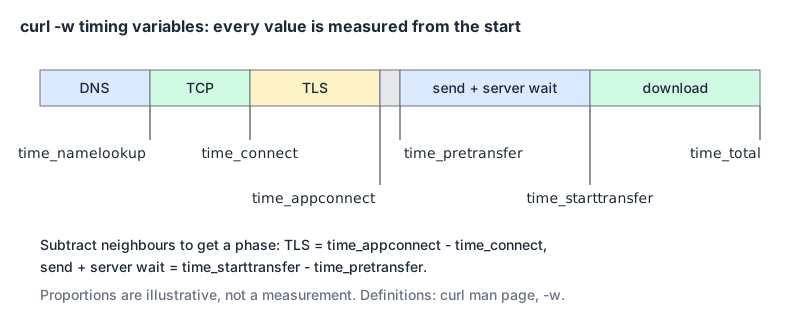
-w / --write-out prints variables after the transfer finishes. The timing ones are where curl beats most GUI clients for diagnosis, as long as you know they're cumulative: each is seconds from the start of the request, not the length of a phase.
Put the format in a file so you can reuse it (-w @file reads it, and \n works as a newline):
     dns: %{time_namelookup}s\n
 connect: %{time_connect}s\n
     tls: %{time_appconnect}s\n
    ttfb: %{time_starttransfer}s\n
   total: %{time_total}s\n
    http: %{http_version} %{response_code} from %{remote_ip}\n
curl -sS -o /dev/null -w @timing.txt https://api.example.com/v1/itemsThe definitions, straight from the man page: time_connect ends when "the TCP connect to the remote host (or proxy) was completed", time_appconnect when the TLS handshake finished, time_starttransfer when "the first byte was received". So TLS took time_appconnect - time_connect, and the gap between time_pretransfer and time_starttransfer is your request going out plus the server thinking. Newer builds add time_posttransfer (8.10.0, when the last byte was sent) and time_queue (8.12.0). %{json} (7.70.0) dumps every variable as one JSON object if you'd rather pipe it to jq, and %{stderr} switches the rest of the output to stderr so it doesn't mix with the body.
Our HTTP timing analyzer takes per-phase durations in milliseconds (DNS, TCP, TLS, TTFB, download) and shows a waterfall against fixed budgets. Do the subtraction above first and convert seconds to milliseconds, or you'll feed it cumulative numbers and every phase will look slow.
Timeouts and retries that won't hide bugs
curl -sS --fail-with-body --connect-timeout 5 --max-time 20 \
  --retry 3 https://api.example.com/v1/health
--connect-timeout only limits the connection phase (DNS plus the TCP and TLS or QUIC handshakes). --max-time caps the whole transfer and accepts decimals. --retry only retries what the man page calls transient errors: "a timeout, an FTP 4xx response code or an HTTP 408, 429, 500, 502, 503, 504, 522 or 524 response code". --retry-all-errors exists, and the man page itself calls it the "sledgehammer" of retrying. I'd keep it out of anything that sends a non-idempotent POST, for obvious reasons. If you're on the other side of that 429, our rate limiting post covers the headers worth sending back.
HTTP versions
For HTTPS, curl negotiates HTTP/2 in the TLS handshake by default (man page, --http2). --http3 tries HTTP/3 and falls back to earlier versions if the QUIC connection fails; --http3-only doesn't fall back. Both need a curl built with an HTTP/3 backend; curl's HTTP/3 page says "Only the _ngtcp2_ backend is not experimental." Add %{http_version} to your -w format to see what you actually got.
Moving between curl and code
Chrome DevTools can hand you any request as curl: right-click it in the Network panel, then Copy, then Copy as cURL (DevTools network reference). That's the quickest way to reproduce a browser bug outside the browser. The copy carries the request's headers, auth included, so treat it as a secret.
Going the other way, our cURL converter turns a command into fetch, Axios, Python requests, Go or PHP code. It understands the common flags, including -X, -H, the -d family (repeated -d values are joined with &, as curl does), --json, -F, -u, -b and --max-time, and lists any flag it doesn't translate as a note in the output. For JavaScript specifically, Curl to Fetch also turns -b cookies into a Cookie header and emits code that checks response.ok.
Curl isn't a replacement for a proper API client once you're saving collections, sharing environments with a team or writing assertions. Our API client comparison and Postman vs Bruno cover that end.
The cheat sheet
curl -sS --fail-with-body -i URL                  # look at a response
curl -sS --fail-with-body --json @body.json URL   # POST JSON (7.82.0+)
curl -sS -X PATCH --json '{"qty":4}' URL          # other methods: -X is fine here
curl -sS -I URL                                   # HEAD, never -X HEAD
curl -sS --variable %TOKEN \
  --expand-header "Authorization: Bearer {{TOKEN}}" URL   # token from env (8.3.0+)
curl -sS -o /dev/null -w @timing.txt URL          # where did the time go
curl -sS --connect-timeout 5 --max-time 20 --retry 3 URL
curl -sS --http3 -w '%{http_version}\n' -o /dev/null URL
If one of these is rejected, check curl -V against the version numbers above before blaming the server.
Written by AIDToolStack Editorial
Researched from official documentation, specifications and vendor pages, listed under Sources below. Last checked November 2026.
Sources
- curl.se/
- curl.se/changes.html
- curl.se/docs/manpage.html
- curl.se/docs/http3.html
- everything.curl.dev/
- everything.curl.dev/http/post/json.html
- everything.curl.dev/http/modify/method.html
- everything.curl.dev/cmdline/variables
- everything.curl.dev/cmdline/variables/env.html
- ec.haxx.se/usingcurl/verbose/writeout.html
- ec.haxx.se/http/redirects.html
- developer.chrome.com/docs/devtools/network/reference
Related Posts
Explore on AIDToolStack
Discover tools and servers featured in our directory.
AI Tools
MCP Servers
Sponsor Our Newsletter
Reach thousands of developers who are actively evaluating AI tools, MCP servers, and dev infrastructure. Our weekly newsletter goes to engaged technical decision-makers.
All sponsored content is clearly labeled per our editorial policy.