
Background Jobs and Queues in Node.js: BullMQ, pg-boss and Trigger.dev
The signup handler creates the user, sends a welcome email, resizes the avatar and pushes the contact to the CRM. The CRM API is slow today, so signups take eight seconds, and when the deploy restarts the process halfway through, some users never get their email and nobody knows which ones.
That's the case for a job queue. The request does the one thing that has to happen before responding (write the user), records the rest as jobs, and returns. Separate worker processes pick the jobs up, retry the ones that fail, and leave a record of the ones that never succeed. This post covers how that works in Node, the three options I'd look at in November 2026, and the settings that bite in production.
What a queue gives you that setTimeout doesn't
Firing off a promise and not awaiting it ("fire and forget") looks like a background job and isn't one. If the process exits, the work is gone. A real queue gives you:
- Durability. The job is stored (in Redis or Postgres) before the request returns.
- Retries with backoff. Transient failures fix themselves; permanent ones end up somewhere visible.
- Concurrency control. Ten workers, five jobs each, no matter how many requests arrive.
- Scheduling. Run later, or on a cron pattern.
- A place to look. Counts of waiting, active, failed and completed jobs.
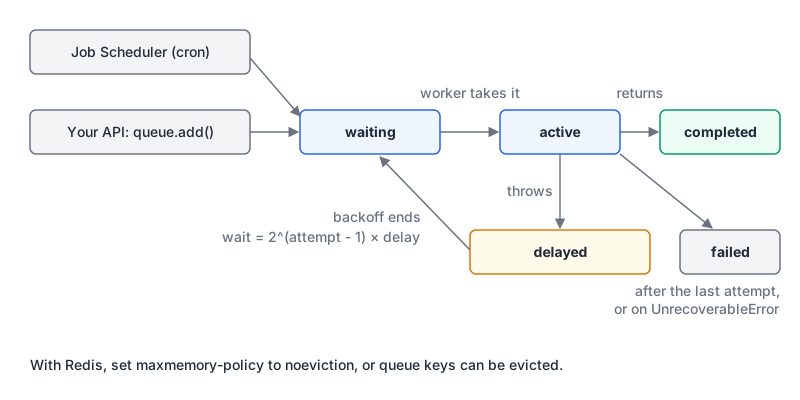
The state names in that diagram are BullMQ's, but every queue has the same shape.
Cron or a queue?
Both, usually. Cron answers when; a queue answers how to do it reliably. A crontab line that runs a 40-minute script has no retries, no concurrency limit and no record of partial failure. The better pattern is a scheduler that enqueues a job, and a worker that runs it with the same retry and monitoring as everything else. BullMQ calls these Job Schedulers, pg-boss has cron scheduling built in, and Trigger.dev has scheduled tasks defined with schedules.task(). If you keep plain cron for anything, the cron best practices post covers overlap, time zones and silent failures, and our cron parser explains five-field expressions and lists their next run times.
The options in November 2026
| BullMQ | pg-boss | Trigger.dev | |
|---|---|---|---|
| Latest (npm, 7 Nov 2026) | 6.7.2 | 12.38.1 | @trigger.dev/sdk 4.8.3 |
| Storage | Redis (default) or Postgres | Postgres 13+ | Managed service, or self-hosted |
| Runs your code | Your worker processes | Your worker processes | Trigger.dev's workers (or your self-hosted ones) |
| Good fit | High throughput, Redis already in the stack | One database, jobs created in the same transaction as your data | Long-running tasks and AI agents without running workers yourself |
There are others (Graphile Worker on Postgres, the managed queues from each cloud), but these three cover most Node teams.
BullMQ
BullMQ started out as a Redis-backed queue, and version 6 changed its shape. The changelog entry for 6.0.0 (30 July 2026) introduces "Redis and PostgreSQL backends", makes ioredis "an optional peer dependency" rather than a direct one, and removes the legacy repeat option in favour of Job Schedulers. If you're upgrading from v5, install ioredis explicitly and read the migration guide before touching repeatable jobs.
Here's a worker with retries, a custom job ID and a non-retryable error. I ran this against Redis 8.10 in Docker with BullMQ 6.7.2 and ioredis 6.0.0:
import { Queue, Worker, UnrecoverableError } from 'bullmq';
import IORedis from 'ioredis';

const connection = new IORedis({ port: 16479, maxRetriesPerRequest: null });
const queue = new Queue('emails', { connection });

const t0 = Date.now();
const worker = new Worker('emails', async (job) => {
  console.log(`attempt ${job.attemptsMade + 1} for ${job.id} at +${Date.now() - t0}ms`);
  if (job.data.bad) throw new UnrecoverableError('bad address');
  if (job.attemptsMade < 2) throw new Error('SMTP timeout');
  return 'sent';
}, { connection, concurrency: 5 });

worker.on('completed', (job, rv) => console.log(`completed ${job.id}: ${rv}`));
worker.on('failed', (job, err) => console.log(`failed ${job.id} (attempt ${job.attemptsMade}): ${err.message}`));

const opts = { attempts: 4, backoff: { type: 'exponential', delay: 1000 } };
const a = await queue.add('welcome', { userId: 42 }, { ...opts, jobId: 'welcome-42' });
const b = await queue.add('welcome', { userId: 42 }, { ...opts, jobId: 'welcome-42' });
console.log('same job returned twice:', a.id === b.id);
await queue.add('welcome', { userId: 7, bad: true }, { ...opts, jobId: 'welcome-7' });
try { await queue.add('x', {}, { jobId: '123' }); } catch (e) { console.log('numeric id:', e.message); }
The output (trimmed of a count I printed alongside):
attempt 1 for welcome-42 at +8ms
same job returned twice: true
failed welcome-42 (attempt 1): SMTP timeout
numeric id: Custom Id cannot be integers
attempt 1 for welcome-7 at +13ms
failed welcome-7 (attempt 1): bad address
attempt 2 for welcome-42 at +1015ms
failed welcome-42 (attempt 2): SMTP timeout
attempt 3 for welcome-42 at +3090ms
completed welcome-42: sent
Three things in there are worth knowing. The retries landed at about +1 s and +3 s, matching the documented backoff formula of 2 ^ (attempts - 1) * delay (1,000 ms, then 2,000 ms). The same docs offer a jitter option between 0 and 1, which you want when many jobs fail at once. Adding a job whose ID already exists did nothing: per the job ID docs, it "will just be ignored and not added to the queue at all", which makes a business key like welcome-42 a cheap dedupe. Those docs also say custom IDs can't be all digits or contain :, and that an ID becomes reusable once the old job is removed. And UnrecoverableError failed the job on the first attempt instead of burning retries on an address that will never work.
Schedules use the same queue. Calling upsertJobScheduler twice with the same ID left one scheduler in my test, with the next run computed in the given time zone:
await queue.upsertJobScheduler('nightly-report',
  { pattern: '15 3 * * *', tz: 'Europe/London' },
  { name: 'build-report', data: {} });
// getJobSchedulers() -> 1 scheduler, next: 2026-11-08T03:15:00.000Z
BullMQ in production
The going to production guide is short and every point matters:
maxmemory-policy noeviction. BullMQ "cannot work properly if Redis evicts keys arbitrarily". If you share a Redis that's configured as an LRU cache, jobs can vanish. BullMQ does warn you; with the policy set toallkeys-lru, adding a job printedIMPORTANT! Eviction policy is allkeys-lru. It should be "noeviction". Give the queue its own Redis instance or database server rather than sharing a cache. The Redis vs Valkey vs Memcached post covers the server choice; the docs say the Redis advice also applies to compatible servers such as Valkey and Dragonfly.maxRetriesPerRequest: nullon ioredis connections used by Workers, as in the quick-start.- Close workers on shutdown. Call
await worker.close()onSIGTERMandSIGINT"to minimize the risk of stalled jobs", and add handlers foruncaughtExceptionandunhandledRejection. - Persistence. The guide recommends AOF, noting that fsync once per second "is enough for most applications".
When you're debugging a live queue, the official Redis MCP server lets an AI assistant inspect keys and list lengths; connect it as a read-only ACL user, as its README advises.
Staying on Postgres: pg-boss or BullMQ's new backend
If Postgres is your only datastore, adding Redis just for jobs is a real cost. Postgres has the primitive queues need. The SELECT docs describe SKIP LOCKED as unsuitable for general use but say it "can be used to avoid lock contention with multiple consumers accessing a queue-like table".
pg-boss is built on exactly that. Its README lists Node 22.12 or newer (or Bun) and PostgreSQL 13 or newer, cron and RRULE scheduling, dead letter queues, exponential backoff, LISTEN/NOTIFY for low-latency delivery, and the feature I'd pick it for: you can "create jobs in an existing db transaction", with adapters for Drizzle, Knex, Kysely and Prisma. Creating the job in the same transaction as the row it's about means you never have a user without their welcome email job, or a job for a user whose insert rolled back. The README's basic usage:
const { PgBoss } = require('pg-boss');
const boss = new PgBoss('postgres://user:pass@host/database');
boss.on('error', console.error);
await boss.start();
await boss.createQueue('readme-queue');
const id = await boss.send('readme-queue', { arg1: 'read me' });
await boss.work('readme-queue', async ([job]) => { /* handle job */ });
I didn't run pg-boss for this post (no Postgres on hand); that snippet is from the README.
BullMQ's PostgreSQL backend is the other route: same Queue and Worker API, pass createPostgresBackend, install pg. It needs PostgreSQL 13 or newer (14+ recommended), uses LISTEN/NOTIFY, doesn't run migrations automatically (you call runMigrations as a deploy step) and doesn't support schema downgrades. The docs are candid that Redis "remains the default and the most battle-tested option" and estimate roughly 1.5 to 2 times fewer jobs per second on Postgres, from indicative laptop numbers. It's young; I'd use it for moderate volumes where one fewer service matters more than throughput.
Trigger.dev
Trigger.dev takes the workers off your hands. You write tasks as functions, deploy them, and trigger them from your app. Per its docs, v4 is current and the v2 and v3 docs "describe superseded versions". From the tasks overview, retries are configured per task, and tasks "can execute indefinitely" by default unless you set maxDuration:
import { task } from "@trigger.dev/sdk";

export const taskWithRetries = task({
  id: "task-with-retries",
  retry: { maxAttempts: 10, factor: 1.8, minTimeoutInMs: 500, maxTimeoutInMs: 30_000, randomize: false },
  run: async (payload: { userId: string }) => { /* ... */ },
});
Its idempotency keys dedupe triggers, are stored for 30 days by default, and can be scoped to a run, an attempt or globally. The platform core is Apache-2.0 and self-hostable. The catch is the obvious one: your job code runs on someone else's infrastructure unless you self-host. There's also a Trigger.dev MCP server built into its CLI; run it with --dev-only or --readonly unless you want an agent able to deploy. I didn't run the Trigger.dev example, which needs an account.
Assume every job can run twice
A worker can finish the work and crash before it marks the job complete. Then the job runs again. Design for it:
- Make handlers idempotent. Check before acting ("is this email already sent for this user?"), or use upserts.
- Pass idempotency keys downstream. If the job charges a card through Stripe, derive the key from the job's business ID, not a fresh UUID per attempt. The Stripe integration patterns post shows this with
plan-change:${id}. - Use deterministic job IDs when the same event might enqueue twice.
- Classify errors. Retry timeouts and 5xx responses; fail fast on validation errors and 4xx.
CPU-heavy work is a different problem
Queues move work out of the request. They don't make CPU-bound JavaScript stop blocking the event loop. The Node docs are clear about where threads help: workers "are useful for performing CPU-intensive JavaScript operations. They do not help much with I/O-intensive work." Image resizing or PDF rendering in a job worker still blocks that worker's other jobs; run those jobs with lower concurrency or a dedicated queue, or hand the heavy step to a worker thread or native library.
Before you ship a queue
- Jobs are enqueued after (or inside) the transaction that creates their data, never before.
- Every job has
attempts, exponential backoff with jitter, and a terminal failed state someone looks at. - Permanent failures throw a non-retryable error.
- Handlers are idempotent; external calls carry idempotency keys.
- Redis-backed queues run on
noevictionwith persistence, on an instance that isn't your cache. - Workers close cleanly on
SIGTERM, and deploys give them time to. - Scheduled work goes through the queue, not straight from crontab.
- Someone gets alerted when the failed count grows, and structured logs carry the job ID.
Written by AIDToolStack Editorial
Researched from official documentation, specifications and vendor pages, listed under Sources below. Last checked November 2026.
Sources
- github.com/taskforcesh/bullmq/blob/master/docs/gitbook/changelog.md
- github.com/taskforcesh/bullmq/releases
- docs.bullmq.io/quick-start
- docs.bullmq.io/guide/going-to-production
- docs.bullmq.io/guide/retrying-failing-jobs
- docs.bullmq.io/guide/jobs/job-ids
- docs.bullmq.io/guide/job-schedulers
- docs.bullmq.io/guide/postgresql
- www.npmjs.com/package/bullmq
- github.com/timgit/pg-boss
- www.npmjs.com/package/pg-boss
- www.postgresql.org/docs/current/sql-select.html
- trigger.dev/docs/introduction
- trigger.dev/docs/tasks/overview
- trigger.dev/docs/tasks/scheduled
- trigger.dev/docs/idempotency
- www.npmjs.com/package/@trigger.dev/sdk
- nodejs.org/api/worker_threads.html
Related Posts
Explore on AIDToolStack
Discover tools and servers featured in our directory.
AI Tools
MCP Servers
Sponsor Our Newsletter
Reach thousands of developers who are actively evaluating AI tools, MCP servers, and dev infrastructure. Our weekly newsletter goes to engaged technical decision-makers.
All sponsored content is clearly labeled per our editorial policy.