
CORS Explained: Preflights, Credentials and the Errors You Actually See
Your frontend runs on http://localhost:5173, the API on http://localhost:3000. The same request works in curl and in Postman, but in the browser the console turns red and fetch() rejects. The usual next move is to google the error and paste Access-Control-Allow-Origin: * into the server, which fixes it right up until you add a login cookie.
CORS makes a lot more sense once you know that the server almost always answered. The browser received the response and then decided your JavaScript wasn't allowed to read it. Everything below follows the WHATWG Fetch standard (the living standard that defines CORS; its last update as of this writing is 19 October 2026) and MDN's CORS guide.
Origins, and what the browser is protecting
An origin is scheme + host + port (web.dev). http://localhost:5173 and http://localhost:3000 differ by port, so they're cross-origin, even though they're the same machine. https://app.example.com and https://api.example.com are cross-origin too, though they are the same site, a distinction that matters for cookies but not for CORS. If you're unsure what a URL's origin is, our URL parser prints it.
By default, a page can send many cross-origin requests but can't read the responses. CORS is the opt-in a server uses to say "this origin may read my response". Two consequences people miss:
- curl and Postman don't care. CORS is enforced by browsers on behalf of the user. A non-browser client reads whatever comes back, which is why "it works in Postman" tells you nothing.
- CORS is not access control for your API. Some cross-origin requests reach your server and run before the browser decides anything. MDN notes that even simple requests need the server to opt in "to share the response with the script", not to receive it. If a request changes state, authenticate it and protect it against CSRF on the server; our web security checklist covers that side.
Simple requests and preflighted requests
The browser sends some cross-origin requests straight away and asks permission first for others. According to MDN, a request skips the preflight only if all of these hold:
| Condition | Allowed without a preflight |
|---|---|
| Method | GET, HEAD, POST |
| Headers you set | Only Accept, Accept-Language, Content-Language, Content-Type, and Range with a single range |
| Content-Type | application/x-www-form-urlencoded, multipart/form-data, text/plain |
| Other | No upload listeners on XMLHttpRequest.upload, no ReadableStream body |
The Fetch standard adds a length rule: each safelisted header value must be 128 bytes or less, and if the safelisted values add up to more than 1024 bytes they're treated as unsafe.
Look at that list next to a typical API call. Content-Type: application/json isn't on it. Authorization isn't on it. PUT, PATCH and DELETE aren't on it. So nearly every fetch from a single-page app to a JSON API is preflighted, and the preflight is where most CORS bugs live.
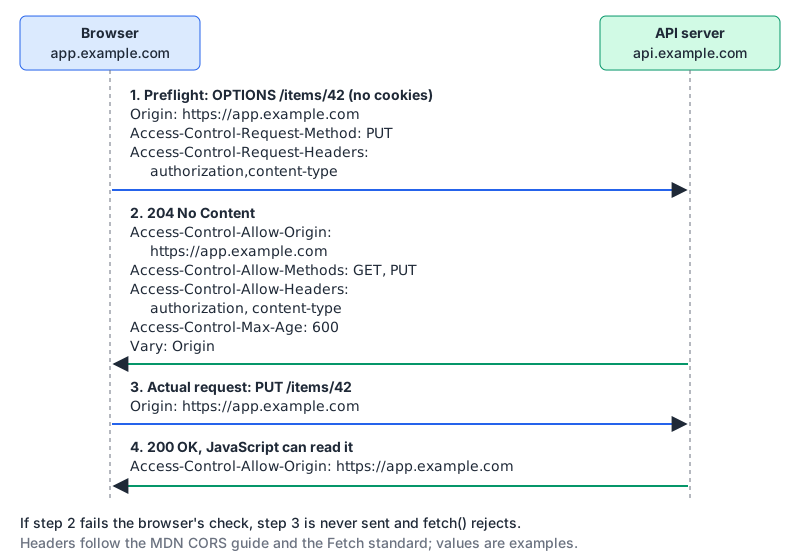
The preflight is an OPTIONS request carrying Origin, Access-Control-Request-Method and Access-Control-Request-Headers. The server's answer has to have an ok status ("e.g., 200 or 204", per Fetch) and Access-Control-Allow-* headers that cover the method and every non-safelisted header. Only then does the browser send the real request, and the real response still needs its own Access-Control-Allow-Origin.
Two Fetch rules explain a whole class of bugs. First, "a CORS-preflight request never includes credentials." No cookies and no Authorization header ride on the OPTIONS request, so if your auth middleware runs before your CORS handling and answers OPTIONS with a 401, the preflight fails every time. Second, Access-Control-Allow-Headers: * doesn't cover Authorization. MDN's header reference says "The Authorization header doesn't accept wildcard and always needs to be listed explicitly."
Credentials change the rules
By default a cross-origin fetch() sends no cookies. You opt in with credentials: "include" (or withCredentials = true on XHR), and then the server's side gets stricter. From MDN:
- the response must carry
Access-Control-Allow-Credentials: true, or the browser won't expose it; Access-Control-Allow-Origin,-Allow-Headers,-Allow-Methodsand-Expose-Headersmust not be*. In credentialed requests the Fetch standard treats*in the last three as a literal header name, not a wildcard;- if a credentialed request gets
Access-Control-Allow-Origin: *, anySet-Cookieon that response "would not set a cookie".
And even with all of that right, MDN warns that cookies in CORS responses are "subject to normal third-party cookie policies", so a browser that blocks third-party cookies can stop a credentialed cross-site call that the server allowed. If your API and app sit on different sites, tokens in an Authorization header are often simpler than cookies.
Access-Control-Allow-Origin holds one origin or *. Its grammar in the Fetch standard is origin-or-null / wildcard, so a comma-separated list isn't valid; Firefox reports "Multiple CORS header 'Access-Control-Allow-Origin' not allowed" when the header appears twice. To allow several origins, check the request's Origin against an allowlist and echo back the match, and add Vary: Origin so caches don't serve one origin's response to another (MDN). Our post on HTTP caching headers explains why a missing Vary causes cross-user weirdness at the CDN. And don't allow the literal origin null: MDN points out that sandboxed documents and data: or file: URLs serialize as null, so "any origin can create a hostile document with a null origin."
A server that gets it right
Plain Express, no CORS package, so you can see every header. Register it before authentication:
const allowed = new Set([
  "https://app.example.com",
  "http://localhost:5173",
]);

app.use((req, res, next) => {
  const origin = req.headers.origin;
  res.append("Vary", "Origin");

  if (origin && allowed.has(origin)) {
    res.setHeader("Access-Control-Allow-Origin", origin);
    res.setHeader("Access-Control-Allow-Credentials", "true");
  }

  // Preflight: answer it here, before auth middleware can 401 it.
  if (req.method === "OPTIONS" && req.headers["access-control-request-method"]) {
    res.setHeader("Access-Control-Allow-Methods", "GET, POST, PUT, PATCH, DELETE");
    res.setHeader("Access-Control-Allow-Headers", "Authorization, Content-Type");
    res.setHeader("Access-Control-Max-Age", "7200");
    return res.sendStatus(204);
  }
  next();
});
If the origin isn't on the list, the response simply has no Access-Control-Allow-Origin and the browser blocks the read. That's the correct failure.
On Access-Control-Max-Age: browsers cache a preflight for 5 seconds by default and cap whatever you send. MDN's Max-Age reference lists Firefox at 86400 seconds and Chromium (v76 and later) at 7200, so sending a week buys you nothing.
If you're on Next.js and wondering where this belongs, our proxy.ts (formerly middleware) post covers handling preflights there.
Reading the error messages
JavaScript gets almost nothing. MDN's CORS errors page says specifics "are not available to JavaScript code. All the code knows is that an error occurred." The console has the real reason. Firefox's wording maps neatly to fixes:
| Console reason (Firefox) | Usual cause | Fix |
|---|---|---|
CORS header 'Access-Control-Allow-Origin' missing | Server didn't send it: the origin wasn't on the list, or an error path skipped the code that adds it | Add the header on every response path, including errors |
CORS header 'Access-Control-Allow-Origin' does not match 'xyz' | Echoed the wrong origin, or a trailing slash or port mismatch | Echo the exact Origin value |
Credential is not supported if the CORS header 'Access-Control-Allow-Origin' is '*' | credentials: "include" against a wildcard | Echo the origin, add Allow-Credentials |
expected 'true' in CORS header 'Access-Control-Allow-Credentials' | Credentialed request, header missing | Send Access-Control-Allow-Credentials: true |
missing token 'xyz' in CORS header 'Access-Control-Allow-Headers' from CORS preflight channel | A request header isn't allowed | List it, and list Authorization by name |
Did not find method in CORS header 'Access-Control-Allow-Methods' | Method not allowed | Add it to Allow-Methods |
CORS preflight channel did not succeed | OPTIONS failed: 401/404/500, or no handler | Answer OPTIONS with 204 before auth |
Multiple CORS header 'Access-Control-Allow-Origin' not allowed | App and proxy both add it | Set it in one place only |
Chrome words its messages differently, but they point at the same headers.
One more trap from MDN: some browsers still refuse to follow a cross-origin redirect after a preflight ("Request requires preflight, which is disallowed to follow cross-origin redirects"). A trailing-slash redirect on your API can be enough to hit it, so call the final URL directly.
Testing without a browser
You can impersonate a preflight with curl, since curl will happily send whatever headers you give it:
curl -sS -i -X OPTIONS https://api.example.com/items/42 \
  -H "Origin: https://app.example.com" \
  -H "Access-Control-Request-Method: PUT" \
  -H "Access-Control-Request-Headers: authorization,content-type"
You want a 2xx, your exact origin in Access-Control-Allow-Origin, and PUT plus both headers covered. curl won't block anything; you're reading the headers yourself.
To reason about a config before deploying it, our CORS tester simulates the decision rather than sending requests: give it the request origin and your allowlist, methods, headers, credentials flag and max-age, and it shows whether the origin is allowed, the headers your server should send (echoing a listed origin with Vary: Origin) and the classic mistakes such as a wildcard with credentials.
Things that look like fixes but aren't
mode: "no-cors"gives you an opaque response whose "headers and body are not available to JavaScript" (MDN). The error goes away because you can no longer read anything.- A browser extension that disables CORS fixes your machine and nobody else's.
Access-Control-Allow-Origin: *everywhere is fine for a public, cookie-free API and wrong for anything with sessions.
A dev-server proxy that forwards /api to your backend is legitimate, though: it makes the browser see a same-origin request. Just remember production needs a real answer, either the same arrangement behind one domain or proper CORS headers.
Checklist before you ship
- Allowlist exact origins; echo the match; always send
Vary: Origin. - Answer OPTIONS with 204 before any auth check.
- List
AuthorizationandContent-Typeexplicitly in Allow-Headers. - With cookies:
Access-Control-Allow-Credentials: true, no wildcards anywhere, andSameSite=None; Secureon the cookie if the sites differ. - Add CORS headers to error responses too, or a 500 will show up as a CORS error.
- Set
Access-Control-Max-Ageto 7200 or less if you care about Chromium. - Never allow
null, and never reflect anyOriginyou receive without checking it.
Written by AIDToolStack Editorial
Researched from official documentation, specifications and vendor pages, listed under Sources below. Last checked November 2026.
Sources
- fetch.spec.whatwg.org/#http-cors-protocol
- developer.mozilla.org/en-US/docs/Web/HTTP/Guides/CORS
- developer.mozilla.org/en-US/docs/Web/HTTP/Guides/CORS/Errors
- developer.mozilla.org/en-US/docs/Web/HTTP/Reference/Headers/Access-Control-Allow-Origin
- developer.mozilla.org/en-US/docs/Web/HTTP/Reference/Headers/Access-Control-Allow-Headers
- developer.mozilla.org/en-US/docs/Web/HTTP/Reference/Headers/Access-Control-Max-Age
- developer.mozilla.org/en-US/docs/Web/API/Request/mode
- web.dev/articles/same-site-same-origin
Related Posts
Explore on AIDToolStack
Discover tools and servers featured in our directory.
AI Tools
MCP Servers
Sponsor Our Newsletter
Reach thousands of developers who are actively evaluating AI tools, MCP servers, and dev infrastructure. Our weekly newsletter goes to engaged technical decision-makers.
All sponsored content is clearly labeled per our editorial policy.