
Running AI Coding Agents Safely: Permission Modes, Sandboxes, Containers and Egress
In August 2025, someone published malicious versions of the nx build tool to npm. The postinstall script hunted for credentials on the developer's machine, and according to Nx's own postmortem it "attempted to use local AI tools (like Claude and Gemini)" to help with the search. The attackers had noticed something the rest of us were slow to: a coding agent on a laptop is a capable, already-authenticated program that will read files and run commands if asked nicely.
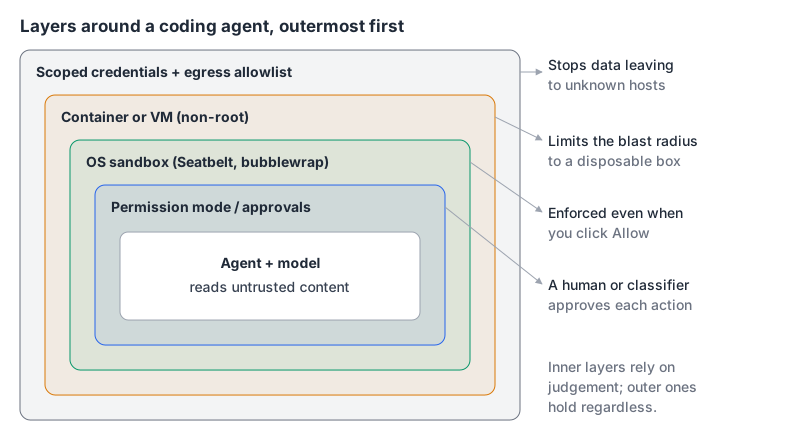
That's the real question behind "running agents safely". It isn't only "will the model do something dumb?" It's "what can anything that talks to the model make it do, and what can it reach when it does?" This post walks through the controls that actually exist in Claude Code, Codex, Gemini CLI and Copilot as of November 2026, in the order I'd add them.
The threat model in one sentence
Simon Willison's lethal trifecta is the most useful framing I know. An agent becomes dangerous when it has all three of: access to your private data, exposure to untrusted content, and the ability to communicate externally. A coding agent usually has all three by default. It reads your repo and home directory, it reads issues, web pages, dependency READMEs and MCP tool output, and it can run curl.
You rarely get to remove "untrusted content", since that's half of what agents are for. So the practical work is shrinking the other two legs: what the agent can read and write, and where it can send data.
Layer 1: permission modes
Every agent has an approval system. It's the weakest layer because it depends on a human reading prompts, but it's where you start.
Claude Code has six modes, documented on its permission modes page:
| Mode | What runs without asking |
|---|---|
default (Manual) | Reads only; edits, shell and network ask first |
acceptEdits | Also file edits and common filesystem commands in the working directory |
plan | Nothing changes until you approve a plan |
auto | Everything, with a separate classifier model reviewing actions |
dontAsk | Only pre-approved tools; anything else is denied (meant for CI) |
bypassPermissions | Everything, no checks |
Per Claude Code's security page, auto mode is now the starting mode for interactive terminal and VS Code sessions. The docs are blunt about the last row: use bypassPermissions "only in isolated environments like containers, VMs, or dev containers without internet access," and it "offers no protection against prompt injection." On Linux and macOS it refuses to start as root unless it detects a sandbox. Admins can disable it with permissions.disableBypassPermissionsMode.
Codex splits the problem into two axes, a sandbox mode (read-only, workspace-write, danger-full-access) and an approval policy (on-request, never, or a granular policy). Its approvals and security docs note that approval_policy = "untrusted" is no longer supported, so older config snippets that use it are stale. The flag to avoid is --dangerously-bypass-approvals-and-sandbox, alias --yolo, which the docs label "not recommended".
A permission prompt only protects you if you read it. After the fortieth npm test approval, nobody does. That's why the next layer matters more.
Layer 2: an OS-level sandbox
A sandbox enforces limits at the operating system level, so it holds even when you click "yes" without thinking or the model is talked into something.
Codex sandboxes by default. On macOS it uses Seatbelt via sandbox-exec; on Linux, bubblewrap plus seccomp. In the default workspace-write mode, network access is off unless you enable it, and inside writable roots it keeps .git, .codex, .agents and .aws read-only. That last detail is quietly important: an agent that can rewrite .git/hooks can get code executed outside the sandbox the next time you commit.
Claude Code's sandbox is off by default; turn it on with /sandbox or "sandbox": {"enabled": true}. It uses Seatbelt on macOS and bubblewrap plus socat on Linux and WSL2 (native Windows isn't supported). By default, sandboxed commands can write only to the working directory, a temp directory and added directories. Network traffic goes through a local proxy that checks each host against an allowlist that starts empty.
Read the fine print, though:
- Reads are wide open by default. The docs say sandboxed commands get "read access to the entire computer, except certain denied directories. This default still allows reading credential files." Add
denyReadrules. - Only shell commands are sandboxed. Claude's built-in Read, Edit, Write, WebFetch and WebSearch tools, MCP servers and hooks run outside it, governed by permission rules instead.
- There's an escape hatch. When a command fails, Claude may retry with
dangerouslyDisableSandbox. SetallowUnsandboxedCommands: falseto remove it.
A tightened starting point, using keys from the docs:
{
  "sandbox": {
    "enabled": true,
    "failIfUnavailable": true,
    "allowUnsandboxedCommands": false,
    "filesystem": { "denyRead": ["~/"], "allowRead": ["."] },
    "network": { "allowedDomains": ["github.com", "*.npmjs.org"] }
  }
}
Gemini CLI has a sandbox too, enabled with -s/--sandbox or GEMINI_SANDBOX. Per its docs, the default macOS Seatbelt profile, permissive-open, confines writes to the project directory but allows broad reads and network access. If you want network traffic restricted, pick one of the -proxied profiles or use the Docker/Podman mode.
Layer 3: a container or VM
When you want an agent to run unattended for a while, put the whole thing in a box you're willing to lose. Anthropic's dev container docs describe the pattern: a container running Claude Code as a non-root user, with the repo bind-mounted, and an optional init-firewall.sh that sets iptables to default-deny and allows only GitHub's published IP ranges plus a short list of hosts (registry.npmjs.org, api.anthropic.com, the VS Code marketplace and a couple of telemetry endpoints). The script even checks itself: curl https://example.com must fail.
Two caveats from reading the script and the docs:
- The firewall still allows outbound DNS and SSH to any address. That's a convenience, and also an exfiltration path if you're being strict.
- The docs warn that with
--dangerously-skip-permissions, a dev container does "not prevent a malicious project from exfiltrating anything accessible inside the container, including the Claude Code credentials." So don't mount~/.sshor cloud credential files into it. Codex's docs give the same warning about full-access mode in dev containers.
Remember also that the bind mount is your real repo. The agent can delete or rewrite anything in it, and that lands on your host. Commit or stash before a long run. If Docker isn't your thing, rootless Podman works for the same idea; see Docker vs Podman.
Layer 4: secrets and egress
Most real damage from a hijacked agent comes from two places: credentials it can read and hosts it can send them to.
- Keep secrets out of the agent's reach. Don't run agents in a shell where production
AWS_*variables are exported. Use short-lived, repo-scoped tokens for anything the agent needs. Our post on environment variables and secrets covers the.envpitfalls, and the secret scanner is handy for checking a transcript or diff before you paste it anywhere. - Allowlist egress. A proxy or firewall allowlist (Claude's sandbox, the dev container script, Codex's network-off default) cuts the "communicate externally" leg of the trifecta.
- Treat MCP servers as code with your permissions. They run outside Claude's sandbox and outside Copilot's firewall. Our MCP server security guide and the post on tool poisoning and prompt injection go through the documented attacks.
Hosted agents follow the same playbook. GitHub's Copilot cloud agent runs with its firewall on by default, allowing common package registries. GitHub is honest about the gaps: the firewall doesn't apply to MCP server processes or setup steps, only covers processes started through the agent's Bash tool, and warns that "sophisticated attacks may bypass the firewall."
What I'd actually use
| Situation | Setup |
|---|---|
| Exploring an unfamiliar repo | Plan or read-only mode, no network |
| Day-to-day work in your own repo | Sandbox on, edits auto-approved in the working directory, denyRead on home, small domain allowlist |
| Long unattended task | Dev container or VM, non-root, egress firewall, no host credentials mounted, then bypass prompts inside it |
| Untrusted input (public issues, third-party PRs) | Read-only sandbox, no secrets in the environment, output reviewed by a human |
| CI | dontAsk or an explicit tool allowlist, minimal token permissions (see our GitHub Actions patterns) |
The rule I keep coming back to: approve the environment once instead of approving every command forever. Spend ten minutes on a sandbox config or a container, then let the agent work inside it. It's both safer and less annoying than clicking "Allow" a hundred times a day.
If you're comparing agents partly on these controls, Claude Code, OpenAI Codex and Gemini CLI each have pages here, and the Claude Code tips post shows the permission rules and hooks that sit alongside the sandbox.
Written by AIDToolStack Editorial
Researched from official documentation, specifications and vendor pages, listed under Sources below. Last checked November 2026.
Sources
- nx.dev/blog/s1ngularity-postmortem
- simonwillison.net/2025/Jun/16/the-lethal-trifecta/
- code.claude.com/docs/en/permission-modes
- code.claude.com/docs/en/security
- code.claude.com/docs/en/sandboxing
- code.claude.com/docs/en/devcontainer
- github.com/anthropics/claude-code/blob/main/.devcontainer/init-firewall.sh
- learn.chatgpt.com/docs/agent-approvals-security
- geminicli.com/docs/cli/sandbox/
- docs.github.com/en/copilot/how-tos/use-copilot-agents/coding-agent/customize-the-agent-firewall
Related Posts
Explore on AIDToolStack
Discover tools and servers featured in our directory.
AI Tools
MCP Servers
Sponsor Our Newsletter
Reach thousands of developers who are actively evaluating AI tools, MCP servers, and dev infrastructure. Our weekly newsletter goes to engaged technical decision-makers.
All sponsored content is clearly labeled per our editorial policy.