
Prompt Caching Explained: How Anthropic, OpenAI and Google Cache Prompts
Look at what an agent loop actually sends. Every turn carries the same tool definitions, the same long system prompt, the same reference docs and the whole conversation so far, plus one new message at the end. If that's 20,000 tokens of repeated context, you pay to process those 20,000 tokens again on every call, and you wait for them too.
Prompt caching is the providers' answer. The model's processed state for a prompt prefix is kept for a while (OpenAI's caching guide says it stores KV tensors, not the tokens), and the next request that starts with exactly the same prefix reuses it at a discount. All three big providers do this. They differ in how you turn it on, how long it lasts, what writes cost, and how short a prompt can be before caching silently doesn't happen. This post goes through each as of November 2026.
The one rule: it's a prefix match
Caching works on the start of the prompt, and it needs an exact match. Anthropic's prompt caching docs spell out the order the prefix is built in: tools, then system, then messages. OpenAI routes requests by a hash of the initial tokens, tool definitions included. Change one token early in the prompt and everything after it is a miss.
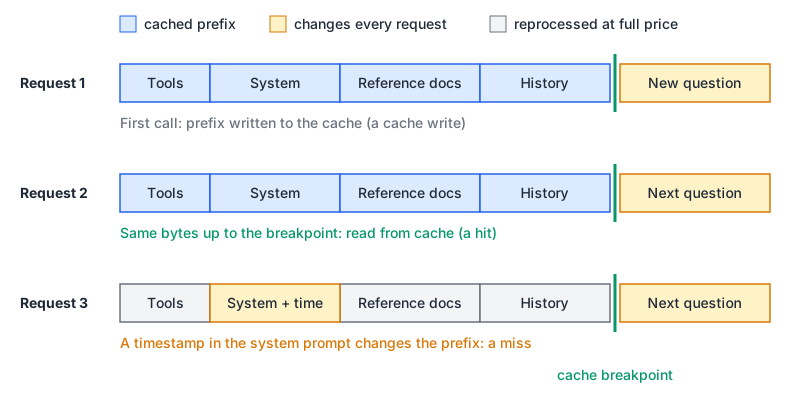
So the design rule is the same everywhere. Stable content goes first, things that change per request go last. The classic mistake is a system prompt that begins "Current time: 14:32:07". That one line at the top makes every request a cache miss. Anthropic's docs say exactly this: content that changes every request, like timestamps, belongs after the last cache breakpoint.
Caching doesn't change what the model generates. Both Anthropic and OpenAI say so. It's purely a cost and latency feature.
Anthropic: you mark what to cache
Claude's API caches only what you tell it to. There are two ways:
- Automatic caching: put one
cache_controlfield at the top level of the request. The breakpoint sits on the last cacheable block and moves forward as the conversation grows. The pricing page calls this the recommended starting point. - Explicit breakpoints: put
cache_controlon individual content blocks, up to 4 per request.
import anthropic

client = anthropic.Anthropic()

resp = client.messages.create(
    model="claude-sonnet-5-5",
    max_tokens=1024,
    system=[
        {
            "type": "text",
            "text": STYLE_GUIDE_AND_EXAMPLES,   # long and identical on every call
            "cache_control": {"type": "ephemeral"},
        }
    ],
    messages=[{"role": "user", "content": question}],
)

u = resp.usage
print(u.cache_creation_input_tokens, u.cache_read_input_tokens, u.input_tokens)
The usage fields tell you what happened. cache_creation_input_tokens were written to the cache, cache_read_input_tokens were served from it, and input_tokens is whatever came after the last breakpoint. If both cache fields are 0, nothing was cached, and the docs say the usual reason is a prompt below the minimum length. There's no error, so log these fields from day one.
The details that matter:
- Lifetime. The default is 5 minutes, refreshed free each time the cache is read. Add
"ttl": "1h"tocache_controlfor an hour. If you mix them, 1-hour entries have to come before 5-minute ones. - Minimum length. 512 tokens on the current generation (Opus 5.5, Sonnet 5.5, Haiku 5.5 and others), 1,024 on models such as Sonnet 4.6, and up to 4,096 on Opus 4.5, Opus 4.6 and Haiku 4.5.
- Price. A 5-minute write costs 1.25x the base input price and a 1-hour write 2x. Reads cost 0.1x on most models, 0.05x on Opus 5.5 and Sonnet 5.5, and 0.025x on Fable 5.1 and Mythos 5.1. These stack with the Batch API discount.
- Lookback. On a read, the API checks at most 20 positions back from each breakpoint. In a long agent loop, move the breakpoint forward (automatic caching does this for you) or you'll fall off the end.
- Isolation. On the Claude API, caches are per workspace. Organizations never share them.
OpenAI: on by default, and newly priced
OpenAI caches automatically on supported models, with no code changes. The caching guide now splits behaviour by model generation, which is the thing most older blog posts get wrong.
GPT-5.6 and later (for example gpt-6.1-sol):
- The minimum is 1,024 tokens of visible input.
- Caching is implicit by default (a breakpoint at the end of the latest eligible message), or explicit with
prompt_cache_optionsand per-blockprompt_cache_breakpoint, up to four writes per request. ttlis"30m"(default) or"12h", the latter on the Responses API only.- Writes cost 1.25x input for 30 minutes and 2.5x for 12 hours. Reads cost 0.1x, or 0.05x on GPT-6.1 Sol and Terra. On the pricing page,
gpt-6.1-solis $2 input, $0.10 cached, $2.50 for a 30-minute write.
{
  "model": "gpt-6.1-sol",
  "prompt_cache_options": { "mode": "explicit", "ttl": "30m" },
  "prompt_cache_key": "support-bot-v3:tenant-42",
  "input": [
    {
      "role": "developer",
      "content": [{
        "type": "input_text",
        "text": "<long, stable instructions>",
        "prompt_cache_breakpoint": { "mode": "explicit", "ttl": "12h" }
      }]
    },
    { "role": "user", "content": [{ "type": "input_text", "text": "<this turn>" }] }
  ]
}
One catch from the guide: the top-level instructions field can't hold a breakpoint, so reusable instructions go in a developer message, as above.
Earlier models (GPT-5.5 and before) work the old way. There's no cache-write charge, the minimum varies with request settings, and retention is prompt_cache_retention: "in_memory" (roughly 5 to 10 minutes idle, up to an hour) or "24h". On these models prompt_cache_key matters for hit rates. Caches live on individual machines, and the guide says traffic above about 15 requests per minute for one prefix and key can overflow to other machines and miss. Split busy traffic across keys.
Read the result from usage.input_tokens_details.cached_tokens, with cache_write_tokens beside it on newer models. Cached tokens still count toward your tokens-per-minute rate limit, and there's no way to clear the cache manually.
Google: implicit by default, explicit on older models
Gemini has two mechanisms, and which you get depends on the model.
Implicit caching is on by default for Gemini 2.5 and newer, per Google's caching docs. The minimum is 4,096 tokens on current models (Gemini 4 Argon, 3.8 Flash, 3.6 Flash, 3.1 Pro Preview) and 2,048 on Gemini 2.5. Google passes savings on when a request hits but doesn't guarantee them. There's also a Gemini 4 rule for agent loops: the full previous request is only cached if the new request adds at least 2,050 tokens.
Explicit caching is where you create a named cache object and reference it. It's beta, it works through generateContent on Gemini 3 and 2.5 models, and it isn't supported on Gemini 4 Argon or later. The default TTL is one hour.
from google import genai
from google.genai import types

client = genai.Client()

cache = client.caches.create(
    model="gemini-3.8-flash",
    config=types.CreateCachedContentConfig(
        display_name="product-manual",
        system_instruction="Answer only from the manual.",
        contents=[MANUAL_TEXT],
        ttl="3600s",
    ),
)

resp = client.models.generate_content(
    model="gemini-3.8-flash",
    contents="How do I reset the device?",
    config=types.GenerateContentConfig(cached_content=cache.name),
)
Explicit caches are billed for storage by the hour on top of the cheaper cached-token price. On the pricing page, Gemini 3.8 Flash is $0.75 input, $0.075 cached and $0.50 per million tokens per hour of storage, all doubling on 1 January 2027. Gemini 3.1 Pro Preview's storage is $4.50 per million per hour. An idle explicit cache costs money, so give it a TTL that matches your traffic.
Side by side
| Anthropic | OpenAI (GPT-5.6+) | ||
|---|---|---|---|
| Turned on by | cache_control (top level or per block) | Default; explicit mode optional | Implicit default; explicit via caches.create |
| Lifetimes | 5 min (refreshed on read), 1 h | 30 min, 12 h | Implicit: unstated; explicit: 1 h default, you set TTL |
| Minimum prefix | 512 tokens on current models | 1,024 tokens | 4,096 tokens on current models |
| Write cost | 1.25x (5 min), 2x (1 h) | 1.25x (30 min), 2.5x (12 h) | Storage per million tokens per hour (explicit) |
| Read cost | 0.1x, 0.05x or 0.025x by model | 0.1x, 0.05x on 6.1 Sol/Terra | Model's cached-token price |
| Where to look | cache_read_input_tokens | cached_tokens | usage_metadata |
Does it pay off?
Anthropic's pricing page puts it simply: a 5-minute write pays for itself after one read, a 1-hour write after two. Here's a concrete case with a 20,000-token prefix on Claude Sonnet 5.5 ($2 per million input, $2.50 for a 5-minute write, $0.10 for a read):
- Uncached, the prefix costs $0.04 every call.
- Cached, the first call costs $0.05 (the write) and each read after it $0.002.
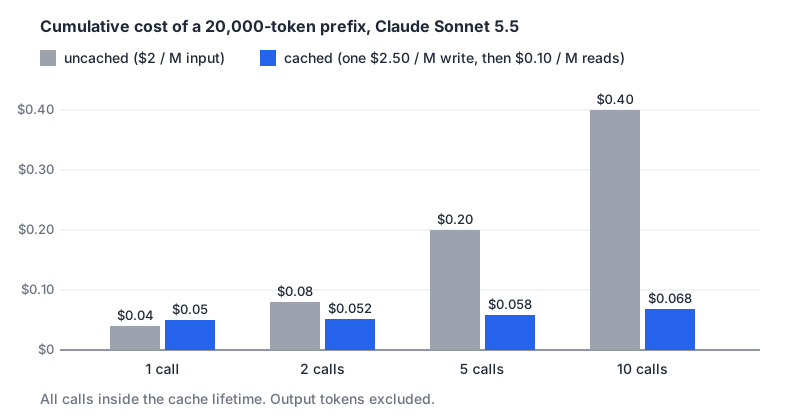
Ten calls inside the cache window cost $0.40 uncached and $0.068 cached. gpt-6.1-sol happens to have identical input, write and read prices, so the same numbers hold there. The output tokens are unaffected either way, and they're often the bigger part of the bill, as the LLM API pricing comparison shows. Our LLM pricing calculator helps with the rest of the arithmetic.
Where caching loses: one-off requests, traffic so sparse that the cache always expires before the next call, and 1-hour or 12-hour writes for prefixes that only get read once.
Things that quietly break the cache
- Volatile content near the top. Timestamps, request IDs, the user's name in the system prompt. Move them to the end.
- Tool lists that change order. Tools come first in the prefix, so any reshuffle invalidates everything. Anthropic's docs say changing tool definitions invalidates the whole cache. The MCP tools spec asks servers to return tools in a deterministic order for this very reason. If your host merges several MCP servers, sort the combined list.
- Switching
tool_choice. On Anthropic it invalidates the message cache. On OpenAI,allowed_toolslets you restrict which tools can be called without changing the tool list, which the function calling guide says helps preserve caching. - Toggling features mid-conversation. On Anthropic, adding or removing images, changing thinking settings or effort, or turning web search or citations on or off all invalidate some or all of the cache. Changing the structured output format does too, as the structured outputs post notes.
- Non-deterministic serialization. If you build the prompt from a dict or JSON object whose key order varies, the bytes differ and so does the prefix.
- Being under the minimum. A 900-token system prompt never caches on a model with a 1,024-token minimum, and nobody tells you. Our token counter is a quick way to check where you are.
Checklist
- Order every prompt as tools, system, long reference material, history, new turn. Nothing volatile before the last breakpoint.
- Turn caching on explicitly where you have to (Anthropic, Gemini explicit) and pick the shortest lifetime your traffic keeps warm.
- Log the cache fields on every response and alert when the hit rate drops after a deploy.
- Keep tool definitions byte-for-byte stable and sorted.
- On older OpenAI models, set a
prompt_cache_keyand spread hot prefixes across keys. - Recheck minimum lengths and multipliers when you change models. They differ per model, even within one provider.
Written by AIDToolStack Editorial
Researched from official documentation, specifications and vendor pages, listed under Sources below. Last checked November 2026.
Sources
- developers.openai.com/api/docs/guides/prompt-caching
- platform.claude.com/docs/en/build-with-claude/prompt-caching
- platform.claude.com/docs/en/about-claude/pricing
- developers.openai.com/api/docs/pricing
- aistudio.google.com/docs/caching
- aistudio.google.com/docs/pricing
- modelcontextprotocol.io/specification/latest/server/tools
- developers.openai.com/api/docs/guides/function-calling
Related Posts
Explore on AIDToolStack
Discover tools and servers featured in our directory.
AI Tools
MCP Servers
Sponsor Our Newsletter
Reach thousands of developers who are actively evaluating AI tools, MCP servers, and dev infrastructure. Our weekly newsletter goes to engaged technical decision-makers.
All sponsored content is clearly labeled per our editorial policy.