
The Node.js Test Runner in Practice: Mocks, Snapshots, Coverage and What's Still Experimental
You want tests for a small Node library or service and you'd rather not add a test framework, a config file and a transform pipeline to get them. Node has shipped a test runner for years, and the module has been marked stable since v20.0.0 per the node:test docs. The question is no longer whether it works, but which of its features are finished.
Timing helps here. Node 26 ("Lithium") became Active LTS on 28 October 2026 with v26.13.0, and Node 24 moved to maintenance on 20 October, according to the Node.js release schedule. Node 27 is in its alpha phase until its April 2027 release. So "current LTS" now means 26, and that's the documentation this post follows.
Our Choosing a Test Runner post covers when to pick node:test over Vitest or Jest. This one is the hands-on version. Everything below ran on Node v24.4.0, which is what I had installed; where the Node 26 docs say something different, I point it out.
Files and running
{
  "type": "module",
  "scripts": { "test": "node --test" }
}
With no arguments, node --test finds files matching patterns like **/*.test.{cjs,mjs,js}, **/*_test.js, **/test-*.js and anything under a test/ directory, plus the same patterns for .ts, .mts and .cts unless you pass --no-strip-types. You can pass your own globs in double quotes: node --test "**/*.spec.js".
Each test file runs in its own child process by default (--test-isolation=process, per the CLI docs), with --test-concurrency capping how many run at once. That gives you isolation between files for free. Within a file, tests share a process, so module-level state leaks between them the way it would in any script.
describe, it and assertions
describe() and it() are aliases for suite() and test(), so Jest-shaped tests mostly port over once you swap expect for node:assert:
// src/retry-after.test.js
import { describe, it } from 'node:test';
import assert from 'node:assert/strict';
import { retryAfterMs } from './retry-after.js';

describe('retryAfterMs', () => {
  it('reads delay-seconds', () => {
    assert.equal(retryAfterMs('120'), 120_000);
  });

  it('reads an HTTP-date relative to now', (t) => {
    t.mock.timers.enable({ apis: ['Date'], now: Date.parse('2026-11-07T12:00:00Z') });
    assert.equal(retryAfterMs('Sat, 07 Nov 2026 12:00:30 GMT'), 30_000);
  });

  it('returns null for junk', () => {
    assert.equal(retryAfterMs('soon'), null);
  });
});
The function under test parses an HTTP Retry-After header into milliseconds. The default spec reporter prints:
▶ retryAfterMs
  ✔ reads delay-seconds (0.471709ms)
  ✔ reads an HTTP-date relative to now (1.730458ms)
  ✔ returns null for junk (0.080666ms)
✔ retryAfterMs (3.118959ms)
ℹ tests 3
ℹ suites 1
ℹ pass 3
ℹ fail 0
ℹ cancelled 0
ℹ skipped 0
ℹ todo 0
ℹ duration_ms 72.255959
Since v23.0.0 spec is the default even when stdout isn't a terminal, so CI logs look like your local ones. tap, dot, junit and lcov are built in too.
Beyond the basics, a few newer options are worth knowing. it.expectFailure() (v25.5.0 and v24.14.0) flips a test so it must throw, which is handy for documenting a known bug. --test-rerun-failures <state-file> (v24.7.0) records which tests passed and only reruns the rest next time, with the documented caveat that test order must be deterministic.
Mocking functions and timers
The second test above already used t.mock.timers to pin Date. Mocking through the test context t rather than the top-level mock export means the runner restores everything when the test ends. Here's a debounce test that never waits for real time:
// src/debounce.test.js
import { test } from 'node:test';
import assert from 'node:assert/strict';
import { debounce } from './debounce.js';

test('only the last call in a burst fires', (t) => {
  t.mock.timers.enable({ apis: ['setTimeout'] });
  const save = t.mock.fn();
  const debounced = debounce(save, 300);

  debounced('a');
  debounced('b');
  t.mock.timers.tick(299);
  assert.equal(save.mock.callCount(), 0);

  t.mock.timers.tick(1);
  assert.equal(save.mock.callCount(), 1);
  assert.deepEqual(save.mock.calls[0].arguments, ['b']);
});
Mock timers have been stable since v23.1.0. Without an apis list, enable() mocks setTimeout, setInterval, setImmediate, their clear functions and Date together, all on one internal clock. One limitation from the docs: destructured imports such as import { setTimeout } from 'node:timers' aren't mocked, so call the global or the module's property.
mock.fn() records arguments, result, error and this for every call, and t.mock.method(obj, 'name') wraps an existing method the same way. That covers most spying needs without a library.
Module mocks: still early development
Replacing a whole module is where node:test is least finished. mock.module() is labelled 1.0 - Early development and needs a flag. Without it, my run failed with:
TypeError [Error]: t.mock.module is not a functionWith --experimental-test-module-mocks, this works, as long as you import the code under test after creating the mock:
// src/config.test.js
import { test } from 'node:test';

test('file values override defaults', async (t) => {
  t.mock.module('node:fs/promises', {
    exports: { readFile: async () => '{"retries":5,"baseUrl":"https://api.example.com"}' },
  });
  const { loadConfig } = await import('./config.js');
  t.assert.snapshot(await loadConfig('ignored.json'));
});
That's the Node 26 form. The current docs mark the older namedExports and defaultExport options as deprecated in favour of exports. On my v24.4.0, though, exports was silently ignored and the import failed with SyntaxError: The requested module 'node:fs/promises' does not provide an export named 'readFile'; switching to namedExports fixed it. The v24.22.2 docs already list exports, so update within the 24 line if you hit this.
If module mocking is central to your test suite, this is the point where I'd still pick Vitest. The Jest vs Vitest comparison covers those two.
Snapshots
The test above ends with t.assert.snapshot(), which has been stable since v23.4.0. The first run fails on purpose:
Error [ERR_INVALID_STATE]: Invalid state: Cannot read snapshot file '.../src/config.test.js.snapshot.' Missing snapshots can be generated by rerunning the command with the --test-update-snapshots flag.Running with --test-update-snapshots writes src/config.test.js.snapshot next to the test:
exports[`file values override defaults 1`] = `
{
  "retries": 5,
  "baseUrl": "https://api.example.com"
}
`;
Commit it. The docs recommend keeping snapshot files in source control, and the format is readable enough to review in a PR.
Coverage and thresholds
Coverage is still 1 - Experimental, but it works:
node --test --experimental-test-module-mocks --experimental-test-coverageℹ start of coverage report
ℹ ----------------------------------------------------------------
ℹ file | line % | branch % | funcs % | uncovered lines
ℹ ----------------------------------------------------------------
ℹ src | | | |
ℹ config.js | 100.00 | 100.00 | 100.00 |
ℹ debounce.js | 100.00 | 100.00 | 100.00 |
ℹ retry-after.js | 100.00 | 85.71 | 100.00 |
ℹ ----------------------------------------------------------------
ℹ all files | 100.00 | 92.31 | 100.00 |
ℹ ----------------------------------------------------------------
ℹ end of coverage reportThat's the tail of the output, minus the module-mocking ExperimentalWarning.
The missed branch is the if (!value) return null guard, which none of my tests hit. To fail a build on coverage, add a threshold. --test-coverage-branches=95 made the run exit with code 1 and this line:
ℹ Error: 92.31% branch coverage does not meet threshold of 95%.--test-coverage-lines and --test-coverage-functions work the same way. Test files and node_modules are excluded by default. For an lcov file plus readable output in CI, pair reporters with destinations in order: --test-reporter=spec --test-reporter=lcov --test-reporter-destination=stdout --test-reporter-destination=lcov.info. To exclude a block, wrap it in /* node:coverage disable */ and /* node:coverage enable */.
What's stable, experimental or early
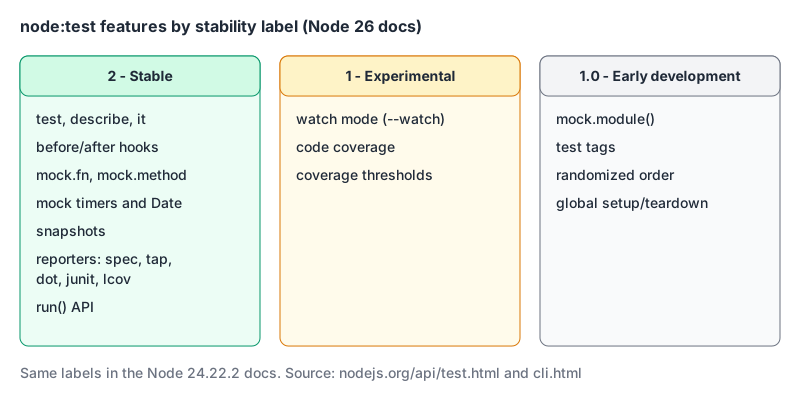
The early-development features are recent and move fast:
- Test tags (v26.2.0, backported to v24.19.0):
describe('database', { tags: ['db'] }, ...), filtered with--experimental-test-tag-filter. - Randomized order (v26.1.0, v24.16.0):
--test-randomizeprints a seed, and--test-random-seed=<n>replays it. Good for flushing out tests that depend on order. - Global setup (v24.0.0):
--test-global-setup=setup.mjs, exportingglobalSetupandglobalTeardown. If setup throws, no tests run. - Watch mode (
node --test --watch) is older but still experimental. It reruns the tests affected by a change.
None of these are a reason to avoid the runner. Tags and randomized order only arrived in 2026, though, so don't build CI around an early-development flag without pinning your Node version.
When I'd use it
- A library, CLI or backend service: yes. Zero dependencies, stable core, real mocks and snapshots. The Node CLI tool post is a good example of a project that fits.
- Heavy module mocking or a Vite-based frontend: use Vitest. The React component testing post shows that setup.
- Coverage gates in CI: fine, but pin the Node version so an experimental flag can't change under you.
To get started: add "test": "node --test", write one *.test.js file with describe/it, run it, then add --experimental-test-coverage once you have something worth measuring.
Written by AIDToolStack Editorial
Researched from official documentation, specifications and vendor pages, listed under Sources below. Last checked November 2026.
Sources
Related Posts
Explore on AIDToolStack
Discover tools and servers featured in our directory.
AI Tools
MCP Servers
Sponsor Our Newsletter
Reach thousands of developers who are actively evaluating AI tools, MCP servers, and dev infrastructure. Our weekly newsletter goes to engaged technical decision-makers.
All sponsored content is clearly labeled per our editorial policy.