
Choosing a Test Runner: Vitest, Jest, node:test or Playwright
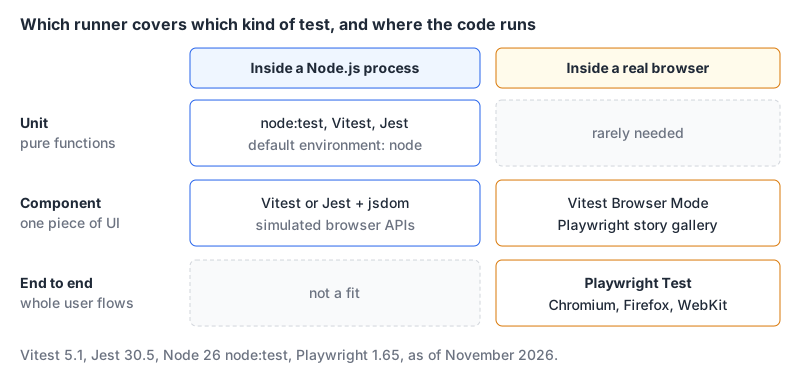
"Should we use Vitest, Jest, the Node test runner or Playwright?" sounds like a four-way choice, but it isn't. Three of them run your code inside a Node.js process. Playwright drives real browsers. Most projects that have a UI end up with one from the first group and Playwright, and the real decision is which Node-side runner you pair it with.
Versions and features below are from each project's docs and release notes as of November 2026.
Where each one stands
| Latest release | Licence | Needs | Notable recent change | |
|---|---|---|---|---|
| Vitest | 5.1.0, 2 November 2026 | MIT | Node 22.12+, Vite 6.4+ | 5.0 focused on speed, added Trace View for Browser Mode |
| Jest | 30.5.2, 18 September 2026 | MIT | Node; Babel or ts-jest for TypeScript | ESM support is still experimental |
node:test | Ships with Node (docs for v26.13.0) | Part of Node.js | Nothing to install | Runs .ts test files by default via type stripping |
| Playwright | 1.65.0, 5 November 2026 | Apache-2.0 | Browser builds via npx playwright install | Runs under Bun; new failures reporter |
Sources: Vitest releases and the Vitest 5 post; Jest releases; the Node.js test runner docs; Playwright releases.
node:test: the zero-dependency option
The built-in runner has been stable since Node 20, and in current Node it's a reasonable default for libraries, CLIs and backend code. Two recent changes make it much nicer. Node now strips TypeScript types by default, and that's marked stable as of v25.2.0 and v24.12.0 (TypeScript docs). And node --test picks up .ts files automatically: alongside the .js patterns it matches **/*.test.{cts,mts,ts}, **/test/**/*.{cts,mts,ts} and friends, unless you pass --no-strip-types.
// src/slugify.test.ts
import { test } from 'node:test';
import assert from 'node:assert/strict';
import { slugify } from './slugify.ts';

test('lowercases and joins words with dashes', () => {
  assert.equal(slugify('Hello World'), 'hello-world');
});
node --test
node --test --experimental-test-coverageNote the .ts extension in the import. Type stripping requires explicit extensions, ignores tsconfig.json (so paths aliases fail), doesn't support enums or namespaces with runtime code, and doesn't type-check anything. Keep tsc --noEmit in CI.
The rough edges are in the stability labels. In the Node 26 docs, coverage and watch mode are still marked Experimental, and mock.module(), test tags, randomised order and global setup are marked Early development. Snapshots and mock timers are stable. If your tests need module mocking, that's the point where I'd stop and reach for Vitest.
Vitest: the default for anything built with Vite
If your app already builds with Vite, Vitest reads your vite.config to match the app's plugins and setup (config docs), which removes a whole class of "works in the app, fails in the test" problems. Version 5.0 shipped on 3 September 2026 and raised the floor to Node.js 22.12 and Vite 6.4 (Vitest 5 post). If CI is stuck on older Node, the 4.1 line was still getting patches in October 2026 (4.1.12, per the releases page), which buys time; check its own requirements before you pin it.
Things in 5.0 that change behaviour, not just speed:
clearMocksnow defaults totrue, so mock call history resets before each test. Tests that accidentally relied on calls leaking between tests will start failing.- Unawaited
resolves,rejectsandtoMatchFileSnapshotnow fail the test instead of passing silently. expect.pollfails when the function doesn't resolve in time.- Browser Mode locators are strict by default.
- Reporters write into one
.vitestdirectory.
The default test environment is node; for DOM tests you switch to jsdom or happy-dom (environment docs). For tests that need real layout, focus or CSS, Browser Mode runs them in an actual browser through a provider. The Browser Mode guide lists playwright, webdriverio and preview, and says preview isn't suitable for CI. Our Vitest component testing post has a full React setup.
Jest: still fine, with two known costs
Jest 30 landed in June 2025 after three years without a major, and the team said it wants more frequent majors from here (Jest 30 release). The 30.x line is actively patched. If you have a big Jest suite that's green, there's no emergency.
The two costs are well documented by Jest itself:
ESM is still experimental. The ECMAScript Modules page says so in its first line, and running it means a Node flag:
NODE_OPTIONS="$NODE_OPTIONS --experimental-vm-modules" npx jestTypeScript needs a transform. With Babel's @babel/preset-typescript, Jest doesn't type-check your tests; for that you use ts-jest or run tsc separately (getting started). Jest's default environment is also node, with jsdom available via testEnvironment (configuration).
If those two match your codebase (CommonJS, an existing Babel setup) Jest is perfectly serviceable. If you're ESM-first, they add up. Our Jest vs Vitest comparison covers migration effort, and the Jest matcher builder is handy while you're writing assertions either way.
Playwright: the browser half
Playwright runs tests in Chromium, Firefox and WebKit, plus branded Chrome and Edge (browsers docs). It's the end-to-end layer in almost any stack above, and 1.65 adds a few useful things:
// playwright.config.ts
import { defineConfig } from '@playwright/test';

export default defineConfig({
  reporter: [
    ['failures'],
    ['html', { onlyFailures: true }],
  ],
});
The new failures reporter prints only failures and successful retries as they happen, and onlyFailures keeps HTML, JSON and JUnit reports small. The runner also works under Bun now with bunx --bun playwright test; without --bun it still runs on Node. Under Bun there's no watch mode and --tsconfig has no effect, so read the release notes before switching CI.
Component testing changed too. The component testing docs now describe a "story gallery" served by your own dev server: you write small *.story.* wrappers and call the mount fixture with a story id. The old @playwright/experimental-ct-* packages have been removed, and the docs say to stay on 1.62 until you've migrated off them.
For selectors, our Playwright selector builder helps, and the Playwright MCP server lets an AI agent drive a browser through the same engine.
Picking a layer split
What to test where is a bigger topic, covered in our frontend testing strategy post. The short version for runner choice:
- Put pure logic in the Node-side runner. It's the fastest feedback you'll get.
- Use jsdom for component behaviour that doesn't depend on layout.
- Move a test to a real browser (Vitest Browser Mode or Playwright) when it touches focus, scrolling, CSS or browser APIs that jsdom fakes.
- Keep end-to-end tests few and focused on flows that would cost money if they broke.
The decision rule
- A library, CLI or backend service with no Vite in sight? Start with
node:test. Move to Vitest the day you need module mocking or stable coverage. - A frontend or full-stack app built with Vite? Vitest 5, if CI runs Node 22.12 or newer. Otherwise upgrade Node first, or pin the 4.1 line while you do.
- A large, green Jest suite in CommonJS? Keep Jest 30. Revisit when you move to ESM.
- Anything with a UI? Add Playwright for end-to-end, whichever runner you chose above.
Written by AIDToolStack Editorial
Researched from official documentation, specifications and vendor pages, listed under Sources below. Last checked November 2026.
Sources
- github.com/vitest-dev/vitest/releases
- vitest.dev/blog/vitest-5.html
- github.com/jestjs/jest/releases
- nodejs.org/api/test.html
- github.com/microsoft/playwright/releases
- nodejs.org/api/typescript.html
- vitest.dev/config/
- vitest.dev/guide/environment
- vitest.dev/guide/browser/
- github.com/jestjs/jest/releases/tag/v30.0.0
- jestjs.io/docs/ecmascript-modules
- jestjs.io/docs/getting-started
- jestjs.io/docs/configuration
- playwright.dev/docs/browsers
- github.com/microsoft/playwright/releases/tag/v1.65.0
- playwright.dev/docs/test-components
- github.com/microsoft/playwright
Related Posts
Explore on AIDToolStack
Discover tools and servers featured in our directory.
AI Tools
MCP Servers
Sponsor Our Newsletter
Reach thousands of developers who are actively evaluating AI tools, MCP servers, and dev infrastructure. Our weekly newsletter goes to engaged technical decision-makers.
All sponsored content is clearly labeled per our editorial policy.