
MCP servers for web search: Brave, Exa, Tavily and Perplexity compared
Your agent's knowledge stops at its training cutoff, and the library you're debugging shipped a breaking change last Tuesday. Built-in web search in some clients helps, but you don't control which engine it uses, how many results come back, or what it costs. A search MCP server puts those choices back in your hands.
Four vendors ship their own servers and keep them maintained as of November 2026: Brave, Exa, Tavily and Perplexity. They are not interchangeable. Brave returns search results from its own index, Exa and Tavily return page content shaped for models, and Perplexity can return either raw results or a finished, cited answer. The facts below come from each vendor's repo, docs and pricing page as fetched on 7 November 2026. Quality claims are the vendors' own; I haven't benchmarked them and won't pretend otherwise.
The four servers at a glance
| Server | Hosted endpoint | Local package | Auth | Main tools |
|---|---|---|---|---|
| Brave Search | none | @brave/brave-search-mcp-server | BRAVE_API_KEY | brave_web_search, brave_news_search, brave_llm_context, brave_summarizer and more |
| Exa | https://mcp.exa.ai/mcp | exa-mcp-server | none (rate-limited), OAuth or API key | web_search_exa, web_fetch_exa; opt-in web_search_advanced_exa, agent_run |
| Tavily | https://mcp.tavily.com/mcp | tavily-mcp | API key or OAuth | tavily_search, tavily_extract, tavily_map, tavily_crawl, tavily_research |
| Perplexity | https://api.perplexity.ai/mcp | @perplexity-ai/mcp-server | API key (Bearer) | perplexity_search, perplexity_ask, perplexity_reason, perplexity_research |
Brave: your own index, run locally
The current server is brave/brave-search-mcp-server, version 2.1.4 on npm. If your config still says @modelcontextprotocol/server-brave-search, that's the old reference server, and npm now marks it "no longer supported". The 2.x line changed two things worth knowing: the default transport is now stdio, and brave_image_search no longer returns base64 image data, which the README says slowed responses and wasted context.
{
  "mcpServers": {
    "brave-search": {
      "command": "npx",
      "args": ["-y", "@brave/brave-search-mcp-server"],
      "env": {
        "BRAVE_API_KEY": "...",
        "BRAVE_MCP_ENABLED_TOOLS": "brave_web_search brave_llm_context"
      }
    }
  }
}
BRAVE_MCP_ENABLED_TOOLS is a whitelist, and I'd use it: the server exposes web, local, place, image, video and news search plus a summarizer, and most coding sessions need one or two of those. brave_llm_context is the interesting one for agents. It returns pre-extracted passages with token budgets you set (maximum_number_of_tokens from 1,024 to 32,768). Brave's API page claims its index is "crawled, ranked, and served end to end" with no fallback to another engine, and that LLM Context runs under 500 ms at P90. Those are Brave's numbers.
There's no hosted endpoint. HTTP mode exists (BRAVE_MCP_TRANSPORT=http), binds to 127.0.0.1 by default, and the README says plainly that the HTTP endpoint is unauthenticated, so don't expose it beyond a trusted network. BRAVE_API_KEY_FILE reads the key from a mounted file, which is nicer than an env var in containers.
Exa: search plus fetch, hosted, works without a key
Exa's server is the lowest-friction way to try a search MCP server: point your client at https://mcp.exa.ai/mcp and it works. Exa's MCP docs say search and fetch run anonymously "at a free rate limit", with a 429 when you hit it. Keyless access needs a direct IPv4 connection; over IPv6 or a proxy you get a 403. Sign in with OAuth (https://mcp.exa.ai/mcp?login) or send an x-api-key header and usage moves to your team's plan.
Two tools are on by default: web_search_exa and web_fetch_exa, which reads a known URL as Markdown. The fetch tool is underrated for coding work: "read this changelog page" is often what you actually want, not a search. web_search_advanced_exa adds domain and date filters, and agent_run starts Exa's multi-step research agent, which needs authentication. Enabling tools with the tools URL parameter replaces the defaults, so list all of them: ?tools=web_search_exa,web_fetch_exa,web_search_advanced_exa.
Exa describes its results as "relevant, ready-to-use content". The docs give no benchmark figures.
Tavily: search, extract, map, crawl
Tavily's server covers more of the "get the web into my context" job than search alone. Besides tavily_search there's tavily_extract for specific URLs, tavily_map to list a site's pages, tavily_crawl to walk and extract them, and tavily_research. That makes it a good fit for "read the whole docs section on X", with the cost that implies.
The remote server takes your key in the URL (?tavilyApiKey=...), in an Authorization: Bearer header, or via OAuth. I'd avoid the URL form: URLs end up in shell history, client logs and screenshots of config files. With OAuth, Tavily uses an account key called mcp_auth_default and creates it if it doesn't exist. Locally it's npx -y tavily-mcp@latest with Node 20+, and DEFAULT_PARAMETERS lets you pin settings such as {"search_depth": "basic", "max_results": 5} so the model can't quietly choose the more expensive depth on every call.
Perplexity: results or answers
Perplexity's official server is the odd one out because three of its four tools return a model-written answer rather than search results. perplexity_search hits the Search API and returns ranked results. perplexity_ask, perplexity_reason and perplexity_research are backed by the Agent API's fast, medium and high presets, and the README warns research runs can take minutes.
That's a change worth noting if you set this up a year ago. The README says earlier versions called the sonar-pro, sonar-reasoning-pro and sonar-deep-research models, and that parameters like reasoning_effort are now ignored. Remote use is a header away:
claude mcp add --transport http perplexity https://api.perplexity.ai/mcp \
  --header "Authorization: Bearer $PERPLEXITY_API_KEY"
Do you want an answer engine inside your coding agent at all? It's a fair question. Your agent is already a language model; giving it another model's summary means two layers of synthesis between you and the source. For "what's the current API for X" I prefer raw results plus a fetch. For broad research the answer tools save tokens. If you're weighing the consumer products instead, see our You.com vs Perplexity comparison and the Perplexity tool page.
What it costs (as of November 2026)
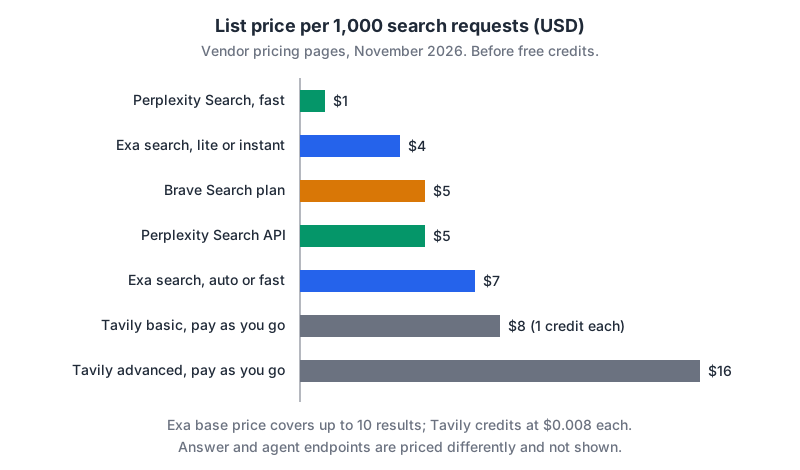
From each vendor's pricing page, fetched today:
- Brave (pricing): Search plan $5 per 1,000 requests at 50 queries per second; Answers plan $4 per 1,000 requests plus $5 per million input/output tokens at 2 queries per second. Each plan includes $5 of free credits a month. The page header also says "up to $20 in free calls every month" without reconciling the two figures.
- Exa (pricing): search is $4 per 1,000 for
liteandinstant, $7 forautoandfast, $12 fordeep, $15 fordeep-reasoning, each covering up to 10 results with $1 per 1,000 extra results. Page contents are $1 per 1,000 pages per content type. New accounts get $10 of credit that resets to $10 on the first of each month. - Tavily (pricing, credit costs): 1,000 free credits a month, then $0.008 per credit pay-as-you-go, or the $30/month Project plan with 4,000 credits. Basic search costs 1 credit, advanced 2. Extract costs 1 credit per 5 successful URLs (2 for advanced), map 1 credit per 10 pages, and research between 4 and 250 credits depending on the model.
- Perplexity (pricing): Search API $5 per 1,000 requests, $1 with
search_type: "fast", and one request can carry up to five queries. The Agent API behind the answer tools bills per token plus per tool call (for exampleweb_searchat $0.0025), with token rates on a separate models page. No free credits are mentioned.
The search price is rarely the bill that surprises you. The context is. Every result you feed the model is input tokens on your model provider's invoice too, which is why the token-budget knobs (brave_llm_context limits, Exa's highlights, Tavily's max_results) matter more than a dollar's difference per thousand.
How I'd choose
- Just want search in the editor, minimal setup: Exa's hosted endpoint, keyless to start, signed in once you rely on it.
- Want results from an independent index and control over what loads: Brave, locally, with
BRAVE_MCP_ENABLED_TOOLS. - Need whole pages or doc sites in context: Tavily, with
DEFAULT_PARAMETERSpinning basic depth. - Want answers with citations rather than links: Perplexity's ask tool, accepting the extra synthesis layer.
Whichever you pick, keep the key out of the URL, prefer OAuth where the server offers it (our post on remote MCP servers and OAuth explains the flow), and remember that search results are untrusted text. A page can contain instructions written for your model, so read our notes on prompt injection defences before you pair a search server with tools that can write files or send messages.
Written by AIDToolStack Editorial
Researched from official documentation, specifications and vendor pages, listed under Sources below. Last checked November 2026.
Sources
- github.com/brave/brave-search-mcp-server
- brave.com/search/api/
- github.com/exa-labs/exa-mcp-server
- docs.exa.ai/reference/exa-mcp
- github.com/tavily-ai/tavily-mcp
- github.com/perplexityai/modelcontextprotocol
- exa.ai/pricing
- www.tavily.com/pricing
- docs.tavily.com/documentation/api-credits
- docs.perplexity.ai/getting-started/pricing
- www.npmjs.com/package/@modelcontextprotocol/server-brave-search
- www.npmjs.com/package/@brave/brave-search-mcp-server
Related Posts
Explore on AIDToolStack
Discover tools and servers featured in our directory.
AI Tools
MCP Servers
Sponsor Our Newsletter
Reach thousands of developers who are actively evaluating AI tools, MCP servers, and dev infrastructure. Our weekly newsletter goes to engaged technical decision-makers.
All sponsored content is clearly labeled per our editorial policy.