
MCP Servers for Project Management: Linear, Jira, Asana, Trello, monday.com, Todoist and Notion
Letting an agent read your tracker is low risk and high value. "Summarise what's blocking the release epic", "find the ticket for this stack trace", "draft sub-tasks from this spec": all reads, or writes you can eyeball. The trouble starts when the same connection can also bulk-edit, move or delete. A model that misreads "close out the stale ones" can do a lot of damage to a board before you notice, and unlike code, there's no git revert for a Jira project.
So for project-management servers I care about three things: is it the vendor's own server or a community wrapper, how does it authenticate, and what's the most destructive thing it can do. This covers Linear, Jira (Atlassian), Asana, Trello, monday.com, Todoist and Notion. Details are from each vendor's docs or repository, as of November 2026.
At a glance
| Tool | Official server | Endpoint | Auth | Read-only option |
|---|---|---|---|---|
| Linear | Yes, hosted | https://mcp.linear.app/mcp | OAuth 2.1, or API key as bearer | /mcp/readonly URL or read-only key |
| Jira / Atlassian | Yes, hosted | https://mcp.atlassian.com/v2/mcp | OAuth 2.1 or API token | Admin-controlled permission groups |
| Asana | Yes, hosted | https://mcp.asana.com/v2/mcp | OAuth | None documented |
| Trello | Yes, hosted | https://mcp.trello.com/v1 | OAuth 2.0 | Grant only Read at consent |
| monday.com | Yes, hosted and local | https://mcp.monday.com/mcp | OAuth, or API token locally | --read-only (local) |
| Todoist | Yes, hosted and local | https://ai.todoist.net/mcp | OAuth, or API key locally | None documented |
| Notion | Yes, hosted | https://mcp.notion.com/mcp | OAuth, or MCP token (Business/Enterprise) | None documented |
Every vendor here now runs its own hosted server, which is a big change from a year or two ago when community wrappers were the only option. Several of the repositories you'll still find in tutorials are now deprecated, so check before you install one.
Linear
Linear's MCP docs list a Streamable HTTP endpoint at https://mcp.linear.app/mcp, with the older /sse URL kept as a deprecated fallback. Sign-in is OAuth 2.1 with dynamic client registration, and you can also pass a Linear API key or OAuth token as Authorization: Bearer.
The useful detail is that Linear gives you a read-only endpoint, https://mcp.linear.app/mcp/readonly, and alternatively honours an OAuth grant with only the read scope or an API key created with only Read permission:
claude mcp add --transport http linear https://mcp.linear.app/mcp/readonlySkip the community linear-mcp-server package. Its own README says it's deprecated and points to the official server. If you're comparing the trackers themselves, see Linear vs Jira.
Jira and the rest of Atlassian
Atlassian's server covers Jira, Confluence, Jira Service Management, Bitbucket, Compass and Loom. The repository README says v2 at https://mcp.atlassian.com/v2/mcp is the recommended version, and that the legacy SSE endpoint stopped being supported after 30 June 2026.
What I like here is that write safety is an admin decision, not a client flag. Tools are grouped into permission groups (read_jira, write_jira, search_jira and so on), and delete_jira and manage_jira are disabled by default until an org admin turns them on. Admins can also uncheck whole groups for the organization.
For headless use there are API tokens, but an admin has to enable token auth first:
| Token type | Header |
|---|---|
| Personal API token | Authorization: Basic <base64(email:api_token)> |
| Service account API key | Authorization: Bearer <api_key> |
Jira Service Management tools only work with API tokens. And note the server exposes a small set of primary tools and lets the client discover the rest on demand; gateways that need the full list can append ?tools=all.
On Jira Server or Data Center, the hosted server won't help. The community mcp-atlassian project supports Server/DC (Jira 8.14+) using a personal access token, and its configuration docs list READ_ONLY_MODE=true and ENABLED_TOOLS for allowlisting individual tools.
Asana
Asana's official server is at https://mcp.asana.com/v2/mcp over Streamable HTTP, per its developer docs. The earlier beta at /sse is deprecated and scheduled for shutdown, so if a tutorial gives you that URL, swap it. Authentication is OAuth; some clients need you to register an app for a client ID and secret. Asana describes reading tasks and projects as well as creating and managing them, and I found no documented read-only mode. Enterprise+ admins can allow or block individual MCP clients.
If you need read-only today, the community @roychri/mcp-server-asana takes a personal access token and supports READ_ONLY_MODE=true, which disables the create, update and delete tools. The trade-off is a long-lived token that can see everything you can.
Trello
Trello's official server is at https://mcp.trello.com/v1. On the consent screen you pick one workspace (multi-workspace support is planned) and choose which permissions to grant: Read, Write and Search. It also doesn't support permanent deletes at all. The assistant can archive cards and lists but can't delete them, which is a sensible default for a tool that acts on your behalf. Org admins can remove read_trello or write_trello centrally from the Atlassian admin console.
monday.com
monday.com publishes both: a hosted server at https://mcp.monday.com/mcp with OAuth, and a local package, @mondaydotcomorg/monday-api-mcp, that takes an API token. The local one is the one with a read-only switch:
{
  "mcpServers": {
    "monday": {
      "command": "npx",
      "args": ["@mondaydotcomorg/monday-api-mcp@latest", "--read-only"],
      "env": { "MONDAY_TOKEN": "<token>" }
    }
  }
}
Without it, the tool list includes delete_item ("Delete an item from a board permanently") and delete_column. There's also a beta "dynamic API" mode, all_monday_api, which generates and runs any GraphQL query or mutation. The README notes it needs full API access and is not compatible with read-only mode. I'd leave that off unless you've a specific reason.
Todoist
Doist's server (the repository has been renamed to todoist-mcp) runs hosted at https://ai.todoist.net/mcp with OAuth, or locally with npx @doist/todoist-mcp and a TODOIST_API_KEY. The tool set is built around whole workflows (find-tasks-by-date, add-tasks, complete-tasks, reschedule-tasks) and includes delete-object. No read-only mode is documented. The repo's docs also note that the standalone HTTP server runs every call with the operator's key and binds to 127.0.0.1 by default; don't expose it to a network without adding your own auth.
Notion
Notion now steers everyone to its hosted server at https://mcp.notion.com/mcp. The README of the open-source notion-mcp-server says it's no longer actively maintained. Per Notion's setup guide, interactive use is OAuth and follows the signed-in user's page permissions, guests can't connect, and on Business and Enterprise plans workspace owners can create MCP tokens for headless use. I didn't find a read-only mode; the guide says the assistant can read and update whatever you can access.
How destructive can each one get
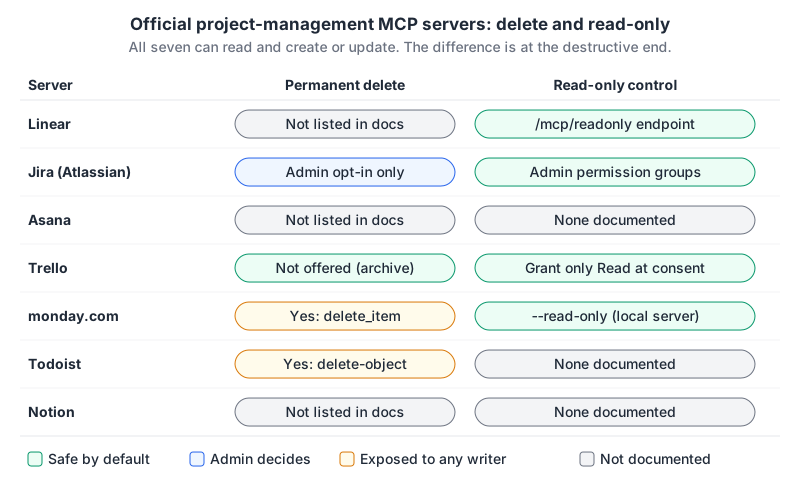
Two patterns stand out. Atlassian and Trello put the brakes on the server side: delete is off by default or not offered. monday.com and Todoist expose deletes to any token that can write, so the protection has to come from you.
Write-safety rules I'd actually follow
- Use the read-only path for exploration. Linear's
/mcp/readonly, Trello with only Read granted, monday's--read-only. Add a second, write-capable connection only when you need it, and give it a different name so you can see which one the agent picked. - Prefer OAuth to personal tokens. OAuth grants can be revoked per client and, on Linear and Trello, scoped down at consent. A pasted personal token usually inherits everything you can see. Our explainer on OAuth for remote MCP servers covers how the flow works.
- Keep per-call approval on for writes. Bulk operations are where a model's interpretation of "stale" and yours diverge.
- Ticket text is untrusted input. Anyone who can file an issue can put instructions in it, and the agent will read them. The tool poisoning and prompt injection post explains why a read-and-write session over public issues is the risky combination.
- Ask your admin about org controls. Atlassian, Trello and Asana Enterprise+ let admins block clients or permission groups centrally, which beats relying on every developer's local config.
If you only set up one thing, make it the read-only connection. Most of the value of a tracker in an agent's context comes from reading it.
Written by AIDToolStack Editorial
Researched from official documentation, specifications and vendor pages, listed under Sources below. Last checked November 2026.
Sources
- linear.app/docs/mcp
- github.com/jerhadf/linear-mcp-server
- github.com/atlassian/atlassian-mcp-server
- github.com/sooperset/mcp-atlassian
- mcp-atlassian.soomiles.com/docs/configuration
- developers.asana.com/docs/using-asanas-mcp-server
- github.com/roychri/mcp-server-asana
- github.com/atlassian/trello-mcp-server
- github.com/mondaycom/mcp
- github.com/Doist/todoist-ai
- github.com/makenotion/notion-mcp-server
- developers.notion.com/guides/mcp/get-started-with-mcp
- github.com/Doist/todoist-mcp
Related Posts
Explore on AIDToolStack
Discover tools and servers featured in our directory.
AI Tools
MCP Servers
Sponsor Our Newsletter
Reach thousands of developers who are actively evaluating AI tools, MCP servers, and dev infrastructure. Our weekly newsletter goes to engaged technical decision-makers.
All sponsored content is clearly labeled per our editorial policy.