
Embeddings Explained for Developers: Similarity, Dimensions and Choosing a Model
A user types "how do I stop being charged" into your help-centre search. The article that answers it is titled "Cancelling your subscription". Keyword search finds nothing, because the two strings share no words. That gap is the whole reason embeddings exist.
An embedding model turns a piece of text into a fixed-length list of numbers, chosen so that texts with similar meaning end up close together. Once your articles and the user's query are both lists of numbers, "find the relevant article" becomes "find the nearest vectors", which is arithmetic a database can do quickly. This post covers what you need to use them well: how closeness is measured, why queries and documents get treated differently, what the dimension count actually buys you, and how the main hosted models compare as of November 2026.
What you get back from the API
Here's the smallest useful call, from OpenAI's embeddings guide:
from openai import OpenAI

client = OpenAI()
resp = client.embeddings.create(
    model="text-embedding-3-small",
    input=["Cancelling your subscription", "how do I stop being charged"],
)
doc_vec, query_vec = (d.embedding for d in resp.data)
print(len(doc_vec))  # 1536
Each vector is 1,536 floats for that model, and every input produces the same length no matter how long the text is (up to the model's input limit, 8,192 tokens for OpenAI's v3 models). One sentence and a two-page article both become 1,536 numbers. That's worth sitting with for a second: a long document gets squeezed into the same space as a short one, which is why you embed chunks, not whole manuals. The RAG pipeline walkthrough goes through chunking in detail.
The individual numbers mean nothing on their own. Dimension 417 isn't "about billing". Only the relationships between vectors carry information, and only between vectors produced by the same model with the same settings.
Measuring "close": cosine, dot product and Euclidean distance
There are three common ways to compare two vectors:
- Cosine similarity is the cosine of the angle between them. 1 means they point the same way, 0 means unrelated, negative means opposite. It ignores length.
- Dot product multiplies matching components and sums them. It's cosine similarity scaled by both vectors' lengths.
- Euclidean (L2) distance is the straight-line distance between the two points. Smaller is closer.
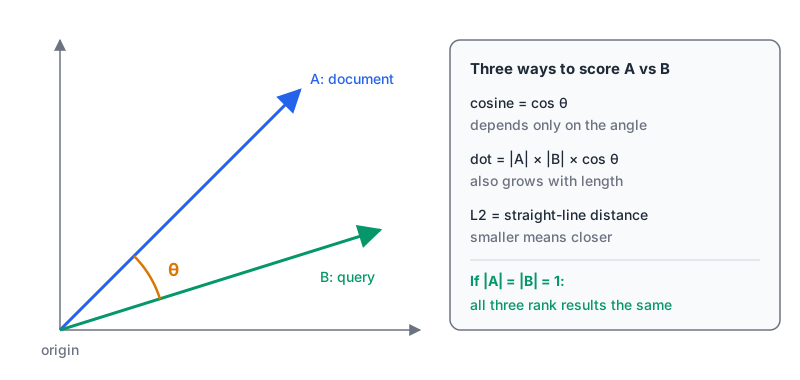
The detail that saves you thinking: most hosted models return vectors already scaled to length 1. OpenAI's guide says its embeddings are normalized, so cosine similarity equals the dot product and cosine and Euclidean distance produce identical rankings. Anthropic's embeddings page says the same of Voyage's vectors. So for normalized vectors, pick whichever is fastest in your store and move on.
import numpy as np

a, b = np.array(doc_vec), np.array(query_vec)
cosine = a @ b / (np.linalg.norm(a) * np.linalg.norm(b))
dot = a @ b          # same number, because both norms are ~1.0
print(round(cosine, 4), round(dot, 4))
If you want to poke at the maths with small hand-made vectors, our vector similarity calculator computes cosine similarity, dot product and Euclidean distance for vectors you paste in.
In Postgres with pgvector, the README gives you <=> for cosine distance, <-> for L2 and <#> for negative inner product (negative because Postgres index scans only run in ascending order). It recommends inner product for normalized vectors, since it's the cheapest. Just remember to flip the sign if you display the score.
One thing no similarity function fixes: scores aren't calibrated across models. A cosine of 0.6 might be a strong match from one model and noise from another, so don't hard-code thresholds you copied from somebody's blog. Look at your own score distribution first.
Queries and documents aren't the same kind of text
A search query is short and phrased as a question. The passage that answers it is long and phrased as a statement. Several models handle that asymmetry by letting you say which one you're embedding, and getting it wrong quietly costs you recall.
- Voyage takes
input_type="query"or"document". Per its docs, that prepends a fixed prompt, such as "Represent the query for retrieving supporting documents: ", before embedding. Anthropic's page goes further and tells you not to omit it for retrieval. - Gemini:
gemini-embedding-001takes atask_typesuch asRETRIEVAL_QUERYorRETRIEVAL_DOCUMENT. The newergemini-embedding-2drops that parameter. According to Google's embeddings guide, you write the task into the text instead:task: search result | query: {content}for queries andtitle: {title} | text: {content}for documents. - Open models often do the same thing with instructions. The Qwen3-Embedding-0.6B card has queries use
Instruct: {task}\nQuery:{query}while documents get no instruction. - OpenAI's v3 models document no query/document distinction. You embed both the same way.
The bug to watch for is ingesting with one convention and querying with another, say, a script that embedded documents with Gemini's document prefix and an API route that sends raw query text. Nothing errors. Results just get a bit worse, and nobody notices until someone measures.
Dimensions: what the number buys you
More dimensions can hold finer distinctions, and they cost you storage, memory and query time in direct proportion. The arithmetic is plain: a float32 is 4 bytes, so one 1,536-dimension vector is 6,144 bytes, and a million of them is about 6.1 GB before any index overhead. At 3,072 dimensions it's double. Our embedding dimension calculator does this for other sizes and formats.
Until a few years ago, the dimension was fixed by the model. Now most hosted models let you ask for fewer, thanks to a training approach called Matryoshka Representation Learning (Kusupati et al., 2022). The idea is to train the model so the first dimensions carry the coarse meaning and later ones add detail, so a prefix of the vector is still a usable embedding. The paper's headline result was embeddings up to 14 times smaller at the same accuracy on ImageNet-1K classification. That's an image benchmark, so treat it as proof the idea works rather than a promise for your text search.
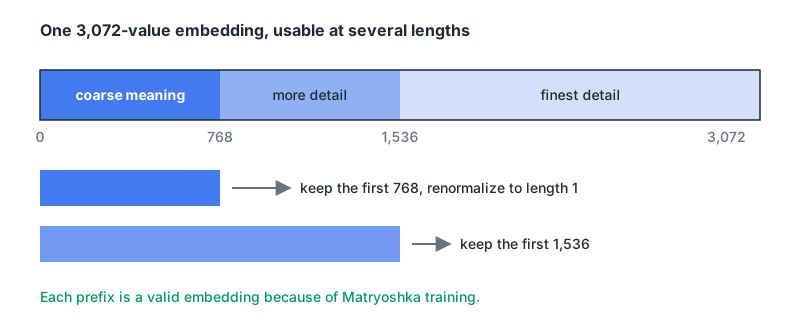
How each provider exposes it:
- OpenAI: the
dimensionsparameter. The guide says atext-embedding-3-largevector cut to 256 dimensions still beattext-embedding-ada-002at 1,536 on the MTEB benchmark. If you shorten vectors yourself, renormalize them. - Gemini:
output_dimensionalityfrom 128 to 3,072, with 768, 1,536 and 3,072 recommended.gemini-embedding-2normalizes truncated outputs for you;gemini-embedding-001only normalizes at 3,072, so you must normalize anything shorter yourself. - Voyage:
output_dimensionof 256, 512, 1,024 or 2,048 on the 4-series. It also offersoutput_dtypevalues ofint8andbinary, which Anthropic's page says cut storage by 4x and 32x.
Manual truncation, for vectors you've already stored, looks like this:
def shorten(vec, dims):
    v = np.asarray(vec[:dims], dtype=np.float32)
    n = np.linalg.norm(v)
    return v / n if n else v
Dimensions also run into database limits. pgvector indexes vector columns up to 2,000 dimensions and halfvec up to 4,000, so a 3,072-dimension Gemini or text-embedding-3-large vector needs either halfvec or a smaller requested size. The vector database comparison covers how that and per-dimension pricing play out in each store.
My default: start at 1,024 or 1,536, measure retrieval on your own queries, then try half that. If recall doesn't move, take the smaller vectors and the cheaper index.
Picking a model
Here's what the main hosted options look like, from each provider's docs and pricing pages on 7 November 2026. Prices are per million input tokens.
| Model | Default dims | Can shorten to | Max input | Price |
|---|---|---|---|---|
OpenAI text-embedding-3-small | 1,536 | fewer, via dimensions | 8,192 tokens | $0.02 |
OpenAI text-embedding-3-large | 3,072 | fewer, via dimensions | 8,192 tokens | $0.13 |
Google gemini-embedding-2 | 3,072 | 128 to 3,072 | 8,192 tokens, multimodal | $0.20 (text) |
Google gemini-embedding-001 | 3,072 | 128 to 3,072 | 2,048 tokens | $0.15 |
Voyage voyage-4-lite | 1,024 | 256, 512, 2,048 | 32,000 tokens | $0.02 |
Voyage voyage-4 | 1,024 | 256, 512, 2,048 | 32,000 tokens | $0.06 |
Voyage voyage-4-large | 1,024 | 256, 512, 2,048 | 32,000 tokens | $0.12 |
Voyage voyage-code-4 | 1,024 | 256, 512, 2,048 | 32,000 tokens | $0.12 |
Sources: OpenAI pricing, Gemini pricing, Voyage pricing. Google's batch API halves the Gemini prices, and Voyage includes 200 million free tokens per model.
A few things the table doesn't show:
- Anthropic doesn't make an embedding model. Its docs point you to Voyage AI, which is now "Voyage AI by MongoDB": new API keys are created in MongoDB Atlas and the HTTP endpoint is
ai.mongodb.com. gemini-embedding-2is multimodal. Text, images, audio, video and PDFs land in one vector space, which matters if you're searching screenshots or slides alongside docs.- Voyage has a code model.
voyage-code-4is aimed at code retrieval, worth testing if you're indexing a repository rather than prose. - OpenAI's v3 models are old. The guide says they lack knowledge of events after September 2021. That rarely matters for similarity, but new product names and jargon may embed less well.
- You can self-host. Qwen3-Embedding-0.6B is Apache 2.0, has a 32K context and lets you choose 32 to 1,024 dimensions. Voyage also publishes
voyage-4-nanoas open weights.
Don't pick from a leaderboard alone. Public benchmarks average over dozens of tasks that probably don't look like your data. Take 50 real queries with known answers, embed your corpus with two or three candidates, and compare recall at 5 or 10. It's an afternoon of work and it settles the question.
One model per index, forever (or until you re-embed)
Vectors from different models aren't comparable, even at the same dimension. Google's guide says plainly that gemini-embedding-001 and gemini-embedding-2 spaces are incompatible, so upgrading means re-embedding everything. The same is true of switching providers, changing the requested dimension, or changing the query prefix convention.
There's one documented exception worth knowing: Voyage says all its 4-series embeddings are compatible with each other, so you could embed documents with voyage-4-large and queries with the cheaper voyage-4-lite. Test it on your own data before relying on it.
Store the recipe next to every vector, so a future you can tell what's in the index:
ALTER TABLE chunks
  ADD COLUMN embed_model text NOT NULL DEFAULT 'text-embedding-3-small',
  ADD COLUMN embed_dims  int  NOT NULL DEFAULT 1536;
Before you embed a million chunks
- Run 50 real queries against two or three models and compare recall. Keep the script.
- Decide on the query/document convention (
input_type, task prefix or instruction) and put it in one shared function used by both ingest and search. - Request the smallest dimension that holds recall, and check it fits your index limits.
- Confirm whether vectors come back normalized. If you truncate, renormalize.
- Record model, dimension and prefix convention with the data.
- Pair vectors with keyword search for exact strings like error codes. RAG for developer documentation explains why hybrid search wins there.
Written by AIDToolStack Editorial
Researched from official documentation, specifications and vendor pages, listed under Sources below. Last checked November 2026.
Sources
- developers.openai.com/api/docs/guides/embeddings
- platform.claude.com/docs/en/build-with-claude/embeddings
- github.com/pgvector/pgvector
- docs.voyageai.com/docs/embeddings
- aistudio.google.com/docs/embeddings
- huggingface.co/Qwen/Qwen3-Embedding-0.6B
- arxiv.org/abs/2205.13147
- developers.openai.com/api/docs/pricing
- aistudio.google.com/docs/pricing
- www.mongodb.com/docs/voyageai/management/billing/
Related Posts
Explore on AIDToolStack
Discover tools and servers featured in our directory.
AI Tools
MCP Servers
Sponsor Our Newsletter
Reach thousands of developers who are actively evaluating AI tools, MCP servers, and dev infrastructure. Our weekly newsletter goes to engaged technical decision-makers.
All sponsored content is clearly labeled per our editorial policy.