
Building a RAG Pipeline Step by Step: Chunking, Embeddings, pgvector, Reranking and Evals
Most RAG tutorials end the moment the model says something plausible. That's the easy part. The hard part starts a week later when an answer is wrong and you can't tell whether the chunker split the wrong place, the embedding missed, the right chunk was retrieved at rank 31, or the model ignored it.
So this walkthrough builds a small pipeline where every stage is a plain function you can swap and measure: Markdown docs in, cited answers out, and a retrieval score you can rerun after each change. It's Python, about 120 lines, with maintained libraries at the versions on PyPI as of November 2026.
What we're building
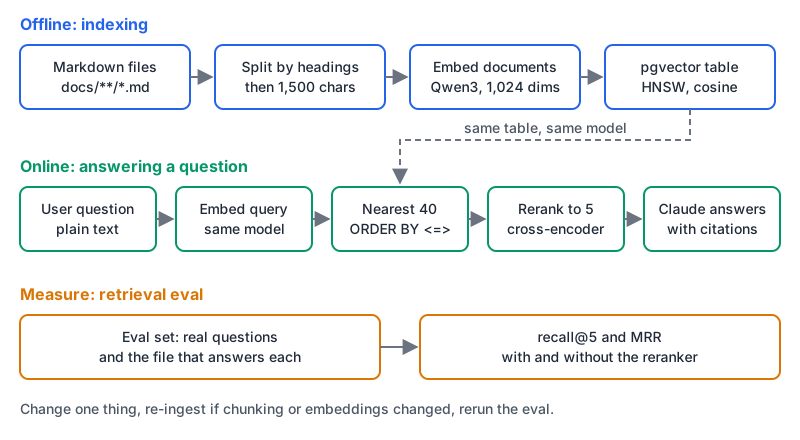
| Stage | Library | Why this one |
|---|---|---|
| Chunking | langchain-text-splitters 1.1.3 | MIT, installs without the main langchain package |
| Embeddings | sentence-transformers 6.2.0 + Qwen3-Embedding-0.6B | Runs locally, Apache 2.0 model |
| Storage | Postgres + pgvector 0.8.7, pgvector 0.5.1 for Python | One database you probably already run |
| Reranking | cross-encoder/ms-marco-MiniLM-L6-v2 | Small, Apache 2.0 |
| Generation | anthropic SDK, claude-sonnet-5-5 | Any chat model works here |
None of these choices is sacred. If you'd rather use a hosted vector store, our Pinecone vs Qdrant comparison covers the trade-offs, and the same functions work with a different client inside.
Step 1: Postgres with pgvector
The pgvector README publishes Docker images tagged by extension and Postgres version:
docker run -d --name ragdb -p 5432:5432 \
  -e POSTGRES_PASSWORD=postgres \
  pgvector/pgvector:0.8.7-pg18

pip install langchain-text-splitters sentence-transformers \
  "psycopg[binary]" pgvector anthropic
Step 2: split the documents
Chunking decides what the retriever can ever find. A chunk that mixes two topics matches neither well; a chunk cut mid-explanation matches but can't answer.
For Markdown, split on headings first so each chunk belongs to one section, then cap the size. The LangChain splitter docs show exactly this pairing, and their troubleshooting note matters: use split_documents on the header splits, not split_text, "so that overlap is applied within each section."
from pathlib import Path
from langchain_text_splitters import (
    MarkdownHeaderTextSplitter,
    RecursiveCharacterTextSplitter,
)

by_heading = MarkdownHeaderTextSplitter([("#", "h1"), ("##", "h2"), ("###", "h3")])
by_size = RecursiveCharacterTextSplitter(chunk_size=1500, chunk_overlap=150)

def chunks_for(path: Path):
    sections = by_heading.split_text(path.read_text())
    for doc in by_size.split_documents(sections):
        crumb = " > ".join(doc.metadata[k] for k in ("h1", "h2", "h3") if k in doc.metadata)
        yield {"source": str(path), "heading": crumb, "body": doc.page_content}
Two details. chunk_size here counts characters, not tokens; the docs show from_tiktoken_encoder if you want token-based sizes. And by default the header splitter strips the headings out of the chunk text, which is why we keep them as a breadcrumb in metadata and put them back at embed time. Our RAG chunk size calculator helps you see how size, overlap and top-k add up against a context window.
Step 3: embed
The Qwen3-Embedding-0.6B model card lists an Apache 2.0 licence, a 32K context, and output dimensions you can set anywhere from 32 to 1,024. It's instruction-aware: queries get a one-line task instruction, documents don't, and the card says instructions typically improve results by 1% to 5%. Sentence Transformers handles that split for you with encode_query and encode_document, as its quickstart shows.
from sentence_transformers import SentenceTransformer

embedder = SentenceTransformer("Qwen/Qwen3-Embedding-0.6B")

def embed_docs(rows):
    texts = [f"{r['heading']}\n\n{r['body']}" for r in rows]
    return embedder.encode_document(texts, batch_size=32)

def embed_query(question: str):
    return embedder.encode_query(question)
1,024 dimensions also sits under pgvector's 2,000-dimension limit for indexed vector columns. If you swap in OpenAI's text-embedding-3-small, the embeddings guide gives 1,536 by default, which also fits.
The rule that bites people: documents and queries must use the same model and dimension setting, forever. Store the model name somewhere. Changing it means re-embedding everything.
Step 4: store and index
From the pgvector-python README: enable the extension, then register_vector on the connection so Psycopg 3 knows the type.
import psycopg
from pgvector import Vector
from pgvector.psycopg import register_vector

conn = psycopg.connect("postgresql://postgres:postgres@localhost:5432/postgres", autocommit=True)
conn.execute("CREATE EXTENSION IF NOT EXISTS vector")
register_vector(conn)

conn.execute("""
  CREATE TABLE IF NOT EXISTS chunks (
    id        bigserial PRIMARY KEY,
    source    text NOT NULL,
    heading   text,
    body      text NOT NULL,
    embedding vector(1024) NOT NULL
  )""")
conn.execute("CREATE INDEX IF NOT EXISTS chunks_hnsw ON chunks USING hnsw (embedding vector_cosine_ops)")

def ingest(folder="docs"):
    rows = [c for p in Path(folder).rglob("*.md") for c in chunks_for(p)]
    vectors = embed_docs(rows)
    with conn.cursor() as cur:
        cur.executemany(
            "INSERT INTO chunks (source, heading, body, embedding) VALUES (%s, %s, %s, %s)",
            [(r["source"], r["heading"], r["body"], Vector(v)) for r, v in zip(rows, vectors)],
        )
The index uses vector_cosine_ops, so queries must sort with <=>, the cosine distance operator. The README says to "add an index for each distance function you want to use": a query with a different operator won't use this index, and you get no error, just a slower scan.
Step 5: retrieve wide, then rerank narrow
The embedding model compares a query vector against document vectors that were computed separately. That's what makes it fast, and also why it's a bit blunt. A cross-encoder reads the question and a candidate together and scores the pair, which is more accurate and far too slow to run over every chunk. So you do both: pull 40 candidates by vector distance, rerank them, keep 5.
from sentence_transformers import CrossEncoder

reranker = CrossEncoder("cross-encoder/ms-marco-MiniLM-L6-v2")

def retrieve(question: str, k: int = 40):
    conn.execute("SET hnsw.ef_search = 100")
    return conn.execute(
        "SELECT id, source, heading, body FROM chunks "
        "ORDER BY embedding <=> %s LIMIT %s",
        (Vector(embed_query(question)), k),
    ).fetchall()

def rerank(question: str, rows, n: int = 5):
    scores = reranker.predict([(question, f"{r[2]}\n\n{r[3]}") for r in rows])
    ranked = sorted(zip(scores, rows), key=lambda pair: pair[0], reverse=True)
    return [row for _, row in ranked[:n]]
hnsw.ef_search defaults to 40, and the pgvector README notes that results are limited by that candidate list, so with LIMIT 40 you want it comfortably above 40. The reranker's model card says it was trained on the MS MARCO passage ranking task. If your docs aren't in English, test it (or a multilingual reranker) with the eval in step 7 before trusting it.
If your users type error codes and function names, add keyword search next to the vector query and fuse the two lists. Our RAG for developer documentation post covers hybrid search and reciprocal rank fusion, so I won't repeat it here.
Step 6: generate with citations
Number each chunk, tell the model to answer only from them, and require citations. Pull the text blocks out explicitly: current Claude models use adaptive thinking (per the models overview), so the first content block isn't guaranteed to be the answer.
import anthropic

client = anthropic.Anthropic()

SYSTEM = ("Answer only from the documents provided. Cite document ids like [2] "
          "after each claim. If the documents don't contain the answer, say so.")

def answer(question: str) -> str:
    top = rerank(question, retrieve(question))
    context = "\n\n".join(
        f'<doc id="{i}" source="{r[1]}">\n{r[2]}\n\n{r[3]}\n</doc>'
        for i, r in enumerate(top, start=1)
    )
    msg = client.messages.create(
        model="claude-sonnet-5-5",
        max_tokens=1024,
        system=SYSTEM,
        messages=[{"role": "user", "content": f"{context}\n\nQuestion: {question}"}],
    )
    return "".join(b.text for b in msg.content if b.type == "text")
Map the cited ids back to source and heading and render them as links. Then check that every cited id was one you actually sent. If you'd rather run generation locally too, our post on running local LLMs covers Ollama and friends; only answer() changes.
Step 7: measure retrieval before you touch anything else
Write 50 or so real questions (from support tickets, search logs, chat) and the file that answers each one. Then score retrieval alone:
import json

def evaluate(path="eval.jsonl", k=5, use_reranker=True):
    hits = rr = n = 0
    for line in open(path):
        case = json.loads(line)  # {"question": "...", "source": "docs/billing/refunds.md"}
        rows = retrieve(case["question"])
        top = rerank(case["question"], rows, k) if use_reranker else rows[:k]
        sources = [r[1] for r in top]
        n += 1
        if case["source"] in sources:
            hits += 1
            rr += 1 / (sources.index(case["source"]) + 1)
    print(f"recall@{k} {hits / n:.2f}   MRR {rr / n:.2f}   n={n}")

evaluate(use_reranker=False)
evaluate(use_reranker=True)
Recall@5 asks "was the right document in the five chunks the model saw?" MRR asks "how high up was it?" Running it with and without the reranker tells you whether the reranker earns its latency on your data, rather than taking anyone's word for it.
Read the numbers this way:
- Recall is low. No prompt will save you. Look at chunking (are answers split across chunks?), the embedding model, and whether keyword search would catch the misses.
- Recall is high but answers are wrong. Retrieval works; fix the prompt or the model.
- Recall moves a lot when you change
k. The right chunk is being found but ranked low, which is exactly what the reranker is for.
Once retrieval is solid, score the answers too. Ragas has faithfulness and context-recall metrics for that.
When to reach for a framework instead
Everything above is plain functions on purpose. Frameworks bundle the same stages behind loaders, retrievers and query engines, which saves code once you need many sources or connectors. LlamaIndex leans toward indexing and retrieval; LangChain toward composing agents and tools. Our LangChain vs LlamaIndex comparison goes into which fits where.
Whichever you pick, keep the eval script. A checklist for the next change you make:
- Change one thing (chunk size, overlap, model,
k, reranker). - Re-ingest if the change touches chunking or embeddings.
- Rerun
evaluate()with and without the reranker. - Keep the change only if recall or MRR went up.
Written by AIDToolStack Editorial
Researched from official documentation, specifications and vendor pages, listed under Sources below. Last checked November 2026.
Sources
- pypi.org/project/langchain-text-splitters/
- pypi.org/project/sentence-transformers/
- pypi.org/project/pgvector/
- docs.langchain.com/oss/python/integrations/splitters
- github.com/pgvector/pgvector
- docs.langchain.com/oss/python/integrations/splitters/markdown_header_metadata_splitter
- huggingface.co/Qwen/Qwen3-Embedding-0.6B
- sbert.net/docs/quickstart.html
- developers.openai.com/api/docs/guides/embeddings
- github.com/pgvector/pgvector-python
- huggingface.co/cross-encoder/ms-marco-MiniLM-L6-v2
- platform.claude.com/docs/en/about-claude/models/overview
- docs.ragas.io/en/stable/concepts/metrics/available_metrics/
Related Posts
Explore on AIDToolStack
Discover tools and servers featured in our directory.
AI Tools
MCP Servers
Sponsor Our Newsletter
Reach thousands of developers who are actively evaluating AI tools, MCP servers, and dev infrastructure. Our weekly newsletter goes to engaged technical decision-makers.
All sponsored content is clearly labeled per our editorial policy.