
Choosing a Vector Database: Pinecone, Qdrant, Weaviate, Chroma or pgvector
Your RAG prototype works. The embeddings sit in a NumPy array, cosine similarity runs in a loop, and the demo answers questions about your docs. Then someone asks where the vectors will live in production, and every vendor page you open promises speed and scale. That tells you nothing.
The differences that actually decide this are narrower: who runs the thing, what happens when a query has a filter on it, whether keyword search comes built in, and what the bill is metered on. This post goes through those four for Pinecone, Qdrant, Weaviate, Chroma and pgvector, using their own docs and pricing pages as of November 2026.
Start with what you already run
If your app already has Postgres, try pgvector before anything else. One fewer system to run, back up and secure is worth a lot, and your vectors can join against the rows they describe.
The README (install instructions currently pin v0.8.7, for Postgres 13 and later) gives you a vector type, HNSW and IVFFlat indexes, and distance operators: <-> for L2, <#> for negative inner product, <=> for cosine distance. The limit people hit is dimensions. A vector column stores up to 16,000 dimensions, but HNSW and IVFFlat only index up to 2,000. halfvec indexes up to 4,000.
That matters more than it sounds. OpenAI's embeddings guide lists text-embedding-3-large at 3,072 dimensions by default, which is over the vector index limit. Either store it as halfvec, or ask the API for fewer dimensions with its dimensions parameter. text-embedding-3-small (1,536) fits as is.
CREATE EXTENSION IF NOT EXISTS vector;

CREATE TABLE chunks (
  id        bigserial PRIMARY KEY,
  tenant_id bigint NOT NULL,
  body      text NOT NULL,
  embedding vector(1536)
);

CREATE INDEX ON chunks USING hnsw (embedding vector_cosine_ops);

-- keep scanning the index until enough rows pass the filter
SET hnsw.iterative_scan = strict_order;

SELECT id, body
FROM chunks
WHERE tenant_id = 42
ORDER BY embedding <=> $1
LIMIT 10;
That SET line is there for a reason, which brings us to the part most comparisons skip.
Filtering is where they really differ
Nearly every real query has a filter: this tenant, this product version, documents the user is allowed to see. Approximate indexes like HNSW aren't built for that, and each database solves it differently.
The pgvector README is unusually honest about the naive approach. With approximate indexes, "filtering is applied after the index is scanned." Its example: if a condition matches 10% of rows, HNSW with the default ef_search of 40 returns about 4 rows on average. You asked for 10 and got 4, silently. Since 0.8.0, iterative index scans fix most of this: set hnsw.iterative_scan to strict_order or relaxed_order and the scan continues until it has enough matches or hits hnsw.max_scan_tuples.
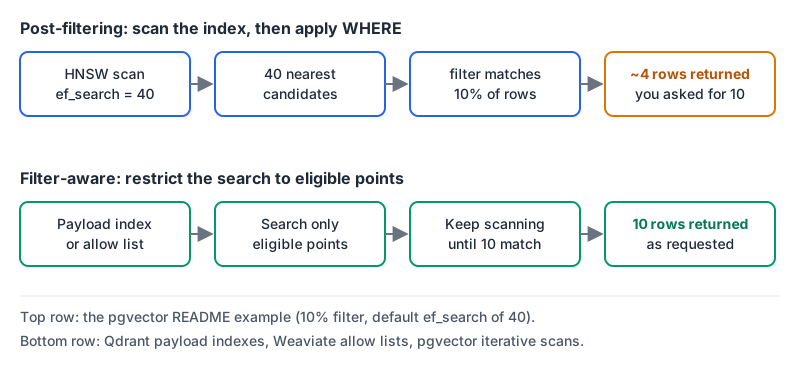
The dedicated databases push the filter into the search itself:
- Qdrant uses payload indexes, which you create per field and type (
keyword,integer,geo,textand so on). Its indexing docs say the HNSW graph gets extra filter-aware edges, but only if the payload indexes exist before the graph is built, and they also feed cardinality estimates to the query planner. The practical rule: create payload indexes before you ingest. - Weaviate pre-filters. Its filtering docs describe an inverted index that builds an allow list of eligible IDs, and the vector search only keeps candidates on it. Since v1.34 the default filter strategy is ACORN; v1.40 added another strategy, PathSeer, though
acornstays the default. When a filter is very restrictive (the cutoff is around 15% of the dataset), it falls back to brute force over the matching subset. - Pinecone documents metadata filters with
$eq,$ne, range operators,$in/$nin(up to 10,000 values),$exists, and$and/$or/$not. It doesn't describe the internals, so you test it rather than reason about it. - Chroma takes a
whereclause on metadata ($eq,$gt,$in,$containsand friends) and a separatewhere_documentfor substring matches on the text, per its filtering docs.
Here's the Qdrant version of "index the field you filter on," from its docs:
from qdrant_client import QdrantClient, models

client = QdrantClient(url="http://localhost:6333")

client.create_payload_index(
    collection_name="chunks",
    field_name="tenant_id",
    field_schema=models.PayloadSchemaType.KEYWORD,
)
If you run multi-tenant search with lots of small tenants, this section should weigh more than any benchmark chart. Test with your real filter selectivity: a 0.1% filter behaves nothing like a 50% one.
Keyword and hybrid search
Developers and support users search for exact strings: error codes, function names, SKUs. Embeddings are weak at that, which is why hybrid search exists. Our post on RAG for developer documentation goes through why and how to fuse the two result lists.
What each option gives you out of the box:
- Pinecone: its indexing overview says new indexes are now "document indexes," with a schema that can mix dense vectors, sparse vectors and full-text-searchable string fields. Legacy vector indexes keep working. Pinecone can also embed your text for you ("integrated embedding").
- Chroma: its introduction lists dense, sparse and hybrid search, plus metadata filtering.
- Weaviate: its hybrid search runs BM25 and vector search together, weighted by
alpha(1 is pure vector, 0 pure keyword), with relative score fusion as the default since v1.24. See Pinecone vs Weaviate for how that compares. - Qdrant: the Query API runs dense and sparse queries as
prefetchsteps and fuses them with RRF or DBSF, per its hybrid query docs. You produce the sparse vectors yourself or with an inference option. - pgvector: gives you
sparsevec(up to 16,000 non-zero elements, 1,000 for HNSW) next to Postgres's own full-text search. You write the fusion yourself, which is a dozen lines of SQL or Python.
What you pay for, and how it grows
The headline prices don't compare well because each vendor meters something different. Here's what the pricing pages said on 7 November 2026.
| Self-host | Free cloud tier | Paid entry | Metered on | |
|---|---|---|---|---|
| Pinecone | No (BYOC by quote) | 2 GB, 2M write units, 1M read units a month, AWS us-east-1 only | Builder $20/mo flat; Standard $50/mo minimum | Read units ($16 to $18 per million on Standard), write units, $0.33/GB-month storage |
| Qdrant | Yes, Apache 2.0 | 0.5 vCPU, 1 GB RAM, 4 GB disk, free forever | Standard, usage-based | Hourly vCPU, memory and storage |
| Weaviate | Yes, BSD-3 plus Weaviate License | 100,000 objects, 1 GB memory, 10 GB disk | Flex from $45/mo | Vector dimensions (from $0.00465 per million), storage, backups |
| Chroma | Yes, Apache 2.0 | Starter $0 plus usage, $5 credits a month | Team $250/mo with $100 credits | $2.50 per GiB written, $0.33/GiB-month stored, $0.0075 per TiB queried |
| pgvector | It's an extension | Whatever your Postgres host offers | Your Postgres bill | Your Postgres bill |
The metering shape tells you what to optimise:
- Pinecone charges per operation, so a read-heavy app with modest data pays mostly for queries. Model your queries per second before you model storage.
- Weaviate charges per stored dimension, so your embedding size is a direct cost lever. At the Flex "from" rate, a million 1,536-dimension vectors is 1,536 million dimensions, about $7 a month for that component, before storage and the $45 minimum. Halving dimensions halves it. Our embedding dimension calculator is handy for this kind of arithmetic.
- Qdrant Cloud charges for the machine, which is easy to predict and means an idle cluster still costs money.
- Chroma Cloud charges per byte written and scanned, which suits spiky or small workloads.
The Weaviate repo's LICENSE file says code is "variously licensed under the BSD-3-Clause License, or the Weaviate License," so read it if self-hosting under a specific licence matters to you. Qdrant and Chroma are Apache 2.0 per GitHub.
Running it, and letting agents at it
A few operational facts that tend to decide things late:
- Pinecone is a managed service; the pricing page lists bring-your-own-cloud only as "contact us." That's the point of it: no clusters to size. Namespaces partition an index, and every read and write targets exactly one, which maps neatly onto tenants or onto a throwaway namespace per CI run.
- Qdrant and Weaviate are open source, so you can run the same engine locally that you'll pay for in their cloud, which keeps tests honest.
- Chroma runs in-process (
chromadb.Client()in its getting-started guide), self-hosted, or on Chroma Cloud. The in-process mode is why it's the usual first pick for notebooks and prototypes. - pgvector inherits your Postgres backups, replicas and access control. It also shares your Postgres capacity, and the README warns that HNSW has slower builds and uses more memory than IVFFlat, so a big index build competes with your transactional load. Our Postgres tuning post covers the memory settings that matter.
If you want a coding agent to inspect or query the store directly, there are MCP servers for Qdrant, Pinecone, Weaviate and Chroma. Give them read-only credentials unless you really want an agent deleting collections.
A decision rule
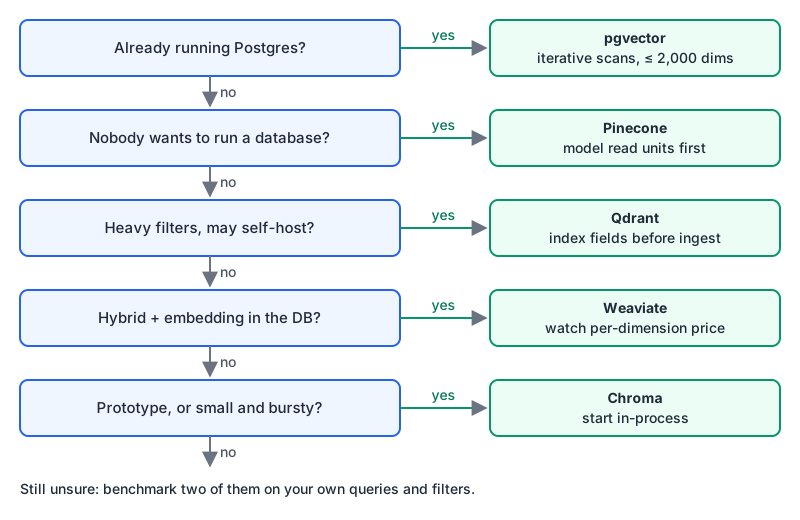
My default order:
- Already on Postgres? Use pgvector until it hurts. Turn on iterative scans, keep dimensions at or under 2,000 (or use
halfvec), and measure recall on filtered queries. - Nobody on the team wants to run a database? Pinecone. Model read units against your query volume first.
- Heavy filtering, multi-tenant, and you want the option to self-host? Qdrant, with payload indexes created before ingest.
- Want hybrid search and embedding handled inside the database? Weaviate (its free tier even includes 2,000 embedding requests a day), and size your dimensions with the per-dimension price in mind.
- Prototyping, or small and bursty? Chroma, in-process first.
Before you commit, run the same three checks on your shortlist: recall on your real queries with your real filters, p95 latency under your expected concurrency, and the monthly bill at ten times today's data. The Chroma vs Weaviate and Pinecone vs Qdrant comparisons are a good place to go next if you're down to two.
Written by AIDToolStack Editorial
Researched from official documentation, specifications and vendor pages, listed under Sources below. Last checked November 2026.
Sources
- github.com/qdrant/qdrant
- github.com/weaviate/weaviate
- github.com/weaviate/weaviate/blob/main/LICENSE
- github.com/chroma-core/chroma
- github.com/pgvector/pgvector
- developers.openai.com/api/docs/guides/embeddings
- qdrant.tech/documentation/concepts/indexing/
- docs.weaviate.io/weaviate/concepts/filtering
- docs.pinecone.io/guides/search/filter-by-metadata
- docs.trychroma.com/docs/querying-collections/metadata-filtering
- docs.pinecone.io/guides/index-data/indexing-overview
- docs.trychroma.com/docs/overview/introduction
- docs.weaviate.io/weaviate/search/hybrid
- qdrant.tech/documentation/concepts/hybrid-queries/
- www.pinecone.io/pricing/
- qdrant.tech/pricing/
- weaviate.io/pricing
- www.trychroma.com/pricing
- docs.trychroma.com/docs/overview/getting-started
Related Posts
Explore on AIDToolStack
Discover tools and servers featured in our directory.
AI Tools
MCP Servers
Sponsor Our Newsletter
Reach thousands of developers who are actively evaluating AI tools, MCP servers, and dev infrastructure. Our weekly newsletter goes to engaged technical decision-makers.
All sponsored content is clearly labeled per our editorial policy.