
Choosing an AI Agent Framework: LangGraph, CrewAI, OpenAI Agents SDK or Claude Agent SDK
Every agent framework's hello-world looks the same: define an agent, give it instructions, call run, print a haiku. You can't choose between them from that. The differences show up on day three, when the agent needs a human to approve a refund before it continues, or survive a deploy halfway through a task, or edit files in a repo without you writing the file tools yourself.
The useful question isn't "which is best." It's who owns the control flow: you, writing an explicit graph, or the model, running a loop with tools until it decides it's done. LangGraph, CrewAI, the OpenAI Agents SDK and the Claude Agent SDK sit at different points on that line.
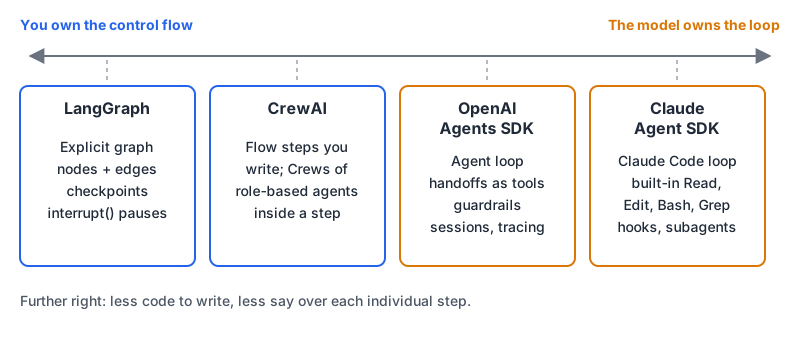
The four at a glance
Versions are from PyPI and npm on 7 November 2026; licences from each repo.
| LangGraph | CrewAI | OpenAI Agents SDK | Claude Agent SDK | |
|---|---|---|---|---|
| Python package | langgraph 1.2.20 | crewai 1.15.37 | openai-agents 0.24.0 | claude-agent-sdk 0.2.179 |
| JS/TS package | @langchain/langgraph 1.7.2 | none | @openai/agents 0.21.0 | @anthropic-ai/claude-agent-sdk 0.3.319 |
| Licence | MIT | MIT | MIT | Python repo MIT; use governed by Anthropic's Commercial Terms |
| Models | Whatever you call inside nodes | Per-agent llm; native SDKs plus LiteLLM | OpenAI by default; README says 100+ other LLMs | Claude only (API, Bedrock, Vertex, Foundry) |
| Core abstraction | State graph: nodes and edges | Flows that run Crews of role-based agents | Agents, handoffs, guardrails | Claude Code's agent loop and tools |
| State | Checkpointers per thread | Pydantic state on a Flow | Sessions | Sessions you can resume or fork |
| Paid platform | LangSmith Deployment | CrewAI AMP Suite | none required | none required |
Two things stand out. Both vendor SDKs are still 0.x, so pin exact versions and read changelogs before upgrading. And the Claude Agent SDK's licensing is unusual: the overview says use is governed by Anthropic's Commercial Terms "except to the extent a specific component or dependency is covered by a different license." The Python repo carries an MIT LICENSE file; the TypeScript repo's LICENSE.md points to the Commercial Terms instead.
LangGraph: you draw the graph
The LangGraph overview calls it a "low-level orchestration framework and runtime for long-running, stateful agents." You define a typed state, write nodes as functions, connect them with edges, and compile. Some nodes call a model; others are plain code. Its README says it's built by LangChain Inc. "but can be used without LangChain."
What you get for that extra wiring is durability. A checkpointer saves state after each step, keyed by a thread_id, and interrupt() pauses a run until you resume it (with a database-backed checkpointer, even from a different process):
from typing import TypedDict
from langgraph.graph import StateGraph, START, END
from langgraph.types import interrupt, Command
from langgraph.checkpoint.memory import InMemorySaver

class State(TypedDict):
    ticket: str
    draft: str
    approved: bool

def draft_reply(state: State):
    return {"draft": f"Re: {state['ticket']}"}  # call your model here

def human_review(state: State):
    return {"approved": interrupt({"draft": state["draft"]})}

builder = StateGraph(State)
builder.add_node("draft_reply", draft_reply)
builder.add_node("human_review", human_review)
builder.add_edge(START, "draft_reply")
builder.add_edge("draft_reply", "human_review")
builder.add_edge("human_review", END)
graph = builder.compile(checkpointer=InMemorySaver())

config = {"configurable": {"thread_id": "ticket-881"}}
graph.invoke({"ticket": "Refund for order 881"}, config)  # pauses at interrupt
graph.invoke(Command(resume=True), config)                # carries on
The persistence docs treat InMemorySaver as a development option and PostgresSaver as the production one (keep thread IDs under 255 characters). The value you pass to Command(resume=...) becomes the return value of interrupt(), per the interrupts docs.
Pick it when the workflow has steps you can name in advance and you need approvals, retries or resumption. Skip it if you just want a model with tools; LangChain's own docs point you to its higher-level agents for that. More detail on our LangGraph page.
CrewAI: roles, tasks, and a Flow around them
CrewAI's README describes "autonomous agent collaboration through Crews and precise, event-driven control through Flows." A Crew is a team of agents, each with a role, goal and backstory, working through Tasks in a Process. A Flow is ordinary Python with @start, @listen and @router decorators and typed state.
from crewai import Agent, Crew, Process, Task

analyst = Agent(
    role="Senior Market Analyst",
    goal="Conduct deep market analysis with expert insight",
    backstory="You're a veteran analyst known for identifying subtle market patterns",
)
analysis = Task(
    description="Analyze {sector} sector data for the past {timeframe}",
    expected_output="Detailed market analysis with confidence score",
    agent=analyst,
)
crew = Crew(agents=[analyst], tasks=[analysis], process=Process.sequential)
result = crew.kickoff(inputs={"sector": "tech", "timeframe": "1W"})
The introduction is direct about structure: start with a Flow for any production app, and use a Crew inside a Flow step when a task needs agents working autonomously. If you choose the hierarchical process instead of sequential, the crews docs say manager_llm is required.
It's Python only, and the current release declares Python 3.10 up to but not including 3.14 on PyPI, so check that against your runtime. Our LangGraph vs CrewAI comparison goes deeper on the two.
OpenAI Agents SDK: a small set of primitives
The Agents SDK docs keep the core list short: agents (an LLM with instructions and tools), agents as tools or handoffs, and guardrails, plus sessions, tracing, MCP tool calling and, more recently, sandbox agents that work against a container. It uses the Responses API by default for OpenAI models, and the README calls it provider-agnostic with support for "100+ other LLMs."
Multi-agent routing is handoffs. Per the handoffs docs, each handoff is exposed to the model as a tool named like transfer_to_refund_agent, and the receiving agent takes over the conversation:
from agents import Agent, Runner

billing_agent = Agent(name="Billing agent", instructions="Answer billing questions.")
refund_agent = Agent(name="Refund agent", instructions="Handle refund requests.")

triage_agent = Agent(
    name="Triage agent",
    instructions="Route the customer to the right specialist.",
    handoffs=[billing_agent, refund_agent],
)

result = Runner.run_sync(triage_agent, "I was charged twice for order 881.")
print(result.final_output)
If you want a specialist's answer without giving it the conversation, Agent.as_tool() is the alternative. This is the framework I'd pick for a customer-facing assistant with a few specialists and no long-running state, especially if you want tracing without adding a separate product.
Claude Agent SDK: Claude Code as a library
The overview puts it plainly: "a library that runs the Claude Code binary," with the same tools, agent loop and context management. You don't write file or shell tools; Read, Edit, Glob, Grep, Bash and WebSearch are built in, and you decide which ones run without asking. This is the quickstart example, trimmed:
import asyncio
from claude_agent_sdk import query, ClaudeAgentOptions, ResultMessage

async def main():
    async for message in query(
        prompt="Review utils.py for bugs that would cause crashes. Fix any issues you find.",
        options=ClaudeAgentOptions(
            allowed_tools=["Read", "Edit", "Glob"],
            permission_mode="acceptEdits",
        ),
    ):
        if isinstance(message, ResultMessage):
            print(f"Done: {message.subtype}")

asyncio.run(main())
On top of that you get hooks, subagents, MCP servers, permissions, resumable sessions, and the same .claude/ skills and memory files Claude Code loads. If you already use Claude Code, our Claude Code tips post covers those building blocks, and they carry over.
Constraints worth knowing before you build a product on it:
- Both SDKs bundle a native Claude Code binary; installs that skip npm optional dependencies, or pip installs that fall back to a source distribution, don't get one.
- Authentication is an API key or Bedrock, Claude Platform on AWS, Google Cloud or Microsoft Foundry credentials. The docs say third-party developers may not offer claude.ai login or rate limits in their products without prior approval.
- It's Claude only. If model portability is a requirement, this isn't your framework.
An agent with Bash and Edit is also an agent that can be talked into running something you didn't intend. Read our post on MCP tool poisoning and prompt injection before you hand it untrusted input.
How I'd choose
- The agent's job is mostly working on files, repos or a shell? Claude Agent SDK. Writing and sandboxing those tools yourself is a project of its own.
- You need durable runs, human approval steps or resumption after a crash? LangGraph, with a Postgres checkpointer.
- A few specialist agents routing a conversation, possibly across model providers? OpenAI Agents SDK.
- The problem decomposes into roles and tasks, and Python is fine? CrewAI, starting from a Flow.
These aren't exclusive. A LangGraph node can call a Claude Agent SDK session; a CrewAI Flow step can call anything. Whatever you shortlist, build the same two-step workflow (one tool call, one approval) in your top two and see which one you'd rather debug at 2am. The LangChain vs CrewAI comparison is a good next read if LangChain's higher-level agents are also in the running.
Written by AIDToolStack Editorial
Researched from official documentation, specifications and vendor pages, listed under Sources below. Last checked November 2026.
Sources
- github.com/langchain-ai/langgraph
- github.com/crewAIInc/crewAI
- github.com/openai/openai-agents-python
- github.com/anthropics/claude-agent-sdk-python
- github.com/anthropics/claude-agent-sdk-typescript
- docs.crewai.com/en/concepts/llms
- pypi.org/project/langgraph/
- pypi.org/project/crewai/
- pypi.org/project/openai-agents/
- pypi.org/project/claude-agent-sdk/
- www.npmjs.com/package/@anthropic-ai/claude-agent-sdk
- www.npmjs.com/package/@openai/agents
- www.npmjs.com/package/@langchain/langgraph
- code.claude.com/docs/en/agent-sdk/overview
- www.anthropic.com/legal/commercial-terms
- docs.langchain.com/oss/python/langgraph/overview
- docs.langchain.com/oss/python/langgraph/persistence
- docs.langchain.com/oss/python/langgraph/interrupts
- docs.crewai.com/en/introduction
- docs.crewai.com/en/concepts/crews
- openai.github.io/openai-agents-python/
- openai.github.io/openai-agents-python/handoffs/
- code.claude.com/docs/en/agent-sdk/quickstart
Related Posts
Explore on AIDToolStack
Discover tools and servers featured in our directory.
AI Tools
MCP Servers
Sponsor Our Newsletter
Reach thousands of developers who are actively evaluating AI tools, MCP servers, and dev infrastructure. Our weekly newsletter goes to engaged technical decision-makers.
All sponsored content is clearly labeled per our editorial policy.