
Mermaid Diagrams in Markdown: Syntax, Where They Render and the Mermaid 12 Changes
Someone draws the architecture in a diagramming app, exports a PNG and commits it. Six months later the services have moved, the PNG hasn't, and the source file is on a laptop that no longer exists. Mermaid fixes that particular failure: the diagram is text in a fenced code block, so it lives next to the code, shows up in diffs and gets reviewed like everything else.
The Markdown beyond the README post covers Mermaid as one of several GitHub extras. This is the practical follow-up: the syntax you'll actually write, where a mermaid block turns into a picture (and where it stays a code block), and the release that changed how existing diagrams look.
Where Mermaid stands in November 2026
The current release is mermaid 12.3.0, published on 3 November 2026 according to the npm registry. It added open-arrow and hollow-circle edge markers, BPMN shapes, and numbered flowchart steps with an optional animation that's hidden when the reader prefers reduced motion.
The release to know about is 12.0.0 from 10 September 2026, because its release notes change defaults rather than just adding features:
- ELK is now bundled and is the default layout for flowchart, state, class, ER, requirement and use-case diagrams. The notes say existing flowcharts, state and class diagrams "will re-lay out and recolour."
- The default theme and look changed to
redux-colorandneofor several diagram types. - It targets ES2024, Safari 17.4+ and Node.js 22.12+.
- The
defaultRendereroption is ignored now;layoutreplaces it.
The syntax reference sidebar lists 31 diagram types. The everyday ones are flowchart, sequence, class, state, entity relationship, Gantt and pie. Less familiar ones include Kanban, Packet, Treemap, Ishikawa and Event Modeling, and eight are flagged Beta: Swimlanes, Use Case, Architecture, Radar, Venn, Wardley, Cynefin and TreeView. I'd stay off the Beta ones for anything that has to render on a host you don't control.
Where a mermaid block actually renders
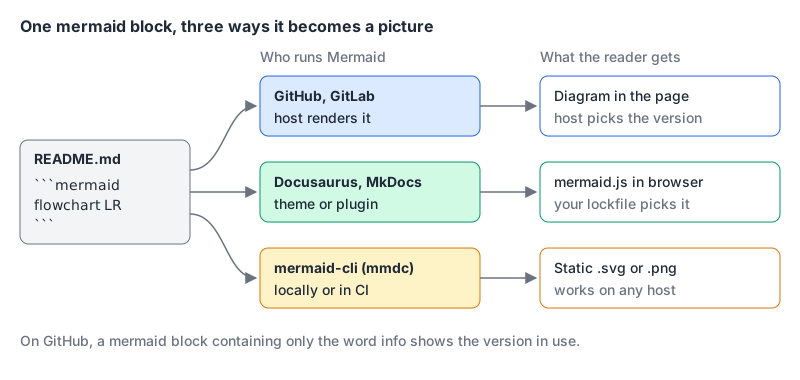
Text only becomes a picture if something runs Mermaid on it. There are three routes, and they differ mostly in who chooses the Mermaid version.
The host renders it
GitHub renders Mermaid in issues, discussions, pull requests, wikis and Markdown files. You don't choose the version. GitHub's tip for finding it: put the single word info inside a mermaid block and preview it. The same page warns that a third-party Mermaid plugin can cause errors on GitHub.
GitLab renders a mermaid block too, and its Markdown docs say it supports Mermaid version 12. Self-managed admins get one gotcha: if a Cross-Origin-Resource-Policy header is set to same-site or same-origin, diagrams "silently fail to render." The fix is cross-origin.
Your docs site renders it
Docusaurus needs the @docusaurus/theme-mermaid package plus two config keys:
// docusaurus.config.js
export default {
  markdown: { mermaid: true },
  themes: ['@docusaurus/theme-mermaid'],
  themeConfig: {
    mermaid: { theme: { light: 'neutral', dark: 'forest' } },
  },
};
One thing to check here. The Docusaurus page still describes dagre as the default layout and ELK as an optional @mermaid-js/layout-elk install. But the 3.10.2 theme package declares mermaid >=11.6.0 as its dependency (npm), a range that allows Mermaid 12, where ELK is built in and on by default. Run npm ls mermaid to see which major you actually got, and pin it if your diagrams' appearance matters.
Material for MkDocs uses a SuperFences custom fence (docs):
# mkdocs.yml
markdown_extensions:
  - pymdownx.superfences:
      custom_fences:
        - name: mermaid
          class: mermaid
          format: !!python/name:pymdownx.superfences.fence_code_format
Material restyles flowcharts, sequence, state, class and ER diagrams to match the site theme. Pie, Gantt, user journey, git graph and requirement diagrams render but aren't restyled, and the docs advise against them because they don't work well on mobile. That page now also points to Zensical as the team's "modern successor," so check that project before starting a new site. If you're still choosing a docs tool at all, Choosing a Docs Platform compares the main options.
You render it yourself
mermaid-cli (mmdc, version 12.2.0 on npm as of November 2026) turns a .mmd file into SVG or PNG. It can also rewrite a whole Markdown file, rendering each mermaid block to an SVG and swapping in an image link:
npx -p @mermaid-js/mermaid-cli mmdc -i architecture.mmd -o architecture.svg
npx -p @mermaid-js/mermaid-cli mmdc -i input.mmd -o output.png -t dark -b transparent
npx -p @mermaid-js/mermaid-cli mmdc -i README.template.md -o README.md
This is the route for anywhere that doesn't run Mermaid itself, and for freezing a diagram at a known version. The README also documents a Docker image, minlag/mermaid-cli, for CI runners where you'd rather not install it.
The syntax you'll write most
After any frontmatter, every diagram starts with a line declaring its type. Lines starting with %% are comments. Everything else depends on the type, but two types cover most engineering docs.
Flowcharts
flowchart LR
  accTitle: Deploy pipeline
  accDescr: A push to main runs tests, deploys to staging and, after approval, to production.
  push([Push to main]) --> test[Run tests]
  test -->|pass| staging[Deploy to staging]
  test -->|fail| fix[Fix and push again]
  staging --> approve{Approved?}
  approve -->|yes| prod[(Production)]
  approve -->|no| fix
The pieces, per the flowchart docs:
- Direction comes after
flowchart:TBorTD(top to bottom),BT,RL,LR. - Shapes come from the brackets:
id[text]is a rectangle,id(text)rounded,id{text}a rhombus,id((text))a circle. The example also uses a stadium([ ])and a cylinder[( )]. Since v11.3.0 you can name shapes instead:A@{ shape: cyl, label: "Orders DB" }. - Edges:
-->arrow,---plain line,-.->dotted,==>thick. Labels go in pipes (-->|pass|) or inline (-- pass -->). Links chain:A --> B --> C. - Subgraphs group nodes:
subgraph api [API tier]...end. - Quotes protect awkward characters:
id["Price (USD)"].
Sequence diagrams
These are the ones I reach for in API docs and design reviews, because they show who calls whom in what order, which prose is bad at.
sequenceDiagram
  autonumber
  participant B as Browser
  participant A as API
  participant P as Payments
  B->>A: POST /orders
  A->>P: charge(card, total)
  alt payment ok
    P-->>A: charge id
    A-->>B: 201 Created
  else card declined
    P-->>A: declined
    A-->>B: 402 Payment Required
  end
From the sequence diagram docs: ->> is a solid line with an arrowhead and -->> a dotted one, -x ends in a cross, and -) draws an open arrowhead for async messages. Append + or - to an arrow to activate or deactivate the receiver. alt/else/end, opt, loop and Note over A,B: text cover most of what you'll need, and autonumber numbers every message.
Accessibility in two lines
The accTitle and accDescr lines in the flowchart above aren't decoration. Per the accessibility docs, they become the SVG's <title> and <desc> elements, wired up with aria-labelledby and aria-describedby, and they work in every diagram type. For a longer description, use the block form accDescr { ... }. Without them, a screen reader has little to announce beyond the diagram type.
Gotchas that break diagrams
I checked every snippet in this post with Mermaid 12.3.0's mermaid.parse() in Node (with jsdom standing in for the DOM). I didn't render them, so anything about layout below comes from the docs.
- The word
end. The docs warn that a lowercaseendbreaks flowcharts and can break sequence diagrams, because it's the keyword that closes subgraphs and blocks. This is the real error fromflowchart LRfollowed bystart --> end:
   Parse error on line 2:
   ...hart LR  start --> end
   ----------------------^
   Expecting 'AMP', 'COLON', 'PIPE', 'TESTSTR', 'DOWN', 'DEFAULT', 'NUM', ... got 'end'
Write finish["end"], or capitalise it as End.
- Node IDs starting with
oorx. After a link, those letters become edge markers:A---oBdraws a circle-ended edge to a node calledB, not a line tooB. Add a space or capitalise.
- Frontmatter must start on line one. The syntax reference says the opening
---must be the only thing on the first line. It also warns that Mermaid silently ignores misspelled config keys while badly formed values break the whole diagram, so a typo inlayuotjust does nothing.
- Braces in comments. A
%%comment containing{}can be mistaken for a directive. Keep braces out of comments.
- Version drift. Whatever you preview with, whether the Mermaid Live Editor or a local install, may be newer than the host. A Beta diagram type or a 12.3 edge marker can work in your preview and fail on GitHub. Check with
infobefore relying on anything new.
- The Mermaid 12 re-layout. If a diagram you care about suddenly looks different after a host upgrade, pin the pre-12 behaviour in its frontmatter, as the release notes suggest:
   ---
   config:
     layout: dagre
     look: classic
     theme: default
   ---
   flowchart TD
     a[Request] --> b{Cached?}
     b -->|yes| c[Return cached]
     b -->|no| d[Fetch and store]
The layouts page confirms layout: elk now needs no setup in the main package; only the "tiny" build leaves ELK out and falls back to dagre.
When to use something else
Mermaid's strength is also its limit: you describe nodes and edges, and the layout engine decides where they go. That's what you want for diagrams that change with the code, like request flows, deploy pipelines, ER sketches and the context diagram in an architecture decision record. It's the wrong tool when placement carries meaning, such as a byte layout, a timeline drawn to scale, or a diagram meant to look identical everywhere. Those are better as a hand-written or exported SVG.
Size matters too. A 40-node flowchart is hard to read whoever lays it out. Split it by audience, the way Writing Developer Documentation suggests splitting docs by purpose.
Checklist before you commit a diagram
- Draft in the Live Editor, then check the target host's version with an
infoblock. - Add
accTitleandaccDescrto every diagram. - Quote any label containing
end, parentheses or other punctuation. - Pin
layout,lookandthemein frontmatter if the appearance matters across upgrades. - For hosts that can't render Mermaid, run
mmdcin CI and commit the SVG next to its.mmdsource. - Keep each diagram small enough to read on a phone.
Written by AIDToolStack Editorial
Researched from official documentation, specifications and vendor pages, listed under Sources below. Last checked November 2026.
Sources
- github.com/mermaid-js/mermaid/releases
- github.com/mermaid-js/mermaid/releases/tag/mermaid%4012.0.0
- registry.npmjs.org/mermaid
- mermaid.js.org/intro/
- mermaid.js.org/intro/syntax-reference.html
- mermaid.js.org/config/layouts.html
- mermaid.js.org/syntax/flowchart.html
- mermaid.js.org/syntax/sequenceDiagram.html
- mermaid.js.org/config/accessibility.html
- docs.github.com/en/get-started/writing-on-github/working-with-advanced-formatting/creating-diagrams
- docs.gitlab.com/user/markdown/
- docusaurus.io/docs/markdown-features/diagrams
- registry.npmjs.org/@docusaurus/theme-mermaid/3.10.2
- squidfunk.github.io/mkdocs-material/reference/diagrams/
- github.com/mermaid-js/mermaid-cli
- registry.npmjs.org/@mermaid-js/mermaid-cli
Related Posts
Explore on AIDToolStack
Discover tools and servers featured in our directory.
AI Tools
MCP Servers
Sponsor Our Newsletter
Reach thousands of developers who are actively evaluating AI tools, MCP servers, and dev infrastructure. Our weekly newsletter goes to engaged technical decision-makers.
All sponsored content is clearly labeled per our editorial policy.