
Choosing a Docs Platform: Mintlify, ReadMe, Docusaurus or Starlight
Docs platforms get chosen by whoever sets up the first page, and then nobody revisits the choice for years. That's a shame, because the right answer depends on things you can know on day one: who will edit the docs, whether an API reference is the main product, and if you would rather pay a vendor every month or own a static site in your repo.
This guide compares the four tools I'd shortlist in November 2026: two hosted platforms (Mintlify and ReadMe) and two open-source static site generators (Docusaurus and Starlight). Prices are from the vendors' pages as of November 2026.
The question that splits the field
Ask who will edit the docs most weeks.
If it's engineers, working in pull requests next to the code, a static site generator in the repo is the natural fit. Docs change in the same PR as the feature, CI can check links, and review happens where review already happens. If it's technical writers, support staff or product managers who don't live in Git, a hosted platform with a web editor removes a lot of friction.
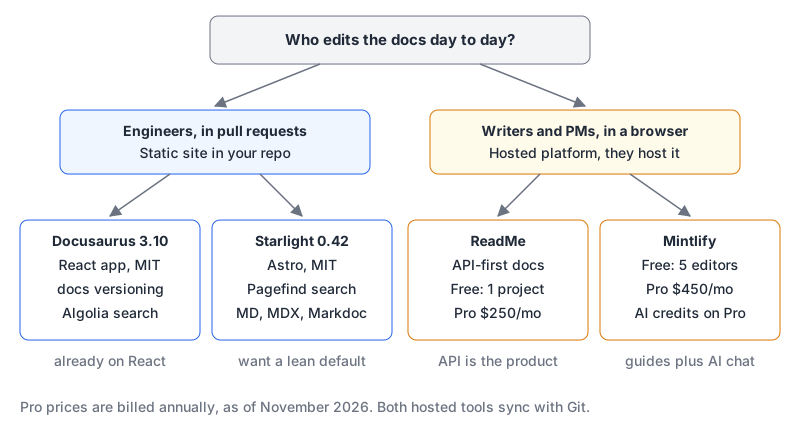
Both hosted tools sync with Git, so this isn't a hard wall. It's about where the default workflow lives. Our developer documentation writing guide covers the docs-as-code side (Diátaxis, Vale, CI checks) if you go that way.
Side by side
| Mintlify | ReadMe | Docusaurus | Starlight | |
|---|---|---|---|---|
| Model | Hosted | Hosted | Open source, self-hosted | Open source, self-hosted |
| Licence | Commercial SaaS | Commercial SaaS | MIT | MIT |
| Free tier | Starter: 5 editor seats, custom domain | Starter: 1 project, 1 admin, custom domain | Free; you pay for hosting | Free; you pay for hosting |
| Paid entry | Pro $450/month annual, $540 monthly | Pro $250/month, billed annually | n/a | n/a |
| Built on | Their platform | Their platform | React | Astro |
| Search | Included on Starter | Not listed on pricing page | Algolia DocSearch officially supported | Pagefind by default |
| AI chat | Assistant on Pro, uses credits | Ask AI add-on, $150/month | Bring your own | Bring your own |
| Current version | n/a | n/a | 3.10.2 (July 2026) | 0.42.x (0.42.10, 6 November 2026) |
Sources: Mintlify pricing, ReadMe pricing, Docusaurus releases, Starlight releases. Licences are from the Docusaurus and Starlight repositories.
Mintlify: guides plus an AI layer, priced for companies
Mintlify's free Starter plan is more generous than people expect: five editor seats, a custom domain, the web editor, Git sync, search, an API playground and an MCP server for your docs. The jump to Pro is steep, at $450 a month billed annually or $540 billed monthly. Pro adds preview deployments, analytics, webhooks, password auth and the AI features.
Those AI features run on credits. Pro includes 10,000 credits a month, the assistant uses 25 credits per answer (free when it can't answer), and overage is $0.01 per credit. If nothing else spends credits, that's about 400 assistant answers a month before overage, so check your expected question volume against that before you promise "AI search" to support. We have a Mintlify tool page with more on the product.
ReadMe: when the API reference is the product
ReadMe is built around the interactive API reference. Even the free Starter plan includes a custom domain, the interactive reference, usage analytics, an LLMs.txt file and an MCP server, but only one project, one admin and one published version. Metrics only go back 7 days and request history 24 hours.
Pro is $250 a month on annual billing. It adds teammates (five admins, $20 for each extra), multiplayer editing, branching and reviews, unlimited published versions, private docs, custom MDX components and the changelog. The Ask AI chat is a $150-a-month add-on on either plan. If you want ReadMe's branding removed, the plan list puts that under Enterprise.
The single-version limit on Starter is the one that bites. The moment you ship v2 of an API and need v1 docs to stay up, you're on Pro. Our Mintlify vs ReadMe comparison puts the two hosted options next to each other in more detail.
Docusaurus: the React team's default
Docusaurus is a static site generator built on React; the docs describe a Docusaurus site as "a React app." It needs Node.js 20 or newer and starts with:
npx create-docusaurus@latest my-website classic --typescript(installation docs). The current line is 3.10. Version 3.10.0 in April 2026 made Docusaurus Faster stable, upgraded Rspack and added per-locale url and baseUrl options, and it has future.v4 flags so you can opt into v4 behaviour early. No v4 release is listed yet.
Its biggest built-in strength is docs versioning. One command snapshots the current docs:
npm run docusaurus docs:version 1.1.0That copies the whole docs/ folder into versioned_docs/version-1.1.0/, creates a versioned sidebar and appends to versions.json (versioning docs). The docs themselves warn against overdoing it: don't version for patch releases, try to keep fewer than 10 versions, and skip versioning entirely if your docs rarely change. Because each version is a full copy, a fix to old docs means editing the old copy.
Search is the other thing to plan. The search docs give first-class support only to Algolia DocSearch. Typesense and local search plugins exist but are community-maintained.
Starlight: Astro's docs theme, lighter by default
Starlight is a documentation theme on top of Astro. You start with:
npm create astro@latest -- --template starlightPages go in src/content/docs/ as Markdown, MDX or Markdoc (getting started). Search works with no configuration: Starlight uses Pagefind, so you build, deploy and the search bar works, and you can swap in Algolia DocSearch with the official plugin (site search guide). Since it's Astro, pages render to static HTML and you only ship JavaScript for interactive bits.
The 0.42 release in September 2026 focused on shipping less JavaScript by using the Popover API, plus performance and accessibility work (Starlight 0.42). Two things to keep in mind. Starlight is still versioned 0.x, so read the changelog on each minor release. And its fortunes are tied to Astro, whose company joined Cloudflare in January 2026 while staying MIT-licensed and platform-agnostic. For how Astro compares to a React meta-framework, see Astro vs Next.js.
What the hosted price actually buys
The licence for Docusaurus or Starlight is free. The site isn't. You'll own:
- Hosting. Any static host works. Static assets on Cloudflare Workers are free and unlimited, and Netlify and Vercel both have free tiers with limits (Vercel's Hobby tier is non-commercial only); our Vercel vs Netlify comparison covers those.
- Upgrades. Framework majors (Docusaurus v4 when it lands, every Starlight minor while it's 0.x).
- Search and analytics. An Algolia application, or Pagefind's static index, plus whatever analytics you add.
- Non-engineer editing. Someone has to teach writers Markdown and pull requests, or you add a Git-based CMS.
On the hosted side, a year of Mintlify Pro is $5,400 and a year of ReadMe Pro is $3,000 at list price. That buys the editor, the hosting, analytics and the AI layer, and it means nobody on your team maintains a docs build. For a company with paying API customers, that can be cheap. For an open-source library, it's usually the wrong spend.
If your docs are going to feed an AI assistant you build yourself, the format matters more than the platform. Our post on RAG for developer documentation covers chunking by headings and citing sources, and Markdown beyond the README covers the dialect differences between Docusaurus MDX and plain Markdown.
The decision rule
- Open-source project or engineer-maintained docs, React already in the stack? Docusaurus, especially if you need built-in versioning.
- Engineer-maintained docs and you want the leanest output with zero-config search? Starlight, accepting 0.x churn.
- The API is the product and customers try calls from the docs? ReadMe. Budget for Pro as soon as you need a second published version.
- Product docs edited by non-engineers, with an AI assistant on the roadmap? Mintlify. Start on Starter, and move to Pro when you need previews, analytics or the assistant.
- Still torn? Port your five most-visited pages to the two finalists and let the people who'll edit them every week pick.
Written by AIDToolStack Editorial
Researched from official documentation, specifications and vendor pages, listed under Sources below. Last checked November 2026.
Sources
- www.mintlify.com/pricing
- readme.com/pricing
- github.com/facebook/docusaurus/releases
- github.com/withastro/starlight/releases
- github.com/facebook/docusaurus
- github.com/withastro/starlight
- docusaurus.io/docs/installation
- docusaurus.io/docs/versioning
- docusaurus.io/docs/search
- starlight.astro.build/getting-started/
- starlight.astro.build/guides/site-search/
- astro.build/blog/starlight-042/
- astro.build/blog/joining-cloudflare/
- docs.astro.build/en/concepts/islands/
Related Posts
Explore on AIDToolStack
Discover tools and servers featured in our directory.
AI Tools
MCP Servers
Sponsor Our Newsletter
Reach thousands of developers who are actively evaluating AI tools, MCP servers, and dev infrastructure. Our weekly newsletter goes to engaged technical decision-makers.
All sponsored content is clearly labeled per our editorial policy.