
MCP Servers for Vector Databases: Pinecone, Qdrant, Weaviate, Chroma and Milvus
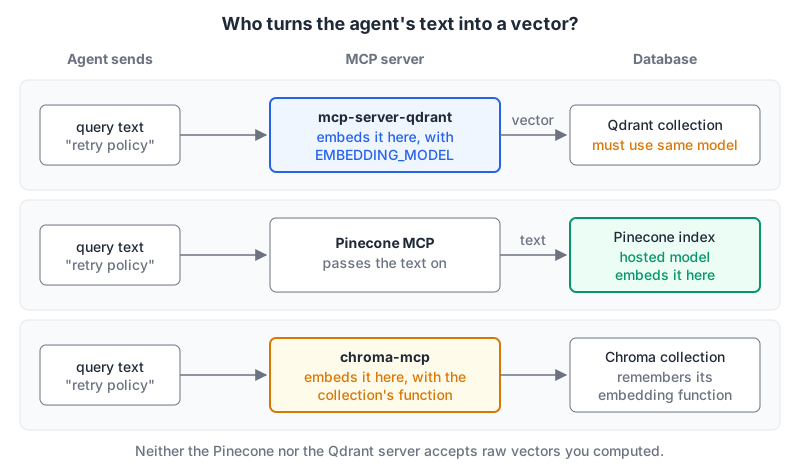
Here's a failure you'll hit within the first hour of wiring a vector database to an agent. You point an MCP server at the collection your RAG pipeline already fills, ask "what's our retry policy?", and get back confident nonsense or nothing at all. The server works fine. The problem is that it embedded your question with a different model than the one that built the collection, so the nearest neighbours are meaningless.
Vector database MCP servers differ less in what they can do than in two quieter details: who computes the query vector, and whether the agent can write. This roundup covers the official servers for Pinecone, Qdrant, Weaviate, Chroma and Milvus with those two questions up front. Versions and status are as of November 2026, checked against each repo and the vendor docs.
At a glance
| Database | Server | Transport | Auth | Embeds queries with | Write off switch |
|---|---|---|---|---|---|
| Pinecone | @pinecone-database/mcp | Local stdio | PINECONE_API_KEY | The index's hosted model | None in the server |
| Qdrant | mcp-server-qdrant | stdio, SSE, Streamable HTTP | QDRANT_API_KEY | Its own FastEmbed model | QDRANT_READ_ONLY=true |
| Weaviate | Built into Weaviate | Streamable HTTP at /v1/mcp | API key (Bearer) | Weaviate, via hybrid search | Write tool off by default |
| Chroma | chroma-mcp | Local stdio | Tenant + API key for Chroma Cloud | The collection's stored function | None documented |
| Milvus | mcp-server-milvus | stdio, SSE, Streamable HTTP | MILVUS_TOKEN | Raw vectors, or a Milvus 2.6+ embedding function | None documented |
Pinecone: a developer tool, not a RAG connector
The Pinecone Developer MCP Server (0.4.0 on npm, needs Node 22 or later) is aimed at coding assistants. It searches Pinecone's docs, lists and describes indexes, creates indexes, upserts and searches. The README's tool list now includes document-index tools (create-document-index, upsert-documents, search-document-index) alongside the older integrated-index ones like search-records and cascading-search.
The limitation that matters is spelled out in the README: integrated-embedding indexes and document indexes are supported, but "Assistants, standalone embeddings, and search with your own vectors are not supported." The Pinecone docs say the same thing another way: indexes built from external embedding models don't work. If your production index stores vectors you computed with your own model, this server can describe it but can't search it.
Without an API key it still searches the documentation, which is handy on its own. There's no read-only flag, so a key with full project access means the agent can create indexes and upsert data. If you want an agent to answer questions from a knowledge base, Pinecone points you at its separate Assistant MCP instead.
{
  "mcpServers": {
    "pinecone": {
      "command": "npx",
      "args": ["-y", "@pinecone-database/mcp"],
      "env": { "PINECONE_API_KEY": "<key>" }
    }
  }
}
Our page: Pinecone MCP server.
Qdrant: a memory layer with two tools
mcp-server-qdrant (v0.8.1) is deliberately small. It calls itself a semantic memory layer and exposes exactly two tools: qdrant-store and qdrant-find. Both take plain text. The server embeds it with FastEmbed, and the default EMBEDDING_MODEL is sentence-transformers/all-MiniLM-L6-v2.
That's the trap from the opening. It works well as the agent's own scratch memory, in a collection only this server writes to. Pointing it at a collection your pipeline built with a different model is the case where results go wrong. Either set EMBEDDING_MODEL to match (only FastEmbed is supported as a provider) or give the server its own collection.
Two settings worth knowing:
QDRANT_URL="http://localhost:6333" \
COLLECTION_NAME="agent-notes" \
QDRANT_READ_ONLY=true \
uvx mcp-server-qdrant --transport streamable-http
QDRANT_READ_ONLY removes qdrant-store, so the agent can only search. The --transport flag takes stdio (the default), sse or streamable-http; the README calls Streamable HTTP the newer of the two remote options. It binds to 127.0.0.1:8000 by default via FastMCP settings. You can also run against a local file with QDRANT_LOCAL_PATH, but not at the same time as QDRANT_URL.
If you're still choosing between the two databases rather than their servers, our Pinecone vs Qdrant comparison covers that. Our page: Qdrant MCP server.
Weaviate: now built into the database
This is the biggest change of the year. The standalone weaviate/mcp-server-weaviate repo now opens with "This standalone server is deprecated" and points to an MCP server inside Weaviate itself. The Weaviate docs mark it as added in v1.38 (the deprecation notice says a preview shipped from v1.37.1).
You enable it with an environment variable, and it serves Streamable HTTP on the REST port:
MCP_SERVER_ENABLED=true
MCP_SERVER_WRITE_ACCESS_ENABLED=false   # the default
# endpoint: http://localhost:8080/v1/mcp
There are four tools: weaviate-collections-get-config, weaviate-tenants-list, weaviate-query-hybrid and weaviate-objects-upsert. The upsert tool only appears when write access is enabled. On Weaviate Cloud the server is always on, and the switch is called "Enable MCP Read-Only".
The RBAC integration is the best of the bunch. Each tool needs an MCP permission plus the data permission underneath (read_mcp plus read_data for hybrid search, create_mcp and update_mcp plus the data equivalents for upsert), and the predefined viewer role already covers the read tools. One quirk from the docs: a permission failure comes back as HTTP 200 with isError: true, not a 403, so don't rely on status codes in a proxy.
Our Chroma vs Weaviate and Pinecone vs Weaviate comparisons cover the databases themselves. Our page: Weaviate MCP server.
Chroma: broad tools, quiet repo
chroma-mcp supports four client types (ephemeral, persistent, HTTP for self-hosted, and cloud) and 12 tools covering collection management and document CRUD, including chroma_delete_collection and chroma_delete_documents. I didn't find a read-only option in the README, so the agent gets delete by default.
Embedding is handled by the collection. You pick an embedding function (default, cohere, openai, jina, voyageai or roboflow) when the collection is created, and Chroma persists that choice, so later queries reuse it. The README notes that persistence arrived in Chroma 1.0, so collections created on 0.6.3 or earlier don't get it.
One caution: the last tagged release is v0.2.6 from August 2025, and the last push to the repo was September 2025. It works, but it isn't moving fast. For anything shared, I'd run it against a persistent or HTTP client with a separate, disposable dataset rather than your main Chroma instance.
Our page: ChromaDB MCP server.
Milvus: the most tools, run from source
Zilliz maintains mcp-server-milvus. The README runs it from a clone with uv run src/mcp_server_milvus/server.py --milvus-uri http://localhost:19530, adding --sse or --streamable-http for remote use (and --stateless with Streamable HTTP). Auth is MILVUS_TOKEN.
It has the widest tool set here: text, vector, hybrid and text-similarity search, filter queries, collection create/load/release, milvus_insert_data and milvus_delete_entities. It's also the only server here that takes a raw query vector: milvus_vector_search expects a vector parameter, which a chat model has no good way to produce by itself. The text route is milvus_text_similarity_search, which the README says needs Milvus 2.6.0 or later with an embedding function configured on the Milvus server. There's no read-only flag, so limit the token's privileges in Milvus. More on Milvus itself on our Milvus page.
Gotchas
- Model mismatch fails silently. A mismatched query vector still returns k results, just irrelevant ones. Test with a query whose answer you know before trusting the output.
- Delete is often on by default. Only Qdrant and Weaviate give you a server-level switch. For Pinecone, Chroma and Milvus, the key or token you hand over is the boundary.
- Retrieved chunks are untrusted text. Whatever sits in your vector store goes straight into the model's context. If the same session can write elsewhere, read our post on MCP tool poisoning and prompt injection.
- Remote transports need auth you add. Qdrant and Milvus can serve SSE or Streamable HTTP, but binding them beyond localhost is your call and your risk. Weaviate's built-in server reuses Weaviate's own API-key auth, which is one reason to prefer it.
Which one to set up
If you run Weaviate 1.38 or later, use the built-in server; it's the only one with per-tool RBAC. For agent memory that lives apart from your production data, mcp-server-qdrant with its own collection is the simplest thing that works, and QDRANT_READ_ONLY makes it safe to share. Use the Pinecone server for building and debugging integrated indexes in your editor, not for querying an index of your own vectors. For Chroma and Milvus, give the server a token that can't delete anything you'd miss. And if your vectors live in Postgres with pgvector, our MCP servers for databases roundup is the better starting point.
Written by AIDToolStack Editorial
Researched from official documentation, specifications and vendor pages, listed under Sources below. Last checked November 2026.
Sources
- github.com/pinecone-io/pinecone-mcp
- docs.pinecone.io/guides/operations/mcp-server
- registry.npmjs.org/@pinecone-database/mcp
- github.com/qdrant/mcp-server-qdrant
- github.com/qdrant/mcp-server-qdrant/releases
- github.com/weaviate/mcp-server-weaviate
- docs.weaviate.io/weaviate/configuration/mcp-server
- github.com/chroma-core/chroma-mcp
- github.com/chroma-core/chroma-mcp/releases
- github.com/zilliztech/mcp-server-milvus
Related Posts
Explore on AIDToolStack
Discover tools and servers featured in our directory.
AI Tools
MCP Servers
Sponsor Our Newsletter
Reach thousands of developers who are actively evaluating AI tools, MCP servers, and dev infrastructure. Our weekly newsletter goes to engaged technical decision-makers.
All sponsored content is clearly labeled per our editorial policy.