
MCP servers for Slack, Discord, Teams, Telegram and WhatsApp
Reading chat is where an agent earns its keep: "what did the team decide about the auth migration?", "summarise the incident channel since Friday". Posting is where it gets you in trouble. A wrong message in a 400-person channel has been read by the time you notice it, and a prompt-injected message in a thread the agent was summarising can ask it to post something you'd never write.
So this roundup sorts team chat MCP servers by two things: who maintains them, and what stops them sending a message you didn't approve. Everything here comes from each project's repo or the vendor's docs as fetched on 7 November 2026.
The short list
| Platform | Server | Maintainer | Runs | Auth | Posting control |
|---|---|---|---|---|---|
| Slack | Slack MCP server | Slack | Hosted, https://mcp.slack.com/mcp | OAuth, user token scopes | Scopes per tool, admin approval |
| Slack | slack-mcp-server | Community (korotovsky) | Local or HTTP | xoxp, xoxb or browser tokens | Posting off by default, channel allowlist |
| Discord | discord-mcp | Community (SaseQ) | Docker or Java | Bot token | Bot's role permissions only |
| Teams | Teams server in Agent 365 | Microsoft | Hosted, tenant URL | McpServers.Teams.All | Entra permissions; preview |
| Teams | ms-365-mcp-server | Community (Softeria) | Local or HTTP | Device code or app | --read-only, presets, signoff |
| Telegram | telegram-mcp | Community (chigwell) | Local | Your user account session | TELEGRAM_EXPOSED_TOOLS, chat allowlist |
| whatsapp-mcp | Community (lharries), unmaintained since July 2025 | Local bridge | Your personal account (QR) | None documented |
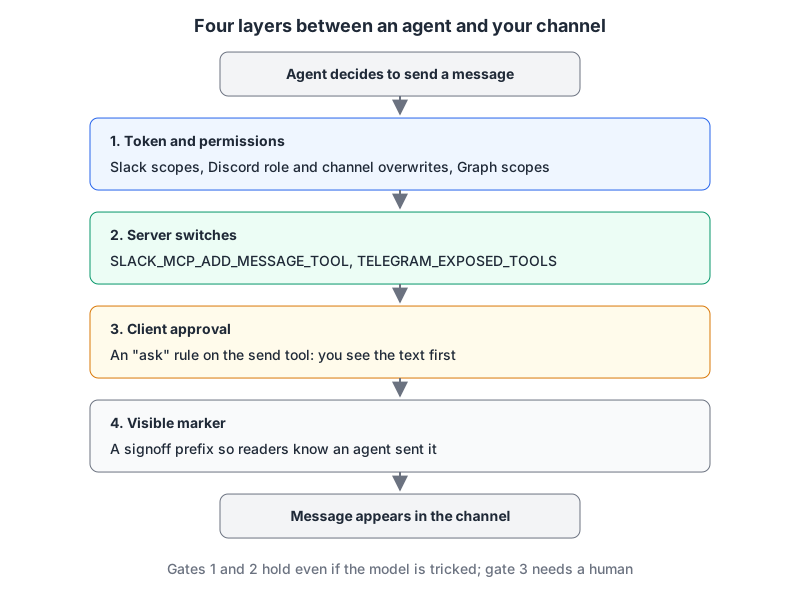
The diagram is the whole argument of this post. The token's permissions and the server's own switches hold even when the model has been talked into something. Client approval only works if a human reads the prompt. Plan for the first two.
Slack: use the official server if your workspace allows it
Slack now runs its own MCP server at https://mcp.slack.com/mcp over Streamable HTTP. It authenticates with confidential OAuth, and tools act through a user token, so the agent sees what you can see and posts as you. The docs list user scopes per tool group: search:read.public through search:read.im for search, chat:write plus the *:history scopes for messaging, canvases:write, reactions:write and so on. Tools cover search, reading channels and threads, sending, scheduling and drafting messages, canvases, lists and file uploads.
The governance is the point. The client must be backed by a registered Slack app; only directory-published or internal apps may use MCP. Workspace admins approve and manage MCP client integrations, and activity shows up in Slack's audit logs. Slack names Claude.ai, Claude Code, Perplexity and Cursor as partner clients. Rate limits are per tool and match the Web API, so the agent can't send faster through MCP than a normal app could.
The community korotovsky/slack-mcp-server is what our Slack page tracks, and it does things the official one doesn't advertise, such as unread-message triage across DMs. Its posting design is good: conversations_add_message is disabled by default, and SLACK_MCP_ADD_MESSAGE_TOOL turns it on for everything (true), for a list of channel IDs, or for everything except IDs prefixed with !. Reactions have the same switch. It accepts a user OAuth token (xoxp-), a bot token (xoxb-, which can't use message search), or a "stealth mode" using the browser's xoxc- token and d cookie, which the README pitches as needing no workspace permissions. In a company workspace I wouldn't use stealth mode: it routes around the admin approval that exists for exactly this case.
SLACK_MCP_XOXP_TOKEN=xoxp-... \
SLACK_MCP_ADD_MESSAGE_TOOL=C0123ABCD \
npx -y slack-mcp-server@latest --transport stdio
That is the npx form from the project's configuration docs, with posting allowed in one channel only. We compare the two biggest community chat servers in Slack MCP vs Discord MCP.
Discord: the bot's permissions are your only brake
Discord doesn't publish an MCP server. The most complete community option is SaseQ/discord-mcp, built on JDA and run with Docker using a DISCORD_TOKEN bot token. It exposes a lot: send_message, delete_message, channel and role management, and moderation tools including kick_member and ban_member. The README doesn't document a read-only mode or per-tool switches.
That leaves Discord's own permission model, which is actually precise if you use it. A bot's permissions start from @everyone plus its roles, then channel overwrites apply. Two rules matter here: ADMINISTRATOR grants everything and bypasses channel overwrites, and KICK_MEMBERS and BAN_MEMBERS only work on members below the bot's highest role. So:
- never give the bot Administrator;
- give it
SEND_MESSAGESonly in the channels where it should talk, via channel overwrites; - leave out
MANAGE_MESSAGES,KICK_MEMBERSandBAN_MEMBERSunless moderation is the job.
If you only need read and send, the older v-3/discordmcp is much smaller (send and read messages), but its last commit was January 2025.
Microsoft Teams: preview server, and Microsoft points elsewhere
Microsoft's Teams MCP server (mcp_TeamsServer, scope McpServers.Teams.All) is documented in the Copilot Studio reference as a preview with full create, read, update and delete over chats and channels: mcp_graph_chat_postMessage, mcp_graph_teams_postChannelMessage, mcp_graph_chat_deleteChat and more. The same page says the app-specific Microsoft 365 tools are kept for backward compatibility and shouldn't be used in production or new projects, and recommends Work IQ instead. The Work IQ page notes that write operations are on by default and that workload selection is all-or-nothing per workload. Both pages are Copilot Studio documentation, written for agents built there rather than for your editor.
For a coding agent, the community Softeria/ms-365-mcp-server is the practical route. Teams tools need --org-mode, --read-only disables writes, and --preset teams exposes only Teams tools. It also has the only built-in disclosure feature I found: --message-signoff-prefix stamps outgoing Teams messages so readers can tell an agent sent them. The README is clear that this guards against misuse of granted tools, not a determined attacker. InditexTech/mcp-teams-server, which our Teams page tracks, is narrower: an Entra app pinned to one team and one channel via TEAM_ID and TEAMS_CHANNEL_ID, which is its own kind of safeguard.
Telegram and WhatsApp: these are your personal accounts
Both of these log in as you, not as a bot.
chigwell/telegram-mcp uses Telethon with your API ID, hash and a session string, and exposes 80+ tools. Its safety design is the most thought-through in this list. TELEGRAM_EXPOSED_TOOLS=read-only exposes only read tools, and you can add exactly what you need: read-only+send_message,reply_to_message. TELEGRAM_ALLOWED_CHAT_IDS limits which chats it touches. When the agent names a contact, only an exact saved alias sends; a near match returns a question for you instead. It also warns that the telegram-mcp name on PyPI isn't controlled by the project, so install from git.
lharries/whatsapp-mcp connects your personal WhatsApp through the whatsmeow library, stores messages in local SQLite, and can send messages and files. It's a community project, not from Meta, and its last commit was July 2025. Its README carries its own warning about the "lethal trifecta": private data, untrusted content and a way to send it out, all in one agent. I'd only run it with a client that asks before every send.
A checklist before you enable sending
- Start read-only. Every server above that has a switch defaults to it or makes it one flag away.
- Scope the token, not the prompt. Slack scopes, Discord channel overwrites and a single Teams channel all hold when the model is confused.
- Make send tools ask. The MCP spec (2026-07-28) says there SHOULD always be a human in the loop able to deny tool calls. In Claude Code, an
askrule does that per tool:
{
  "permissions": {
    "ask": [
      "mcp__slack__conversations_add_message",
      "mcp__discord__send_message",
      "mcp__telegram__send_message"
    ]
  }
}- Prefer drafts. Slack's server can draft and schedule; telegram-mcp ships a "draft replies without sending" workflow. Let the agent write, and you press send.
- Treat message content as hostile. Anything a channel member writes ends up in the model's context, which is exactly the path described in our prompt injection post and the MCP server security guide.
Written by AIDToolStack Editorial
Researched from official documentation, specifications and vendor pages, listed under Sources below. Last checked November 2026.
Sources
- docs.slack.dev/ai/mcp-server/
- github.com/korotovsky/slack-mcp-server
- github.com/korotovsky/slack-mcp-server/blob/master/docs/03-configuration-and-usage.md
- github.com/SaseQ/discord-mcp
- docs.discord.com/developers/topics/permissions
- github.com/v-3/discordmcp
- learn.microsoft.com/en-us/microsoft-copilot-studio/mcp-teams-tools
- learn.microsoft.com/en-us/microsoft-copilot-studio/agents-experience/add-work-iq
- github.com/Softeria/ms-365-mcp-server
- github.com/InditexTech/mcp-teams-server
- github.com/chigwell/telegram-mcp
- github.com/lharries/whatsapp-mcp
- modelcontextprotocol.io/specification/2026-07-28/server/tools
Related Posts
Explore on AIDToolStack
Discover tools and servers featured in our directory.
AI Tools
MCP Servers
Sponsor Our Newsletter
Reach thousands of developers who are actively evaluating AI tools, MCP servers, and dev infrastructure. Our weekly newsletter goes to engaged technical decision-makers.
All sponsored content is clearly labeled per our editorial policy.