
MCP Servers for Headless CMSs: Contentful, Sanity, WordPress and More
The first time you let an agent loose on a CMS, the question isn't "can it write a blog post?" It obviously can. The question is what happens when it calls publish on the wrong entry, in the wrong environment, while you're at lunch. A headless CMS feeds live websites, apps and newsletters, so a stray write isn't a bad row in a table. It's a broken page that customers see.
So this roundup looks at each CMS's MCP server through that lens: who runs it, how it authenticates, what it can change, and where the off switch for writes lives. Everything below was checked against the vendor's docs or the server's repo as of November 2026. Several servers that were common a year ago are now archived, and I've said so where it matters.
The short version
| CMS | Server | Runs where | Auth | Write guard you can set |
|---|---|---|---|---|
| Contentful | Remote server, plus @contentful/mcp-server | Contentful-hosted, or local stdio | OAuth (remote), CMA token (local) | Per-environment read-only or read/write in the MCP app; PROTECTED_ENVIRONMENTS locally |
| Sanity | mcp.sanity.io | Sanity-hosted | OAuth, or a Bearer API token | Token role; writes go to drafts |
| WordPress | MCP Adapter | Inside WordPress | Per-server transport permissions | Abilities are private until you mark them public |
| Directus | Built-in MCP (v11.12+) | Inside Directus | OAuth or static token | "Allow Deletes" is off by default; user role |
| Payload | @payloadcms/plugin-mcp | Inside Payload | Payload user API key | Per-collection tools: { delete: false } and access control |
| Webflow | Remote server, plus webflow-mcp-server | Webflow-hosted, or local | OAuth (remote), API token (local) | Your Webflow role |
| Ghost | Community ghost-mcp | Local stdio | Admin API key | None documented |
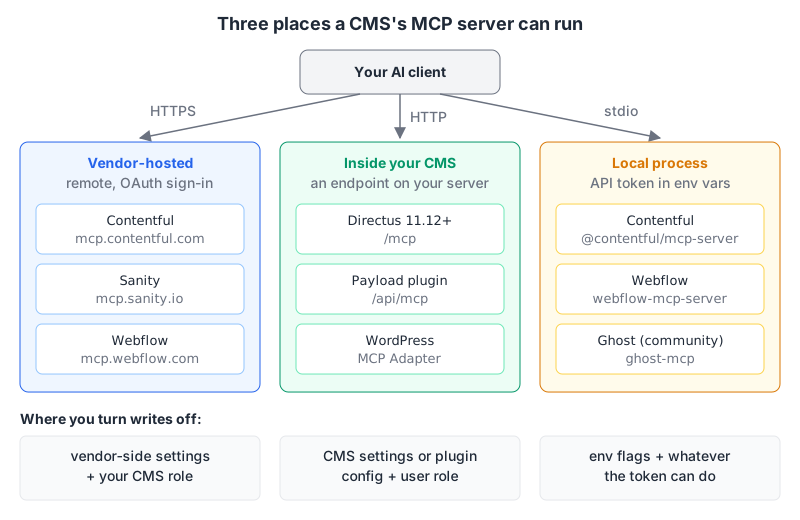
That split matters more than any feature list. A vendor-hosted server means OAuth and permissions managed in the vendor's UI. A server built into your CMS means the same role system your editors already use. A local process means a long-lived token sitting in a JSON config file, and the token's scope is your only real limit.
Contentful: the most knobs
Contentful now documents two servers. The remote server lives at https://mcp.contentful.com/mcp (with an EU endpoint at mcp.eu.contentful.com/mcp) and uses OAuth 2.1. There's a catch that trips people up: it can't touch a space or environment until the Contentful MCP app is installed and configured there. That app is also where the useful control sits. Admins pick tool categories per environment and set each one to read-only or read/write, and disabled tools are rejected even if a client calls them directly. The docs suggest starting read-only, which is good advice.
The local server is the npm package @contentful/mcp-server (1.24.5 on npm as of this week). It authenticates with a Content Management API personal access token, so every call carries that token's full permissions and none of the MCP app gating applies. It does have one guard worth turning on:
{
  "mcpServers": {
    "contentful": {
      "command": "npx",
      "args": ["-y", "@contentful/mcp-server"],
      "env": {
        "CONTENTFUL_MANAGEMENT_ACCESS_TOKEN": "<cma-token>",
        "SPACE_ID": "<space-id>",
        "ENVIRONMENT_ID": "dev",
        "PROTECTED_ENVIRONMENTS": "master,staging"
      }
    }
  }
}
With PROTECTED_ENVIRONMENTS set, write and delete calls against those environment IDs fail with "Environment 'master' is protected" before they reach the API. The README is honest about its limits: IDs are case-sensitive, it only guards environment-scoped writes, and invoke_ai_action isn't covered. Use it alongside Contentful roles, not instead of them.
The tool list is long (content types, entries, assets, publish and unpublish in bulk, delete_content_type). An agent that can delete a content type can do real damage, so the remote server's read-only setting is the safer default.
Our page: Contentful MCP server.
Sanity: remote only, and drafts by default
Sanity's local sanity-mcp-server repo is archived, and its description says to use the remote server at https://mcp.sanity.io instead. Setup is one command, npx sanity@latest mcp configure, which wires up Cursor, Claude Code and VS Code using your logged-in CLI user, per the agent toolkit README.
The Sanity MCP docs say OAuth is the default. You can send an Authorization: Bearer header instead, and then "tool calls use the API token and are limited to its role and permissions." I didn't find a server-side read-only switch, so a token whose role can't write is how you'd get one.
What I like is the write model. create_documents creates drafts, and patch_documents on a published document edits a draft rather than the live version. Publishing is a separate call (publish_documents). That means an agent's mistakes land somewhere an editor can review them, as long as you don't let it call publish unsupervised. Two tools, generate_image and transform_image, spend Sanity AI credits; the docs suggest disabling them in your client if you don't want that.
Our page: Sanity MCP server.
WordPress: the MCP Adapter and the Abilities API
If you set up Automattic's wordpress-mcp plugin last year, check it: the repo is archived and its description points to WordPress/mcp-adapter for ongoing work. The adapter (v0.7.1, released October 2026) is the official package. It turns WordPress "abilities" into MCP tools, resources and prompts. Abilities come from the Abilities API, which first shipped in WordPress 6.9; plugins register them with wp_register_ability().
The default is cautious. Abilities are private until you set meta.public (or meta.mcp.public) to true, and the default server exposes three meta-tools to find and run them: mcp-adapter/discover-abilities, mcp-adapter/get-ability-info and mcp-adapter/execute-ability. You connect over STDIO through WP-CLI, or over HTTP at /wp-json/mcp/mcp-adapter-default-server.
The practical upshot: on WordPress, the agent can only do what some plugin (or your own code) has registered as a public ability. That's a smaller blast radius than a server that wraps the whole REST API, but it also means the usefulness depends on which abilities your plugins register.
Our page: WordPress MCP server.
Directus: built in, deletes off
Directus moved MCP into the product. The Directus MCP docs say it requires v11.12 or later, and you switch it on under Settings, AI. The installation page lists the endpoint as https://your-directus-url.com/mcp, recommends OAuth, and also accepts a static token as a Bearer header or access_token query parameter. I'd use the header; tokens in URLs end up in logs.
The setting that matters is Allow Deletes, off by default, which covers items, files, flows, fields, relations and collections. Everything else follows the connecting user's role, so create a dedicated MCP user with a narrow role, as the docs suggest.
The older standalone package, @directus/content-mcp, still exists for older Directus versions. It hasn't been published since July 2025 (0.1.0 on npm), and its README supports a DISABLE_TOOLS list such as ["delete-item", "update-field"]. On a current Directus, use the built-in one.
Our page: Directus MCP server.
Payload: a plugin, configured in code
Payload's approach fits a code-first CMS. Add @payloadcms/plugin-mcp (3.93.0, released alongside Payload this week) to your config and you get a Streamable HTTP endpoint at /api/mcp. The plugin docs list generic tools such as findDocuments, createDocuments, updateDocument and deleteDocuments, filtered by Payload's access control.
Turning off deletes is a one-liner per collection:
mcpPlugin({
  collections: {
    posts: { tools: { delete: false } },
    media: { tools: { create: false, delete: false } },
  },
})
Authentication uses a Payload user API key in a header like Authorization: users API-Key <key>. The quick-start URL ends in ?overrideAccess=true, and the docs say plainly that it skips access control and is for development only. Make sure that query string never reaches a deployed config.
Our page: Payload CMS MCP server.
Webflow: the Designer needs a companion app
Webflow's official server has a remote mode (OAuth, at https://mcp.webflow.com/sse per the README) and a local mode where you set WEBFLOW_TOKEN and run npx -y webflow-mcp-server@latest. Anything that touches the live canvas (snapshots, image uploads, the current selection, page or breakpoint) needs the "Webflow MCP Bridge App" open inside the Designer, which you launch from the Apps panel; everything else works without it. Webflow's AI tools page adds that each authorization covers a single workspace and that agents work within your existing roles. I found no read-only mode.
Our page: Webflow MCP server.
Ghost: no official server yet
Ghost's documentation index (llms.txt) lists no MCP server as of this writing, so the options are community projects. One I could verify is MFYDev/ghost-mcp, published as @fanyangmeng/ghost-mcp. It uses the Admin API with GHOST_ADMIN_API_KEY and exposes browse, read, add, edit and delete for posts, members, newsletters, offers, tiers and more.
That's a lot of power behind one key: the same configuration that lets an agent draft a post also exposes "Delete Member". I'd keep this one to a staging site, or wait for something official.
Our page: Ghost MCP server.
Gotchas that apply to all of them
- Publish is the dangerous verb, not create. Sanity's drafts and Contentful's read-only environments are the two best defaults here. Elsewhere, keep publish behind a human.
- Content is untrusted input. An agent that reads entries written by other people can read instructions planted in them. Our post on tool poisoning and prompt injection covers why that matters when the same session can also write.
- Local tokens outlive your interest in them. A CMA token or Ghost Admin key in
~/.cursor/mcp.jsonkeeps working until you revoke it. Prefer the OAuth servers when one exists. - Setup guides go stale. Automattic's WordPress plugin and Sanity's local server are both archived now, so check the repo before you follow an older tutorial. The MCP server security guide has a checklist for vetting a server before you install it.
A decision rule
If your CMS ships a built-in or vendor-hosted server (Directus, Payload, Contentful, Sanity, Webflow), use that and set the write guard before your first prompt: read-only environments in Contentful, Allow Deletes off in Directus, delete: false in Payload, a viewer token in Sanity. On WordPress, install the MCP Adapter and expose only the abilities you need. On Ghost, treat any community server as a staging tool for now. And if you also want the agent querying the database underneath the CMS, our roundup of MCP servers for databases covers that side.
Written by AIDToolStack Editorial
Researched from official documentation, specifications and vendor pages, listed under Sources below. Last checked November 2026.
Sources
- contentful.com/developers/docs/tools/mcp-server.md
- github.com/contentful/contentful-mcp-server
- registry.npmjs.org/@contentful/mcp-server
- github.com/sanity-io/agent-toolkit
- github.com/sanity-io/sanity-mcp-server
- www.sanity.io/docs/ai/mcp-server
- github.com/WordPress/mcp-adapter
- github.com/Automattic/wordpress-mcp
- developer.wordpress.org/news/2025/11/introducing-the-wordpress-abilities-api/
- directus.com/docs/guides/ai/mcp
- directus.com/docs/guides/ai/mcp/installation
- github.com/directus/mcp
- registry.npmjs.org/@directus/content-mcp
- github.com/payloadcms/payload/blob/main/docs/plugins/mcp.mdx
- github.com/payloadcms/payload/releases
- github.com/webflow/mcp-server
- developers.webflow.com/data/v2.0.0/docs/ai-tools
- docs.ghost.org/llms.txt
- github.com/MFYDev/ghost-mcp
Related Posts
Explore on AIDToolStack
Discover tools and servers featured in our directory.
AI Tools
MCP Servers
Sponsor Our Newsletter
Reach thousands of developers who are actively evaluating AI tools, MCP servers, and dev infrastructure. Our weekly newsletter goes to engaged technical decision-makers.
All sponsored content is clearly labeled per our editorial policy.