
MCP servers for email: Resend, Postmark, Mailgun, Gmail and Outlook
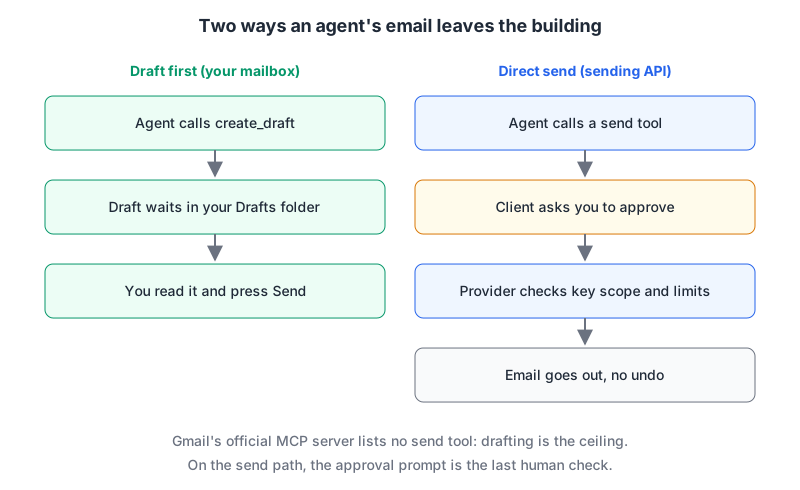
Email MCP servers come in two kinds, and mixing them up is how you get surprised. One kind talks to a sending API (Resend, Postmark, Mailgun): the agent can send transactional mail from your domain, manage templates, and read bounce logs. The other kind talks to your mailbox (Gmail, Outlook): the agent can read your inbox and, depending on the server, reply as you. Both can put words in front of real people with your name on them, and neither has an undo button once the message is out.
This post covers the maintained servers for each, what they can send, the limits that apply, and the confirmation steps worth setting up. Everything is from each project's README or vendor docs as fetched on 7 November 2026.
The short list
| Server | Kind | Maintainer | Runs | Auth | Can send directly? |
|---|---|---|---|---|---|
| Resend MCP | Sending API | Resend | Hosted https://mcp.resend.com/mcp or npx resend-mcp | OAuth or API key | Yes |
| Postmark MCP | Sending API | ActiveCampaign (Postmark) | Local, npx @activecampaign/postmark-mcp | Server token | Yes |
| Mailgun MCP | Sending API | Mailgun | Local, npx @mailgun/mcp-server | API key | Yes |
| Gmail MCP server | Mailbox | Hosted https://gmailmcp.googleapis.com/mcp/v1 | OAuth | No, drafts only | |
| Workspace MCP | Mailbox | Community (taylorwilsdon) | Local or HTTP | OAuth | If you grant gmail:send |
| Mail tools in Agent 365 | Mailbox | Microsoft | Hosted, tenant URL | Microsoft 365 work account | Yes; preview |
| ms-365-mcp-server | Mailbox | Community (Softeria) | Local or HTTP | Device code or app | Yes, unless --read-only |
Sending APIs: Resend, Postmark, Mailgun
Resend
Resend's server is the broadest of the three. It covers sending and batch sending, received emails, inboxes with threads and drafts, templates, contacts, broadcasts, automations, domains, webhooks, API keys and logs. The hosted endpoint uses OAuth in the browser; for headless setups you pass an API key as a Bearer header. The hosted server runs the same open-source code as the resend-mcp npm package.
Two settings do most of the safety work:
- Use a sending-only key when the agent only sends. Resend's API key docs define
full_access("Can create, delete, get, and update any resource") andsending_access("Can only send emails"), and a sending key can be restricted to one domain. Withsending_access, the server's management tools will fail, which is what you want: an agent writing a password-reset template doesn't need to delete your domains or mint API keys. - Fence off local files.
send-emailcan attach files by path. The README warns that on stdio you should set--allowed-file-dirs"to stop a prompt-injected agent from attaching files outside the folders you choose". Over--http, file reads are off unless you set it.
Limits, from Resend's pricing and rate limit pages: the free plan allows 3,000 emails a month and 100 a day, Pro starts at $20/month for 50,000, and the API default is 10 requests per second per team, shared by all keys.
Postmark
ActiveCampaign/postmark-mcp is the official server, with 24 tools: sendEmail, sendEmailWithTemplate, batch sends, template management, message search, bounce and suppression lookups, stats and webhooks. It runs locally with Node 22+ via npx -y @activecampaign/postmark-mcp, configured by POSTMARK_SERVER_TOKEN, DEFAULT_SENDER_EMAIL and DEFAULT_MESSAGE_STREAM. sendEmail accepts up to 50 recipients per call. It marks its tools with MCP readOnlyHint and destructiveHint annotations so clients can auto-approve reads and prompt on sends.
Postmark's API overview distinguishes a server token (one Postmark server) from an account token (the whole account); the MCP server takes the narrower one. For a dry run, Postmark accepts POSTMARK_API_TEST as the server token to send test emails that aren't delivered. Expect the read tools to be less useful with it.
A warning that's specific to this server's history: in September 2025 an unofficial npm package named postmark-mcp shipped a version that BCC'd every outgoing email to the attacker. Postmark said it had no involvement. The real project lives at the ActiveCampaign GitHub org and its npm package is scoped as @activecampaign/postmark-mcp. Check the scope before you install any email server.
Limits from Postmark's pricing: the free plan is 100 emails a month with no overages, and Basic starts at $15/month for 10,000.
Mailgun
mailgun/mailgun-mcp-server runs locally over stdio (the README says Mailgun has no hosted version) via npx -y @mailgun/mcp-server, with MAILGUN_API_KEY and MAILGUN_API_REGION=eu if your account is in the EU region. It's generated from Mailgun's OpenAPI spec against a curated allowlist, and it deliberately exposes no delete operations. Two other features help: --tags loads only the products you name (for example --tags validate,inspect for a workflow that never sends), and in --tags dynamic mode the fallback mailgun_call_tool refuses anything that changes data, so approving it can never send mail. The README says the server does no client-side rate limiting and recommends a dedicated key scoped to the operations you need.
Mailgun's pricing page lists a free plan with 100 emails a day and Basic from $15/month for 10,000.
Before any of these send real mail, your domain needs SPF and DKIM in order. Our DNS records explainer, SPF record generator and post on transactional email deliverability cover that side.
Mailboxes: Gmail and Outlook
Gmail: Google's server can't send, and that's a feature
Google's Gmail MCP server is in Developer Preview through the Google Workspace Developer Preview Program. It exposes ten tools: search_threads, get_thread, get_message, list_labels, label and unlabel tools for messages and threads, list_drafts and create_draft. There is no send tool. The setup guide has you enable the Gmail API and gmailmcp.googleapis.com in a Cloud project and grant gmail.readonly and gmail.compose, then register an OAuth client with "Use this client for an AI-powered agent" ticked. Google's own warning in that guide is worth repeating: don't let the client process emails from unverified sources, because hidden instructions in them could hijack the session.
The community Workspace MCP (what our Gmail page tracks) covers twelve Workspace services and lets you grant Gmail in levels via --permissions: readonly, organize, drafts, send, full, per its docs. Stop at gmail:drafts and you get the same draft-only behaviour as Google's server.
Outlook: decide whether sending is on
Microsoft documents a Mail server for Agent 365 (mcp_MailTools) in its Copilot Studio reference. It's a preview, and unlike Gmail's it can send: sendMail, reply, replyAll and sendDraft sit alongside createMessage (which makes a draft) and deleteMessage. The same page marks these app-specific tools as backward-compatibility only and points new projects at Work IQ.
For a coding agent, Softeria/ms-365-mcp-server is the practical choice. --read-only disables writes, --preset mail limits the tool list to mail, and --message-signoff-prefix stamps agent-sent mail so recipients can tell. Our Outlook page tracks a different community server, ryaker/outlook-mcp, which I haven't reviewed here.
Confirmation steps that actually hold
- Draft first for anything personal. Google's server and Workspace MCP at
gmail:draftsmake this the default. You read the draft in your mail client, where the formatting and recipients are visible, and press Send yourself. - Make send tools ask. The MCP spec says clients SHOULD present confirmation prompts, and that annotations like
destructiveHintare untrusted unless the server is. Don't rely on them; set it explicitly. In Claude Code:
{
  "permissions": {
    "ask": [
      "mcp__resend__send-email",
      "mcp__postmark__sendEmail",
      "mcp__postmark__sendBatch"
    ]
  }
}
Copy the exact tool names from your client's tool list rather than from this post. Postmark also has sendEmailWithTemplate and sendBatchWithTemplate, which send mail too.
- Scope the key below the agent's ambitions. Resend
sending_accessrestricted to one domain, a Postmark server token rather than an account token, a dedicated Mailgun key. - Fix the sender.
DEFAULT_SENDER_EMAILorSENDER_EMAIL_ADDRESSstop the model choosing a From address. - Watch the free-tier ceilings. 100 a day on Resend's free plan or Mailgun's, 100 a month on Postmark's: a looping agent hits these quickly, which is a crude but real circuit breaker.
- Remember the inbox is input. Every email the agent reads is untrusted text; see our prompt injection post before pairing a mailbox reader with a send tool.
Written by AIDToolStack Editorial
Researched from official documentation, specifications and vendor pages, listed under Sources below. Last checked November 2026.
Sources
- github.com/resend/resend-mcp
- resend.com/docs/api-reference/api-keys/create-api-key
- resend.com/pricing
- resend.com/docs/api-reference/rate-limit
- github.com/ActiveCampaign/postmark-mcp
- postmarkapp.com/developer/api/overview
- thehackernews.com/2025/09/first-malicious-mcp-server-found.html
- postmarkapp.com/pricing
- github.com/mailgun/mailgun-mcp-server
- www.mailgun.com/pricing/
- developers.google.com/workspace/gmail/api/reference/mcp
- developers.google.com/workspace/guides/configure-mcp-servers
- github.com/taylorwilsdon/google_workspace_mcp
- workspacemcp.com/docs
- learn.microsoft.com/en-us/microsoft-copilot-studio/mcp-mail-tools
- github.com/Softeria/ms-365-mcp-server
- modelcontextprotocol.io/specification/2026-07-28/server/tools
- www.npmjs.com/package/@activecampaign/postmark-mcp
Related Posts
Explore on AIDToolStack
Discover tools and servers featured in our directory.
AI Tools
MCP Servers
Sponsor Our Newsletter
Reach thousands of developers who are actively evaluating AI tools, MCP servers, and dev infrastructure. Our weekly newsletter goes to engaged technical decision-makers.
All sponsored content is clearly labeled per our editorial policy.