
Zapier, Make, n8n and Composio as MCP Hubs
You want your coding agent to post a Slack message when a deploy finishes, open a Linear issue from a stack trace, and add a row to a sheet. You could install three MCP servers, each with its own token. Or you could point the agent at one automation platform that already holds those logins and let it act as a hub.
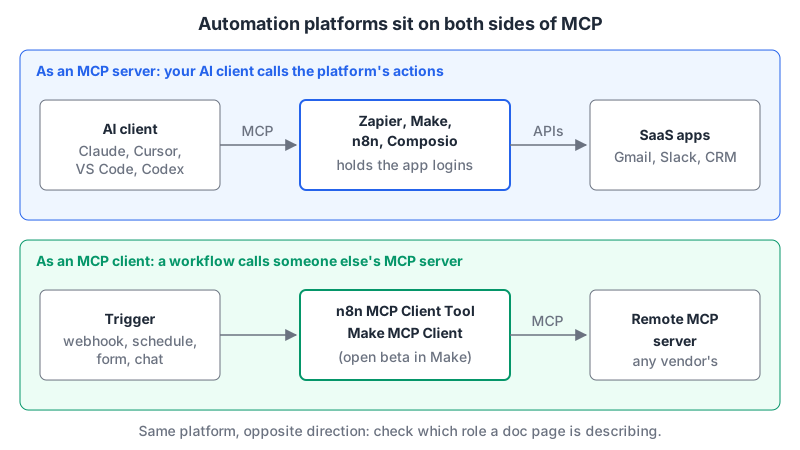
That second option is what Zapier, Make, n8n and Composio now all offer, in different ways. They also work in the opposite direction: some can call other MCP servers from inside a workflow. This post sorts out which platform does what, how each authenticates, and what a tool call costs, using the vendors' docs and pricing pages as of November 2026.
The quick comparison
| Platform | Acts as server | Acts as client | Auth to the server | Billing unit for MCP use |
|---|---|---|---|---|
| Zapier | Hosted Zapier MCP | Not covered here | OAuth | 2 tasks per successful tool call |
| Make | Hosted, mcp.make.com | MCP Client app (open beta) | OAuth or API key | Credits |
| n8n | MCP Server Trigger node, plus instance-level MCP | MCP Client Tool node | None, Bearer, header or n8n OAuth | Workflow executions |
| Composio | Per-user MCP URLs | Not covered here | x-api-key plus per-user connections | Tool calls |
Zapier: the biggest catalogue, priced in tasks
Zapier MCP is a hosted server that exposes actions from Zapier's catalogue, which the docs put at 9,000+ apps and 40,000+ actions. You connect with a URL; for VS Code the zapier-mcp repo gives https://mcp.zapier.com/api/v1/connect as an http server, and most clients sign in with OAuth. Your client must support Streamable HTTP, since SSE isn't supported.
There are two modes. In agentic mode the AI finds and adds the actions it needs during the conversation. In managed mode you pick a fixed set. For anything beyond personal use, I'd pick managed: an agent that can add any of 40,000 actions mid-chat is a wide surface for a prompt injection to aim at.
Cost is the part to plan for. The docs say each successful tool call uses two tasks from your plan, and failed calls don't count. Against the pricing page:
| Zapier plan (billed annually) | Tasks/month | Successful MCP calls at 2 tasks each |
|---|---|---|
| Free ($0) | 100 | 50 |
| Professional ($19.99/mo) | 750 | 375 |
| Team ($69/mo) | 2,000 | 1,000 |
MCP is listed on every plan, and those tasks come from the same pool as your Zaps, so an agent that loops on a tool can eat your Zap budget. The pricing page itself calls the 2-task figure an "illustrative anchor" and links to its rates page, so check it before you budget. Our pages: Zapier MCP server and Zapier AI.
Make: scenarios as tools, and a client too
Make's cloud MCP server runs over stateless Streamable HTTP. With OAuth you connect to https://mcp.make.com/v2; with an API key you use https://<MAKE_ZONE>/mcp/v2 and an Authorization: Bearer header. The docs also show a form with the key in the URL path. Avoid it; URLs end up in logs and shell history.
It exposes two kinds of tools. Scenario run tools run your active, on-demand scenarios and are available on all plans. Management tools view and modify scenarios, connections, webhooks and data stores, and need a paid plan. Scopes on the key decide which you get, and you can limit which scenarios are exposed. Timeouts are tight: 25 seconds for a scenario run over OAuth, 40 with an API key. Longer runs keep going for up to 40 minutes and return an executionId you can poll.
The older local package, @makehq/mcp-server, is now labelled legacy in its own README. It only needed scenarios:read and scenarios:run scopes, which is still a good model: if the agent only needs to trigger scenarios, don't give it management scopes.
Make also works as a client. The MCP Client app, in open beta, connects a scenario to a remote MCP server, with a "Call a tool" module for testing and an "Execute an action with AI" module that lets a model pick the tools.
On cost, the pricing page bills in credits: most actions use one, some AI features use more, and the Free plan has 1,000 credits a month. Our page: Make MCP server.
n8n: three separate MCP features
n8n is the one most likely to confuse you, because it has three features with similar names.
- MCP Server Trigger (docs): a trigger node that makes one workflow an MCP server. You attach tool nodes to it (the Custom n8n Workflow Tool node exposes other workflows). It supports SSE and Streamable HTTP but not stdio. Auth can be none, Bearer, header, or n8n user OAuth.
- Instance-level MCP (docs): an owner or admin enables it under Settings, then turns it on per workflow. The URL ends in
/mcp-server/http. It can search workflows, run the enabled ones, and (from n8n 2.13.0) build and edit workflows. Every connected client sees every enabled workflow, so scoping is per workflow, not per client. - MCP Client Tool: the reverse direction, letting an n8n AI agent call external MCP servers.
Two operational gotchas from the trigger docs. If you run multiple webhook replicas in queue mode, route all /mcp* traffic to one replica or SSE and Streamable HTTP connections can break. And behind nginx, turn off proxy buffering for the MCP path.
There's also a popular community server, czlonkowski/n8n-mcp, which gives an agent n8n's node documentation so it can build workflows for you. Its README carries a blunt warning I'd repeat: never edit production workflows directly with AI; copy them and test first.
The pricing page charges by workflow executions "regardless of complexity": Starter is €20 a month billed annually for 2,500 executions, Pro €50 a month, also billed annually, for 10,000. The feature table lists the MCP Server Trigger, MCP Client and instance-level MCP on Starter, Pro and Enterprise. Self-hosting the Community Edition from GitHub is the other route. If you're weighing n8n against the others as a platform, see n8n AI vs Zapier AI and Activepieces vs n8n. Our page: n8n MCP server.
Composio: MCP for apps you ship
Composio solves a different problem. Zapier and Make connect your accounts to your agent. Composio is built for products where each of your end users connects their own Gmail or Slack, and your agent acts on their behalf.
You create a server tied to one or more toolkits with composio.mcp.create(...), limit it with an allowed_tools list, then call composio.mcp.generate(user_id=..., mcp_config_id=...) for a per-user URL. The docs warn not to build that URL yourself from a server ID. Requests need an x-api-key header, which is on by default for new organisations. That header is a real constraint: the docs say Anthropic's hosted MCP connector can't send it, and suggest the Claude Agent SDK's HTTP transport instead. The docs also say that for most use cases a regular "session" is the better choice than a fixed MCP server, with session.mcp.url and session.mcp.headers handed to any MCP client.
The pricing page is generous at the low end: the free Hobby plan includes 100,000 tool calls a month, of which up to 20,000 can be on Composio-managed apps. Pro is $29 a month, with overage at $0.30 per 1,000 calls and higher per-call rates on managed apps. On Hobby, custom MCP servers are "shared only" across a project's users. Our pages: Composio MCP server, and Composio vs LangChain if you're deciding where tool integration should live in your stack.
Gotchas across all four
- One hub means one big blast radius. The platform holds tokens for every connected app. Use Zapier's managed mode, Make's scenario-only scopes, n8n's per-workflow opt-in, or Composio's
allowed_toolsto keep the exposed set small. - Loops cost money. Tasks, credits, executions and tool calls all meter agent retries. Set a usage cap where the platform offers one: Zapier stops at your task limit if pay-per-task is off, and Composio's Hobby plan pauses at its cap.
- Actions can send things. "Send email" and "post message" are irreversible. Keep them behind your client's per-call approval, and read our post on prompt injection through MCP tools before you let an agent read inbound email and send replies in the same session.
Which to pick
If the agent is for you and you already pay for Zapier, its MCP server is the fastest start; just budget two tasks per call. If you want the agent to run logic you've already built, expose those workflows through Make scenarios or n8n's per-workflow MCP, which gives you tighter control over what runs. If you're building a product where each customer connects their own accounts, that's Composio's job. And if you self-host n8n, the MCP Client Tool lets your workflows use the same MCP servers your editor does.
Written by AIDToolStack Editorial
Researched from official documentation, specifications and vendor pages, listed under Sources below. Last checked November 2026.
Sources
- docs.zapier.com/mcp/home
- github.com/zapier/zapier-mcp
- zapier.com/pricing
- developers.make.com/mcp-server
- github.com/integromat/make-mcp-server
- apps.make.com/c5ZhYquO55e90hoCJ0rzt.md
- www.make.com/en/pricing
- docs.n8n.io/integrations/builtin/core-nodes/n8n-nodes-langchain.mcptrigger/
- docs.n8n.io/advanced-ai/accessing-n8n-mcp-server/
- n8n.io/pricing/
- github.com/czlonkowski/n8n-mcp
- docs.composio.dev/docs/mcp-overview
- composio.dev/pricing
Related Posts
Explore on AIDToolStack
Discover tools and servers featured in our directory.
AI Tools
MCP Servers
Sponsor Our Newsletter
Reach thousands of developers who are actively evaluating AI tools, MCP servers, and dev infrastructure. Our weekly newsletter goes to engaged technical decision-makers.
All sponsored content is clearly labeled per our editorial policy.