
JSON Web Key Sets (JWKS): Format, Key Rotation and Caching Without Outages
Your API accepts access tokens from an identity provider. It verifies them with a public key it fetched once at startup. Then the provider rotates its signing key, every new token carries a kid your process has never seen, and every request fails until someone restarts the service. That outage is entirely avoidable, and avoiding it is mostly about understanding one small JSON document: the JSON Web Key Set.
This post covers the format, how a verifier should pick a key, how to rotate keys you issue yourself, and what the big providers actually say about caching.
What a JWK Set looks like
RFC 7517 defines two things. A JWK is a JSON object representing one key. A JWK Set is an object with a required keys member holding an array of JWKs. Here's a real one, generated with jose for this post:
{
  "keys": [
    {
      "kty": "EC",
      "crv": "P-256",
      "x": "DrMeQU80ehgk-r18vksMGqqPeOUDW0a2D3cnSfbY-iw",
      "y": "I64P0XQ3noIDxBgvGasgCcOHJE6Y31h4vgXljPiwiek",
      "kid": "2Ev8Ou2jhr51p7RiqrdzAGyt96WQjX2E9R-CkuLBcvY",
      "alg": "ES256",
      "use": "sig"
    }
  ]
}
Google's set at googleapis.com/oauth2/v3/certs has the same shape, with two RSA keys that each carry kty, alg (RS256), use (sig), kid, n and e when fetched on 7 November 2026.
The members you'll meet:
| Member | Meaning | Notes from the specs |
|---|---|---|
kty | Key type: RSA, EC, oct, OKP | Required. A set parser SHOULD skip keys with a kty it doesn't understand rather than fail. |
kid | Key ID | Free-form string. Keys in one set should have distinct values. Matched against the token header's kid. |
use | sig or enc | Optional in RFC 7517, but OIDC requires it on every key when a set mixes signing and encryption keys. |
key_ops | ["verify"] etc. | Optional. RFC 7517 recommends not using it together with use. |
alg | Intended algorithm, e.g. RS256 | Optional, but publish it. It lets verifiers reject a token whose header claims a different algorithm. |
x5c | Certificate chain | Standard base64, not base64url. First cert must contain this key. |
x5t#S256 | SHA-256 cert thumbprint | base64url. |
The key material itself comes from RFC 7518, section 6. RSA keys carry n and e as unsigned big-endian integers in base64url with no leading zero octet (65537 encodes as AQAB). RFC 7518 explicitly calls out libraries that prepend a zero byte to n and asks implementers to omit it. EC keys carry crv, x and y, and each coordinate must be the full size for the curve, so a P-521 coordinate is always 66 octets even when it has leading zeros. RSA keys used with RS256 or PS256 must be at least 2048 bits.
Ed25519 keys use kty: "OKP" with crv: "Ed25519" and a single x, from RFC 8037. One change worth knowing: RFC 9864, published October 2025, deprecated the polymorphic JOSE algorithm name EdDSA and registered the fully specified Ed25519 and Ed448 in its place. New code should put "alg": "Ed25519" in headers and JWKs where its libraries support it.
How a verifier should find the key
For OpenID Connect providers you don't hard-code the JWKS URL. OIDC Discovery puts provider metadata at {issuer}/.well-known/openid-configuration, and its jwks_uri field is required and must be https. The same spec says the issuer in that document must be identical to the issuer URL you used to build the path and to the iss claim in tokens, compared code point by code point. The set at jwks_uri must never contain private or symmetric keys.
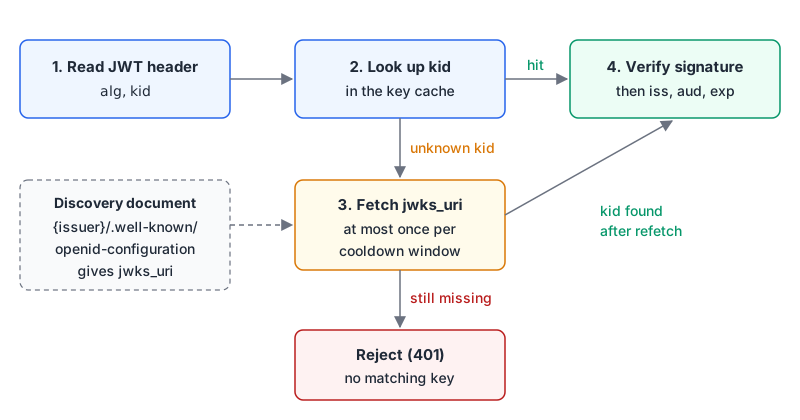
The unknown-kid branch is the part people skip. OpenID Connect Core section 10.1.1 describes rotation in exactly these terms: the signer adds new keys to the set at jwks_uri, signals the switch through kid, and the verifier knows to go back to jwks_uri when it sees an unfamiliar kid. Section 10.1 also says a kid MUST be in the JOSE header whenever the referenced set has more than one key.
The cooldown on that branch matters just as much. Anyone can send you a token with a made-up kid. If every unknown kid triggers a fetch, an attacker can turn your API into a request amplifier aimed at your identity provider, which may well rate-limit you right back.
To see what's in a token's header while debugging, paste it into our JWT decoder. It shows alg, kid and the claims, and it says plainly that it does not verify signatures, which is the right expectation for a browser tool.
Verifying against a remote JWKS with jose
jose (v6.2.15 on npm as of November 2026) handles fetching, caching and the refetch rule:
import { createRemoteJWKSet, jwtVerify } from "jose";

const ISSUER = "https://auth.example.com/";
// In practice, read jwks_uri from the issuer's /.well-known/openid-configuration at startup
const JWKS = createRemoteJWKSet(new URL("https://auth.example.com/.well-known/jwks.json"), {
  cacheMaxAge: 10 * 60 * 1000, // default: 10 minutes
  cooldownDuration: 30 * 1000, // default: 30 seconds
  timeoutDuration: 5 * 1000,   // default: 5 seconds
});

export async function verifyAccessToken(token: string) {
  const { payload } = await jwtVerify(token, JWKS, {
    issuer: ISSUER,
    audience: "https://api.example.com",
    algorithms: ["RS256", "ES256"], // never let the header choose freely
  });
  return payload;
}
The defaults in the comments come from the RemoteJWKSetOptions docs. Per the createRemoteJWKSet docs, it selects keys by the header's alg and kid, respects use and key_ops, and requires exactly one match. If nothing matches it refetches only once the cooldown since the last successful fetch has passed. When it still finds nothing, it throws JWKSNoMatchingKey with the stable code ERR_JWKS_NO_MATCHING_KEY, which is what you map to a 401. If a set ever has two keys that both match (no kid, same alg), jose throws JWKSMultipleMatchingKeys, and the docs show iterating over the candidates.
What the providers say about caching
Libraries pick sensible defaults, but providers publish their own guidance and it isn't identical:
| Source | Cache lifetime | Unknown kid | Other notes |
|---|---|---|---|
| Auth0 | 5 to 10 minutes if you build your own cache | Invalidate and refetch, limited (e.g. retry once) | Signs with one key at a time, but the set can hold several during rotation |
| Microsoft Entra | Cache each key by kid for 24 hours, refresh hourly in the background | Refresh on the hot path, but not more often than every 5 minutes | No set rollover schedule, emergency rollovers possible, always more than one valid key published |
| Use the HTTP cache directives on the response | Not specified | Keys change "only infrequently" | |
| jose defaults | 10 minutes | Refetch after a 30 second cooldown | 5 second fetch timeout |
Microsoft's page is the most detailed. Two points from it apply everywhere: discover and cache keys per tenant (or per issuer) even if they look shared today, and keep using the last known good keys if a refresh fails rather than dropping everything. Its pseudo code also refuses to refresh if the last successful refresh was under 5 minutes ago, which is the same idea as jose's cooldown with a longer window.
Publishing your own JWKS
If you issue tokens, you're on the other side of this. Generate a key pair, publish the public half, and sign with the private half:
import { generateKeyPair, exportJWK, calculateJwkThumbprint, SignJWT } from "jose";

const { publicKey, privateKey } = await generateKeyPair("ES256");
const jwk = await exportJWK(publicKey);
const kid = await calculateJwkThumbprint(jwk); // RFC 7638, SHA-256 by default

// Serve this at /.well-known/jwks.json
export const jwks = { keys: [{ ...jwk, kid, alg: "ES256", use: "sig" }] };

export const token = await new SignJWT({ scope: "read:orders" })
  .setProtectedHeader({ alg: "ES256", kid })
  .setIssuer("https://auth.example.com/")
  .setAudience("https://api.example.com")
  .setIssuedAt()
  .setExpirationTime("10m")
  .sign(privateKey);
Using the thumbprint as kid is suggested by RFC 7638 itself. It's computed over only the required members (crv, kty, x, y for EC; e, kty, n for RSA), so it's stable no matter what optional fields you add, and two services can derive the same kid independently. In production the private key lives in a KMS or secrets manager, not in process memory generated at boot. If you already have a PEM public key (our RSA key generator outputs SPKI PEM, for example), jose's importSPKI(pem, "RS256", { extractable: true }) followed by exportJWK turns it into a JWK.
If several internal services verify your tokens, an asymmetric key and a JWKS endpoint beat sharing an HMAC secret with all of them. Our JWT generator only signs with HS256, HS384 and HS512, so it's handy for testing HMAC flows but can't produce tokens that would verify against a JWKS.
Rotating without breaking anyone
OIDC Core says the signer SHOULD keep recently decommissioned keys in the set for a reasonable period. Combine that with the fact that verifiers cache, and you get a three-step rotation:
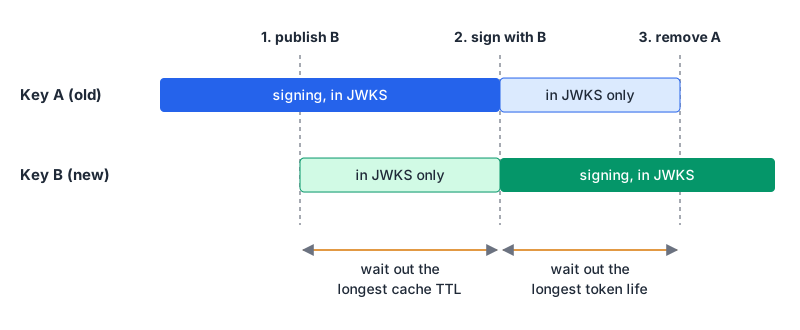
- Publish the new key alongside the old one. Nothing signs with it yet.
- Wait at least the longest cache lifetime your verifiers use, then start signing with the new key. Verifiers that refetch on unknown
kidwould cope anyway, but this keeps you clear of their cooldowns and of any verifier that doesn't refetch at all. - Wait at least the longest token lifetime, then remove the old key. Any token signed by it has expired by then.
For an emergency (a leaked private key) you skip the waiting: remove the compromised key immediately and accept that tokens it signed will fail. That's the point. The secret scanning post covers the wider rotation drill when a key ends up in a repository.
Gotchas
- Never fetch keys from a URL in the token.
jkuandx5uin a JWT header are attacker-controlled. Configure the JWKS location per issuer. The JWT security mistakes post covers this andalgconfusion in detail. - Pin
algorithms. A JWK withalghelps, but pass an explicit allow-list to the verify call too. - Don't assume one key. Microsoft says outright that its documents always contain more than one valid key, and that key order means nothing.
- Mixed-up base64 flavours.
x5cis plain base64 with+and/; everything else is base64url. The Base64 post explains the difference. - Per-tenant issuers. In multi-tenant setups, cache keys under issuer plus
kid, notkidalone. - Serving your JWKS. RFC 7517 registers
application/jwk-set+jsonas the media type for a set. Send cache headers that match your rotation timing. Google, for one, tells clients to cache its keys according to the response's cache directives, and some verifiers will treat yours the same way.
A quick check before shipping a verifier: does it discover jwks_uri from the issuer, cache by kid, refetch on an unknown kid with a cooldown, keep the last good set on fetch failure, pin iss, aud and algorithms, and survive the provider publishing three keys tomorrow? If yes, the next rotation will be a non-event.
Written by AIDToolStack Editorial
Researched from official documentation, specifications and vendor pages, listed under Sources below. Last checked November 2026.
Sources
- www.rfc-editor.org/rfc/rfc7517.html
- www.rfc-editor.org/rfc/rfc7518.html
- www.rfc-editor.org/rfc/rfc8037.html
- www.rfc-editor.org/rfc/rfc9864.html
- www.rfc-editor.org/rfc/rfc7638.html
- openid.net/specs/openid-connect-discovery-1_0.html
- openid.net/specs/openid-connect-core-1_0.html
- www.googleapis.com/oauth2/v3/certs
- developers.google.com/identity/openid-connect/openid-connect
- auth0.com/docs/secure/tokens/json-web-tokens/json-web-key-sets
- learn.microsoft.com/en-us/entra/identity-platform/signing-key-rollover
- github.com/panva/jose
- github.com/panva/jose/blob/main/docs/jwks/remote/functions/createRemoteJWKSet.md
- github.com/panva/jose/blob/main/docs/jwks/remote/interfaces/RemoteJWKSetOptions.md
- github.com/panva/jose/blob/main/docs/key/generate_key_pair/functions/generateKeyPair.md
- github.com/panva/jose/blob/main/docs/jwt/sign/classes/SignJWT.md
- github.com/panva/jose/blob/main/docs/util/errors/classes/JWKSNoMatchingKey.md
- www.npmjs.com/package/jose
Related Posts
Explore on AIDToolStack
Discover tools and servers featured in our directory.
AI Tools
MCP Servers
Sponsor Our Newsletter
Reach thousands of developers who are actively evaluating AI tools, MCP servers, and dev infrastructure. Our weekly newsletter goes to engaged technical decision-makers.
All sponsored content is clearly labeled per our editorial policy.