
GitHub Copilot AI Credits Explained: What Costs Credits and How Budgets Work
Until June 2026, GitHub Copilot billing was easy to reason about: you got a number of premium requests a month, each chat prompt cost one (times a model multiplier), and extra ones were four cents. Since June 1, 2026 that's gone for most plans. Copilot now meters chat and agent work by the tokens it actually uses, priced at each model's API rate, and converts the result into GitHub AI Credits.
The practical difference: two prompts that look the same in the chat box can now cost wildly different amounts. A question in a fresh chat is cheap. The same question at the end of a long agent session, carrying 100,000 tokens of context, is not. Here's how the system works as of November 2026, from GitHub's own docs and announcements.
What changed on June 1
GitHub announced the switch in an April 27, 2026 changelog post. The main points:
- Premium request units were replaced by AI Credits. "Usage will be calculated based on token consumption, including input, output, and cached tokens," at the published API rate for each model.
- Every plan gets a monthly credit allotment, and paid plans can buy more.
- "Fallback experiences will no longer be available." Under the old system you dropped to an included model when you ran out. Now you stop, or you pay.
- Copilot code review also consumes GitHub Actions minutes, at the same per-minute rates as other workflows.
- People on annual Pro or Pro+ plans stay on premium-request billing until the plan expires, then move to Free.
If you're on one of those annual plans, the legacy billing page still applies to you: 300 premium requests a month on Pro, 1,500 on Pro+, $0.04 per extra request, and 13 premium requests per code review since June 1.
Plans and allowances
GitHub then reshaped the individual plans in a May 12, 2026 post that added a "flex" allotment on top of the base credits and a new Max plan. Current numbers from the individual billing docs and the plans page, as of November 2026:
| Plan | Price | Base credits | Flex credits | Total per month |
|---|---|---|---|---|
| Free | $0 | Not published | Not published | "Limited" chat and agent use, 2,000 completions |
| Pro | $10 | 1,000 | 500 | 1,500 |
| Pro+ | $39 | 3,900 | 3,100 | 7,000 |
| Max | $100 | 10,000 | 10,000 | 20,000 |
| Business | $19 per seat | 1,900 per seat, pooled | n/a | Pooled across the org |
| Enterprise | $39 per seat | 3,900 per seat, pooled | n/a | Pooled across the org |
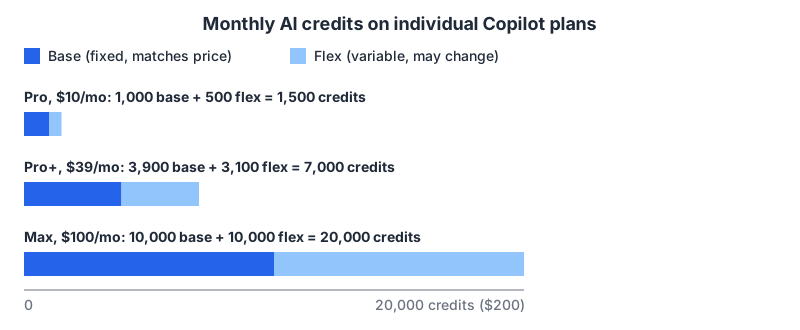
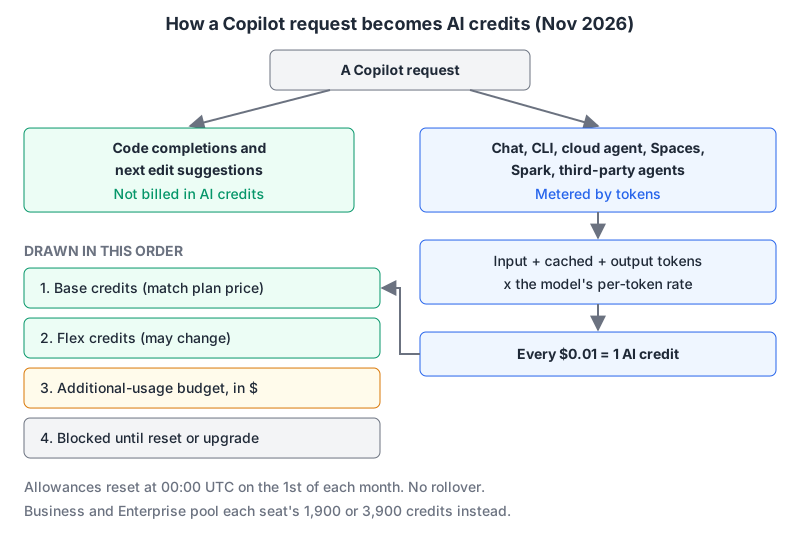
One credit is $0.01, so base credits are simply your subscription price in credits. GitHub's post says base credits "never change". Flex credits are "variable additional usage on top of your base" and "will vary over time". Base is spent first. I'd budget on the base number and treat flex as a bonus that might shrink.
Business and Enterprise seat prices come from GitHub's plans reference, and the per-seat credit numbers from the organization billing docs. Copilot Free is limited to auto model selection and doesn't publish its credit amount.
What costs credits, and what doesn't
The free part is the part most people use most: "Code completions and next edit suggestions are not billed in AI credits and remain unlimited for all paid plans," per the billing docs. If Copilot is mainly autocomplete for you, the credit system barely touches you.
Everything model-heavy is metered: Copilot Chat, Copilot CLI, the cloud agent, Spaces, Spark and third-party coding agents. The docs say heavier tasks, longer conversations, agentic features and more capable models all burn more. Code review is the odd one: the changelog says it now consumes GitHub Actions minutes, but the credit docs don't list it among the metered features, so check your billing page rather than assuming either way.
How a request turns into credits
Per-token rates are listed on GitHub's models and pricing page. A sample, per million tokens, as of November 2026:
| Model | Input | Cached input | Cache write | Output |
|---|---|---|---|---|
| Claude Haiku 4.5 | $1.00 | $0.10 | $1.25 | $5.00 |
| Claude Sonnet 5.5 | $2.00 | $0.10 | $2.50 | $10.00 |
| Claude Opus 5.5 | $4.00 | $0.20 | $5.00 | $20.00 |
| GPT-5.6 Sol (up to 272K input) | $4.00 | $0.40 | $5.00 | $20.00 |
| Gemini 4 Argon (promotional until Dec 1, 2026) | $2.00 | $0.10 | not listed | $10.00 |
GitHub doesn't publish a worked example, so here's one from those rates. Say an agent turn sends 100,000 input tokens and gets 3,000 back on Claude Sonnet 5.5:
No cache hits:
  input   100,000 x $2.00 / 1M  = $0.200
  output    3,000 x $10.00 / 1M = $0.030
  total $0.230 = 23 credits

90,000 of the input served from cache:
  cached   90,000 x $0.10 / 1M  = $0.009
  input    10,000 x $2.00 / 1M  = $0.020
  output    3,000 x $10.00 / 1M = $0.030
  total $0.059 = about 6 credits
On Pro's 1,500 credits, that's about 65 uncached turns or about 250 well-cached ones. The same uncached turn on Opus 5.5 or GPT-5.6 Sol is 46 credits. Real agent sessions make many model calls per prompt, and Anthropic models also charge for cache writes, so treat these as a floor rather than a forecast.
What follows from the arithmetic:
- Context size is the bill. Start a new chat when you change topic. Long threads re-send their history every turn.
- Model choice is a 2x to 4x lever. Use the cheaper model for routine edits. Our Copilot usage guide has more on matching the model to the task.
- Promotional prices end. Gemini 4 Argon's rates on GitHub's page are marked promotional through December 1, 2026.
When you run out
For individuals, the billing docs give three options: upgrade and pay only the difference, stay on your plan and pay for additional usage, or wait for the reset. Additional usage is set as a dollar budget ("a $10 budget covers 1,000 credits"), and GitHub sends alerts at 75%, 90% and 100% of a budget, according to the plans page.
The reset is fixed: 00:00:00 UTC on the first day of each calendar month, regardless of your billing date. "Included AI credits do not carry over between months." If you're in a timezone well behind UTC, your month ends on the evening of the last day.
Budgets and policies for organizations
This is where admins need to make decisions, because the defaults are generous. From the organization billing docs:
- Credits are pooled. Each license adds its monthly allowance (1,900 on Business, 3,900 on Enterprise) to a shared pool at the billing entity. Light users subsidise heavy ones, which is usually what you want.
- Paid overage is on by default. The "AI credits paid usage" policy is enabled by default for Business, Enterprise and Copilot access. Decide deliberately whether to leave it on.
- Budgets stack at four levels: user, cost center, organization and enterprise. Budgets are in dollars; usage displays in credits.
- A budget only blocks if you tell it to. Spending limits need "Stop usage when budget limit is reached" enabled to be enforced. Without additional usage allowed, usage is blocked until the next cycle.
- Model policies still apply. Restricting which models people can pick is the bluntest cost control available, since Opus-class models cost twice Sonnet's rate on GitHub's table.
Existing Business and Enterprise customers got a promotional bump to $30 and $70 of monthly credits for June through August 2026, per the changelog. The pool went back to the standard $19 and $39 per seat after that, so a team that sized its budget over the summer had less headroom from September.
A quick checklist
- Mostly autocomplete? Pro's unlimited completions are the point; credits are a side detail.
- Heavy chat or agent use on an individual plan: compare Pro+ (7,000 credits for $39) with paying overage on Pro at $0.01 a credit.
- Admins: set a per-user budget, decide on the paid-usage policy, and turn on "Stop usage when budget limit is reached".
- Everyone: new topic, new chat.
For how Copilot stacks up against alternatives on more than price, see Cursor vs GitHub Copilot, Claude Code vs GitHub Copilot and our GitHub Copilot tool page.
Written by AIDToolStack Editorial
Researched from official documentation, specifications and vendor pages, listed under Sources below. Last checked November 2026.
Sources
- github.blog/changelog/2026/04/27/github-copilot-is-moving-to-usage-based-billing/
- github.blog/news-insights/company-news/github-copilot-individual-plans-introducing-flex-allotments-in-pro-and-pro-and-a-new-max-plan/
- github.com/features/copilot/plans
- docs.github.com/en/copilot/concepts/billing/usage-based-billing-for-individuals
- docs.github.com/en/copilot/concepts/billing/usage-based-billing-for-organizations-and-enterprises
- docs.github.com/en/copilot/concepts/billing/individual-plans
- docs.github.com/en/copilot/reference/copilot-billing/models-and-pricing
- docs.github.com/en/copilot/concepts/billing/copilot-requests
Related Posts
Explore on AIDToolStack
Discover tools and servers featured in our directory.
AI Tools
MCP Servers
Sponsor Our Newsletter
Reach thousands of developers who are actively evaluating AI tools, MCP servers, and dev infrastructure. Our weekly newsletter goes to engaged technical decision-makers.
All sponsored content is clearly labeled per our editorial policy.