
Git Hooks with Husky and Lefthook: Setup, npm 12 Gotchas and CI Parity
Git hooks are scripts in .git/hooks, and .git isn't part of what you commit. So the pre-commit lint you set up last week lives on your laptop and nowhere else. Every hook manager exists to fix that one problem: put the hook definitions in the repo and get them wired into each clone without anyone remembering a setup step.
Husky and Lefthook are the two you'll meet most in JavaScript projects. They solve the same problem in noticeably different ways, and both have a few sharp edges in late 2026 (npm 12's script blocking is one of them). This post sets each one up, shows what actually runs when you commit, and covers how to keep hooks and CI from drifting apart.
What Git gives you before any tool
The githooks docs cover the basics. Hooks live in $GIT_DIR/hooks unless core.hooksPath points somewhere else, and a hook without the executable bit is ignored. The ones you'll use most:
- pre-commit runs before the commit message is even requested. A non-zero exit aborts the commit.
- commit-msg gets one argument, the path of the file holding the proposed message, which is where commitlint hooks in.
- pre-push gets the remote name and URL as arguments and one line per ref on stdin; a non-zero exit stops the push.
Both pre-commit and commit-msg can be bypassed with --no-verify. Keep that in mind for later: a hook is a convenience, never a guarantee.
Git itself has grown here. The Git 2.54 release notes added hooks defined in configuration, with several commands allowed per event, and 2.55 let them run in parallel. The syntax from the git-hook docs:
[hook "linter"]
  event = pre-commit
  event = pre-push
  command = ~/bin/linter --cpp20
That's great for personal hooks you want in every repository. It doesn't solve the sharing problem, though, because Git config files don't travel with a clone. For a team you still want something that lives in the repo and installs itself.
Husky 9: shell scripts in .husky/
Husky's current release is 9.1.7. The npm registry dates it to 18 November 2024, and it's still the latest as of November 2026. Setup from the getting-started page:
npm install --save-dev husky
npx husky init
init creates .husky/pre-commit and sets "prepare": "husky" in package.json. npm runs prepare on a plain npm install in the project, per the npm scripts docs, so every teammate gets hooks the first time they install.
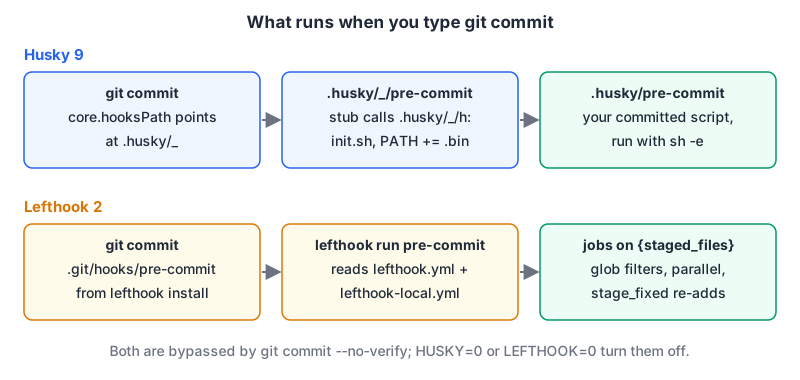
What husky does at that moment is small enough to read. The 9.1.7 source runs git config core.hooksPath .husky/_, writes a git-ignored .husky/_/ folder with a stub per hook, and each stub calls a shared runner. The runner sources ~/.config/husky/init.sh if it exists, puts node_modules/.bin on the PATH, and runs your .husky/pre-commit with sh -e, so the first failing command stops the hook.
Your hooks are plain shell. Husky doesn't know about staged files, so the usual pairing is lint-staged (17.6.0 on npm as of November 2026), which runs commands on staged files only and re-stages what they fix:
# .husky/pre-commit
npx lint-staged
{
"lint-staged": {
"*.{js,ts,tsx}": "eslint --fix",
"*.{json,md,css}": "prettier --write"
}
}If you haven't settled the ESLint and Prettier config yet, our ESLint and Prettier setup guide covers that, and a commit-msg hook running commitlint is described in the commit messages post.
Husky's how-to page covers the edge cases: HUSKY=0 disables hooks, a production install without devDependencies makes "prepare": "husky" fail (the documented fix is "prepare": "husky || true" or a small .husky/install.mjs that skips CI and production), and Husky won't install into a parent directory, so a package in frontend/ needs "prepare": "cd .. && husky frontend/.husky".
Lefthook 2: one YAML file, one binary
Lefthook is a single Go binary configured by lefthook.yml. Version 2.2.2 was released on 13 October 2026. The npm package downloads the right binary for your platform through optional dependencies:
npm install --save-dev lefthookUnlike Husky, Lefthook writes real files into .git/hooks/, and each one calls lefthook run <hook>. The config is read on every run, so per the install docs you don't reinstall after editing it. A typical config:
# lefthook.yml
pre-commit:
  parallel: true
  jobs:
    - name: eslint
      glob: "*.{js,ts,tsx}"
      run: npx eslint --fix {staged_files}
      stage_fixed: true
    - name: prettier
      glob: "*.{json,md,css}"
      run: npx prettier --write {staged_files}
      stage_fixed: true

pre-push:
  jobs:
    - name: test
      run: npm test
{staged_files} is filled in by Lefthook, glob filters which files a job sees, and stage_fixed runs git add on the files afterwards. The stage_fixed docs say it only works in pre-commit, and that if the git add fails the hook fails too. So for the job lint-staged does in Husky setups, you don't need a second package. Developers can override any of it in a lefthook-local.yml kept out of Git (the docs suggest a global gitignore entry), which is handy for wrapping commands in Docker on one machine.
Skipping works globally or by name and tag: LEFTHOOK=0 git commit ... turns everything off, and LEFTHOOK_EXCLUDE=lint git commit ... skips just the jobs tagged or named lint.
The install step is a postinstall script
This is where Lefthook needs more care in 2026. Hooks get installed by the npm package's postinstall script, which runs lefthook install unless CI is set (set LEFTHOOK=1 to override that). Three things can stop it:
- pnpm doesn't run dependency build scripts unless the package is listed. Lefthook's Node install docs say to add
lefthooktoonlyBuiltDependencies, or hooks won't be installed. - npm 12 (released 8 July 2026) made the same change. Its release notes say dependency lifecycle scripts "are now blocked by default unless allowed by the root package's
allowScriptspolicy." Lefthook's postinstall is a dependency script, so on npm 12 it's skipped until you approve it withnpm install-scripts approve lefthookfollowed bynpm rebuild. The install-scripts docs note approvals are pinned to the installed version by default. Husky avoids this, because itspreparescript belongs to your own package, not a dependency. - An existing
core.hooksPath, typically left behind by Husky. Lefthook's install docs say it stops with a message; runlefthook install --reset-hooks-pathonce when you migrate.
If you'd rather not depend on postinstall at all, add your own "prepare": "lefthook install". Since prepare is a root script, npm 12 runs it.
Side by side
| Husky 9 | Lefthook 2 | |
|---|---|---|
| Hook definitions | Shell scripts in .husky/ | lefthook.yml |
| How Git finds them | core.hooksPath=.husky/_ | Files in .git/hooks/ |
| Installed by | Your prepare script | Package postinstall (or lefthook install) |
| Staged-file filtering | Add lint-staged | Built in ({staged_files}, glob, stage_fixed) |
| Parallel jobs | Whatever your script does | parallel: true |
| Per-developer overrides | ~/.config/husky/init.sh | lefthook-local.yml |
| Off switch | HUSKY=0 | LEFTHOOK=0 |
| Non-JS repos | Needs Node | Also via Homebrew, Go, pip, gem and others |
My take: for a single JavaScript package where all you want is lint-staged on commit, Husky is two files and nothing to learn. Once you have a monorepo, a mix of languages, or more than two or three checks you want running in parallel, Lefthook's YAML pays for itself, as long as you handle the install step. If your repo is mostly Python, the pre-commit framework is the more natural fit, and our pre-commit config generator gives you a starting .pre-commit-config.yaml with Python, Node or full-stack presets; the full-stack one includes gitleaks for secret scanning.
Keeping hooks and CI in step
Hooks are optional by design. --no-verify skips them, HUSKY=0 and LEFTHOOK=0 skip them, someone's GUI client may not find node at all. So treat hooks as fast feedback and CI as the gate, and make both call the same commands so they can't disagree.
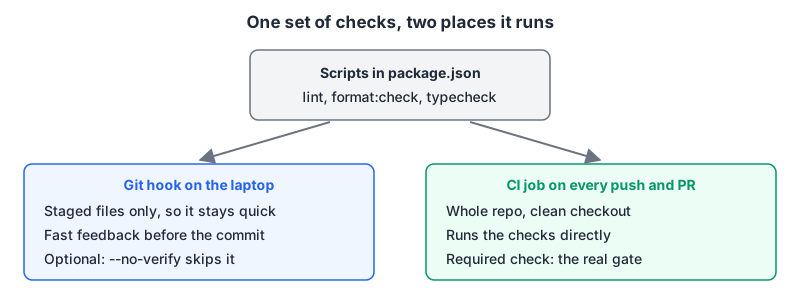
The simplest way is to keep the real commands in package.json scripts, call them from the hook, and call them again in CI against everything:
# .github/workflows/ci.yml (excerpt)
env:
  HUSKY: 0          # Husky's docs: don't install hooks in CI
jobs:
  checks:
    runs-on: ubuntu-latest
    steps:
      - uses: actions/checkout@<full-commit-sha>
      - uses: actions/setup-node@<full-commit-sha>
        with:
          node-version: 24
      - run: npm ci
      - run: npm run lint
      - run: npm run format:check
With Lefthook you can go further and run the hook itself in CI: lefthook run pre-commit --all-files swaps {staged_files} for every file, per the run docs. That guarantees the commit-time checks and the CI checks are literally the same list. Our GitHub Actions patterns post covers permissions and pinning for the workflow itself.
Gotchas worth knowing up front
- Hooks run from GUIs without your shell setup. If Node comes from nvm or fnm, a commit from a Git GUI may not find it. Husky sources
~/.config/husky/init.shbefore every hook, so put your version manager's init there. - Write POSIX sh, not bash. Husky's docs say hook scripts should be POSIX compliant because not everyone has bash, Windows users especially.
- Keep pre-commit fast. Lint and format staged files there. Put the test suite in
pre-pushor leave it to CI; a slow pre-commit is how people learn--no-verify. - Don't let hooks rewrite unstaged work. Use lint-staged or
stage_fixed, which only touch what's staged, rather than runningprettier --write .in a hook. - Secrets are the one check worth doing early. A leaked key is already on the remote once pushed. A secret scanner in pre-commit catches it while it's still local; our secret scanning guide compares the scanners.
Checklist for a new repo: pick the manager, commit its config, confirm a fresh clone plus npm install actually installs the hooks on your npm or pnpm version, and add a CI job that runs the same checks over the whole repo.
Written by AIDToolStack Editorial
Researched from official documentation, specifications and vendor pages, listed under Sources below. Last checked November 2026.
Sources
- git-scm.com/docs/githooks
- git-scm.com/docs/git-hook
- github.com/git/git/blob/master/Documentation/RelNotes/2.54.0.adoc
- github.com/git/git/blob/master/Documentation/RelNotes/2.55.0.adoc
- www.npmjs.com/package/husky
- typicode.github.io/husky/get-started.html
- typicode.github.io/husky/how-to.html
- github.com/typicode/husky/blob/v9.1.7/index.js
- github.com/typicode/husky/blob/v9.1.7/husky
- github.com/lint-staged/lint-staged
- lefthook.dev/
- github.com/evilmartians/lefthook/releases
- github.com/evilmartians/lefthook/blob/master/docs/installation/node.md
- github.com/evilmartians/lefthook/blob/master/docs/usage/commands/install.md
- github.com/evilmartians/lefthook/blob/master/docs/usage/commands/run.md
- github.com/evilmartians/lefthook/blob/master/docs/configuration/stage_fixed.md
- github.com/evilmartians/lefthook/blob/master/docs/configuration/jobs.md
- github.com/evilmartians/lefthook/blob/master/docs/examples/lefthook-local.md
- github.com/evilmartians/lefthook/blob/master/docs/usage/envs/CI.md
- github.com/evilmartians/lefthook/blob/master/docs/usage/envs/LEFTHOOK.md
- github.com/evilmartians/lefthook/blob/master/docs/usage/envs/LEFTHOOK_EXCLUDE.md
- github.com/evilmartians/lefthook/blob/master/packaging/registries/npm/lefthook/postinstall.js
- github.com/npm/cli/releases/tag/v12.0.0
- docs.npmjs.com/cli/v12/commands/npm-install-scripts
- docs.npmjs.com/cli/v11/using-npm/scripts
Related Posts
Explore on AIDToolStack
Discover tools and servers featured in our directory.
AI Tools
MCP Servers
Sponsor Our Newsletter
Reach thousands of developers who are actively evaluating AI tools, MCP servers, and dev infrastructure. Our weekly newsletter goes to engaged technical decision-makers.
All sponsored content is clearly labeled per our editorial policy.