
Fetch Timeouts, Retries and Cancellation with AbortSignal
An upstream API starts accepting connections and then never answers. Your handler calls it with a plain fetch(url) and waits. And waits. The browser's fetch has no timeout option at all, and in Node the built-in client's defaults are generous: per the undici Client docs, headersTimeout and bodyTimeout both default to 300e3 milliseconds (five minutes each) and the connect timeout to 10e3. Meanwhile a 500 from that same API doesn't throw at all.
So every outbound fetch worth writing needs three things bolted on: a deadline, a way to cancel, and a retry policy that won't make an outage worse. Here's how to do each with the platform APIs, ending in a retry helper of about 60 lines. I ran the Node examples on Node v24.4.0 (which bundles undici 7.11.0) against a small local node:http server that stalls, drips its body and returns 503 on cue. The outputs below are real.
What fetch throws, and what it doesn't
MDN is blunt about it: the promise only rejects when the request fails, such as a bad URL or a network error. HTTP error statuses resolve normally, and you're expected to check response.ok or response.status.
Here's what each failure looked like in my run:
| Situation | Promise | err.name | Detail |
|---|---|---|---|
Server returns 404 or 500 | resolves | none | res.ok is false |
AbortSignal.timeout() fires | rejects | TimeoutError | "The operation was aborted due to timeout" |
You call controller.abort() | rejects | AbortError | "This operation was aborted" |
| Connection refused | rejects | TypeError | "fetch failed", err.cause.code is ECONNREFUSED |
| DNS lookup fails | rejects | TypeError | "fetch failed", err.cause.code is ENOTFOUND |
That TypeError with a vague "fetch failed" message is Node-specific in its details: the useful bit is on err.cause, which is one more reason to log causes properly (the TypeScript error handling post covers Error.cause). One oddity I hit while testing: fetching port 1 fails with a cause of "bad port", because the Fetch Standard blocks a list of ports outright. Pick a high unused port if you want to simulate a refused connection.
A deadline per request: AbortSignal.timeout()
try {
  const res = await fetch(url, { signal: AbortSignal.timeout(5_000) });
  if (!res.ok) throw new Error(`HTTP ${res.status}`);
  return await res.json();
} catch (err) {
  if (err.name === 'TimeoutError') {
    // took longer than 5 s, including reading the body
  }
  throw err;
}
AbortSignal.timeout() has been available across browsers since April 2024. Three details from its docs matter in practice:
- It aborts with a
TimeoutErrorDOMException, so you can tell a timeout from a deliberate cancel, which surfaces asAbortError. - The timer counts active time, not wall-clock time. It's effectively paused in a suspended worker or while the page sits in the back-forward cache.
- You can't cancel it. If you need to clear the timer early, use an
AbortControllerwithsetTimeoutandclearTimeoutinstead.
The signal also covers the body, not just the headers. In my test the server sent headers and a first chunk immediately, then stalled for three seconds. With a one-second timeout, fetch() resolved with status 200 and then await res.text() rejected with TimeoutError. That's usually what you want, because a response that stalls halfway is just as stuck, but it means res.json() belongs inside the same try.
Cancel plus deadline: AbortSignal.any()
Real code often has two reasons to stop: the user navigated away (or the incoming request was cancelled), and the deadline passed. AbortSignal.any(), available across browsers since March 2024, combines them:
const userCancel = new AbortController();
cancelButton.addEventListener('click', () => userCancel.abort());

const signal = AbortSignal.any([userCancel.signal, AbortSignal.timeout(30_000)]);
const res = await fetch(downloadUrl, { signal });
The combined signal aborts when any input does, and its reason is the reason of the first one to abort. In my run, with the timeout firing first, the fetch rejected with TimeoutError and signal.reason.name was TimeoutError too. It doesn't work in the other direction: aborting the combined signal doesn't abort its inputs or stop their timers. MDN also suggests removing any abort listeners you add to it once the operation finishes.
Node's own timeouts, and a version trap
The five-minute undici defaults are separate from your signal and act as a backstop. Note how bodyTimeout is defined in the Client docs: it "monitors the time between consecutive body chunks." A server that trickles one byte every few seconds never trips it, so it doesn't replace a total deadline.
To tighten them, the Node fetch docs say you can pass any undici-compatible dispatcher:
import { Agent } from 'undici';

const dispatcher = new Agent({
  headersTimeout: 10_000,
  bodyTimeout: 10_000,
  connectTimeout: 5_000,
});
const res = await fetch(url, { dispatcher });
Here's the trap. I first ran that with the latest undici from npm (8.12.4) against Node 24.4.0's built-in fetch, and every request failed with TypeError: fetch failed, cause UND_ERR_INVALID_ARG, message "invalid onRequestStart method". The npm package's major version didn't match the undici bundled inside Node. With undici@7 (7.30.2) the same code worked, and the timeouts fired as UND_ERR_HEADERS_TIMEOUT and, for the dripping body, UND_ERR_BODY_TIMEOUT (that one surfaced as TypeError: terminated). Importing fetch from the undici package itself instead of using the global also worked with 8.x.
Rule: match majors. Node 26.13.0 bundles undici 8.12.2 and Node 24.22.2 bundles 7.30.1 (from each release's deps/undici package.json), and process.versions.undici tells you what your runtime has.
Which requests to retry
Retrying is only safe when repeating the request can't do damage. RFC 9110, section 9.2.2 defines PUT, DELETE and the safe methods (GET, HEAD, OPTIONS, TRACE) as idempotent, and says a client "SHOULD NOT automatically retry a request with a non-idempotent method" unless it knows the request is actually safe to repeat. For POST, that usually means an idempotency key the server honours; HTTP Methods and Idempotency covers how that works and where the IETF draft stands.
Then decide which failures are worth another try:
- Network errors and timeouts (
TypeError,TimeoutError): yes, for idempotent requests. 408,429,500,502,503,504: yes. These are the transient ones, and almost exactly the list curl's own--retryuses (see curl for API testing).- Other
4xx: no. A400or404will fail the same way every time. (The status code lookup is handy if you need to check what an unfamiliar code means.) AbortErrorfrom the caller's own signal: never. Someone asked you to stop.
When the server sends Retry-After, use it. RFC 9110, section 10.2.3 allows two forms, an HTTP-date or a number of seconds (Retry-After: 120 means two minutes), and describes it on 503 and 3xx responses. Rate limiters send it with 429, as the rate limiting post explains from the server side.
Backoff with jitter
Without a hint from the server, wait longer after each failure, and randomise the wait so a thousand clients that failed together don't retry together. Marc Brooker's 2015 AWS Architecture Blog post compared three variants. The simulator code behind it defines them precisely, with expo(n) = min(cap, base * 2^n):
- Full jitter:
random(0, expo(n)) - Equal jitter:
expo(n) / 2 + random(0, expo(n) / 2) - Decorrelated jitter:
sleep = min(cap, random(base, sleep * 3))
The post calls equal jitter the loser, and says the choice between full and decorrelated is less clear: full jitter does less work, decorrelated finishes slightly sooner. I use full jitter because it's one line and has no state to carry between attempts.
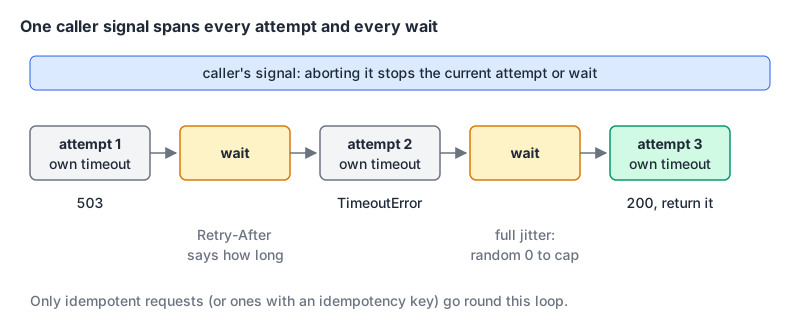
The helper
const RETRYABLE_STATUS = new Set([408, 429, 500, 502, 503, 504]);
const IDEMPOTENT = new Set(['GET', 'HEAD', 'OPTIONS', 'PUT', 'DELETE']);

export async function fetchWithRetry(url, options = {}) {
  const { retries = 3, baseMs = 200, capMs = 5_000, timeoutMs = 10_000, signal, ...init } = options;
  const method = (init.method ?? 'GET').toUpperCase();
  const canRetry = IDEMPOTENT.has(method) || new Headers(init.headers).has('Idempotency-Key');

  for (let attempt = 0; ; attempt++) {
    const timeout = AbortSignal.timeout(timeoutMs);
    const attemptSignal = signal ? AbortSignal.any([signal, timeout]) : timeout;
    const last = !canRetry || attempt >= retries;

    let res;
    try {
      res = await fetch(url, { ...init, signal: attemptSignal });
    } catch (err) {
      if (signal?.aborted || last) throw err; // caller cancelled, or out of tries
      if (err.name !== 'TimeoutError' && err.name !== 'TypeError') throw err;
      await sleep(backoff(attempt, baseMs, capMs), signal);
      continue;
    }

    if (!RETRYABLE_STATUS.has(res.status) || last) return res;

    const hinted = retryAfterMs(res.headers.get('retry-after'));
    if (hinted !== null && hinted > capMs) return res; // longer than we're willing to wait
    await res.body?.cancel(); // release the connection
    await sleep(hinted ?? backoff(attempt, baseMs, capMs), signal);
  }
}

function backoff(attempt, baseMs, capMs) {
  return Math.random() * Math.min(capMs, baseMs * 2 ** attempt); // full jitter
}

function retryAfterMs(value) {
  if (!value) return null;
  if (/^\d+$/.test(value.trim())) return Number(value) * 1000;
  const at = Date.parse(value);
  return Number.isNaN(at) ? null : Math.max(0, at - Date.now());
}

function sleep(ms, signal) {
  return new Promise((resolve, reject) => {
    signal?.throwIfAborted();
    const id = setTimeout(resolve, ms);
    signal?.addEventListener('abort', () => {
      clearTimeout(id);
      reject(signal.reason);
    }, { once: true });
  });
}
Against a test endpoint that returns 503 with Retry-After: 1 twice and then succeeds, with fetch wrapped to log each attempt:
+31ms GET /flaky -> 503
+1038ms GET /flaky -> 503
+2044ms GET /flaky -> 200
{"ok":true}
The server's hint won over the computed backoff, which is the point. A second test aborted the caller's controller at 100 ms while the helper was retrying a stalled endpoint with 50 ms per-attempt timeouts; it rejected with AbortError instead of carrying on.
A few design choices worth copying even if you don't use this code:
- Two deadlines, not one.
timeoutMsbounds each attempt. For a total budget, passsignal: AbortSignal.timeout(30_000)as the caller signal and the waits count against it too. - Cancel the body you're discarding. The undici README warns that leaving unread bodies to the garbage collector in Node can exhaust connections, and says to always consume or cancel them.
- Give up on long hints. If
Retry-Aftersays ten minutes, return the response and let the caller decide, rather than holding a request open. - The last response is returned, not thrown. The caller still checks
res.ok.
If you start from a converted curl command, our curl to fetch converter produces code that checks response.ok and throws on HTTP errors, and turns --max-time into signal: AbortSignal.timeout(...). It has no retry logic, though, so wrap the call in a helper like the one above.
Checklist
- Every outbound
fetchgets asignal, at minimumAbortSignal.timeout(ms). - Check
res.okbefore parsing, and keep body parsing inside the sametryas the request. - Branch on
err.name:TimeoutErrorandTypeErrormay be retryable,AbortErrorfrom your own signal never is. - Retry only idempotent methods, or POSTs with an idempotency key the server supports.
- Honour
Retry-After; otherwise use capped exponential backoff with full jitter. - In Node, if you pass an undici
dispatcherto the globalfetch, install the undici major that matchesprocess.versions.undici.
Written by AIDToolStack Editorial
Researched from official documentation, specifications and vendor pages, listed under Sources below. Last checked November 2026.
Sources
- developer.mozilla.org/en-US/docs/Web/API/Window/fetch
- developer.mozilla.org/en-US/docs/Web/API/AbortSignal/timeout_static
- developer.mozilla.org/en-US/docs/Web/API/AbortSignal/any_static
- fetch.spec.whatwg.org/#block-bad-port
- nodejs.org/api/globals.html#fetch
- github.com/nodejs/undici/blob/main/docs/docs/api/Client.md
- github.com/nodejs/undici/blob/main/docs/docs/api/Dispatcher.md
- github.com/nodejs/undici#garbage-collection
- registry.npmjs.org/undici
- github.com/nodejs/node/blob/v26.13.0/deps/undici/src/package.json
- github.com/nodejs/node/blob/v24.22.2/deps/undici/src/package.json
- www.rfc-editor.org/rfc/rfc9110.html#name-idempotent-methods
- www.rfc-editor.org/rfc/rfc9110.html#name-retry-after
- aws.amazon.com/blogs/architecture/exponential-backoff-and-jitter/
- github.com/aws-samples/aws-arch-backoff-simulator/blob/master/src/backoff_simulator.py
Related Posts
Explore on AIDToolStack
Discover tools and servers featured in our directory.
AI Tools
MCP Servers
Sponsor Our Newsletter
Reach thousands of developers who are actively evaluating AI tools, MCP servers, and dev infrastructure. Our weekly newsletter goes to engaged technical decision-makers.
All sponsored content is clearly labeled per our editorial policy.