
Cursor Plans Explained: The X Subscription, Legacy Plans and Model Billing
Open Cursor's pricing page in November 2026 and the feature table lists cloud agents and Bugbot code reviews, and further down the same table, "Ad-free scrolling", "Edit posts" and "Bookmark folders". That's not a bug. New Cursor subscriptions are now sold as part of The X Subscription, a bundle of Cursor, Grok and X Premium, and the plan names, the usage model and the way Claude or GPT models are billed all changed with it.
If you've been on Cursor Pro since before October, nothing has changed for you yet, and that's worth knowing before you click any upgrade button. Here's what the plans are, how model usage is billed, and how to think about switching, all from Cursor's and xAI's own pages as of November 2026.
How we got here
The short timeline, from primary sources only:
- April 2026: Cursor and SpaceX announced a partnership, which Cursor's later post describes as the start of the acquisition process.
- August 14, 2026: Cursor's blog post Cursor is now a part of SpaceX says "Cursor has officially been acquired by SpaceX" and that the deal gives it access to "the largest fleet of GPUs in the world". It promised "more capable models at lower cost" but announced no plan changes.
- October 12, 2026: xAI's launch post for The X Subscription said the bundle "is available to new customers starting today", with Grok, Cursor and X Premium on one plan, and that "Nothing changes for existing SuperGrok, Cursor, or X Premium subscribers."
The pricing page now states that subscriptions "are only sold directly through X Subscription Corp", and Cursor's legacy plan docs say billing for the new plans moves from cursor.com to grok.com.
The current plans
From cursor.com/pricing and the models and pricing docs, as of November 2026:
| Plan | Price | Included usage | Third-party models (Claude, GPT, Gemini) |
|---|---|---|---|
| Free | $0 | Limited | No |
| Plus | $8/month | Basic shared pool | No, Grok models only |
| Premium | $30/month | 4x Plus | Yes, at API list price from prepaid credit |
| Super | $100/month | 15x Plus | Yes, same |
| Ultra | $200/month | 50x Plus | Yes, same |
| Teams | $30, $100 or $200 per seat | Matches the seat's tier | API list price plus the Cursor Token Rate |
| Enterprise | Custom | Pooled | API list price plus the Cursor Token Rate |
Cloud agents, Bugbot code reviews, code hosting via Origin and third-party models start at Premium. Notice what's missing: absolute usage numbers. The page only gives multipliers relative to Plus, and Plus itself is described as "Basic". You can't work out from the published material how many agent runs any tier buys.
The FAQ adds that the allowance "refreshes weekly, so one heavy day never wipes out your whole month." Cursor's usage limits help page says unused included usage doesn't roll over, and that the pool is shared across Cursor, Grok Bot and the Grok apps. Your Grok chats and your coding agent drink from the same glass.
What draws from the pool and what doesn't
This is the part that changes real bills. The weekly pool covers "Cursor models" only: Grok 4.7, Grok 4.6, Grok 4.5 and Composer 2.5, per the usage limits page. Third-party models are never in the pool. On Premium and above you pay for them "at API list price from your prepaid credit."
Rates from the models and pricing docs, per million tokens:
| Model | Input | Cache read | Output | Billing |
|---|---|---|---|---|
| Composer 2.5 | $0.50 | $0.20 | $2.50 | Pool, then credit |
| Grok 4.7 | $2 | $0.50 | $6 | Pool, then credit |
| Claude Sonnet 5.5 | $2 | $0.10 | $10 | Prepaid credit |
| Claude Opus 5 | $5 | $0.50 | $25 | Prepaid credit |
| GPT-5.5 | $5 | $0.50 | $30 | Prepaid credit |
| Gemini 3 Pro | $2 | $0.20 | $12 | Prepaid credit |
The Cursor-model rates only apply once you've used up the weekly pool. Grok 4.7 above 256K input tokens is billed at 2x. Max Mode isn't part of the new plans at all.
Two routing details from the usage limits page that can surprise you:
- Auto in Cost mode bills from the pool, whichever model ends up serving the request.
- Subagents can use a third-party model even when your picker says Auto, Grok or Composer. Those requests bill at list price from credit.
Prepaid credit is separate from the weekly pool, doesn't reset with it, and currently expires 365 days after purchase. You can set Auto Top-up and a monthly additional usage limit that caps paid usage "regardless of how much credit you hold."
Legacy plans: keep or switch?
If you subscribed before The X Subscription, you're on a legacy plan, and the legacy plans page says they "keep working as they are." It also maps each one to its new equivalent:
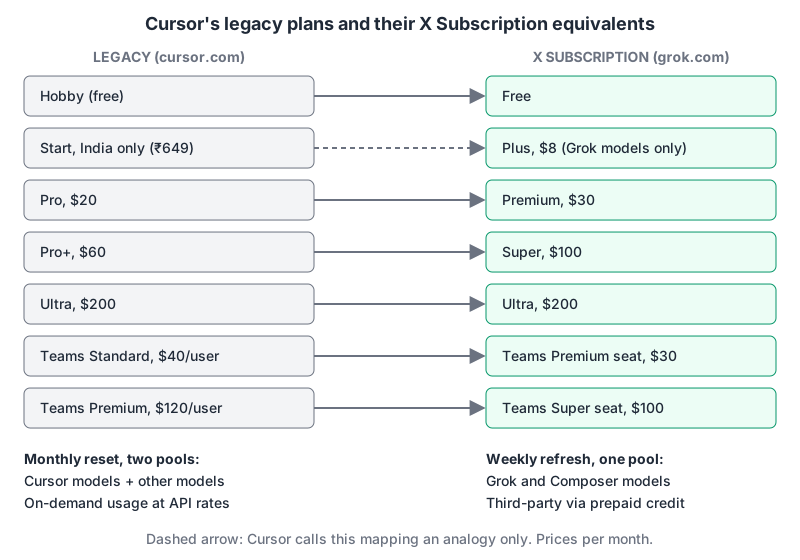
The structural difference is bigger than the price. Legacy plans reset monthly and have two pools: Cursor Models, and Other Models covering third-party models at provider prices. The X Subscription has one weekly pool for Cursor models and nothing included for third-party models. xAI says each new plan has "at least twice as much coding usage with our models as the comparable Cursor plan", which is true of Grok and Composer and says nothing about Claude or GPT.
Switching rules from the same page:
- "Switching to The X Subscription is optional and permanent."
- Your eligible Cursor and Grok subscriptions are cancelled at checkout with a prorated refund.
- Any unbilled on-demand usage goes on a final invoice first.
- On-demand usage is replaced by top-ups and a monthly additional usage limit.
My read: if most of your agent work runs on Claude or GPT models, a legacy Pro plan with an included Other Models pool is likely to beat Premium plus prepaid credit, and "permanent" means you can't test it and come back. If you've mostly used Composer or Grok already, the bigger weekly Cursor-model pool is a straightforward upgrade. Cursor doesn't publish the size of the legacy Other Models pool, so check your own usage on the Spending tab before deciding.
Teams: watch the Token Rate
Teams seats come in Premium, Super and Ultra tiers at $30, $100 and $200, with "the same weekly usage as the matching individual plan", and you can mix tiers on one team. Plus isn't available for teams. Admins get one shared prepaid balance and one spending cap.
The detail that matters for a team budget is the Cursor Token Rate. From the models and pricing docs: on Teams and Enterprise, eligible third-party model requests carry "$0.25 per million tokens" on top of API pricing, and "It applies to input tokens, output tokens, and cached tokens." It also applies when you bring your own API key. It doesn't apply to Grok or Composer, or to models whose cache-read price is strictly below $0.10 per million in every tier.
That last rule produces an odd result with cached context. Claude Sonnet 5.5's cache-read price is exactly $0.10, not below it, so it's eligible. For 100 million cache-read tokens in a month:
list price   100M x $0.10 = $10.00
token rate   100M x $0.25 = $25.00
total                       $35.00
The surcharge is two and a half times the cached-token price itself. Agent sessions are mostly cached context, so on a team running Claude models, the Token Rate can easily be the biggest line on the third-party bill. Claude Haiku 5.5, with a $0.01 cache read, is exempt.
One inconsistency to flag: Cursor's Teams page still says each seat includes "at least $20/mo of agent usage per person, resetting each billing cycle", which describes the legacy monthly model rather than the weekly seat tiers on the pricing page. I'd trust the pricing page and docs, and ask sales if you're buying.
Enterprise
Enterprise is custom-priced. The pricing table lists pooled usage across Grok and Cursor, invoice and PO billing, SCIM, group-level spend limits, model and MCP access controls, and audit logs. The Token Rate applies there too.
Picking a plan
- Trying Cursor with Grok or Composer only: Plus at $8, or Free.
- Daily use, mostly Cursor models: Premium. Add a small credit balance for the odd Claude or GPT task, with a monthly limit set.
- Heavy use of Claude or GPT on a legacy plan: stay put until you've compared a month of real usage. Switching can't be undone.
- Teams on third-party models: model the Token Rate on cached tokens before you sign.
For how Cursor compares with the alternatives beyond price, see Cursor vs Claude Code, Cursor vs GitHub Copilot and Cursor vs Windsurf. The Cursor tool page keeps the current plan summary.
Written by AIDToolStack Editorial
Researched from official documentation, specifications and vendor pages, listed under Sources below. Last checked November 2026.
Sources
Related Posts
Explore on AIDToolStack
Discover tools and servers featured in our directory.
AI Tools
MCP Servers
Sponsor Our Newsletter
Reach thousands of developers who are actively evaluating AI tools, MCP servers, and dev infrastructure. Our weekly newsletter goes to engaged technical decision-makers.
All sponsored content is clearly labeled per our editorial policy.