
Unicode and UTF-8 Explained: Code Points, Bytes and Grapheme Clusters
A user types "café" into a search box and gets no results, even though the product called "café" is right there in the database. Both strings render identically. One of them is four code points, the other is five, and a plain equality check says they're different. If you've never hit this bug, you will, along with its cousins: the 20-character limit that rejects a 12-character name, the truncated tweet that ends in a black diamond, the CSV that opens with three junk bytes.
All of them come from treating "a character" as one thing. In Unicode it's at least four things, and most text bugs are a mismatch between two of them.
Four ways to count one character
As of November 2026 the current version is Unicode 18.0, released on 16 September 2026. It added 13,007 characters for a total of 172,808. Each character has a code point, a number written U+ plus hex, from U+0000 to U+10FFFF (the range RFC 3629 says UTF-8 covers). That's the abstract layer. Below it sit the bytes an encoding produces; above it sits what a reader thinks of as one character, which Unicode calls a grapheme cluster.
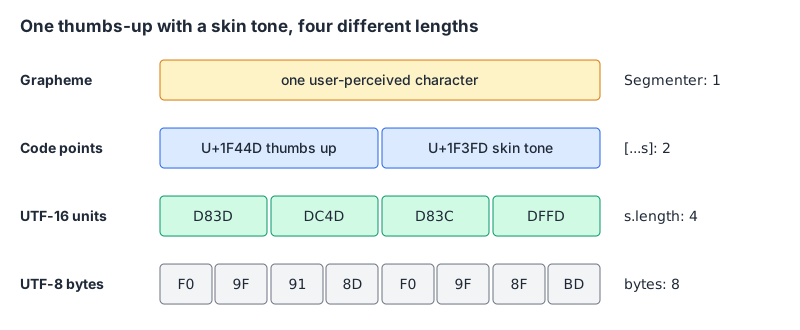
Here's what JavaScript reports for a few strings. I ran this in Node 24.4.0; the columns are s.length, [...s].length (code points), the grapheme count from Intl.Segmenter, and UTF-8 bytes from TextEncoder:
const seg = new Intl.Segmenter("en", { granularity: "grapheme" });
for (const s of ["cafe", "café", "café", "👍🏽", "👨👩👧", "🇯🇵"]) {
console.log(JSON.stringify(s), s.length, [...s].length,
[...seg.segment(s)].length, new TextEncoder().encode(s).length);
}| String | .length | Code points | Graphemes | UTF-8 bytes |
|---|---|---|---|---|
cafe | 4 | 4 | 4 | 4 |
café (precomposed é) | 4 | 4 | 4 | 5 |
cafe + combining accent | 5 | 5 | 4 | 6 |
| 👍🏽 | 4 | 2 | 1 | 8 |
| 👨👩👧 (family) | 8 | 5 | 1 | 18 |
| 🇯🇵 (flag) | 4 | 2 | 1 | 8 |
None of those columns is "wrong". They answer different questions. Storage limits are normally counted in bytes or code points, depending on the system, a "max 20 characters" rule in a UI should count graphemes, and .length counts neither. Our string length analyzer shows all of these side by side for anything you paste in, which is handy when a support ticket says "it says my name is too long".
How UTF-8 turns code points into bytes
UTF-8 uses one to four bytes per code point, and the first byte tells you how many follow. The table in RFC 3629 is short enough to memorise:
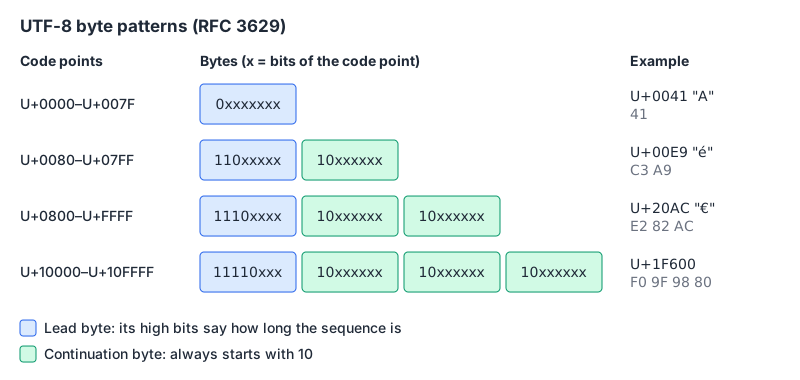
That design has some nice properties. ASCII text is already valid UTF-8, byte for byte. A continuation byte always starts with 10, so you can find the start of a character from any position. And bytes 0x00 to 0x7F never appear inside a multi-byte sequence, so a / or " byte is always that character.
[...new TextEncoder().encode("é€😀")].map(b => b.toString(16).toUpperCase()).join(" ")
// 'C3 A9 E2 82 AC F0 9F 98 80'
Two rules from the RFC matter for anyone writing a parser or validator:
- Surrogates aren't allowed. UTF-8 "prohibits encoding character numbers between U+D800 and U+DFFF". Those values exist only for UTF-16's internal plumbing.
- Overlong forms are invalid.
C0 80would decode toU+0000with a naive decoder. The RFC says implementations "MUST protect against decoding invalid sequences", and its security section describes attacks that used overlong slashes to sneak past path checks.
Modern decoders get this right, but you choose what happens next. In Node, the default decoder replaces bad bytes, and fatal: true makes it throw:
new TextDecoder().decode(new Uint8Array([0xC0, 0x80]));
// '��'  (two U+FFFD replacement characters)
new TextDecoder("utf-8", { fatal: true }).decode(new Uint8Array([0xC0, 0x80]));
// TypeError: The encoded data was not valid for encoding utf-8
Python's default is strict:
b"\xc0\x80".decode("utf-8")
# UnicodeDecodeError: 'utf-8' codec can't decode byte 0xc0 in position 0: invalid start byte
For input you'll store or act on, I'd rather fail loudly at the boundary than carry replacement characters into the database.
The three junk bytes at the start of that CSV are EF BB BF, the UTF-8 encoding of U+FEFF, used as a byte order mark. RFC 3629 allows it as a signature at the start of a stream, and says a U+FEFF anywhere else is a zero-width no-break space, not a signature. A parser that doesn't expect it glues those three bytes onto the first field or key, which is how a CSV header called id stops matching "id".
JavaScript strings are UTF-16
MDN is explicit: length is "the length of the string in UTF-16 code units". Anything above U+FFFF, which includes nearly all emoji, takes two code units (a surrogate pair). That's why 👍🏽 has a length of 4.
The real damage happens when you cut a string by index:
const half = "😀".slice(0, 1);
half.isWellFormed();      // false
half.codePointAt(0).toString(16);  // 'd83d', a lone high surrogate
A lone surrogate can't be encoded as UTF-8, and some APIs refuse it outright. MDN's isWellFormed page shows encodeURI throwing URIError: URI malformed on one. isWellFormed() and toWellFormed() have been Baseline since October 2023, so use them before passing user text to anything strict.
To truncate safely, cut on grapheme boundaries. Intl.Segmenter has been available across browsers since April 2024:
function truncate(text, max) {
  const seg = new Intl.Segmenter(undefined, { granularity: "grapheme" });
  const parts = [...seg.segment(text)].map(s => s.segment);
  return parts.length <= max ? text : parts.slice(0, max).join("") + "…";
}
Python counts code points instead, so len("👍🏽") is 2 and len("👨👩👧") is 5. Neither is a grapheme count. Python 3.15 adds unicodedata.iter_graphemes(), which uses the extended grapheme cluster rules from UAX #29; on older versions you need a third-party library.
Normalization: why "café" doesn't equal "café"
Unicode often has two ways to write the same text. é can be the single code point U+00E9, or e followed by U+0301 COMBINING ACUTE ACCENT. UAX #15 (revision 58, reissued for 18.0.0) calls these canonically equivalent and defines four normalization forms:
| Form | What it does | Typical use |
|---|---|---|
| NFC | Canonical decomposition, then canonical composition | Default for storing and comparing text |
| NFD | Canonical decomposition | Stripping accents, some file systems |
| NFKC | Compatibility decomposition, then canonical composition | Identifiers, search keys |
| NFKD | Compatibility decomposition | Rarely needed directly |
const a = "café", b = "café";
a === b;                                     // false
a.normalize("NFC") === b.normalize("NFC");   // true
"file".normalize("NFKC");                     // 'file'
"①".normalize("NFKC");                       // '1'
The compatibility forms are lossy on purpose: the fi ligature becomes f + i, a circled digit becomes a plain digit. UAX #15 warns that NFKC and NFKD "must not be blindly applied to arbitrary text". Use NFC for storage and comparison; reach for NFKC only on restricted things like usernames or search keys.
Two more traps from the same annex and from practice:
- Normalization doesn't survive concatenation. The annex says none of the forms are "closed under string concatenation". Joining two NFC strings can produce a non-NFC result, so normalize after you build the string.
- Case-insensitive isn't
toLowerCase(). Python's"Straße".casefold()givesstrasse, which matches"STRASSE".casefold(). Lowercasing doesn't get you there.
Normalization also changes percent-encoding, which is how the "café" bug leaks into URLs: encodeURIComponent gives caf%C3%A9 for one form and cafe%CC%81 for the other. If URLs, cache keys or file names are built from user text, normalize first. The encoding guide covers how URL, HTML and Base64 encoding stack on top of this.
Emoji and invisible characters
Emoji are where grapheme logic earns its keep. A skin tone is a separate modifier code point. A family is several people glued with U+200D ZERO WIDTH JOINER. A flag is two regional indicator letters. UAX #29 says each emoji sequence in the RGI emoji set "is a single grapheme cluster", and recommends the extended grapheme rules as the default.
One catch: segmentation depends on the Unicode data your runtime ships. The Node 24.4.0 build I used reports Unicode 16.0 (ICU 77.1), and my Python 3.12 reports unicodedata.unidata_version as 15.0.0, while the standard is at 18.0. Emoji added after your runtime's version can segment differently, so don't hard-code expectations in tests against the newest emoji.
Invisible characters cause a different class of bug. A zero-width space in a pasted API key, a stray BOM at the start of a config file, or U+202E RIGHT-TO-LEFT OVERRIDE making a filename display backwards. If a value "looks right" but fails a comparison, paste it into the invisible character detector, which lists each hidden code point with its position and name. To see exactly which bytes a string becomes, the UTF-8 encoder prints every character's code point with its hex and binary bytes, and the Unicode escape tool gives you the \u{...} form for source code.
Base64 has its own Unicode trap: btoa("café ☕") throws InvalidCharacterError because btoa only takes characters up to U+00FF. Encode to UTF-8 bytes first. The Base64 post walks through that.
A checklist for text handling
- Decide which length you mean (bytes, code points or graphemes) and name it in the code.
- Decode input as UTF-8 at the boundary and reject invalid bytes rather than replacing them.
- Normalize user text to NFC before storing, comparing, hashing or building URLs from it.
- Use NFKC plus case folding only for identifiers and search keys, never for display text.
- Truncate on grapheme boundaries with
Intl.Segmenter, and checkisWellFormed()before handing strings to strict APIs. - Strip or flag a leading BOM when parsing files you didn't write.
- Remember your runtime's Unicode version lags the standard, and test with that in mind.
Written by AIDToolStack Editorial
Researched from official documentation, specifications and vendor pages, listed under Sources below. Last checked November 2026.
Sources
- www.unicode.org/versions/Unicode18.0.0/
- www.rfc-editor.org/rfc/rfc3629
- www.unicode.org/reports/tr15/
- www.unicode.org/reports/tr29/
- developer.mozilla.org/en-US/docs/Web/JavaScript/Reference/Global_Objects/String/length
- developer.mozilla.org/en-US/docs/Web/JavaScript/Reference/Global_Objects/String/isWellFormed
- developer.mozilla.org/en-US/docs/Web/JavaScript/Reference/Global_Objects/Intl/Segmenter
- developer.mozilla.org/en-US/docs/Web/JavaScript/Reference/Global_Objects/String/normalize
- docs.python.org/3/library/unicodedata.html
- docs.python.org/3/howto/unicode.html
Related Posts
Explore on AIDToolStack
Discover tools and servers featured in our directory.
AI Tools
MCP Servers
Sponsor Our Newsletter
Reach thousands of developers who are actively evaluating AI tools, MCP servers, and dev infrastructure. Our weekly newsletter goes to engaged technical decision-makers.
All sponsored content is clearly labeled per our editorial policy.