
Time Zones and DST for Developers: Offsets, IANA Zones and tzdata
I ran two tiny scripts on the same laptop, asking the same question: what time is it in Vancouver at 20:00 UTC on 1 December 2026? Node said noon. Python said one o'clock. Both were using the correct IANA zone name, and neither threw an error.
// Node 24.4.0
new Intl.DateTimeFormat("en-CA", { timeZone: "America/Vancouver",
  dateStyle: "short", timeStyle: "long" }).format(new Date("2026-12-01T20:00:00Z"));
// '2026-12-01, 12:00:00 p.m. PST'
# Python 3.12, reading macOS's zoneinfo files
from datetime import datetime, timezone
from zoneinfo import ZoneInfo
print(datetime(2026, 12, 1, 20, 0, tzinfo=timezone.utc).astimezone(
ZoneInfo("America/Vancouver")).strftime("%Y-%m-%d %H:%M %Z (%z)"))
# 2026-12-01 13:00 MST (-0700)Python is right. British Columbia stopped changing its clocks in 2026, and the two runtimes carry different copies of the time zone database: process.versions.tz in that Node build says 2025b, while the Mac's /usr/share/zoneinfo/+VERSION says 2026c. That one example contains most of what goes wrong with time zones in code, so let's take it apart.
An offset is not a time zone
-07:00 is an offset: the difference from UTC at one particular instant. America/Vancouver is a time zone: a named location with a history of offsets and the rules for when they change. An offset tells you nothing about what the clock will read next month. A zone does, as long as your copy of its rules is current.
Abbreviations are worse than either. The tz project's theory page puts it bluntly: "CST means one thing in China and something else in North America, and IST can refer to time in India, Ireland or Israel." It recommends numeric offsets like -0600 over abbreviations in output. The 2026 releases made the point again: after the Alberta change, America/Edmonton is labelled CST for the new permanent -06, the same letters Winnipeg used for its standard time.
So store and transmit zone IDs, display offsets, and treat abbreviations as decoration. Zone IDs follow an Area/Location pattern, usually named after the most populous city in the region (Asia/Shanghai, not Asia/Beijing). The theory page notes that "inexperienced users are not expected to select these names unaided", so give people a picker with country names rather than a raw list.
What the tz database is, and why it keeps changing
IANA describes the tz database as code and data representing "the history of local time for many representative locations", updated "to reflect changes made by political bodies". As of November 2026 the latest release is 2026f, from 27 October 2026. The theory page is honest about its limits: "many, perhaps most, of the tz database's pre-1970 and future timestamps are either wrong or misleading." Future timestamps are guesses that governments revise.
2026 has been a busy year for North America. From the release notes:
| Release | Date | Future-timestamp change |
|---|---|---|
| 2026b | 2026-04-22 | British Columbia on permanent -07 (legally from 2026-03-09) |
| 2026c | 2026-07-08 | Alberta on permanent -06 (from 2026-06-18); Morocco to permanent +00 on 2026-09-20 |
| 2026d | 2026-09-11 | Northwest Territories (America/Inuvik) stays on -06 |
| 2026e | 2026-09-29 | Manitoba on permanent -05, abbreviated EST, from 2026-10-31 |
| 2026f | 2026-10-27 | Cuba won't fall back on 2026-11-01; stays on -04 through 2027-11-07 |
Two details are worth knowing. First, the Canadian changes are modelled as happening on 2026-11-01 at 02:00, even where the law changed earlier. The notes call this a temporary workaround for limitations in Unicode CLDR and ICU, to be removed once those are fixed. Second, 2026f says "no more leap seconds", and zic now ignores the expiry lines in leap second tables.
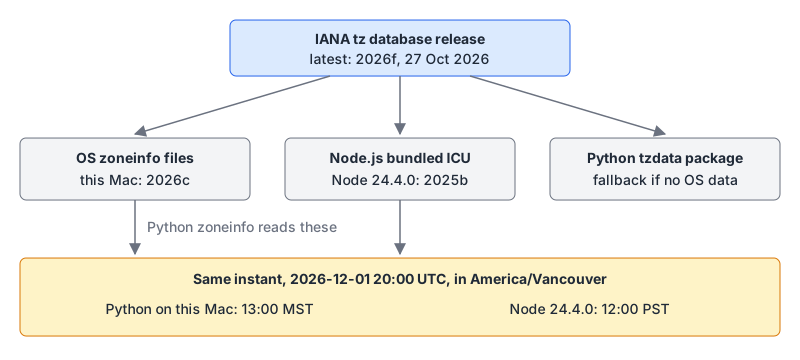
Your code never reads IANA directly. It reads a copy that some package shipped, and each runtime may carry its own. Python's zoneinfo docs say it uses the system's data if available and falls back to the first-party tzdata package from PyPI. They add that some systems, "notably Windows", have no IANA database, so cross-platform projects should declare a dependency on tzdata. Node bundles ICU, and the tz version that comes with it is whatever was current when that Node build was cut.
Check what you're actually running:
node -p process.versions.tz          # 2025b on Node 24.4.0
cat /usr/share/zoneinfo/+VERSION     # 2026c on this Mac
Note that even the Mac's 2026c is behind: it knows about BC and Alberta but not Manitoba (2026e). My Python run showed America/Winnipeg as 14:00 CST for that December instant, where 2026e data gives -05.
DST gaps and overlaps
Even with perfect data, local time isn't a continuous line. In New York in 2026, clocks jumped from 02:00 to 03:00 on 8 March and fell back from 02:00 to 01:00 on 1 November. So one local time didn't exist and another happened twice.
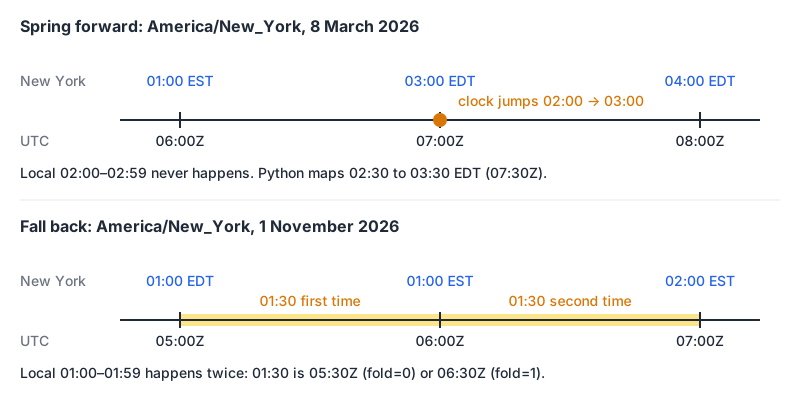
Python's zoneinfo resolves these with the fold attribute from PEP 495. I ran this with the Mac's 2026c data:
from datetime import datetime, timezone
from zoneinfo import ZoneInfo

ny = ZoneInfo("America/New_York")
gap = datetime(2026, 3, 8, 2, 30, tzinfo=ny)
print(gap.astimezone(timezone.utc).astimezone(ny).isoformat())
# 2026-03-08T03:30:00-04:00

for fold in (0, 1):
    t = datetime(2026, 11, 1, 1, 30, fold=fold, tzinfo=ny)
    print(fold, t.tzname(), t.astimezone(timezone.utc).isoformat())
# 0 EDT 2026-11-01T05:30:00+00:00
# 1 EST 2026-11-01T06:30:00+00:00
The nonexistent 02:30 silently becomes 03:30, and the ambiguous 01:30 picks the first occurrence unless you ask for the second. JavaScript's Date does the same thing with TZ=America/New_York: new Date(2026, 2, 8, 2, 30) prints 03:30:00 GMT-0400, and new Date(2026, 10, 1, 1, 30) lands on the EDT one.
Temporal makes the choice explicit with a disambiguation option: earlier, later, reject, or the default compatible, which matches Date by using later for gaps and earlier for overlaps. MDN still marks Temporal as limited availability. When a user is picking a time in a form, reject plus a friendly message beats silently moving their meeting.
Storage rules that hold up
Most time zone bugs are storage bugs. These are the rules I use:
- Past events: store the instant in UTC. Log entries, orders, "created at". The Unix timestamps guide covers column types and the seconds-versus-milliseconds trap, and the Unix timestamp converter turns a stored value back into UTC, ISO 8601 and your local time.
- Future events people care about in local time: store the local date-time plus the zone ID. A meeting at 09:00 in Vancouver next March should still be at 09:00 after a rule change. If you only stored the UTC instant you computed today, it will be an hour off. MDN's Temporal page uses a real case: a reminder set in 2018 for
2019-12-23T12:00:00-02:00[America/Sao_Paulo], before Brazil dropped DST in 2019. - Recurring events: store the rule and the zone, and expand occurrences when you need them. "Every weekday at 09:00 Europe/Berlin" is the data; the instants are derived.
- Date-only values: store a date. A birthday stored as midnight UTC shows up a day early for everyone west of Greenwich.
- User preferences: store the IANA ID, never an offset or abbreviation, because the offset changes twice a year in many places.
For interchange, RFC 9557 strings carry both: 2026-12-01T13:00:00-07:00[America/Vancouver]. Temporal's offset option decides what happens when the stored offset and the zone's current rules disagree, which is the Vancouver problem in miniature.
Testing and operations
- Run tests under several zones. Setting
TZ=America/New_York(as I did above) orTZ=Australia/Lord_Howeflushes out code that assumes the host is UTC. - Test the transition days. Put 2026-03-08 and 2026-11-01 in New York, and the matching dates for your users' regions, in your fixtures.
- Track tzdata like a dependency. Update OS packages, the
tzdataPython package and your Node version when a release affects your users. Six releases landed in the first ten months of 2026. - Schedule jobs in UTC unless the business rule really is local. The cron best practices post covers what different cron daemons do when a job falls in a DST gap.
To sanity-check a value by hand, the Unix timestamp converter shows an epoch value as UTC and in your local zone using your browser's own time zone data, so it's only as current as your browser.
Checklist
- Store instants in UTC; store future local events as local time plus an IANA zone ID.
- Never persist abbreviations; avoid persisting offsets on their own.
- Decide what happens in gaps and overlaps, and test both.
- Know which tzdata version each runtime uses (
node -p process.versions.tz, the OS package,tzdataon PyPI) and update it. - Re-derive future instants from local time and zone when the rules change.
Written by AIDToolStack Editorial
Researched from official documentation, specifications and vendor pages, listed under Sources below. Last checked November 2026.
Sources
Related Posts
Explore on AIDToolStack
Discover tools and servers featured in our directory.
AI Tools
MCP Servers
Sponsor Our Newsletter
Reach thousands of developers who are actively evaluating AI tools, MCP servers, and dev infrastructure. Our weekly newsletter goes to engaged technical decision-makers.
All sponsored content is clearly labeled per our editorial policy.