
SQL Joins Explained: Inner, Outer, Semi and Anti Joins With Runnable Examples
You add a join to a report and a customer disappears. Or the revenue total doubles. Or a "customers with no orders" query returns nothing at all, even though you can see one in the table. Almost every join bug comes down to one question: which rows survive, and how many times?
This post answers that with two tiny tables you can paste into sqlite3 or psql. Every output below is real: I ran the queries in SQLite 3.51 and they use only standard syntax, so Postgres gives the same rows (the one Postgres-only section says so).
The two tables
CREATE TABLE customers (id INTEGER PRIMARY KEY, name TEXT NOT NULL);
CREATE TABLE orders (
  id INTEGER PRIMARY KEY,
  customer_id INTEGER,          -- NULL = guest checkout
  total INTEGER NOT NULL
);

INSERT INTO customers VALUES (1, 'Ada'), (2, 'Grace'), (3, 'Linus');
INSERT INTO orders VALUES (10, 1, 50), (11, 1, 20), (12, 2, 75), (13, NULL, 30);
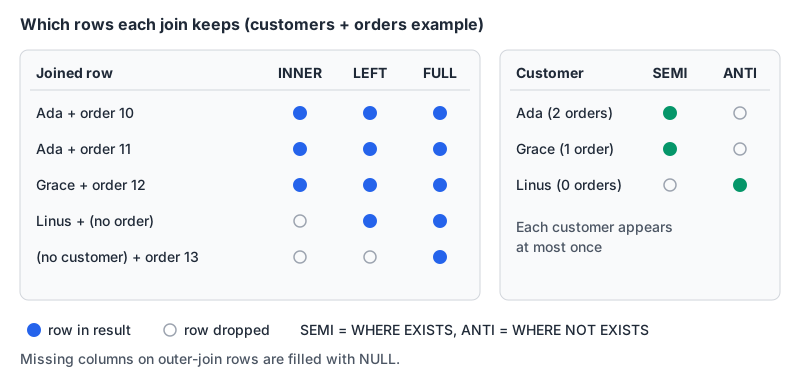
Ada has two orders, Grace one, Linus none, and order 13 belongs to nobody. That's enough to show every join type misbehaving.
Inner join: only rows that match
SELECT c.name, o.id AS order_id, o.total
FROM customers c
JOIN orders o ON o.customer_id = c.id
ORDER BY o.id;
name order_id total
----- -------- -----
Ada 10 50
Ada 11 20
Grace 12 75Linus is gone because he has no order, and order 13 is gone because it has no customer. Ada shows up twice. The Postgres manual puts it precisely: for each row of the first table, the result has a row for each row in the second table that satisfies the join condition. One customer with two orders means two rows. That's the fan-out that doubles your totals when you then join a second one-to-many table and SUM across both.
Left join: keep every row on the left
SELECT c.name, o.id AS order_id, o.total
FROM customers c
LEFT JOIN orders o ON o.customer_id = c.id
ORDER BY c.id, o.id;
name order_id total
----- -------- -----
Ada 10 50
Ada 11 20
Grace 12 75
LinusLinus is back, with NULLs in the order columns. That NULL-padding has a sharp consequence when you count:
SELECT c.name, COUNT(*) AS star, COUNT(o.id) AS orders
FROM customers c
LEFT JOIN orders o ON o.customer_id = c.id
GROUP BY c.id, c.name
ORDER BY c.id;
name star orders
----- ---- ------
Ada 2 2
Grace 1 1
Linus 1 0COUNT(*) counts the padded row, so Linus "has" one order. Count a column from the right-hand table instead. RIGHT JOIN is the mirror image; MySQL's own manual recommends writing LEFT JOIN instead for portability, and I'd add readability to that.
ON versus WHERE: the bug that turns a LEFT JOIN into an INNER JOIN
Say you want every customer, plus only their orders over 40. The intuitive version:
SELECT c.name, o.id AS order_id, o.total
FROM customers c
LEFT JOIN orders o ON o.customer_id = c.id
WHERE o.total > 40
ORDER BY c.id;
name order_id total
----- -------- -----
Ada 10 50
Grace 12 75Linus vanished again. His padded row has total = NULL, NULL > 40 isn't true, and WHERE throws the row away. Move the condition into ON:
SELECT c.name, o.id AS order_id, o.total
FROM customers c
LEFT JOIN orders o ON o.customer_id = c.id AND o.total > 40
ORDER BY c.id;
name order_id total
----- -------- -----
Ada 10 50
Grace 12 75
LinusThe Postgres docs explain why: a restriction in ON is processed before the join, while one in WHERE is processed after it, which doesn't matter for inner joins "but it matters a lot with outer joins." Rule of thumb: filters on the optional side of an outer join go in ON; filters on the preserved side go in WHERE.
Full outer join, and where you can't use it
SELECT c.name, o.id AS order_id, o.total
FROM customers c
FULL JOIN orders o ON o.customer_id = c.id
ORDER BY c.id NULLS LAST, o.id;
name order_id total
----- -------- -----
Ada 10 50
Ada 11 20
Grace 12 75
Linus
13 30Both orphans appear: Linus with no order, and guest order 13 with no customer. That's what you want for reconciliation jobs ("what's in system A but not B, and vice versa").
Support varies. SQLite only gained RIGHT and FULL OUTER JOIN in 3.39.0, released 2022-06-25, so an older bundled SQLite will reject this query. MySQL's join grammar lists only LEFT and RIGHT outer joins; the usual workaround there is a LEFT JOIN unioned with the unmatched rows from the right side. If you're weighing the two databases more broadly, our PostgreSQL vs MySQL comparison covers the rest.
Semi joins and anti joins
Most "join" questions aren't really asking for the joined rows. "Which customers have ordered?" wants each customer once. A plain join gives you Ada twice:
name
-----
Ada
Ada
Grace
Slapping DISTINCT on top hides that, but it's doing extra work to undo the fan-out you just created. A semi join asks the question directly:
SELECT c.name
FROM customers c
WHERE EXISTS (SELECT 1 FROM orders o WHERE o.customer_id = c.id)
ORDER BY c.id;
name
-----
Ada
GraceEXISTS only cares whether the subquery returns any rows, which is why SELECT 1 is the usual convention inside it. The anti join, "customers who never ordered", is NOT EXISTS:
SELECT c.name
FROM customers c
WHERE NOT EXISTS (SELECT 1 FROM orders o WHERE o.customer_id = c.id);
name
-----
LinusThe LEFT JOIN ... WHERE o.id IS NULL pattern returns the same single row and is fine too, as long as you test a column that can't be NULL in a real match (the primary key is the safe choice).
The NOT IN trap
Here's the one that bites in production:
SELECT c.name
FROM customers c
WHERE c.id NOT IN (SELECT customer_id FROM orders);
This returns zero rows. Guest order 13 put a NULL in the subquery's output, and per the Postgres docs, when there's no equal value and at least one right-hand row yields null, the result of NOT IN is null, not true. A NULL condition filters the row out, for every customer. Adding WHERE customer_id IS NOT NULL inside the subquery brings Linus back, but I'd just use NOT EXISTS everywhere and stop thinking about it.
LATERAL: a join that runs per row (Postgres)
"Each customer with their most recent order" is awkward with plain joins. In Postgres, a LATERAL subquery can reference columns from FROM items that come before it, so it runs once per customer:
SELECT c.name, last.id AS order_id, last.total
FROM customers c
LEFT JOIN LATERAL (
  SELECT o.id, o.total
  FROM orders o
  WHERE o.customer_id = c.id
  ORDER BY o.id DESC
  LIMIT 1
) AS last ON true
ORDER BY c.id;
SQLite doesn't support LATERAL, so this one I worked out by hand from the data rather than ran: Ada gets order 11 (total 20), Grace order 12 (75), and Linus a row of NULLs. The LEFT JOIN ... ON true is the idiom the manual itself recommends so that rows still appear when the lateral subquery returns nothing. Swap LIMIT 1 for LIMIT 3 and you have top-N per group. A window function with ROW_NUMBER() does the same job portably.
CROSS, USING and NATURAL in one paragraph each
CROSS JOIN pairs every row with every row, N × M. Our 3 customers and 4 orders give 12 rows. It's useful for building calendars or option grids; it's a bug when you forget an ON in old comma-style joins.
USING (customer_id) is shorthand for an equality on a same-named column and outputs that column once. Fine when your schema names line up.
NATURAL JOIN joins on every column name the two tables share. The Postgres docs call it considerably more risky, since adding a column like created_at to both tables silently changes the join condition. I don't use it in application code.
Checklist before you ship a join
- Say the grain out loud. "One row per order" or "one row per customer"? If it's per customer and you join orders, you need aggregation,
EXISTS, orLATERAL, notDISTINCT. - Outer join filters on the optional side go in
ON. Grep yourWHEREclause for columns from the right side of aLEFT JOIN. - Count a right-side column, not
*, after aLEFT JOIN. - Use
NOT EXISTS, neverNOT IN (subquery)on a nullable column. - Index the foreign key you join on. Postgres doesn't create one for you; our post on composite and foreign key indexes shows how to check, and the SQL EXPLAIN visualizer turns
EXPLAIN ANALYZEtext into a tree so you can see where the time goes. - Format before review. A five-table join on one line hides mistakes. Paste it into the SQL formatter with the right dialect selected, and see our SQL formatting standards for making a style stick across a team.
Written by AIDToolStack Editorial
Researched from official documentation, specifications and vendor pages, listed under Sources below. Last checked November 2026.
Sources
Related Posts
Explore on AIDToolStack
Discover tools and servers featured in our directory.
AI Tools
MCP Servers
Sponsor Our Newsletter
Reach thousands of developers who are actively evaluating AI tools, MCP servers, and dev infrastructure. Our weekly newsletter goes to engaged technical decision-makers.
All sponsored content is clearly labeled per our editorial policy.