
RSS, Atom and JSON Feed: Choosing a Format, Minimal Valid Feeds, Autodiscovery and Validation
A reader emails to say your feed shows every post as new again, all forty of them, right after you changed hosting. Or their reader can't find a feed at all, even though /feed.xml exists. Feeds are an old, quiet technology and they mostly just work, but the failures are specific: IDs that changed, dates in the wrong format, a missing discovery tag, HTML that broke the XML.
This post compares the three formats still in use (RSS 2.0, Atom and JSON Feed), gives a minimal valid example of each, covers autodiscovery, and ends with how to validate and serve a feed without hammering your server. The specs referenced are current as of November 2026.
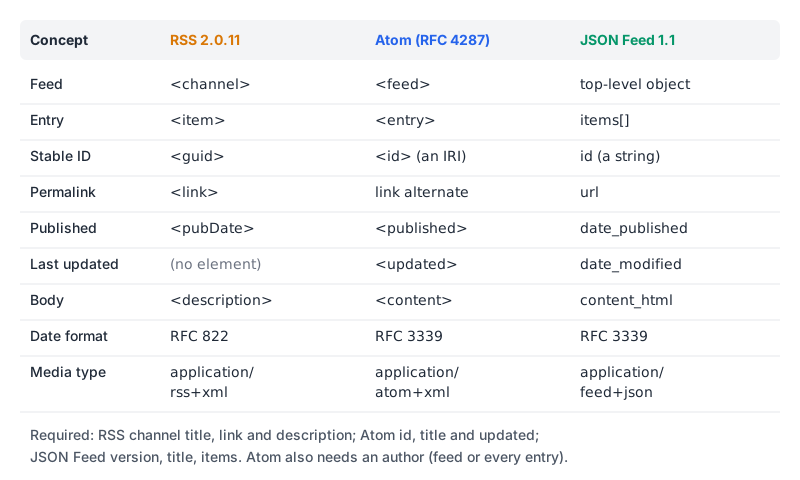
Which format to publish
| RSS 2.0 | Atom | JSON Feed | |
|---|---|---|---|
| Spec | RSS 2.0.11, RSS Advisory Board, 2009 | RFC 4287, IETF Standards Track, December 2005 | Version 1.1, August 2020 |
| Syntax | XML, no namespace for core elements | XML, http://www.w3.org/2005/Atom namespace | JSON |
| Dates | RFC 822 (Sat, 07 Sep 2002 00:00:01 GMT) | RFC 3339 (2026-11-07T09:00:00Z) | RFC 3339 |
| Required IDs | None; guid is optional | id on feed and every entry | id on every item |
| Body markup | Entity-encoded HTML allowed in description | type="text", "html" or "xhtml" | content_html or content_text |
| Media type | application/rss+xml (autodiscovery spec) | application/atom+xml | application/feed+json |
My default is Atom. It's the only one of the three with an IETF standard behind it, it forces you to have stable IDs and an updated timestamp, and its date format is the same RFC 3339 your code already produces. RSS 2.0 is fine and more widely recognised by name; if a client or podcast platform asks for RSS, give it RSS. JSON Feed is pleasant to generate, but I wouldn't publish it alone, because the RSS and Atom readers people already use are the safer bet. You can publish more than one from the same data, but advertise only your main one (more on that below).
A minimal valid Atom feed
RFC 4287 requires exactly one id, title and updated on the feed and on each entry. The feed also needs an author unless every entry has one, and each entry needs either content or a link rel="alternate". It says feeds SHOULD include a rel="self" link pointing at the feed's own URL.
<?xml version="1.0" encoding="utf-8"?>
<feed xmlns="http://www.w3.org/2005/Atom">
<id>https://example.com/</id>
<title>Example Engineering Blog</title>
<updated>2026-11-07T09:00:00Z</updated>
<author><name>Example Engineering</name></author>
<link rel="self" href="https://example.com/feed.xml" />
<link rel="alternate" href="https://example.com/blog/" />
<entry>
<id>tag:example.com,2026:rotating-api-keys</id>
<title>Rotating API Keys Without Downtime</title>
<link rel="alternate" href="https://example.com/blog/rotating-api-keys" />
<published>2026-11-07T09:00:00Z</published>
<updated>2026-11-07T09:00:00Z</updated>
<summary>A two-key overlap pattern for rotating API keys safely.</summary>
<content type="html"><p>Rotate keys by running two at once&hellip;</p></content>
</entry>
</feed>Note the entry id. The RFC says it must be a permanent, universally unique IRI and that it "MUST NOT change" even if the document is relocated. Using the post URL as the ID is common and works until you change domains or URL structure, at which point every reader sees every post as new. A tag: URI built from the domain, a year and the slug avoids that; RFC 4151 even lists Atom as a user of such identifiers. Whatever you pick, generate it once and store it with the post.
Dates in Atom need an uppercase T and either a numeric offset or an uppercase Z. 2026-11-07 09:00:00 is invalid.
The RSS 2.0 equivalent
The RSS spec requires title, link and description on the channel. Each item can have any elements, but "at least one of title or description must be present."
<?xml version="1.0" encoding="utf-8"?>
<rss version="2.0">
<channel>
<title>Example Engineering Blog</title>
<link>https://example.com/blog/</link>
<description>Notes from the Example engineering team.</description>
<ttl>60</ttl>
<item>
<title>Rotating API Keys Without Downtime</title>
<link>https://example.com/blog/rotating-api-keys</link>
<guid isPermaLink="false">tag:example.com,2026:rotating-api-keys</guid>
<pubDate>Sat, 07 Nov 2026 09:00:00 GMT</pubDate>
<description><![CDATA[<p>Rotate keys by running two at once…</p>]]></description>
</item>
</channel>
</rss>Two details people miss. First, isPermaLink defaults to true, which tells readers the guid is a URL they can open. If your guid isn't a URL, set it to false explicitly. Second, ttl is in minutes: it tells readers how long they may cache the channel. RSS has no item-level "last modified" element, so an edited post looks the same as an unedited one unless the reader compares content.
JSON Feed, briefly
JSON Feed 1.1 requires version, title and items, and each item needs an id plus content_html or content_text. home_page_url and feed_url are "optional but strongly recommended", and the spec says public feeds should treat them as required.
{
  "version": "https://jsonfeed.org/version/1.1",
  "title": "Example Engineering Blog",
  "home_page_url": "https://example.com/blog/",
  "feed_url": "https://example.com/feed.json",
  "authors": [{ "name": "Example Engineering" }],
  "items": [
    {
      "id": "tag:example.com,2026:rotating-api-keys",
      "url": "https://example.com/blog/rotating-api-keys",
      "title": "Rotating API Keys Without Downtime",
      "content_html": "<p>Rotate keys by running two at once…</p>",
      "date_published": "2026-11-07T09:00:00Z"
    }
  ]
}
Version 1.1 replaced the singular author with an authors array; the spec says new feeds should use authors even for one person. It also clarified that id is a string, so don't emit a bare number. Run the file through our JSON Formatter if you're hand-editing; it reports the line and column of a parse error.
Autodiscovery: let readers find the feed
Readers and browser extensions look for a <link> in the page's <head>:
<link rel="alternate" type="application/atom+xml"
      title="Example Engineering Blog" href="https://example.com/feed.xml" />
Use application/rss+xml for RSS and application/feed+json for JSON Feed. The rules, from the RSS autodiscovery spec and the HTML standard:
- It must be a
<link>in<head>. A visible<a href="/feed.xml">is nice for humans, but the HTML standard says anchor elements aren't used for feed autodiscovery. - When there are several, the HTML standard says the first in document order should be the default.
- The RSS Board recommends one link per page and says publishers offering the same content in several formats shouldn't advertise all of them. Advertise the main feed; link the others from an about page if you like.
- Use full URLs. Relative ones are allowed but the spec notes some software ignores
<base>.
Add it to every page template, not only the home page. Someone pasting a post URL into a reader should still find the feed.
Serving it politely
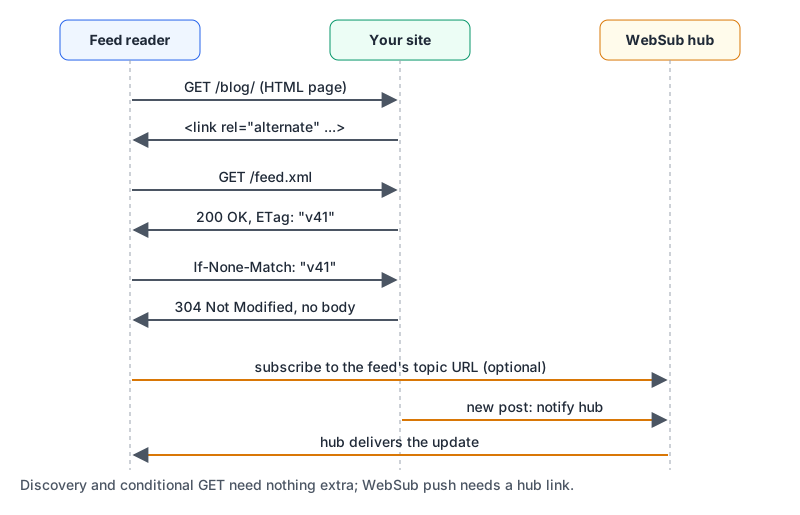
Feed readers poll on a schedule, and every subscribed reader does it independently, so make unchanged polls cheap. Send an ETag or Last-Modified header with the feed. Readers that support conditional requests send If-None-Match or If-Modified-Since back, and if nothing changed you answer 304 Not Modified with no body (MDN on conditional requests). Our HTTP caching headers guide covers how CDNs handle those validators if the feed sits behind one.
If you'd rather push than be polled, WebSub is the W3C Recommendation for it, republished on 2 June 2026 with added XSS mitigations in its security section. You advertise a hub with rel="hub" and your feed's canonical URL with rel="self", either as HTTP Link headers or as <link> elements inside the feed, and you notify the hub when the feed changes. The spec leaves the notification mechanism to each hub. Google's sitemap docs also mention WebSub as the way to tell search engines about Atom or RSS changes, and Google accepts RSS and Atom feeds as sitemaps, though they only cover recent URLs.
Serve feeds with their real media types. Atom is application/atom+xml per the RFC, JSON Feed asks for application/feed+json.
Validating before readers complain
The W3C Feed Validation Service checks Atom and RSS, either by URL or by pasting the XML. Run it on the deployed URL, since that also catches a server sending HTML error pages or the wrong content type.
The common failures it reports are predictable:
- Unescaped HTML in XML. A raw
<p>or inside<description>breaks the document. Wrap HTML in CDATA as above, or entity-encode it; the XML Escape tool does the latter for a snippet. Note that a literal]]>inside your content ends a CDATA section early. - Named HTML entities. XML only knows
&,<,>,"and'.…outside CDATA or escaped markup is a fatal error. - Relative links in content.
<img src="/img/a.png">breaks in a reader that doesn't resolve against your site. Rewrite to absolute URLs when generating the feed. - Wrong date format. RFC 822 in RSS, RFC 3339 in Atom and JSON Feed. Mixing them up is an easy slip in a hand-rolled generator.
- Changing IDs. No validator can catch this one. It's the cause of the "everything is new again" email.
To eyeball a feed's structure, the XML Formatter pretty-prints it after checking that it's well-formed, and names the line of a mismatched or unclosed tag. Well-formed isn't the same as a valid feed, so use the W3C validator for the final word.
Feed checklist
- Pick one primary format (Atom unless someone needs RSS) and advertise only that one with a
<link rel="alternate">on every page. - Give every entry a permanent ID that isn't tied to the current URL, and store it.
- Use the right date format for the format.
- Escape or CDATA-wrap HTML content, and make every URL in it absolute.
- Include
rel="self"in Atom andfeed_urlin JSON Feed. - Serve the real media type with an
ETagorLast-Modified, and answer conditional requests with 304. - Run the deployed URL through the W3C validator after every template change.
Written by AIDToolStack Editorial
Researched from official documentation, specifications and vendor pages, listed under Sources below. Last checked November 2026.
Sources
- www.rssboard.org/rss-specification
- www.rfc-editor.org/rfc/rfc4287.html
- www.jsonfeed.org/version/1.1/
- www.rssboard.org/rss-autodiscovery
- html.spec.whatwg.org/multipage/links.html
- developer.mozilla.org/en-US/docs/Web/HTTP/Guides/Conditional_requests
- www.w3.org/TR/websub/
- developers.google.com/search/docs/crawling-indexing/sitemaps/build-sitemap
- validator.w3.org/feed/
- www.rfc-editor.org/rfc/rfc4151.html
Related Posts
Explore on AIDToolStack
Discover tools and servers featured in our directory.
AI Tools
MCP Servers
Sponsor Our Newsletter
Reach thousands of developers who are actively evaluating AI tools, MCP servers, and dev infrastructure. Our weekly newsletter goes to engaged technical decision-makers.
All sponsored content is clearly labeled per our editorial policy.