
robots.txt and XML Sitemaps: Google's Documented Rules, AI Crawler Tokens and Common Mistakes
The classic robots.txt accident goes like this: staging has Disallow: / so it stays out of search, someone copies the config to production, and a week later traffic falls off a cliff. The second most common one is quieter. A page you want gone from Google gets a Disallow rule, and months later it's still in the results, now with no description, because Google can no longer fetch the page to see your noindex.
Both come from treating robots.txt as an indexing switch. It isn't. This post walks through what Google and the robots.txt RFC actually specify, how the matching rules work, what Google does when the file is missing or broken, the AI crawler tokens worth knowing, and the sitemap rules Google still uses. Sources are Google Search Central, RFC 9309 and sitemaps.org, checked in November 2026.
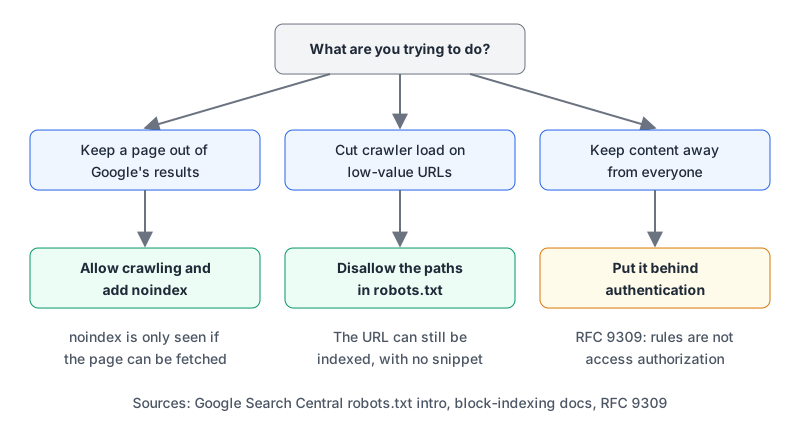
robots.txt controls crawling, not indexing
Google's robots.txt introduction says it directly: robots.txt is "not a mechanism for keeping a web page out of Google." Its main job is managing crawler traffic. A disallowed URL can still be indexed if other pages link to it; it just shows up without a description.
To keep a page out of results you need noindex, as a meta tag or an HTTP header, and Google's block-indexing page adds the catch: "For the noindex rule to be effective, the page or resource must not be blocked by a robots.txt file." Block it and Google never sees the instruction.
HTTP/1.1 200 OK
Content-Type: application/pdf
X-Robots-Tag: noindex
The header form is the one to use for PDFs and other files where you can't add a meta tag. And for anything genuinely private, neither helps. RFC 9309 states that robots.txt rules "are not a form of access authorization." Anyone can read your robots.txt, which makes a list of secret admin paths in it a small gift to whoever's looking.
The format, as Google parses it
Google's robots.txt specification and RFC 9309 agree on the basics:
- The file lives at the root:
https://example.com/robots.txt. It applies only to that protocol, host and port.https://blog.example.comneeds its own, and so doeshttp://example.comif you serve it. - It must be UTF-8 plain text. Google reads the first 500 KiB and ignores the rest.
- Google supports four fields:
user-agent,allow,disallowandsitemap. Everything else, includingcrawl-delay, is ignored by Google. Other crawlers may read it; Anthropic's crawler page, for example, showsCrawl-delayfor ClaudeBot. - Field names are case-insensitive. Path values are case-sensitive, so
Disallow: /Admindoes not block/admin.
Here's a realistic file:
User-agent: *
Disallow: /cart/
Disallow: /search
Allow: /search/help
Disallow: /*?sessionid=
Disallow: /*.json$

User-agent: Googlebot
Disallow: /experiments/

Sitemap: https://example.com/sitemap.xml
Three rules explain almost every surprise:
A crawler follows one group. Google picks the group with the most specific matching user agent and ignores the rest. In the file above, Googlebot obeys only Disallow: /experiments/. It is not blocked from /cart/, because specific groups and the * group aren't merged. Repeat the shared rules in every named group, or the named crawler gets fewer restrictions than everyone else.
The longest matching path wins. For /search/help, both Disallow: /search and Allow: /search/help match, and the longer one wins, so it's allowed. On a tie in length, Google applies the least restrictive rule. RFC 9309 says the same: an equivalent allow beats disallow.
* and $ are the only wildcards. * matches zero or more characters, $ anchors the end of the URL. Disallow: /*.json$ blocks /data/feed.json but not /data/feed.json?v=2. There's no regex beyond that.
The Sitemap line can appear anywhere, takes a full URL and doesn't belong to a group.
What happens when robots.txt fails
This part catches people during outages and migrations. Google treats the HTTP status of /robots.txt as an instruction in itself:
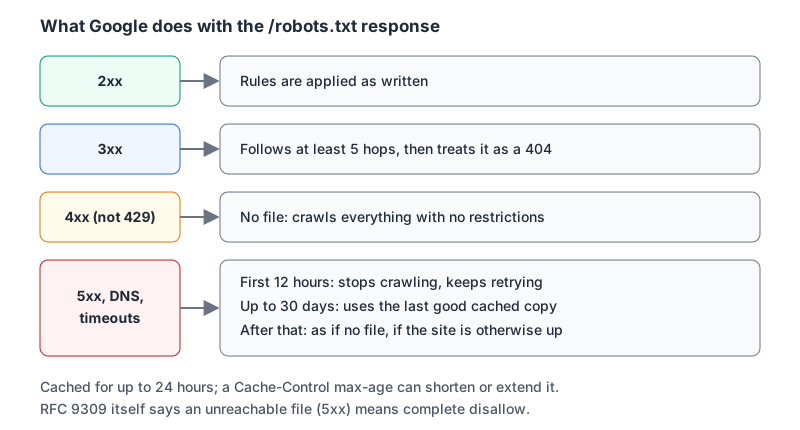
Two consequences:
- A 404 means "crawl everything". If your new framework stops serving the file, nothing is blocked any more. Google also says not to use 401 or 403 to slow crawling, since those count as 4xx too.
- A 5xx stops Google crawling the site. If your robots.txt route depends on a database or an app server that's down, the whole site's crawling pauses with it. Serve the file statically.
Google generally caches robots.txt for up to 24 hours, and a Cache-Control: max-age header can change that (there's more on cache headers in our HTTP caching guide). So a fix to a bad file isn't instant.
AI crawlers: which token does what
Most AI companies now separate training crawlers from search and user-triggered fetchers, and blocking the wrong one costs you visibility for nothing. As of November 2026:
| Token | Operator | Purpose, per the operator |
|---|---|---|
GPTBot | OpenAI | Crawls content that may be used to train foundation models |
OAI-SearchBot | OpenAI | Surfaces sites in ChatGPT search |
ChatGPT-User | OpenAI | User-initiated fetches; robots.txt rules may not apply |
ClaudeBot | Anthropic | Collects content that may be used for training |
Claude-SearchBot | Anthropic | Indexing for search results |
Claude-User | Anthropic | Fetches pages when a person asks Claude something |
Google-Extended | Controls use of crawled content for Gemini training and grounding |
Sources: OpenAI's crawler page, Anthropic's crawler page, Google's common crawlers list. Google states that Google-Extended "does not impact a site's inclusion in Google Search nor is it used as a ranking signal." It isn't a separate crawler either; Google crawls with its usual user agents and the token only governs use.
A file that opts out of training but stays in search:
User-agent: GPTBot
Disallow: /

User-agent: ClaudeBot
Disallow: /

User-agent: Google-Extended
Disallow: /

User-agent: *
Allow: /
One change is on the way. On 30 October 2026 Google announced it plans to support a shared AI-training preference signal from the IETF AIPREF working group, so one rule can express a training opt-out across participating providers. Its crawler page says Google intends to support it with user-agent: __usage_ai-training in early 2027. Until it ships, keep the per-company groups; Google says existing controls will keep working alongside it.
Our Robots.txt Generator is handy for laying out groups, allow and disallow rules and sitemap lines. Its "Block AI Training" preset disallows only the tokens vendors document as training controls (GPTBot, ClaudeBot, Google-Extended, Applebot-Extended, CCBot, meta-externalagent) and leaves search crawlers and user-initiated fetchers like ChatGPT-User alone. Crawl-delay and Host are opt-in, with a note that Google ignores both.
XML sitemaps: what Google still reads
A sitemap is a list of canonical URLs you'd like crawled. It doesn't block anything and it doesn't force indexing. The minimal valid file:
<?xml version="1.0" encoding="UTF-8"?>
<urlset xmlns="http://www.sitemaps.org/schemas/sitemap/0.9">
<url>
<loc>https://example.com/blog/rotating-api-keys</loc>
<lastmod>2026-11-02</lastmod>
</url>
<url>
<loc>https://example.com/docs/search?lang=en&page=2</loc>
</url>
</urlset>The limits and rules, from Google's sitemap guide and sitemaps.org:
- At most 50,000 URLs or 50 MB uncompressed per file. Beyond that, split it and list the parts in a sitemap index, which has the same limits. Gzip is allowed.
- UTF-8, fully qualified absolute URLs, and
<loc>under 2,048 characters. Escape&as&, as in the second entry above. - A sitemap only covers URLs at or below its own directory unless you submit it through Search Console. Put it at the root.
- Google ignores
<priority>and<changefreq>. It uses<lastmod>only when it's "consistently and verifiably accurate", meaning the last significant change to the main content, structured data or links, not a footer tweak. - The ping endpoint is gone. Google deprecated it in June 2023 and pings now return 404. Submit in Search Console, through its API, or with a
Sitemap:line in robots.txt. - RSS and Atom feeds are accepted as sitemaps too, though they only carry recent URLs.
That lastmod rule is where generated sitemaps go wrong. Stamping every URL with today's date on each build makes the field unverifiable, and Google only uses it when it can trust it. Our Sitemap Generator turns a pasted URL list into valid XML with escaping, and it only writes lastmod when you put a real date after a URL. It leaves out changefreq and priority by default, since Google ignores both. For a build-time sitemap, take lastmod from your content's real updated timestamp. If you're on Next.js, sitemap.ts does this cleanly, as shown in our Next.js SEO guide.
Mistakes worth checking for today
- Staging rules in production. Diff your production robots.txt in CI, or generate it from an environment variable with a production default that allows crawling.
- Blocking CSS and JS. Google warns against blocking resources it needs to understand the page.
- Blocking a page to deindex it. Remove the
Disallow, addnoindex, wait for a recrawl. - A named group that forgets the shared rules. Googlebot reads only its own group.
- Wrong case in paths.
/Blog/and/blog/are different rules. - robots.txt served by the app. If it can return 5xx, it will, at the worst moment.
- Sitemaps listing non-canonical URLs. Redirects,
noindexpages and parameter duplicates send mixed signals. List only the URLs you want in results. - Fake
lastmoddates. Use real ones or leave the tag out.
Before shipping a change, fetch the live file with curl -i https://example.com/robots.txt and confirm a 200, a text/plain content type and the rules you expect. Then open the Search Console robots.txt report, which shows the version Google last fetched, any parse errors, and lets you request a recrawl after a fix.
Written by AIDToolStack Editorial
Researched from official documentation, specifications and vendor pages, listed under Sources below. Last checked November 2026.
Sources
- developers.google.com/search/docs/crawling-indexing/robots/intro
- developers.google.com/search/docs/crawling-indexing/robots/robots_txt
- developers.google.com/search/docs/crawling-indexing/block-indexing
- www.rfc-editor.org/rfc/rfc9309.html
- developers.google.com/search/docs/crawling-indexing/google-common-crawlers
- developers.google.com/search/blog/2026/10/ai-training-control
- developers.openai.com/api/docs/bots
- support.claude.com/en/articles/8896518-does-anthropic-crawl-data-from-the-web-and-how-can-site-owners-block-the-crawler
- developers.google.com/search/docs/crawling-indexing/sitemaps/build-sitemap
- www.sitemaps.org/protocol.html
- developers.google.com/search/blog/2023/06/sitemaps-lastmod-ping
- support.google.com/webmasters/answer/6062598
Related Posts
Explore on AIDToolStack
Discover tools and servers featured in our directory.
AI Tools
MCP Servers
Sponsor Our Newsletter
Reach thousands of developers who are actively evaluating AI tools, MCP servers, and dev infrastructure. Our weekly newsletter goes to engaged technical decision-makers.
All sponsored content is clearly labeled per our editorial policy.