
Redis Data Structures in Practice: Strings, Hashes, Sorted Sets and Streams
A lot of Redis code in the wild uses exactly two commands: SET key json and GET key. It works until two requests update the same user at once, each reads the JSON, changes one field and writes the whole blob back, and one change disappears. Redis has had types built for that problem for years. Picking the right one usually removes a race, a cron job or a second datastore.
This is a practical tour of the types you'll reach for most, with output from a real Redis. As of November 2026 the latest stable release on the Redis GitHub releases page is 8.10.3 (26 October 2026), with 8.12 in release candidates; the redis:latest Docker image I ran reports redis_version:8.10.3. Redis 8 and later is offered under RSALv2, SSPLv1 or AGPLv3. Valkey, the BSD-licensed fork, is at 9.1.3. The commands here work on both unless noted, though the internal encodings shown may differ. If you're still deciding between them, our Redis, Valkey or Memcached post covers the licence history.
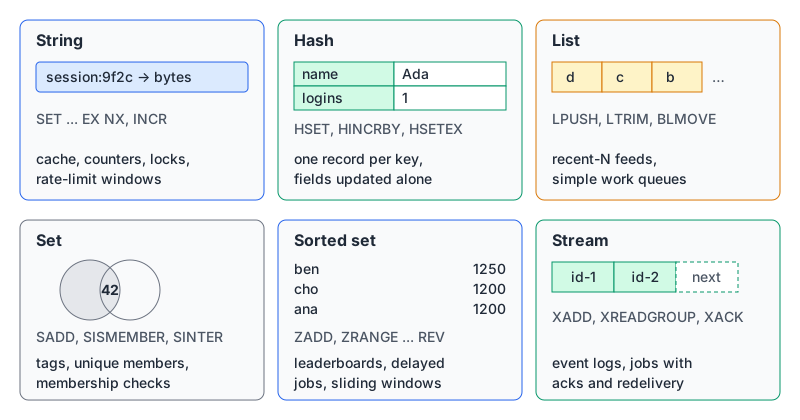
The data types overview lists more than these (bitmaps, geospatial indexes, JSON, probabilistic types, time series, vector sets, and arrays in recent versions), but the six above cover most application code.
Strings: sessions, counters and "only if missing"
A string is a byte sequence, so it holds JSON, a number or a serialized blob. The useful part is the options on SET:
> SET session:9f2c {"uid":42} EX 1800 NX
OK
> SET session:9f2c {"uid":99} EX 1800 NX
(nil)
> TTL session:9f2c
(integer) 1800
> INCR rate:42:202611072014
(integer) 1
> OBJECT ENCODING rate:42:202611072014
"int"
NX means "only set if the key doesn't exist", and the second call returning (nil) is how you know you lost the race. That makes it the base for idempotency keys and simple locks. INCR on a per-minute key gives you a fixed-window rate limiter in one round trip, and Redis stores small integers compactly (the int encoding above). For sliding windows and token buckets, our rate limiting post has a full Redis implementation.
Strings are the right choice when you read and write the value as a whole. They're the wrong choice for objects whose fields change independently.
Hashes: records you update a field at a time
A hash is a set of field-value pairs under one key. You can change one field without touching the others, atomically:
> HSET user:42 name Ada plan pro logins 0
(integer) 3
> HINCRBY user:42 logins 1
(integer) 1
> HSETEX user:42 EX 600 FIELDS 1 reset_token abc123
(integer) 1
> HTTL user:42 FIELDS 2 reset_token name
1) (integer) 600
2) (integer) -1
> OBJECT ENCODING user:42
"listpackex"
That fixes the lost-update problem from the intro: two requests doing HINCRBY and HSET plan can't clobber each other.
The newer bit is per-field expiry. Redis 7.4 added HEXPIRE, HTTL and friends, and Redis 8.0 added HSETEX and HGETEX, which set a value and its TTL in one command. Above, the reset token expires in 10 minutes while the name never does (-1 means no TTL). Before this you needed a separate key per expiring field. Valkey has HSETEX since 9.0.0, so check your server version before relying on it.
The docs note that small hashes get a memory-efficient encoding, which is what listpackex is. Redis 8.10 also added "compact hashes" via HIMPORT for many keys sharing the same field names; that's Redis-only and new, so treat it as an optimisation to measure, not a default.
Lists and sets, briefly
Lists keep insertion order. The classic use is a capped "recent items" feed:
> LPUSH recent:42 page:a page:b page:c page:d
(integer) 4
> LTRIM recent:42 0 2
OK
> LRANGE recent:42 0 -1
1) "page:d"
2) "page:c"
3) "page:b"
The lists docs also pitch them as queues: LPUSH on one end, RPOP (or blocking BRPOP) on the other. The catch is that a popped message is gone. If the worker crashes mid-job, nothing brings it back. That's what streams are for.
Sets are unordered unique members with O(1) add, remove and membership checks. Set operations do the work you'd otherwise do in application code:
> SADD online:2026-11-07 42 7 13
(integer) 3
> SADD online:2026-11-06 42 99
(integer) 2
> SINTER online:2026-11-07 online:2026-11-06
1) "42"
Sorted sets: leaderboards and anything ordered by a number
A sorted set is a set where each member has a score, kept in order. Most operations are O(log n), so ranking stays cheap as the set grows.
> ZADD lb:2026-11 1200 ana 950 ben 1200 cho 400 dev
(integer) 4
> ZINCRBY lb:2026-11 300 ben
"1250"
> ZRANGE lb:2026-11 0 2 REV WITHSCORES
1) "ben"
2) "1250"
3) "cho"
4) "1200"
5) "ana"
6) "1200"
> ZREVRANK lb:2026-11 dev
(integer) 3
Look at the tie. Members with equal scores are ordered lexicographically, so ana sorts before cho ascending. REV reverses everything, including the tie-break, so cho comes first in a descending leaderboard. If you want "first to reach the score wins", encode that in the score, for example by subtracting a fraction based on the timestamp.
Use a timestamp as the score and you get a delayed-job queue: add jobs with their run-at time, and fetch everything due.
> ZADD jobs:delayed 1794083100 job:7 1794083400 job:8
(integer) 2
> ZRANGE jobs:delayed -inf 1794083200 BYSCORE
1) "job:7"
Unix seconds work fine as scores, as above; our Unix timestamps guide covers the seconds-versus-milliseconds trap. In production, claim due jobs atomically (a small Lua script or ZREM and check the return) so two workers don't both run one.
Streams: a log with consumer groups
A stream is an append-only log of entries with time-based IDs. With a consumer group, each entry goes to one consumer in the group, and the server tracks what's been delivered but not acknowledged in a Pending Entries List (PEL). Here's the full cycle, including a crashed worker:
> XGROUP CREATE orders billing $ MKSTREAM
OK
> XADD orders MAXLEN ~ 100000 * order_id 1001 total 49.90
"1794082748191-0"
> XADD orders MAXLEN ~ 100000 * order_id 1002 total 12.00
"1794082748237-0"
> XREADGROUP GROUP billing worker-1 COUNT 10 STREAMS orders >
1) 1) "orders"
   2) 1) 1) "1794082748191-0"
         2) 1) "order_id"
            2) "1001"
            3) "total"
            4) "49.90"
      2) 1) "1794082748237-0"
         ...
> XPENDING orders billing
1) (integer) 2
2) "1794082748191-0"
3) "1794082748237-0"
4) 1) 1) "worker-1"
      2) "2"
Pretend worker-1 died. Another worker claims anything idle longer than a threshold (1000 ms here):
> XAUTOCLAIM orders billing worker-2 1000 0-0 COUNT 10
1) "0-0"
2) 1) 1) "1794082748191-0"
      ...
   2) 1) "1794082748237-0"
      ...
3) (empty array)
> XPENDING orders billing - + 10
1) 1) "1794082748191-0"
   2) "worker-2"
   3) (integer) 55
   4) (integer) 2
...
The last number is the delivery count, now 2. The XAUTOCLAIM docs suggest watching it: entries that keep crashing consumers show rising counts, and that's your cue to move them aside.
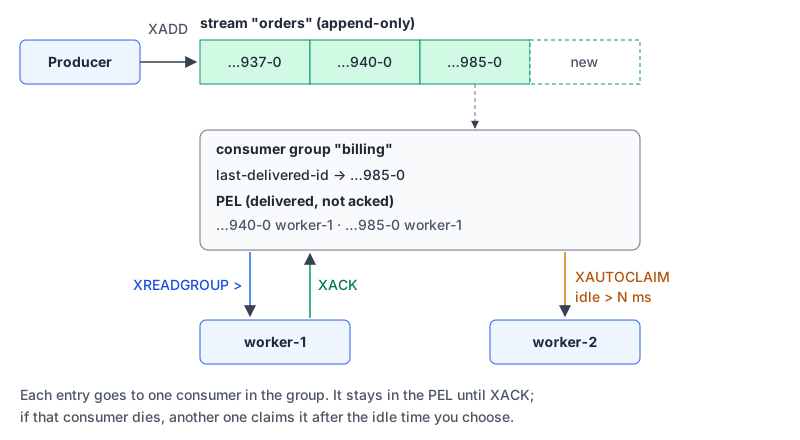
The rules worth memorising, from the XREADGROUP reference:
>asks for entries never delivered to anyone. Any other ID (such as0) replays your own pending entries, which is how a restarted consumer picks up where it left off.XACKremoves an entry from the PEL. Until then, it's at-least-once, so make handlers idempotent.NOACKskips the PEL entirely. That's fire-and-forget; occasional loss is the price.- Trimming with
MAXLENor deleting withXDELdoesn't check the PEL by default. A pending entry whose data was trimmed comes back asnil.
Recent Redis versions keep adding stream features: a CLAIM option on XREADGROUP (8.4) that folds the claim step into the read, XNACK (8.8) to hand a message back immediately, and MAXCOUNT/MAXSIZE caps (8.10). Valkey's XREADGROUP doesn't have those options, so XAUTOCLAIM is the portable choice.
If you need replay across many independent consumer groups, partitioning across machines and long retention, that's when a dedicated log like Kafka starts to earn its operational cost.
Gotchas I'd check in code review
KEYSin application code. The KEYS docs warn it "may ruin performance" on large databases. UseSCAN, or keep an index in a set.- Big values in one key. A 5 MB JSON string is fetched and parsed whole every time. A hash lets you read the two fields you need.
- TTL on the wrong thing. Key-level
EXPIREon a hash kills every field. UseHSETEX/HEXPIREwhen only one field should expire. - Streams without trimming. Without
MAXLENorMINID, a stream grows until memory runs out. - Version drift. Field TTLs,
XNACKand the newer read options depend on your server; Valkey and older servers may not have them.
Which type, by question
| You need to... | Reach for |
|---|---|
| Cache a computed value, count, or take a lock | String with EX, NX, INCR |
| Store a record and update fields independently | Hash, with HSETEX for expiring fields |
| Keep the last N items | List with LPUSH + LTRIM |
| Test membership or intersect groups | Set |
| Rank, page by score, or schedule by time | Sorted set |
| Hand work to consumers with acks and retries | Stream with a consumer group |
To sketch these commands before running them, our Redis command builder has presets for sessions, user hashes and leaderboards (it covers strings, hashes, lists, sets, sorted sets and key commands, not streams). If you want an AI assistant to inspect a live instance, our Redis MCP server page explains Redis's official server and why you should connect it as a read-only ACL user.
Written by AIDToolStack Editorial
Researched from official documentation, specifications and vendor pages, listed under Sources below. Last checked November 2026.
Sources
- github.com/redis/redis/releases
- redis.io/legal/licenses/
- github.com/valkey-io/valkey/releases
- redis.io/docs/latest/develop/data-types/
- redis.io/docs/latest/develop/data-types/hashes/
- redis.io/docs/latest/develop/data-types/lists/
- redis.io/docs/latest/develop/data-types/sorted-sets/
- redis.io/docs/latest/develop/data-types/streams/
- redis.io/docs/latest/commands/xreadgroup/
- redis.io/docs/latest/commands/xautoclaim/
- redis.io/docs/latest/commands/keys/
- valkey.io/commands/hsetex/
- valkey.io/commands/xreadgroup/
Related Posts
Explore on AIDToolStack
Discover tools and servers featured in our directory.
AI Tools
MCP Servers
Sponsor Our Newsletter
Reach thousands of developers who are actively evaluating AI tools, MCP servers, and dev infrastructure. Our weekly newsletter goes to engaged technical decision-makers.
All sponsored content is clearly labeled per our editorial policy.