
Publishing an MCP Server to the Official MCP Registry
You've built an MCP server, published it to npm, and written a README. People still find it by stumbling on a GitHub link, and every client wants the config pasted in a slightly different shape. The official MCP Registry exists to fix the discovery half of that: one place where your server's name, package and install details are published in a standard format that marketplaces and clients can pull from.
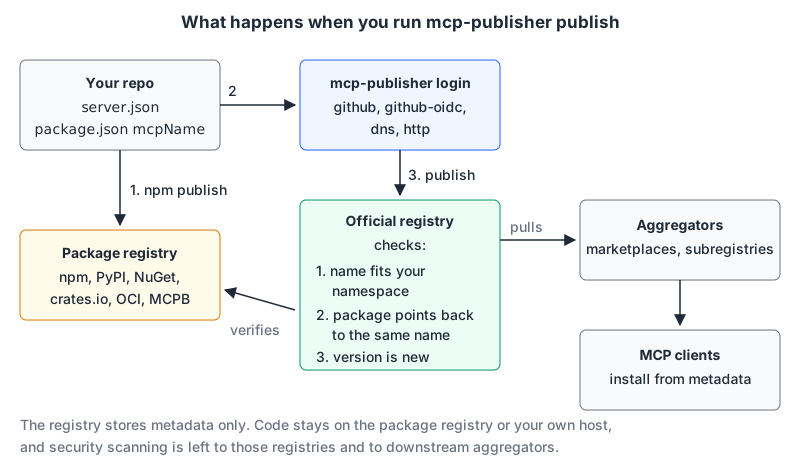
Publishing is quick once you understand the three checks it runs. This walkthrough follows the official docs as of November 2026. If you haven't written the server yet, our custom MCP server guide covers that part.
What the registry is (and isn't)
From the registry's about page:
- It hosts metadata, not code. Your package stays on npm, PyPI, Docker Hub and so on; the registry entry points at it.
- It's meant to be consumed mainly by downstream aggregators (marketplaces, subregistries), which can add curation or ratings. Host apps aren't meant to hit it directly.
- It doesn't accept private servers. If your server lives on a private network or a private package registry, run your own registry that implements the same OpenAPI spec.
- It delegates security scanning to the package registries and aggregators. It verifies who published something, not whether the code is safe.
It's still labelled preview: the docs warn that "breaking changes or data resets may occur before general availability." The registry README says it launched in preview on 8 September 2025 and the API entered a freeze at v0.1 on 24 October 2025. The mcp-publisher CLI is actively released; the latest at the time of writing is v1.8.8, published 6 November 2026.
Step 1: pick your namespace
Your server's name is reverse-DNS style, and the namespace is decided by how you authenticate. From the authentication guide:
| Login method | Name must look like | Example |
|---|---|---|
GitHub (login github, or github-oidc in Actions) | io.github.<user-or-org>/... | io.github.alice/weather-server |
DNS TXT record (login dns) | com.example/... (your domain reversed) | io.modelcontextprotocol/everything |
HTTP well-known file (login http) | same as DNS | com.example/acme-analytics |
GitHub is the quick path. A domain namespace looks more official and doesn't tie the name to one person's account, which is worth the extra setup for a company server. The name is your server's identity in the registry, so choose it once.
For DNS you generate a key pair and publish the public half as a TXT record:
MY_DOMAIN="example.com"
openssl genpkey -algorithm Ed25519 -out key.pem
PUBLIC_KEY="$(openssl pkey -in key.pem -pubout -outform DER | tail -c 32 | base64)"
echo "${MY_DOMAIN}. IN TXT \"v=MCPv1; k=ed25519; p=${PUBLIC_KEY}\""
Add that record at your DNS provider (if TXT records are new to you, see DNS records explained), wait for it to propagate, then log in with the private key. The HTTP method is the same idea with the record served from https://example.com/.well-known/mcp-registry-auth. Keep key.pem out of the repo.
Step 2: prove you own the package
The registry checks that the package you point at points back at the same server name. Each package type has its own marker, per the package types page:
registryType | Supported registry | Ownership marker |
|---|---|---|
npm | registry.npmjs.org | "mcpName" in package.json |
pypi | pypi.org | mcp-name: <name> in the README (an HTML comment works) |
nuget | api.nuget.org | mcp-name: <name> in the README |
cargo | crates.io | mcp-name: <name> as visible README text |
oci | Docker Hub, GHCR, *.pkg.dev, *.azurecr.io, mcr.microsoft.com | LABEL io.modelcontextprotocol.server.name="<name>" |
mcpb | GitHub or GitLab releases | URL contains "mcp", plus a fileSha256 |
The Cargo row is a trap worth repeating: crates.io strips HTML comments when it renders the README, so the hidden-comment trick that works on PyPI and NuGet fails there. For npm it's one line:
{
  "name": "@my-username/mcp-weather-server",
  "version": "1.0.1",
  "mcpName": "io.github.my-username/weather"
}
Publish the package first (npm publish --access public for a scoped package). The registry validates against what's live on npm, so an unpublished version fails.
Step 3: write server.json
Install the CLI with brew install mcp-publisher (or the prebuilt binary from the releases page), then run mcp-publisher init in your project to generate a template. A finished local-server entry, from the quickstart:
{
  "$schema": "https://static.modelcontextprotocol.io/schemas/2025-12-11/server.schema.json",
  "name": "io.github.my-username/weather",
  "description": "An MCP server for weather information.",
  "repository": {
    "url": "https://github.com/my-username/mcp-weather-server",
    "source": "github"
  },
  "version": "1.0.1",
  "packages": [
    {
      "registryType": "npm",
      "identifier": "@my-username/mcp-weather-server",
      "version": "1.0.1",
      "transport": { "type": "stdio" }
    }
  ]
}
If the server needs an API key, declare it under environmentVariables with isRequired and isSecret, so clients know to prompt for it rather than guess. Check the file against the schema URL in $schema with a full validator before you publish. Our JSON Schema validator is fine for a first pass, but it checks only the core keywords and names any it skips, such as $ref.
Remote servers
A hosted server uses remotes instead of (or as well as) packages, per the remote servers page:
{
  "$schema": "https://static.modelcontextprotocol.io/schemas/2025-12-11/server.schema.json",
  "name": "com.example/acme-analytics",
  "title": "ACME Analytics",
  "description": "Real-time business intelligence and reporting platform",
  "version": "2.0.0",
  "remotes": [
    {
      "type": "streamable-http",
      "url": "https://analytics.example.com/mcp",
      "headers": [
        { "name": "X-API-Key", "description": "API key for authentication",
          "isRequired": true, "isSecret": true }
      ]
    }
  ]
}
The URL must be publicly reachable. Use streamable-http; the docs say to publish an sse remote only for existing clients, since SSE is deprecated. URLs can contain {variables} (for a tenant ID or region), with default and choices. Shipping both remotes and packages lets each client choose hosted or local.
Step 4: log in and publish
mcp-publisher login github     # device flow: visit github.com/login/device, enter the code
mcp-publisher publish
Then check it's there:
curl "https://registry.modelcontextprotocol.io/v0.1/servers?search=io.github.my-username/weather"Each entry comes back with an io.modelcontextprotocol.registry/official block in _meta showing status, publishedAt and isLatest; you can see this today by requesting ?limit=1 from the live API.
The quickstart's troubleshooting table covers the three errors you're likely to hit. "Registry validation failed for package" means the ownership marker is missing. "You do not have permission to publish this server" means your name doesn't match your login method's namespace. "Invalid or expired Registry JWT token" means log in again.
Versions are immutable
The versioning page has rules that will bite if you treat the registry like a mutable README:
- Every publish needs a new, unique
version. Once published, that version's metadata can't change. - Ranges like
^1.2.3,~1.2.3,>=1.2.3or1.xare rejected. - Use semver. If a version doesn't parse as semver, the registry always marks it latest, which can make an odd string jump ahead of your real releases.
- Keep the server
versionaligned with the package version. To fix only metadata without a new package, publish a prerelease like1.2.3-1. But since1.2.3-1sorts before1.2.3, publishing it after1.2.3won't make it latest.
Automate it from tags
Once it works by hand, let CI do it. The official GitHub Actions guide recommends OIDC, which needs no registry secret. Trimmed to the registry steps:
name: Publish to MCP Registry
on:
  push:
    tags: ["v*"]
jobs:
  publish:
    runs-on: ubuntu-latest
    permissions:
      id-token: write   # required for OIDC
      contents: read
    steps:
      - uses: actions/checkout@v5
      # ... build, test and npm publish here (needs NPM_TOKEN) ...
      - name: Install mcp-publisher
        run: |
          curl -L "https://github.com/modelcontextprotocol/registry/releases/latest/download/mcp-publisher_$(uname -s | tr '[:upper:]' '[:lower:]')_$(uname -m | sed 's/x86_64/amd64/;s/aarch64/arm64/').tar.gz" | tar xz mcp-publisher
      - run: ./mcp-publisher login github-oidc
      - run: ./mcp-publisher publish
The guide's optional step sets server.json's version from the tag with jq, which keeps the "unique version" rule from failing a release. Note that the full workflow also publishes the npm package first, so a failed npm publish stops the registry step. Our GitHub Actions patterns post covers tag-triggered releases more generally.
Pre-flight checklist
- Name matches your login method:
io.github.<you>/...or reversed domain. - Ownership marker is in the published package (
mcpName,mcp-name:, OCI label). server.jsonnameequalsmcpNameexactly.versionis new and isn't a range; package version matches.- Secrets are declared with
isSecret: true, never given example values that look real. - Remote URL is public and uses
streamable-http. - Your README says what the server can access. Since the registry doesn't scan code, users and aggregators rely on you to be clear about permissions; our post on MCP for databases shows the kind of read-only guidance worth including.
Written by AIDToolStack Editorial
Researched from official documentation, specifications and vendor pages, listed under Sources below. Last checked November 2026.
Sources
- modelcontextprotocol.io/registry/about.md
- github.com/modelcontextprotocol/registry
- github.com/modelcontextprotocol/registry/releases
- modelcontextprotocol.io/registry/quickstart
- modelcontextprotocol.io/registry/authentication.md
- modelcontextprotocol.io/registry/package-types.md
- modelcontextprotocol.io/registry/remote-servers.md
- modelcontextprotocol.io/registry/versioning.md
- modelcontextprotocol.io/registry/github-actions.md
- registry.modelcontextprotocol.io/v0.1/servers?limit=1
Related Posts
Explore on AIDToolStack
Discover tools and servers featured in our directory.
AI Tools
MCP Servers
Sponsor Our Newsletter
Reach thousands of developers who are actively evaluating AI tools, MCP servers, and dev infrastructure. Our weekly newsletter goes to engaged technical decision-makers.
All sponsored content is clearly labeled per our editorial policy.