
Postgres Row Level Security: Policies, Bypass Rules, Supabase and Performance
Most multi-tenant bugs are a missing WHERE tenant_id = ?. Row level security moves that clause into the database, so a forgotten filter returns nothing instead of someone else's invoices. It's a good trade, but RLS has a handful of rules that surprise people the first time: owners skip it, some failures are silent and some are errors, and a policy that calls a function per row can make a 2 ms query take minutes.
Everything below is from the PostgreSQL 18 documentation (18.6 is the current release as of November 2026, and PostgreSQL 19 was at release candidate 1 on 15 October per the versioning page). I ran the plain-Postgres examples on PostgreSQL 18.6 through PGlite 0.5.15, a WebAssembly build you can install from npm, so the outputs and error messages are real. The Supabase-specific SQL (auth.uid(), the anon and authenticated roles) I didn't run, since it needs a Supabase project; those parts follow Supabase's docs.
The minimum that works
create role app_user nologin;
create table notes (id serial primary key, owner text not null, body text);
grant select, insert, update, delete on notes to app_user;

alter table notes enable row level security;

create policy notes_owner on notes to app_user
  using (owner = current_setting('app.user_id', true))
  with check (owner = current_setting('app.user_id', true));
Your app connects as app_user and, per request, sets who the user is:
begin;
select set_config('app.user_id', 'alice', true);  -- true = this transaction only
select id, owner from notes;                      -- only alice's rows
commit;
Use the transaction-local form. The set_config docs say is_local = true makes the value apply "only during the current transaction", which is what you want behind a connection pool; a session-level SET would leak into the next request that borrows the connection. (Our connection pooling explainer covers why that matters with PgBouncer in transaction mode.) One detail I hit while testing: after that transaction commits, current_setting('app.user_id', true) returns an empty string on the same connection, not NULL. The policy above still matches nothing, but if you cast the value, say ::uuid, wrap it in nullif(..., '') first.
Who RLS doesn't apply to
This is the part to get right before anything else.
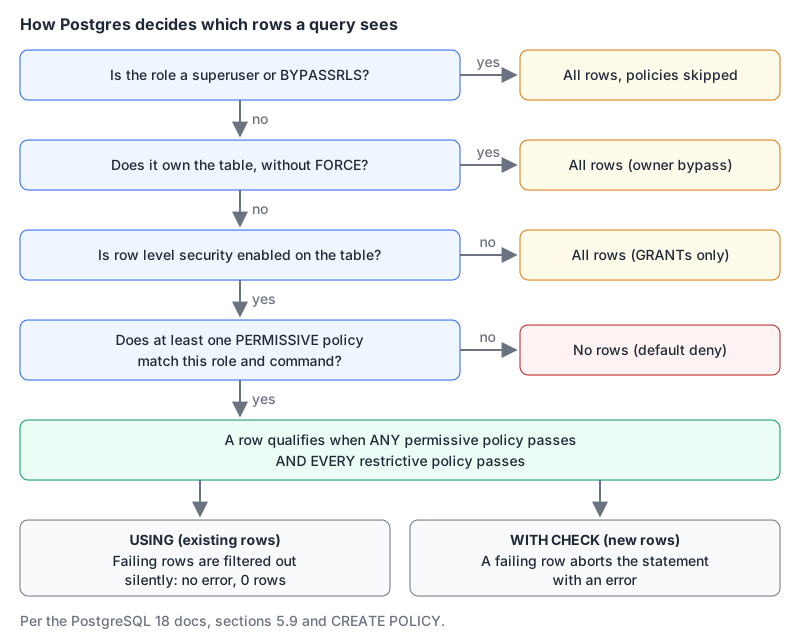
- Superusers and
BYPASSRLSroles "always bypass the row security system." Only a superuser or a role that already hasBYPASSRLScan grant it (CREATE ROLE). - The table owner "is typically not subject to row security policies." If your app connects as the role that ran the migrations, RLS does nothing for it. Fix it with
ALTER TABLE notes FORCE ROW LEVEL SECURITY, or better, don't let the app connect as the owner. - Whole-table operations like
TRUNCATEandREFERENCESaren't subject to row security, and unique, primary key and foreign key checks "always bypass row security." The docs warn this can become a covert channel: a user can learn a row exists because their insert hit a unique violation.
I checked the owner rule directly. With RLS enabled and no policies, app_user saw 0 rows and the non-superuser owner saw all 3. After FORCE ROW LEVEL SECURITY, the owner saw 0 too.
Default deny, USING and WITH CHECK
Enable RLS without any policy and you get a default-deny: "no rows are visible or can be modified." That's the safe direction to fail in, but it's also why a freshly secured table looks empty.
The two clauses do different jobs, and they fail differently (CREATE POLICY):
| Applies to | When the expression is false or NULL | |
|---|---|---|
USING | existing rows: what you can read, update or delete | the row is silently filtered out |
WITH CHECK | new rows: what INSERT or UPDATE would write | the whole statement fails with an error |
From my test run, as alice:
update notes set body = 'x' where owner = 'bob';
-- 0 rows updated, no error: bob's rows are simply invisible

insert into notes (owner, body) values ('bob', 'sneaky');
-- ERROR: new row violates row-level security policy for table "notes"

update notes set owner = 'bob' where id = 1;
-- ERROR: new row violates row-level security policy for table "notes"
That last one is why WITH CHECK exists: USING lets alice touch row 1, and WITH CHECK stops her handing it to bob. If you write only USING on a FOR ALL policy, the docs say it implicitly serves as the check too, but I'd write both so the intent is visible.
A trap that catches everyone once: UPDATE also needs a SELECT policy. If the UPDATE reads any column (in WHERE, RETURNING or the right side of SET), the docs say the user needs access "through a SELECT or ALL policy in addition to" the UPDATE policy. I created a table with only an UPDATE policy and ran update docs set body = 'y' where id = 1: zero rows updated, no error. Supabase's docs make the same point: every UPDATE policy needs a matching SELECT one.
Permissive vs restrictive
Policies are PERMISSIVE by default and combine with OR, so adding a policy can only widen access. AS RESTRICTIVE policies combine with AND, so they can only narrow it. The docs add that "if only restrictive policies exist, then no records will be accessible", which I confirmed: a lone restrictive ... using (true) returned 0 rows.
A typical use is a hard boundary on top of whatever else grants access. The docs' example only lets admins in over a local socket:
create policy admin_local_only on passwd as restrictive to admin
  using (pg_catalog.inet_client_addr() is null);
For multi-tenant apps I'd make the tenant check restrictive and the per-feature rules permissive. That way a sloppy new permissive policy can't cross tenants.
Supabase: the same Postgres, with JWT helpers
Supabase exposes tables over its API as two Postgres roles, anon and authenticated, and gives you auth.uid() and auth.jwt() to read the caller's token inside policies (Supabase RLS guide). Its recommended shape is one policy per operation, each with a to clause:
create policy "read own todos" on todos for select
  to authenticated
  using ( (select auth.uid()) = user_id );

create policy "update own todos" on todos for update
  to authenticated
  using ( (select auth.uid()) = user_id )
  with check ( (select auth.uid()) = user_id );
Supabase-specific points from that guide:
auth.uid()returns NULL for unauthenticated requests, soauth.uid() = user_idquietly matches nothing. Be explicit if that matters.- Don't build policies on
user_metadataclaims inauth.jwt(): users can change them. App metadata is safe. JWTs can also be stale until refreshed, so removing someone from a team doesn't take effect instantly if you read teams from the token. - The secret key maps to
service_role, which hasbypassrls. It belongs on servers only. - Views bypass RLS by default because they're usually created by
postgres. On Postgres 15 and later, create themwith (security_invoker = true).
Supabase's database advisors catch the common misses: lint 0013_rls_disabled_in_public flags public tables without RLS ("Anyone with your project URL can read, edit, and delete all data in this table"), and 0007 flags policies on tables where RLS is off. The Supabase MCP server can pull advisor findings into your editor, which is a handy pre-launch check. If you're still choosing a host, our Postgres hosting guide and Supabase vs Neon cover the trade-offs.
Performance: where RLS gets slow
A policy is effectively a WHERE clause added to every query, evaluated before your own conditions (leakproof functions excepted). Supabase's RLS performance guide has measured numbers, from its own test tables:
| Change | Before | After |
|---|---|---|
| Index the column the policy filters on | 171 ms | under 0.1 ms |
Wrap auth.uid() in (select ...) | 179 ms | 9 ms |
Wrap a has_role() helper function | 178,000 ms | 12 ms |
Rewrite a join as team_id in (select ...) | 9,000 ms | 20 ms |
Add to authenticated (skip anon) | 170 ms | under 0.1 ms |
The (select ...) trick works because Postgres turns the subquery into an InitPlan that runs once per statement, instead of calling the function for every row. You can see it in the plan. On my PGlite run with an indexed user_id and a policy using (select app_uid()) = user_id, EXPLAIN showed:
Index Scan using docs_user_id_idx on docs
  Index Cond: (user_id = (InitPlan 1).col1)
  InitPlan 1
    ->  Result
In fairness, a simple language sql function got inlined and used the index even without the wrapper in my test. The wrapper matters most for functions the planner can't inline, such as PL/pgSQL or security-definer helpers, which is where Supabase's biggest numbers come from. Only wrap calls whose result doesn't depend on the row.
To read plans like this one, paste EXPLAIN ANALYZE output into our SQL EXPLAIN visualizer, which lays the nodes out as a tree and flags large sequential scans. And measure as the right role: EXPLAIN as the table owner skips the policy entirely and tells you nothing. Our Postgres tuning post covers the rest of the workflow.
Backups, debugging and the row_security switch
SET row_security = off doesn't disable RLS. It makes any query that would be filtered fail instead: on my run, query would be affected by row-level security policy for table "notes". That's deliberate. Per the CREATE ROLE docs, pg_dump sets it off by default so a dump either contains every row or errors, rather than silently missing some. Run dumps as the owner or a BYPASSRLS role.
To see what's defined, select policyname, permissive, roles, cmd, qual from pg_policies where tablename = 'notes'; lists each policy with its expression.
Checklist before you trust it
- The app connects as a role that doesn't own the tables and has no
BYPASSRLS, or the tables useFORCE ROW LEVEL SECURITY. - Every table in an exposed schema has RLS enabled, and each has at least one permissive policy (or you meant default-deny).
- INSERT and UPDATE policies have
WITH CHECK; every UPDATE policy has a matching SELECT policy. - User identity is set per transaction with
set_config(..., true), never per session behind a pool. - Columns used in policies are indexed, and function calls are wrapped in
(select ...)where the result doesn't depend on the row. - Views over protected tables use
security_invoker = true. - You've tested as the real app role: one user can't read, update, insert as, or reassign rows to another.
Written by AIDToolStack Editorial
Researched from official documentation, specifications and vendor pages, listed under Sources below. Last checked November 2026.
Sources
- www.postgresql.org/docs/current/ddl-rowsecurity.html
- www.postgresql.org/docs/current/sql-createpolicy.html
- www.postgresql.org/docs/current/sql-createrole.html
- www.postgresql.org/docs/current/functions-admin.html
- www.postgresql.org/support/versioning/
- supabase.com/docs/guides/database/postgres/row-level-security
- supabase.com/docs/guides/troubleshooting/rls-performance-and-best-practices-Z5Jjwv
- supabase.com/docs/guides/database/database-advisors
- supabase.com/mcp
- github.com/electric-sql/pglite
Related Posts
Explore on AIDToolStack
Discover tools and servers featured in our directory.
AI Tools
MCP Servers
Sponsor Our Newsletter
Reach thousands of developers who are actively evaluating AI tools, MCP servers, and dev infrastructure. Our weekly newsletter goes to engaged technical decision-makers.
All sponsored content is clearly labeled per our editorial policy.