
Choosing a Postgres Host: Supabase, Neon, RDS/Aurora or Self-Hosted
Here's a date worth knowing before you pick anywhere to run Postgres: PostgreSQL 14 gets its final release on 12 November 2026, five days from now, according to the project's versioning policy. Each major version is supported for five years, and after the final minor release there are no more fixes, security ones included. If the database behind your app was set up in 2021 and nobody has touched it since, that's the first thing to check.
It's also a decent way to frame the hosting question. Every option below is a different answer to "who does the upgrade, the backup and the 3 a.m. failover?"
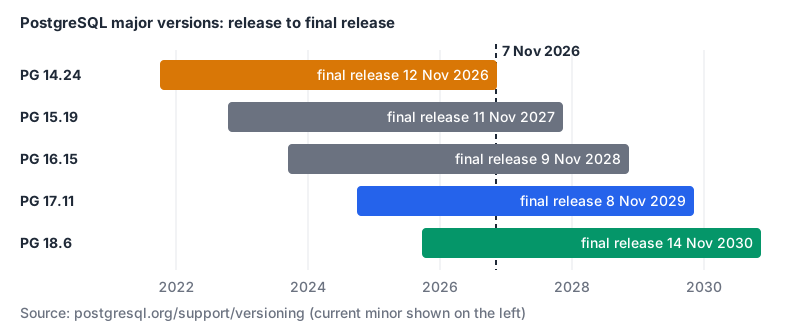
As of 7 November 2026 the current minors are 18.6, 17.11, 16.15, 15.19 and 14.24. A new database should start on 18, which is supported until 14 November 2030.
The four realistic options
| Supabase | Neon | Amazon RDS / Aurora | Self-hosted | |
|---|---|---|---|---|
| What you get | Postgres plus auth, storage, APIs, realtime | Postgres with branching and autoscaling | Managed Postgres inside AWS | Whatever you build |
| Free option | 2 projects, 500 MB, paused after a week idle | 100 projects, 100 CU-hours and 1 GB each | Credits on the AWS Free plan, up to 6 months | Your own hardware |
| Paid model | Plans from $25 a month plus compute | Usage: $0.106 or $0.222 per CU-hour | Instance or ACU hours | Servers plus your time |
| Idle cost | Paid projects are never paused, so compute bills | Scales to zero after 5 minutes | Aurora Serverless v2 can pause at 0 ACU | Full |
| Preview databases | Branches start empty, seeded from migrations | Copy-on-write branches with data | Aurora clones | DIY |
Prices are from the vendors' pages as of November 2026. Details and sources follow.
Supabase: Postgres with the rest of a backend attached
Supabase's architecture page says it doesn't abstract the database, and you get "full privileges". Around it sit PostgREST for a REST API, GoTrue for auth, Realtime, an S3-compatible Storage API, Deno-based Edge Functions and the Supavisor connection pooler. If you'd otherwise be wiring up an auth service and an object store yourself, that bundle is the reason to pick it.
From the pricing page, as of November 2026:
- Free: 500 MB database, 5 GB egress, 50,000 monthly active users, two active projects, and projects are paused after one week of inactivity.
- Pro: from $25 a month, with 8 GB of disk per project, 100,000 MAU, and $10 a month of compute credit, which covers one Micro instance. Compute add-ons run from Micro at $10 to Large at $110 and beyond.
- Team: from $599 a month.
- Add-ons: branching at $0.01344 per branch per hour, and point-in-time recovery at $100 a month per 7 days of retention.
That PITR line is easy to miss. If "restore to 14:32 yesterday" is a requirement, price it in from day one. Our database backup strategies post covers why PITR and nightly dumps answer different questions.
Branching works differently from Neon. The branching docs say new branches "do not start with any data". A GitHub-connected branch builds its schema from your repo's migrations and fills it from a seed file. Preview branches are deleted when the PR closes; persistent branches stick around for staging. That's a cleaner model if your migrations are trustworthy, and a painful one if they've drifted from production.
Neon: pay for compute while it's running
Neon bills compute by the hour and storage by the GB-month, and compute can scale to zero, so an idle database stops costing compute. The pricing page now describes Neon as a Databricks product. Neon announced on 14 May 2025 that it would join Databricks once the deal closed, and our Supabase vs Neon comparison covers what that change means for buyers.
As of November 2026:
- Free: 100 projects, 100 CU-hours per project, 1 GB storage per project (20 GB per account), autoscaling up to 2 CU, and scale to zero after 5 minutes, which you can't turn off. The restore window is 6 hours.
- Launch: $0.106 per CU-hour, storage $0.35 per GB-month, autoscaling up to 16 CU, restore window up to 7 days, and scale to zero can be disabled.
- Scale: $0.222 per CU-hour, same storage price, up to 1,000 projects, restore window up to 30 days.
Branching is where Neon stands out. The branching docs describe a branch as "a copy-on-write clone of your data" that by default includes all the parent's data, and say that creating one "does not increase load on the parent branch". A preview environment per pull request with real data is cheap to set up. Extra branches beyond the plan's allowance cost $1.50 a branch-month.
The catch with scale to zero is the wake-up. Neon's scale-to-zero docs say a suspended compute "reactivates automatically within a few hundred milliseconds" when a query arrives. That's small, but it lands on whichever request happens to come first, so measure it against your latency budget for a sparse customer-facing API. Neon has an MCP server, as does Supabase, if you want an agent to manage branches for you.
RDS and Aurora: the default if you live in AWS
AWS changed its free tier in 2025. The RDS free tier page says new customers get up to $100 in credits at sign-up and can earn up to $100 more, and can use Aurora and RDS on the Free plan for up to six months, on db.t3.micro and db.t4g.micro instances. Accounts opened before 15 July 2025 keep the old deal: select RDS instances free for up to 12 months after sign-up.
The interesting piece is Aurora Serverless v2 auto-pause. Per the Aurora docs, you set minimum capacity to 0 ACUs and choose an idle timeout between 300 seconds and 86,400 seconds. While paused, the instance charge is zero; you still pay for storage. The fine print matters:
- Resume typically takes about 15 seconds, and after more than 24 hours paused it can take 30 seconds or longer. AWS recommends client connect timeouts above 15 seconds and retry logic.
- An RDS Proxy keeps a connection open, so a cluster with one attached never pauses. The same goes for logical replication and for open idle connections from a developer's SQL client.
pg_cronjobs scheduled while the instance is paused are skipped, not queued, and autovacuum running at pause time is cancelled.- Auto-pause needs Aurora PostgreSQL 16.3, 15.7, 14.12 or 13.15 or later.
AWS itself pitches auto-pause at systems "that don't have a stringent service level objective", such as dev and test clusters. Compare that with Neon's few hundred milliseconds and you can see why the two products suit different workloads. For steady production traffic, a small always-on RDS instance is often the simpler answer, and it stays inside the AWS account, monitoring and billing you already have.
Self-hosted: cheapest on paper
Running Postgres yourself on a VPS or in Kubernetes is the lowest bill and the highest number of things you're responsible for: version upgrades (see the chart above), backups you've actually test-restored, replication, failover, connection pooling, monitoring. The Supabase self-hosting docs list exactly these as the operator's job, and they're a fair description of self-hosting any Postgres.
It's the right choice when you already have someone who does this, when data residency rules out the managed regions, or when the database is big and steady enough that per-hour pricing stops making sense. It's the wrong choice when the plan is "we'll figure out backups later". Our Postgres performance tuning post is a good companion if you go this way.
Picking one
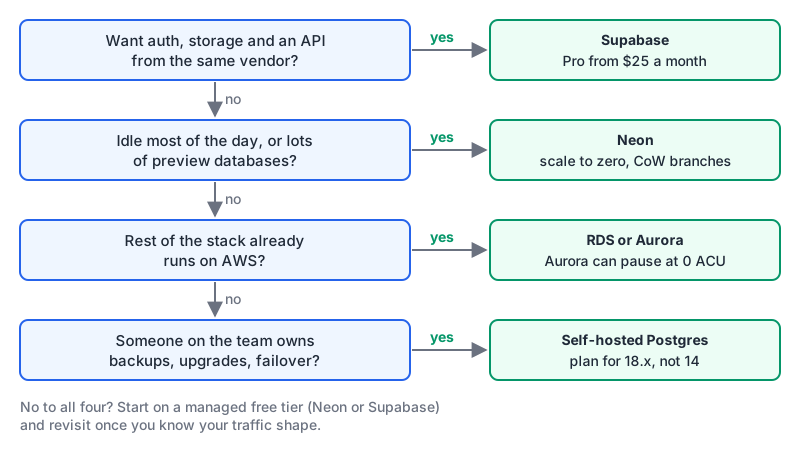
The rule I'd use, top to bottom, first yes wins:
- You'd otherwise build auth, file storage and an API layer yourself: Supabase. If you're weighing it against a non-Postgres backend, see Supabase vs Firebase.
- The database sits idle most of the day, or you want a full-data copy per pull request: Neon. Measure the wake-up against your latency budget first.
- Everything else already runs in AWS: RDS for steady load, Aurora Serverless v2 with auto-pause for environments that can wait 15 seconds to wake up.
- Someone on the team owns backups, upgrades and failover, and wants to: self-host, on PostgreSQL 18.
Whichever you pick, write down the major version and its end-of-life date in the same place you keep the connection string. PostgreSQL 14's deadline is a reminder that "managed" doesn't always mean "upgraded for you".
Written by AIDToolStack Editorial
Researched from official documentation, specifications and vendor pages, listed under Sources below. Last checked November 2026.
Sources
- www.postgresql.org/support/versioning/
- supabase.com/pricing
- supabase.com/docs/guides/getting-started/architecture
- supabase.com/docs/guides/deployment/branching
- supabase.com/docs/guides/self-hosting
- neon.com/pricing
- neon.com/docs/introduction/branching
- neon.com/docs/introduction/scale-to-zero
- neon.com/blog/neon-and-databricks
- aws.amazon.com/rds/free/
- docs.aws.amazon.com/AmazonRDS/latest/AuroraUserGuide/aurora-serverless-v2-auto-pause.html
Related Posts
Explore on AIDToolStack
Discover tools and servers featured in our directory.
AI Tools
MCP Servers
Sponsor Our Newsletter
Reach thousands of developers who are actively evaluating AI tools, MCP servers, and dev infrastructure. Our weekly newsletter goes to engaged technical decision-makers.
All sponsored content is clearly labeled per our editorial policy.